Cryptomator
- 121.00
- 3.7
- Installs
- 50.00K
- Price
- $9.99
Screenshots
Analysis by Reviewed
I rely on cloud storage because it makes files easy to reach, but convenience can leave an awkward question: what protection do private documents have before they land in someone else’s storage? That is the recurring problem Cryptomator is meant to address. It adds an encryption step on your device, so the cloud service can still store and sync your files without being the place where they are first made readable. I find that approach useful when I want the convenience of a familiar drive without treating it as a private filing cabinet.
Where the extra step earns its place
This is a productivity app from Skymatic GmbH, and its value is less about creating or editing documents than making an existing cloud workflow more private. It makes the most sense for people who already use a supported cloud service and want another layer for selected files, such as tax paperwork, scans, work notes, or personal records. If you only store public or disposable material, the extra step may not be worth adding to your routine.
The distinction from a typical cloud-storage app matters. A cloud provider’s own security tools may protect an account or data in transit, while this app is designed to encrypt files on your device before cloud storage receives them. That does not replace a strong account password or sensible backup habits; it addresses a different part of the problem. I would use both account protection and an encrypted vault rather than assuming either one covers everything.
Choosing what belongs in a vault
I would begin by asking how often I need a file, who else needs to work with it, and what would happen if it were exposed. A scanned passport or a signed form may justify the extra handling; a shared shopping list usually does not. This simple sorting step keeps the vault useful instead of turning every cloud interaction into a security chore. It also makes it easier to notice when a file has ended up in the wrong place.
There is a practical middle ground between leaving sensitive documents in a general sync folder and moving everything into encryption. Keep ordinary material in its usual location, then use a vault for files whose privacy matters enough to accept an unlock step. That division is especially helpful on a phone, where you may need to find something quickly while standing in a queue or answering a message.
Why Cryptomator Stands Out
First off, let’s talk about what makes this app stand out in the bustling world of cloud storage security. Cryptomator is like that trusty old lock on your diary, only digital and way cooler. It’s an open-source app, meaning the code is out there for anyone to inspect, which gives it a kind of transparency that’s rare these days.
User-Friendly Interface
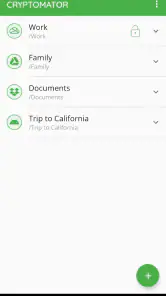
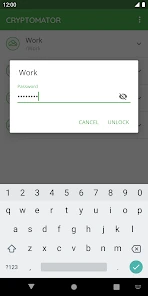
When I first opened Cryptomator, I was greeted with a clean and intuitive interface. No overwhelming options, just straightforward instructions to get started. Setting up a vault was a breeze. Just name it, set a password, and voila! You’re ready to start locking up those files. It’s perfect for someone like me who wants security without the fuss.
More From Our News Desk

Clash of Clans Is Won Between the Battles

Android Auto Makes the Case for Quieter Car Software

MobiOffice: Transforming Mobile Productivity with Seamless Integration

EA SPORTS FC™ Mobile Soccer: Redefining Mobile Sports Gaming

How Microsoft OneDrive Became a Mobile Productivity Giant

How Google Translate Breaks Language Barriers Effortlessly
A setup worth testing before you need it
The first useful setup is not simply creating a vault; it is making sure the whole route works. I would create a small test vault, add a harmless document, and confirm that it appears through the cloud service I already use. Then I would open it on any other device I expect to rely on. That trial reveals whether I can navigate the handoff between the vault and cloud app comfortably, before an urgent document is involved.
I would also decide on a password routine before adding important files. A memorable but weak password undermines the point, while a strong password that exists only in my memory can become a recovery problem. A reputable password manager or another secure, separate record can help, provided it is not stored alongside the encrypted files. The key lesson is that encryption changes who can read the contents, but it does not make forgotten credentials easy to replace.
Seamless Integration
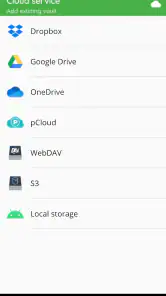
Now, I’m someone who’s constantly juggling between devices, and the fact that Cryptomator works across platforms is a huge plus. Whether you’re on Android, iOS, or even your desktop, accessing your encrypted files is a piece of cake. Plus, it integrates smoothly with various cloud services like Dropbox, Google Drive, and OneDrive. This means you can keep using your favorite storage service without compromising on security.
How it fits beside familiar cloud tools
The app complements a cloud drive rather than replacing it. I would still use the provider’s normal folders for shared projects, quick previews, and material that needs to be edited by several people. The vault is for the subset where I want the cloud to act as a storage and sync destination, not as the place that handles readable content. That division is more realistic than expecting one tool to make every file both private and effortless to collaborate on.
Compared with keeping files only on a phone, a cloud-backed vault can make them reachable across devices, but it adds dependence on sync and account access. Compared with relying only on the cloud provider’s built-in protections, it adds local encryption before upload, but asks me to manage a separate password and access routine. Neither route is universally better: I would choose based on whether portability or minimal friction matters more for a particular set of files.
Security That Speaks Volumes
Security is where Cryptomator truly shines. It uses client-side encryption, which means your data is encrypted on your device before it even touches the cloud. This way, even if someone gets their hands on your cloud storage, they won’t be able to make sense of your data without the encryption key. It’s like having a personal bodyguard for your files!
One practical habit makes this setup more dependable: keep the vault password somewhere secure that is separate from the files it protects. If you forget it, a copy of the encrypted vault in your cloud account is not a substitute for the password. I’d also try opening the vault on each device I plan to use before relying on it for an important trip or deadline. That quick test catches account access or setup snags while I still have time to sort them out.
A useful phone-to-desktop routine
One everyday case is receiving a sensitive document on a phone, saving it to the vault, then opening it later on a computer when filling in a form. I would first make sure the upload has completed, rather than assume that saving locally means the second device can already see it. If I am about to travel or go somewhere with unreliable connectivity, I would check access beforehand and avoid making the vault my only copy of a document I may urgently need.
For recurring paperwork, a consistent naming habit can save time without weakening privacy. I would use clear filenames inside the vault so I can find the right scan once it is unlocked, but avoid putting sensitive details into ordinary cloud folder names or notifications. The point is not to make the workflow mysterious; it is to keep the useful information organized while being thoughtful about what appears outside the protected contents.
Encryption is not just about secrecy, it's about ensuring peace of mind.
Free and Open-Source
Another thing I love about Cryptomator is that it’s free and open-source. This app was born out of a community effort, and you can feel that in its design and functionality. You’re not just a user; you’re part of a community that values privacy and transparency. And if you’re feeling generous, there’s always an option to donate to support the developers.
Making a vault fit real routines
A useful way to start is to create one vault for a clearly defined group of sensitive files, rather than moving an entire cloud library at once. For example, I might keep identity scans and signed forms together, while leaving ordinary shared photos in their existing folders. That makes it easier to remember which files need the extra step and avoids turning routine browsing into a password prompt for everything.
There is a trade-off when sharing. The recipient needs a way to access the encrypted material, so sending a vault folder as if it were an ordinary document folder can create confusion. For a file that someone must open quickly, I would first check that they can use the same setup and have the password through a separate, sensible channel. If they simply need a one-off attachment, a normal secure sharing method may be less cumbersome.
When convenience matters more than the vault
I would skip this approach for documents that need to be previewed directly in a cloud app, edited live with colleagues, or passed repeatedly between people who do not share the same setup. Encryption can protect a private archive, but it can also interrupt the smooth handoffs that make cloud collaboration useful. In those cases, I would use the provider’s sharing controls or another method designed for straightforward collaboration, and reserve a vault for my own sensitive copy.
It is also worth separating privacy from recovery. If a phone is lost, a synced copy may help me reach the files elsewhere, but only if I can sign in to the cloud account and unlock the vault. If the cloud account itself is unavailable, the encrypted files are not magically accessible through the app. I would keep recovery details and independent backups in mind, especially for records that would be difficult to replace.
What the added security asks of you
Encrypted files are not as convenient to preview or handle through the cloud provider’s usual interface as ordinary files. In practice, I would expect to open the vault through the app when I need protected material, rather than assume every cloud feature will work on it unchanged. This is a worthwhile exchange for private records, but not necessarily for files I constantly browse, edit with other people, or need to hand off without explanation.
Before depending on a vault, I would also check that cloud sync has finished after adding or changing files. Encryption protects content, but it does not make a stalled upload complete or replace a separate backup. Keeping an independent copy of anything irreplaceable is still sensible. This is one of the less obvious parts of using encryption: the stronger privacy layer does not remove ordinary housekeeping around storage and recovery.
Price, fit, and everyday reliability
The app is rated for Everyone, has an average rating of 3.7 from around 1.5 thousand ratings, and has passed 50 thousand installs. It costs $9.99; I would weigh that against how often I actually store sensitive files in the cloud. The current version is 1.12.2 and it requires Android 8.0 or later. It was released on October 16, 2017, so it is an established tool rather than a new experiment, though the right choice still depends on your device and workflow.
For a realistic routine, imagine scanning a signed form on your phone, placing it in a vault, and later retrieving it from another device when an office asks for it. That can save the awkward choice between leaving it unprotected in a synced folder and keeping it only on one device. The benefit is strongest when I use the same careful routine each time: unlock the vault, confirm the file is available, then close it when finished.
The time saved is not that every file becomes faster to open; it is that I can keep a chosen set of records in a cloud workflow without repeatedly wondering whether I should move them somewhere else. The payoff depends on using the vault consistently. If I forget to add the important scan, or leave an unprotected duplicate in a general folder, the extra layer has not helped that copy.
Final Thoughts
Overall, Cryptomator is a must-have for anyone looking to secure their files without the hassle of complex setups. It’s user-friendly, highly secure, and works seamlessly across platforms. Whether you’re safeguarding personal photos or sensitive documents, this app has got you covered. So go ahead, give it a try, and join the legion of users who sleep soundly knowing their data is safe. Happy encrypting!
My recommendation is more selective: I would choose it for private documents that already belong in a cloud workflow, and skip it if my priority were effortless collaboration or instant access through every provider’s own preview tools. The paid app is a considered purchase, and the password and sync habits remain my responsibility. For the right files, though, that small routine is a reasonable price in effort for keeping cloud convenience while adding protection where it matters.
Who will get the most from it
I think it suits people who already depend on cloud storage and want to protect a manageable collection of personal records without changing providers. It is particularly useful when the same files need to be available on more than one device, but should not sit in readable form in an ordinary synced folder. People who rarely store sensitive material, work mainly offline, or value immediate previews above privacy are less likely to appreciate the extra steps.
Before committing important records, I would test the complete cycle: add a file, wait for sync, unlock it on the second device, and make sure I can locate and use it. That small rehearsal is more valuable than assuming setup is finished after creating a vault. If that process feels comfortable, the app can become a quiet part of a routine; if it feels burdensome, a simpler storage arrangement may be the more dependable choice for you.
Cryptomator Frequently Asked Questions
Can I try Cryptomator before paying for the mobile app?
Cryptomator’s mobile app costs $9.99, while the desktop app is available free of charge. If you want to understand the basic approach before buying the mobile version, the key idea is that Cryptomator encrypts files on your device before they are stored in a cloud service. This can help you decide whether its file-protection workflow suits the way you manage cloud storage.
Will Cryptomator change how I access files in cloud storage?
Cryptomator adds an encrypted vault to your cloud-storage workflow. You use the app to work with files in that vault, while the files stored in the cloud remain encrypted. This approach is useful when you want to protect sensitive documents without relying on the cloud provider to handle the encryption. Keep in mind that accessing the protected files involves using Cryptomator rather than treating the encrypted cloud contents as ordinary files.
What is Cryptomator and how does it work?
Cryptomator is a user-friendly encryption app designed to secure your cloud files. It creates a virtual drive on your device where you can store files securely. Each file is encrypted individually, making it impossible for unauthorized users to access your data. The encryption process is handled locally, ensuring that your data is safe before it reaches the cloud.
Is Cryptomator free to use or are there any costs involved?
Cryptomator offers a free version with all its core functionalities. However, there is a one-time fee for the mobile app versions on Android and iOS, which provides a seamless experience across devices. This fee supports further development and ensures the app remains ad-free and open source.
On which platforms can I use Cryptomator?
Cryptomator is available on multiple platforms, including Windows, macOS, Linux, Android, and iOS. This makes it a versatile tool for users who need secure file encryption across different devices. The cross-platform availability ensures that you can access your encrypted files anytime, anywhere.
Pros
- Strong encryption for files
- Open-source transparency
- User-friendly interface
- Cross-platform compatibility
- No account required
Cons
- Limited free storage
- No direct cloud integration
- Manual sync required
- No file sharing options
- Paid for mobile version
- Category
- Productivity
- Version
- 1.12.2











