

Cry Analyzer · Baby Translator
- 0.00
- 0.0
- Installs
- 10.00K
- Price
- Free
Screenshots


Analysis by Reviewed
When a baby cries, the hardest part is often not the sound itself but the uncertainty behind it. Cry Analyzer · Baby Translator approaches that stressful moment with a focused idea: use AI to examine a cry and offer a possible explanation, along with soothing suggestions and calming sounds. I found the concept most useful when treated as a quick source of guidance rather than a definitive answer. It does not replace watching the baby, learning familiar patterns, or asking a health professional when something feels wrong, but it can give a tired parent a more organized starting point.
This is a free parenting app from BabyReco, with optional in-app purchases priced from $3.99 to $29.99 per item. It is rated for Everyone, works on devices running Android 8.0 or later, and the current version is 1.0.3. The app has passed 10K+ installs, so it is still a relatively small product rather than a long-established household standard. That makes my impression especially practical: I would consider it a useful experiment for parents who want help interpreting crying, but I would not build an entire childcare routine around an AI result.
What the AI cry analysis is really useful for
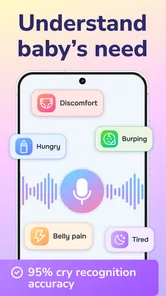
The central capability is simple to understand. You capture or submit a baby’s cry, and the app analyzes it to suggest what may be behind the sound. The important word is “may.” A cry can change because of hunger, tiredness, discomfort, overstimulation, temperature, illness, or the need for closeness. Even an experienced parent can misread it after a long night. An AI suggestion can narrow your attention, but it cannot see the baby’s face, body, skin, breathing, feeding history, or surroundings in the same way a caregiver can.
In my view, the strongest benefit is not that the app magically translates every cry. It is that it encourages a more deliberate response. Instead of moving randomly from feeding to rocking to changing a diaper, I can use the result as one clue and then check the obvious physical needs in a sensible order. The analysis is most valuable as a decision aid, not as a diagnosis. That distinction keeps expectations realistic and makes the tool safer to use.
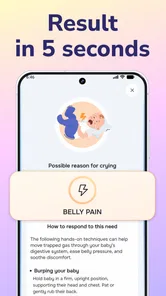
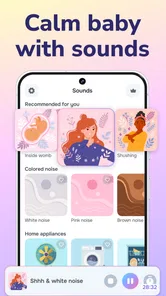
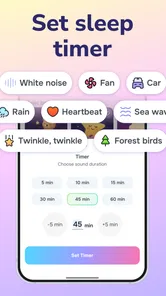
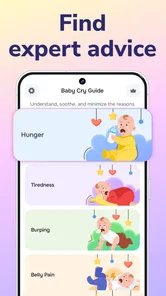
The soothing side also matters. After the analysis, the app can offer tips aimed at calming the baby and provide calming sounds. That combination gives it a practical rhythm: first pause and listen, then consider the suggested reason, then try a gentle response. I prefer this to an app that only labels the cry and leaves the parent with no next step. The suggestions turn an abstract result into something I can try immediately.
There is also a psychological advantage for new parents. When the baby has been crying for several minutes, it is easy to feel that every possible response has already failed. Having a structured prompt can reduce that sense of helplessness. It does not guarantee success, but it can remind me to slow down, check one need at a time, and avoid changing tactics every few seconds.
Why the result should never be the only clue
A recording-based interpretation has natural limits. The same baby may produce different cries for similar needs, and similar sounds may come from completely different situations. Background noise, distance from the phone, a moving baby, or another person speaking nearby could make the input less useful. I would therefore treat a result as weaker when the room is loud or the baby is crying while being carried around.
More From Our News Desk

 Gmail
GmailGmail in a Busy Inbox: Who Benefits Most?
From first account to crowded workday, Gmail earns its place through dependable search and flexible sorting—but its best fit depends on how much inbox maintenance you can tolerate.

 Prime Video
Switching to Prime Video: What Changes in Your Viewing Routine
Prime Video can make a compelling second home for streaming, but switching means learning a different catalog, rental layer, and route from browsing to playback.

 Universal TV Remote Control
Universal TV Remote Control Works Best as a Reliable Backup
A phone remote earns its place through quick setup and reliable habits. Here is how to get more from Universal TV Remote Control—and where its limits show.

 Weather - By Xiaomi
Weather by Xiaomi Review: Clear at a Glance, Less Clear Up Close
Xiaomi’s weather app makes everyday forecasts quick to scan, but its calm surface can leave useful details and recovery paths harder to find than they should be.

 X
XX Under Pressure: Can It Recover When Posting Goes Wrong?
A resilience-focused review of X, examining setup, mistaken posts, interruptions, weak connections, and the gaps that matter when recovery needs to be dependable.

 Clash of Clans
Clash of Clans Is Won Between the Battles
Its raids are quick; its community is a long-term project of coordination, teaching, rivalry, and shared responsibility—with all the friction that entails.
Latest News



My practical rule would be to combine the app’s suggestion with a short physical check. Look at feeding timing, the diaper, clothing, room comfort, signs of tiredness, and whether the baby settles when held. If the cry sounds unusual, intense, persistent, or connected with visible distress, I would stop relying on an app and seek appropriate medical advice. A parenting tool can support observation; it should never delay care when a baby seems unwell.
This also answers a question many parents will have: can it tell me exactly what my baby needs? I would say no, and that is not a failure unique to this app. Crying is communication, but it is not a perfectly standardized language. The useful question is whether the suggestion helps you choose a sensible next check. If you expect certainty, you will probably be disappointed. If you want an extra clue during a confusing moment, the feature makes more sense.
How I would use it during an ordinary difficult moment
Imagine a late evening after a baby has already fed and been changed. The lights are low, the parent is exhausted, and the crying becomes louder whenever the baby is put down. I would first move the phone close enough to capture the sound without placing it directly beside the baby’s face. I would try to keep the room quiet and avoid talking over the recording. Once the app offers its interpretation, I would compare that suggestion with what I can see rather than accepting it automatically.
If the result points toward tiredness or a need for calming, I might reduce stimulation, hold the baby steadily, and try one of the available calming sounds at a low, comfortable volume. The useful insight here is to avoid stacking too many interventions at once. If I start a sound, bounce the baby, turn on bright lights, and switch positions repeatedly, I will not know what helped. A calmer, single-change approach makes the app’s advice easier to evaluate.
If the baby settles, I would remember the surrounding details rather than assuming the AI was completely right. Perhaps the quiet room helped more than the sound, or perhaps being held was the key. Over time, that kind of observation can teach me more about my own baby than any isolated analysis. The app works best when it supports that learning process instead of replacing it.
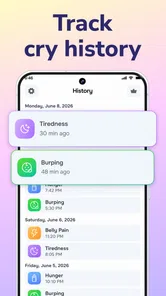
A second useful routine is to compare similar episodes. If the same type of crying appears before naps, after busy outings, or around feeding, I can use the app as a prompt to notice patterns. I would not treat repeated results as medical evidence, but repeated context can help a parent recognize a familiar daily rhythm. This is one of the less obvious ways to get value from the tool: use it to improve your own observation, not merely to chase a label each time the baby cries.
Another practical tip is to use the feature before frustration peaks, when possible. Once everyone in the room is talking, moving, and trying different techniques, the recording becomes less clean and the parent’s attention becomes scattered. A short pause at the beginning of a crying spell may produce a more useful starting point than an attempt made after ten minutes of chaos. That does not mean every cry should trigger a phone check; it simply means timing affects how helpful the interaction feels.
Making the calming sounds more useful
Calming audio can be helpful, but I would use it carefully. The goal is to create a steady background, not to overpower the baby’s cry or become another source of stimulation. I would keep the device at a comfortable distance and volume, watch the baby’s reaction, and stop if the sound appears to make things worse. The app can suggest a calming direction, but the baby’s response remains the best immediate test.
I also would not use the audio as a substitute for contact and attention. Some babies calm with predictable sound, while others need feeding, burping, a change, movement, or simply a caregiver nearby. The sound feature is therefore most useful as one part of a calming routine. It is less suitable as a hands-off solution for a baby who needs direct care.
Parents may also wonder whether the app needs to be used every time. In my experience, that would be unnecessary and could become tiring. I would reserve it for cries that feel difficult to interpret, especially when the usual checks do not immediately explain what is happening. For familiar cries, a parent’s own knowledge is often faster. The app earns its place when uncertainty is the problem, not when it adds an extra step to an already obvious situation.
The trade-offs behind an AI parenting helper
The biggest trade-off is convenience versus interpretation. The app gives a quick result, but quick does not mean complete. A parent who wants a detailed record of feeding, sleep, diapers, growth, and daily routines may find a conventional baby-tracking app more useful. Those tools organize events over time, while this one focuses on the immediate sound of crying. They solve different problems, and I would not choose one expecting it to replace the other.
It also differs from general parenting guides. A book or trusted pediatric resource can explain age-related patterns, warning signs, and broader care routines in depth. Cry Analyzer · Baby Translator is more immediate: it meets you during the cry itself. That immediacy is its advantage, but it also means the advice should be placed in a wider parenting context. I would use a guide for learning and this app for a moment when I need a prompt.
There is a learning curve in judging when to trust the output. A new parent may be tempted to follow the suggested cause too literally, especially after several unsuccessful attempts to calm the baby. I think the better approach is to test the suggestion gently, observe the result, and move on if it does not fit. The app should reduce confusion, not create a new rule that every cry must match a category.
The optional purchase model is another consideration. The app is free to start, but some items cost between $3.99 and $29.99. Before paying, I would spend enough time with the free experience to decide whether the analysis and calming guidance fit my routine. Parents should be particularly cautious about buying extra content out of panic during a difficult night. A purchase may be worthwhile for someone who uses the app regularly, but it should not be treated as a guarantee of more accurate interpretation.
Because the app handles a sensitive parenting situation, I would also make a habit of reading its current on-device prompts and permissions before use, especially on a shared family phone. I would avoid recording other conversations in the background and would keep the phone focused on the baby’s cry. This is not a criticism of a specific policy; it is simply good practice whenever audio is involved. The cleaner and more intentional the recording, the more sensible the result is likely to feel.
Another limitation is emotional rather than technical. An AI result can sound authoritative even when it is only an estimate. A worried parent may remember the label and forget the uncertainty. I would prefer to repeat the app’s suggestion in my own mind as a question: “Could tiredness be part of this?” That wording keeps observation in charge and prevents the screen from becoming more important than the baby.
When another option is better
I would choose a standard tracking app over this one when my main goal is identifying patterns across days. I would choose a pediatric professional or urgent medical service when the baby shows warning signs, seems unusually lethargic, has breathing trouble, develops concerning symptoms, or simply appears seriously unwell. I would choose a basic calming routine without any app when the baby’s need is already clear and reaching for the phone would interrupt attentive care.
It may also be a poor fit for parents who dislike audio analysis or who want a completely manual approach. Some caregivers will feel more confident learning their baby’s individual signals without outside interpretation. That is reasonable. The app is not essential equipment; its value depends on whether a suggested explanation genuinely helps you respond more calmly.
Who is most likely to benefit
The best audience is a new or occasionally overwhelmed caregiver who wants a quick second opinion during ambiguous crying. It can be especially useful when two adults are trying to coordinate care and need a neutral prompt for what to check next. It may also help a babysitter or family member understand that the response should be thoughtful rather than a random sequence of guesses, although the primary caregiver should remain involved in important decisions.
Parents of babies with fairly predictable routines may use it less often, but even then it can be useful when a familiar pattern suddenly changes. The key is not to force the app into every part of the day. Use it when the cry is difficult to classify, then return to your own knowledge once the situation is clear.
I would be more cautious recommending it to someone looking for medical reassurance, guaranteed accuracy, or a complete baby-care system. The name may suggest a translator that turns crying into a precise message, but the real experience is closer to guided interpretation. That is still valuable, provided the user understands the boundary.
BabyReco has made a focused parenting app rather than an overloaded dashboard. Its strongest idea is easy to access: listen to the cry, receive a possible explanation, and try a calming response. The free entry point makes it approachable, while the optional purchases mean regular users should decide carefully whether additional items justify their cost. With an Everyone rating and support for Android 8.0 or later, it is accessible to many families using compatible devices.
My final view is cautiously positive. I would recommend Cry Analyzer · Baby Translator to a parent who wants help during uncertain crying and is comfortable treating AI as one voice among several. I would not recommend using it as a diagnosis tool, a replacement for professional advice, or an automatic sleep solution. Its real strength appears in the small pause it creates: instead of reacting in a panic, I can listen, check the baby, try one appropriate action, and observe. For a tired caregiver, that modest improvement in decision-making can be genuinely useful.
Cry Analyzer · Baby Translator Frequently Asked Questions
Is Cry Analyzer · Baby Translator free to download, and are there in-app purchases?
Cry Analyzer · Baby Translator is free to download, with optional in-app purchases priced from $3.99 to $29.99 per item. You can consider whether its basic features meet your needs before deciding to buy anything. Check the purchase details shown in the app before confirming a transaction, particularly if a child might use the device.
Which devices can run Cry Analyzer · Baby Translator?
The app is available for Android devices running version 8.0 or later. Before downloading, check your device’s operating system version and make sure there is enough room for another app. Cry Analyzer · Baby Translator is listed for everyone and is a parenting app from BabyReco, so it is intended for a broad audience, including parents and caregivers.
What is Cry Analyzer · Baby Translator, and how does it work?
Cry Analyzer · Baby Translator is designed to analyze a baby’s crying and suggest possible reasons, such as hunger, tiredness, discomfort, or the need for attention. After recording or detecting the cry, the app processes its sound patterns and presents an interpretation. Its results should be treated as general guidance rather than a guaranteed translation or professional diagnosis.
Can Cry Analyzer · Baby Translator accurately tell me why my baby is crying?
The app may provide helpful suggestions, but it cannot reliably determine the exact cause of every cry. Babies can cry for several reasons at once, and their sounds may change with age, health, mood, and environment. Use the app as an additional observation tool, while relying on your own knowledge of the baby and advice from a pediatrician when concerns arise.
Is Cry Analyzer · Baby Translator suitable for newborns and older babies?
The application may be useful for parents of newborns and infants, although its recommendations can vary depending on the child’s age and development. Cry patterns are not identical for every baby, so results may be more useful when combined with information about feeding, sleep, diaper changes, and recent behavior. Always check the app’s current age guidance before using it.
Pros
- Simple interface makes it easy to start analyzing a baby’s cry.
- Provides quick interpretations without requiring an account.
- Useful for noticing possible patterns in crying over time.
- Works as an additional tool for new parents during stressful moments.
- Offers a convenient mobile format for checking results anywhere.
Cons
- Cry interpretations are estimates and should not replace medical advice.
- Results may vary depending on background noise and recording quality.
- The app cannot reliably understand every baby or crying situation.
- Some features may require in-app purchases or a subscription.
- Recording a distressed baby may be inconvenient during urgent situations.











