

Crumb: Keeping Your Pets Safe
- 1.03K
- 4.7
- Installs
- 100.00K
- Price
- Free

Screenshots
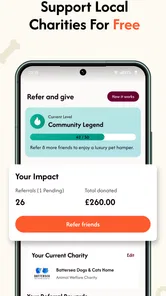
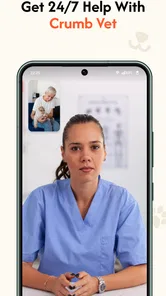
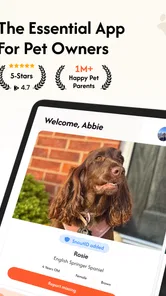
Analysis by Reviewed
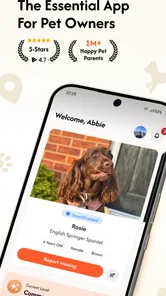
When a pet goes missing, the first problem is rarely a lack of concern. It is the confusion that follows: one person searches nearby, another asks neighbors, and someone else tries to share accurate information quickly. Crumb: Keeping Your Pets Safe is designed for that stressful gap. It is a free House & Home app from Crumb Pet that brings a community-focused approach to helping lost pets return home.
I found the idea most useful when treated as a coordinated workflow rather than a simple notice board. The app is not a replacement for calling local shelters, checking familiar hiding places, or speaking with people in the area. Its value is in making it easier for a wider group of people to notice a missing pet and act on the same information.
That focus gives Crumb a clear purpose. It is aimed at the moment when a private search needs to become a shared effort. The app is available free of charge, has an Everyone content rating, and works on devices running Android 9 or later. The current version is 2.2.5, while the developer is Crumb Pet.
From the first report to a wider search
I find the first report works best when it is treated as a practical handoff, not just an announcement: a clear photo and a precise last-seen location give neighbors something they can act on. From there, I’d keep each new sighting anchored to its time and place, so the search can widen without losing focus.
Starting with the information that matters
A useful lost-pet report has to do more than say that an animal is missing. People need to recognize the pet, understand where it was last seen, and know how to respond. I would begin by preparing the details before posting: a clear recent photo, the pet’s name, distinctive markings, the last known location, and a reliable way to make contact.
This preparation is more important than it sounds. In a tense situation, it is easy to choose a blurry image or describe the location too broadly. A neighbor who sees a similar-looking dog may hesitate if the report gives no useful identifying detail. On the other hand, including every minor detail can make the message difficult to scan. I would put recognition first and keep the wording direct.
Crumb works best when the person creating the report thinks like someone seeing it for the first time. A passerby may only glance at a phone while walking or driving past an area. The photo and the first lines should therefore answer the basic questions quickly: what animal is this, where was it last seen, and what should someone do if they spot it?
More From Our News Desk

 Instagram
Instagram’s Power Comes From Its Place in Your Phone
A close look at how Instagram turns Meta’s reach, recommendation systems and everyday camera habits into durable platform power—and what that costs users.

 Gmail
GmailGmail in a Busy Inbox: Who Benefits Most?
From first account to crowded workday, Gmail earns its place through dependable search and flexible sorting—but its best fit depends on how much inbox maintenance you can tolerate.

 Prime Video
Switching to Prime Video: What Changes in Your Viewing Routine
Prime Video can make a compelling second home for streaming, but switching means learning a different catalog, rental layer, and route from browsing to playback.

 Universal TV Remote Control
Universal TV Remote Control Works Best as a Reliable Backup
A phone remote earns its place through quick setup and reliable habits. Here is how to get more from Universal TV Remote Control—and where its limits show.

 Weather - By Xiaomi
Weather by Xiaomi Review: Clear at a Glance, Less Clear Up Close
Xiaomi’s weather app makes everyday forecasts quick to scan, but its calm surface can leave useful details and recovery paths harder to find than they should be.

 X
XX Under Pressure: Can It Recover When Posting Goes Wrong?
A resilience-focused review of X, examining setup, mistaken posts, interruptions, weak connections, and the gaps that matter when recovery needs to be dependable.
Latest News



One practical tip is to prepare a small set of information before opening the app. Keep the strongest photo ready, confirm the spelling of the pet’s name, and check the location on a map separately if necessary. That reduces the chance of publishing a rushed report with an incorrect street or a confusing description.
Turning one report into a community signal
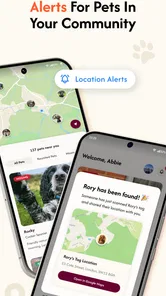
Once the information is ready, the app’s central role is to place the situation in front of people who may be able to help. This is the important shift from a household search to a community search. A person who does not know the owner may still recognize the pet, spot it near a familiar route, or pass the report to someone who lives closer to the last known location.
I see this as Crumb’s strongest reason to exist. A message sent only to close friends has a natural limit. A community-oriented app can make the search visible beyond the owner’s immediate contacts, which matters when an animal has traveled farther than expected or when the original search area is uncertain.
At the same time, visibility only helps when the report remains understandable. I would avoid emotional paragraphs that bury the useful details. A calm, readable report gives helpers a better chance of acting correctly. If the pet is nervous, for example, the report should make clear whether people should approach, observe from a distance, or contact the owner instead.
This is also where expectations need to stay realistic. Installing the app does not automatically create a search team around a missing animal. The owner still has to provide good information and continue checking likely places. Crumb can increase the number of eyes on the situation, but it cannot guarantee that a sighting will happen or that every viewer will respond.
The handoff between owner and helper
The most important handoff is from the person who knows the pet to the person who may encounter it. That handoff can fail if the description is vague, the location is incomplete, or the next step is unclear. I would read the report as a stranger and ask whether I could identify the animal without already knowing the family.
Another handoff happens when a sighting comes in. A helper may have only a brief observation, such as seeing a pet near a road or behind a building. The owner needs to treat that information as a lead rather than absolute proof. Checking the time, direction of travel, and exact surroundings can prevent a group from searching the wrong place for too long.
For safety, I would also avoid encouraging strangers to chase a frightened animal. A scared pet may run farther when approached suddenly. The better response can be to keep visual contact from a safe distance, note the direction, and pass the information to the owner. This is one of the less obvious strengths of a community workflow: different people can contribute observations even when they are not equipped to capture the animal.
People sharing a report should preserve its meaning. Copying only the photo without the location or contact instructions weakens the handoff. Likewise, reposting an old notice after the pet has been found can create unnecessary searches. I would update or close the situation as soon as the outcome is known, then tell anyone actively helping so their effort does not continue in the wrong direction.
A realistic evening search
Imagine a cat slipping out during an evening delivery. The owner notices the open door, checks the nearby rooms, and then searches the immediate area. After confirming that the cat is not hiding indoors, the owner prepares a report with a recognizable photo, the last known location, and identifying details such as coat pattern and a distinctive collar.
That report gives neighbors a shared reference point. One person may notice the cat near a garden, while another remembers seeing it beside a parked car. Neither person needs to know the owner personally to understand that the sighting could matter. The owner can then focus the physical search around the newest information instead of asking every neighbor to describe the animal from memory.
The workflow still requires judgment. A sighting near a busy street may call for caution rather than an immediate attempt to pick up the cat. A report from several blocks away may suggest movement, but it may also be a different animal. Crumb helps organize the information; the owner remains responsible for deciding which leads are credible and what action is safe.
This scenario shows why the app is more useful when opened before a crisis. Knowing how the reporting process feels, where to enter details, and how to review updates can save time when emotions are high. It is also sensible for household members to agree in advance on who will monitor reports and who will search in person.
What happens after a possible match
The desired result is not merely a post that attracts attention. The real outcome is a confirmed reunion or a clearer, more focused search. When someone recognizes the pet, the owner needs enough information to distinguish a useful lead from a coincidence. A photo, location, and time can help, but I would still verify the animal carefully before declaring success.
Once the pet is found, closing the loop matters. People who shared the report may otherwise continue looking, and neighbors may keep sending sightings. A short update can prevent wasted effort and reassure the community that the search has ended. This is a small step, but it is essential in any system built around handoffs.
Crumb can also be useful for people who are not currently missing a pet. A neighbor may browse the community and notice an animal that resembles one seen nearby. That makes the app relevant to residents who want to help, not only to owners in distress. However, casual users should avoid treating every similar animal as a confirmed match. Careful observation is more valuable than a flood of uncertain alerts.
Where the workflow becomes difficult
The biggest weakness is inherent to the community model: the result depends on participation. An excellent report may still receive little attention in an area where few people use the app. This is why I would use Crumb alongside direct conversations with neighbors, local animal services, shelters, and familiar online community channels rather than relying on one place alone.
There is also a quality-control challenge. Community reports can contain mistakes, outdated locations, duplicate sightings, or descriptions that are too general. A busy owner may feel pressure to react to every message, but that can scatter the search. I would record the time and location of each credible sighting and prioritize leads that form a consistent direction of travel.
Privacy and personal safety deserve attention too. A lost-pet report needs enough location information to help, but owners should think carefully before exposing unnecessary details about their home or daily routine. Communication should remain focused on recovering the animal. If a situation feels unsafe, meeting strangers or entering unfamiliar places is not worth the risk.
Another limitation is that Crumb is specialized. It is not the best choice for general household reminders, veterinary scheduling, pet training, or long-term animal records. Someone looking for a complete pet-management app will likely need a different tool. Crumb makes more sense when the priority is connecting lost-pet information with people who may be able to help.
Who will benefit most from Crumb?
I would recommend it to pet owners who want a dedicated community channel ready for an emergency, especially people living in neighborhoods where local participation is active. It is also relevant to animal lovers who are willing to watch for reports and pass along credible sightings. Because it is free and rated for Everyone, it is easy to consider as part of a household’s basic preparedness plan.
It may be less satisfying for someone who expects an app to provide immediate personal assistance, guaranteed responses, or a complete recovery service. The app can connect people, but it cannot replace walking the area, contacting relevant local organizations, or making sensible decisions about a frightened animal. If your community is not engaged, the usual alternatives may produce faster results.
The app’s adoption gives the idea some encouraging weight: it has passed one hundred thousand installs, with a 4.6 average from around 5.9 thousand ratings and roughly one thousand written reviews. Those figures suggest that the concept is reaching a meaningful audience, although popularity alone cannot tell me how active the service will be in a particular neighborhood.
My recommendation after following the full process
What I like about Crumb is its clear understanding of the first few hours after a pet disappears. It encourages a move from panic to shared information, then from shared information to coordinated observation. The strongest results come when the owner supplies a precise report, helpers pass along complete sightings, and everyone updates the situation when the outcome changes.
My advice is to install it before you need it, learn the reporting flow, and prepare a good photo of each pet. Keep local contacts and offline search habits as part of the same plan. If a pet goes missing, publish concise identifying information, monitor leads carefully, and use safe handoffs instead of asking people to chase or confront an anxious animal.
Crumb is not a magic solution, and its usefulness will vary with local participation. Still, for a free app built around helping lost pets come home, it offers a practical bridge between an owner’s urgent search and the wider community. I would keep it available as one part of a broader plan, particularly because the most valuable help may come from a person who happens to notice the right animal at the right time.
Crumb: Keeping Your Pets Safe Frequently Asked Questions
Is Crumb: Keeping Your Pets Safe free to download?
Crumb is free to download, so you can try it without paying an upfront price. It is a House & Home app from Crumb Pet, intended for people who want to help keep pets safe and support efforts to reunite lost animals with their owners. As with any app, check the current in-app options and permissions during setup before deciding how you want to use it.
Can Crumb help if my pet goes missing?
Crumb’s central purpose is to help its community bring lost pets home faster. It can be a useful place to start when you are looking for a safety-focused pet app, and joining the community may help owners share in that goal. If your pet goes missing, act promptly and use the appropriate local channels as well; an app should complement, rather than replace, direct outreach and practical steps.
What is Crumb: Keeping Your Pets Safe?
Crumb: Keeping Your Pets Safe is a pet-care and safety app designed to help owners keep important information about their animals organized in one place. Depending on the features available in your region and version, it may support pet profiles, health details, reminders, emergency information, and practical safety resources. It is intended as a helpful companion for everyday pet ownership, not as a replacement for veterinary advice.
What information can I add to my pet’s profile?
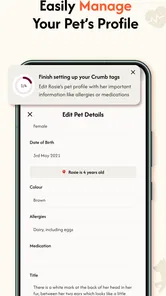
The app is designed to let you create a dedicated profile for each pet and record useful details such as its name, species, breed, age, medical information, allergies, medications, identification details, and emergency contacts. Keeping these records accurate is especially important if someone else must care for your pet or if you need to provide information quickly during an unexpected situation. Available fields may vary by app version.
Can Crumb replace a veterinarian or provide emergency medical treatment?
No. Crumb should be treated as an organizational and safety tool rather than a veterinary service. It may help you store information, prepare for emergencies, or remember important care tasks, but it cannot diagnose illnesses, prescribe medication, or assess a serious injury. If your pet is showing worrying symptoms, has been injured, or may have swallowed something dangerous, contact a qualified veterinarian or emergency animal clinic immediately.
Pros
- Quickly stores essential pet details
- including medical and emergency information.
- Helpful reminders can support consistent medication and care routines.
- Useful for organizing records for multiple pets in one place.
- Safety-focused features may provide reassurance during unexpected situations.
- Simple interface makes routine pet information easy to access.
Cons
- Some features may require an account or additional setup before use.
- Reminder usefulness depends on keeping pet profiles updated regularly.
- Not a substitute for professional veterinary advice or emergency services.
- Limited value for users seeking advanced health tracking or training tools.
- Privacy concerns may arise when storing sensitive pet and owner information.







