CrispSweep Cleaner
- 5.00
- 4.4
- Installs
- 10.00K
- Price
- Free

Screenshots
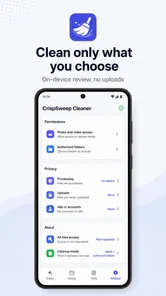
Analysis by Reviewed
When a phone starts feeling crowded, the difficult part is rarely finding files to delete. The difficult part is deciding what is safe to remove without losing a useful photo, an important download, or a folder you still need. CrispSweep Cleaner takes a focused approach to that problem: it scans media and selected folders, then lets me review items before cleaning them. That makes it a productivity app rather than a one-tap “boost” tool, and I think that distinction matters.
I tested it with the mindset I would use before recommending it to a friend. I wanted to know whether it helps with real storage decisions, whether its review-first workflow is practical, and where a more traditional file manager or a broader cleaning utility might be a better fit. My overall impression is that it is most useful for people who want a deliberate cleanup session, not for anyone expecting the app to automatically understand every part of their phone.
What to consider before choosing a cleaner
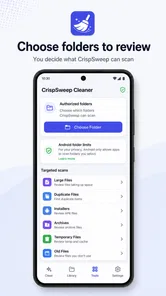
The first question is not how many files an app can find. It is whether the app gives you enough control over the files it presents. CrispSweep Cleaner is built around scanning media and folders that I choose, followed by a review step. That design reduces the uneasy feeling that a cleaner is making decisions on my behalf.
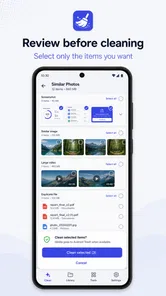
For me, the most important decision criterion is visibility. A useful cleanup tool should help me see what is being considered, separate obvious clutter from personal files, and make it easy to pause when something looks uncertain. CrispSweep Cleaner’s central workflow is well suited to that approach because cleaning is based on selected items rather than an unexplained automatic sweep.
The second criterion is scope. This app is not presented as a complete maintenance suite covering every possible phone problem. Its strength is narrower: examining media and chosen folders. If your main concern is a camera roll, a downloads folder, or a project directory that has accumulated old files, that narrow scope can be an advantage. It keeps the task understandable.
The third criterion is patience. A review-based cleaner asks me to participate. That is safer for important files, but it also means I cannot simply start a scan and walk away expecting the phone to be reorganized. The right choice depends on whether you value control more than maximum automation.
There is also the question of how you normally manage storage. Some people already use the built-in file manager and are comfortable sorting by folder, date, or size. Others want a dedicated place to review media and selected folders without navigating through several system screens. CrispSweep Cleaner sits between those habits: it adds a cleanup-focused workflow while still leaving the final decision with me.
More From Our News Desk

Weather by Xiaomi Review: Clear at a Glance, Less Clear Up Close

X Under Pressure: Can It Recover When Posting Goes Wrong?

Clash of Clans Is Won Between the Battles

Android Auto Makes the Case for Quieter Car Software

MobiOffice: Transforming Mobile Productivity with Seamless Integration

EA SPORTS FC™ Mobile Soccer: Redefining Mobile Sports Gaming
A practical cleanup session
A realistic example is a phone used for family photos, messaging attachments, and occasional work documents. After several months, I might have screenshots that were useful for a day, downloaded images I no longer recognize, and duplicate-looking media mixed with photographs I want to keep. I would begin by choosing the relevant media or folder rather than scanning everything indiscriminately.
Next, I would review the results in small groups. I would remove obvious temporary images first, then look more carefully at personal photos and documents. The important habit is not to treat a large group as automatically disposable. A screenshot of a boarding pass, a receipt, or a work instruction can look like clutter while still being valuable.
That workflow reveals one of the app’s less obvious strengths: it encourages a decision boundary. I can start with low-risk material, learn how the scan presents items, and only then move toward folders where mistakes would matter more. This is more useful than a cleaner that makes every category feel equally safe.
How the scanning approach feels in everyday use
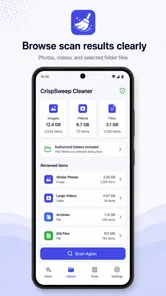
CrispSweep Cleaner is simple to understand because its purpose is visible from the first interaction. I am not asked to learn a complicated dashboard full of unrelated maintenance tools. The core action is to scan media or selected folders, inspect the results, and clean what I approve.
That simplicity is especially helpful when I am cleaning someone else’s phone or helping a less technical family member. I can explain the process in plain language: choose an area, look through the proposed items, and remove only what makes sense. The review stage gives the owner a chance to recognize personal content instead of handing control to an opaque automatic process.
Still, the same simplicity creates a limitation. If I want a broad diagnosis of storage across every app, cache, system area, and account, this is not the first tool I would reach for. I would use the phone’s own storage settings or a more comprehensive file-management solution when the problem is not primarily media and selected folders.
Where CrispSweep Cleaner wins
The clearest advantage is its review-first character. The best reason to use it is control before deletion. I can treat cleanup as a short sorting task instead of trusting a sweeping command that may be difficult to undo. That is a meaningful difference for phones containing irreplaceable photographs or mixed personal and work material.
It also wins when the cleanup target is known. Suppose I only want to examine a downloads folder that has become untidy, or I want to review media rather than investigate the entire operating system. A focused scan is less distracting than a tool that presents a long list of unrelated recommendations.
Another useful insight is that selected-folder scanning can support recurring routines. I could choose one folder after a trip, review screenshots after finishing a project, or inspect a media-heavy directory at the end of the month. The app does not need to become an always-running assistant to be useful. In my view, it works better as a controlled maintenance habit.
The app is also approachable for people who dislike technical storage terminology. A traditional file manager may expose paths and nested folders that are accurate but intimidating. CrispSweep Cleaner frames the task around scanning and reviewing items, which makes the purpose easier to grasp. That does not replace file-manager knowledge, but it lowers the barrier to starting.
Its current version is 3.0.1, and the app comes from Vouch Vault. It is free, which makes trying the workflow relatively easy for someone who is unsure whether a dedicated cleaner belongs in their routine. The app is listed for Everyone and supports Android 8.0 or later, so its intended audience is broad rather than limited to newer phones.
Three habits that make the app safer and more useful
My first tip is to begin with a reversible-feeling category, even if the actual deletion process should always be treated as permanent. Start with screenshots, old downloads, or a folder you already recognize. This gives you a chance to understand the scan results without immediately handling your most important memories.
My second tip is to review by context, not just appearance. A visually similar group of images may include both disposable copies and the original photograph. Before cleaning, I would ask why each item exists: was it created temporarily, downloaded for a purpose, or captured as a record? That small pause is where the app’s manual review becomes valuable.
My third tip is to use selected folders as boundaries for different parts of life. A personal media folder, a work folder, and a downloads area should not be judged by the same standard. Work files may need retention even when they look old, while temporary images may be safe to remove sooner. Separating the scan areas helps prevent one broad cleanup decision from affecting unrelated material.
A fourth practical habit is to clean in short sessions rather than waiting until storage feels urgent. When a folder contains a manageable amount of recent clutter, recognition is easier. If I leave everything for a year, I may no longer remember why a file was saved, which makes cautious review slower and less satisfying.
Where another kind of tool may fit better
CrispSweep Cleaner is not automatically the best choice for every storage problem. If I need to understand which applications consume the most space, I would start with the operating system’s storage screen. It is closer to the source of that information and better suited to app-level decisions. A media-focused cleanup app cannot replace that broader overview.
If I organize files manually by filename, location, and detailed metadata, a full file manager may offer a more natural experience. File managers are usually better for moving, renaming, creating folders, and handling documents as an organized archive. CrispSweep Cleaner is more appealing when my immediate goal is reviewing potential clutter rather than rebuilding a filing system.
There is also a trade-off with highly automated cleaners. Those tools may feel faster because they group or remove common categories with less personal input. That can suit someone who has backups, understands the risks, and wants speed. I would choose CrispSweep Cleaner instead when the phone contains mixed personal content and I want to remain responsible for each cleanup decision.
Cloud-storage tools may be preferable when the real objective is preserving photographs while reducing local storage. Uploading or offloading files is a different solution from cleaning unwanted items. If I want an archive rather than deletion, I would look at backup and cloud-management options first, then use CrispSweep Cleaner only for material I have already decided not to keep.
These comparisons are not criticisms of the app’s design. They clarify its place. It is a focused reviewer of media and selected folders, not a universal answer to every storage, backup, or file-organization question. Choosing it makes the most sense when that focused job matches the problem in front of me.
The cost of switching to a dedicated cleanup routine
Because the app is free, the main cost is not a subscription decision. It is the time needed to review items carefully and build confidence in the workflow. That cost is reasonable for a one-time cleanup, but it becomes more noticeable if I expect instant results every time I open the app.
There is also a learning cost, although it is modest. I need to decide which folders are appropriate, understand what the scan is showing, and develop a personal rule for uncertain files. The first session may be slower than using a familiar system tool, especially if my storage is disorganized. Later sessions should be easier because I know which areas deserve attention.
The bigger switching cost is behavioral. People accustomed to pressing an automatic clean button may find a review-based process less convenient. In return, I get more involvement and fewer assumptions. Whether that is a benefit depends on the value of the files and my tolerance for checking them one by one or in groups.
I would also avoid installing it with the expectation that it will solve a full-device storage crisis by itself. If the largest space users are games, offline video, application data, or cloud synchronization, I need a broader plan. CrispSweep Cleaner can still help with media and chosen folders, but it should be one part of the cleanup process rather than the entire strategy.
Who should use it, and who should skip it
I would recommend CrispSweep Cleaner to someone whose phone is crowded with media and folder clutter, especially someone who wants to approve deletions personally. It is a good match for cautious users, families sharing cleanup responsibilities, and people who prefer a clear task over a complicated system dashboard.
It is also a sensible option for anyone who wants a repeatable workflow after specific events. A holiday can leave behind screenshots, downloaded maps, and temporary images. A finished work project can leave a folder full of drafts. A review-based scan lets me revisit those areas while the context is still fresh, rather than deleting blindly months later.
I would steer power users toward a file manager or the operating system’s storage controls when they need detailed organization, application-level analysis, or broader system maintenance. I would also suggest a backup-oriented tool to anyone whose main concern is keeping large photo collections while freeing local space. In those cases, deleting is not the central goal.
My recommendation after using it
CrispSweep Cleaner earns a recommendation when the decision is “Which media and selected folders can I safely clean?” Its value comes from narrowing the task and keeping me involved. I like that it does not force me to treat every discovered item as disposable, and I appreciate the way its workflow supports cautious, area-by-area maintenance.
The app has a 4.4 average from around 28 ratings and has passed 10 thousand installs, which suggests an active but still relatively modest user base. Those figures do not change my practical assessment, but they place the app in the category of a focused utility worth trying rather than a universally established standard.
My final advice is to install it if you want a free productivity tool for reviewing media and chosen folders, then begin with a low-risk directory. Keep your expectations specific, read each group with context, and use a broader system or file-management tool when your problem extends beyond clutter in those areas. CrispSweep Cleaner is strongest when careful selection matters more than automatic speed.
For that reason, I would recommend it to a friend who says, “I know my phone is full, but I do not trust an app to delete things for me.” I would not recommend it as the only storage solution for someone facing a device-wide capacity problem. Used for the job it is designed to handle, it offers a calm and understandable way to turn an untidy collection of media and folders into a cleanup session I can actually control.
CrispSweep Cleaner Frequently Asked Questions
What should I check before installing CrispSweep Cleaner?
CrispSweep Cleaner is a free productivity app from Vouch Vault, with an Everyone age rating. Before downloading, check that your device runs Android 8.0 or later and that you are getting the app from an official app store. Its purpose is to scan media and folders you choose, so consider whether that review-and-select approach fits the way you want to manage files.
How does CrispSweep Cleaner scan files, and do I choose what gets cleaned?
The app scans media and folders that you choose, then lets you review and clean selected items. That review step matters: take a moment to inspect the results and select only what you actually want removed. Starting with a specific folder or media group can also make the process easier to follow than cleaning everything at once.
What is CrispSweep Cleaner, and what does it do?
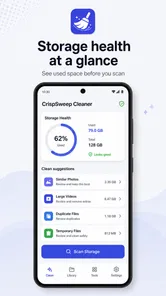
CrispSweep Cleaner is designed to help users organize and maintain storage on their mobile devices. Its typical tools may include scanning for temporary files, unused data, duplicate or similar photos, large files, and application leftovers. After scanning, it presents items that may be safe to remove so you can review them before cleaning. Results and available features can vary depending on whether you use Android or iOS.
Is CrispSweep Cleaner safe to use on my phone?
The application can be useful when you carefully review its scan results, but no cleaning tool should be trusted blindly. Before confirming a deletion, check the selected files and make sure important photos, downloads, documents, or messages are not included. Install CrispSweep Cleaner only from an official app store, examine the permissions it requests, and review its privacy policy. Keeping a backup is recommended before performing a large cleanup.
Can CrispSweep Cleaner delete personal photos, videos, or important files?
Potentially, yes, depending on the cleaning categories you select and the permissions granted to the app. Features that identify duplicate images, blurry pictures, large videos, or old downloads may include files you still want to keep. Always preview the proposed items and deselect anything important before cleaning. If the app offers a recycle bin or recovery period, verify how it works rather than assuming every deletion can be undone.
Pros
- Quickly identifies large
- duplicate
- and unwanted files.
- Simple interface makes storage cleanup easy for beginners.
- Helps organize photos and videos before deleting them.
- Can free space without requiring advanced technical knowledge.
- Useful for spotting files that are consuming storage unexpectedly.
Cons
- Some cleanup features may require a premium subscription.
- Scanning can take time on devices with extensive media libraries.
- Automatic suggestions should be reviewed to avoid deleting needed files.
- Results may overlap with tools already built into Android or iOS.
- Performance and available features can vary by device and operating system.











