CraftNote – AI Note Taker
- 199.00
- 4.5
- Installs
- 500.00K
- Price
- Free

Screenshots
Analysis by Reviewed
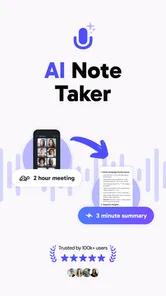
I started using CraftNote – AI Note Taker as a practical way to capture conversations that are difficult to follow and write down at the same time. It belongs to the productivity category, but its value is most obvious in ordinary situations: a household planning a move, a parent trying to remember school information, or several people sharing notes after a meeting. Instead of relying on one person to type everything, the app is designed around recording, live transcription, and organizing notes with AI.
That combination makes it more useful than a basic notes app when the important information is spoken rather than written. My overall impression is positive, especially for people who regularly attend meetings, interviews, lessons, or planning sessions. Still, I would not treat it as a perfect replacement for careful listening or manual notes. Transcription needs checking, and shared-device use requires sensible boundaries because recorded conversations can involve other people.
How CraftNote fits into shared everyday use
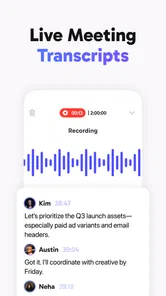
A realistic household example is a weekly planning conversation. One person may be checking a calendar, another may be discussing appointments, and someone else may be trying to remember what needs to be bought or repaired. With a normal notebook, the person writing often misses part of the discussion. CraftNote offers a different workflow: start a recording, let the app create a live transcript, and use the resulting notes as a reference afterward.
I find this particularly helpful when the conversation contains several separate decisions. A useful habit is to pause after each topic and say the decision clearly, including who will handle it and when it should happen. The transcript then has recognizable points that are easier to review than a stream of vague conversation. This is not a special household mode; it is simply a disciplined way to make the app’s note organization more useful.
The same approach works for a study session or a shared project. One person can focus on explaining while another listens, and the app can preserve the discussion for later review. That is more comfortable than passing a phone around to type notes. It also helps when people remember different parts of the same conversation and need a common record rather than several incomplete versions.
There is an important trade-off, though. A recording can preserve too much. Casual comments, unfinished ideas, and personal details may appear alongside the useful points. I would review the generated notes before sharing them with anyone else, especially when a household device is used by several people. The convenience is real, but it works best when the final note is edited into a short, purposeful summary.
What the first session feels like
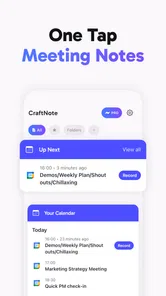
The basic concept is easy to understand: record a meeting, watch the words appear as a live transcription, and return to organized AI notes later. That makes the first use less intimidating than a full project-management tool. I would begin with a short, low-stakes conversation rather than an important appointment. This gives you time to see how clearly the speakers are captured and how much editing the resulting note needs.
More From Our News Desk

Weather by Xiaomi Review: Clear at a Glance, Less Clear Up Close

X Under Pressure: Can It Recover When Posting Goes Wrong?

Clash of Clans Is Won Between the Battles

Android Auto Makes the Case for Quieter Car Software

MobiOffice: Transforming Mobile Productivity with Seamless Integration

EA SPORTS FC™ Mobile Soccer: Redefining Mobile Sports Gaming
For a shared phone or tablet, I recommend agreeing on a simple routine before recording. The person starting the session should say what it is for, who will review it, and when the note should be cleaned up. This avoids the common problem of several people assuming that somebody else will organize the result. CraftNote can help preserve information, but it cannot decide which household commitments matter most.
The app is free to start, which makes that trial easier. Its listing also shows optional in-app purchases ranging from $6.99 to $159.99 per item, so I would check the purchase screen carefully before choosing anything beyond the free experience. The wide range means different options may be presented inside the app, and a household should agree on spending before a shared device is used for upgrades.
Account boundaries matter more than people expect
CraftNote is not the kind of app I would casually hand to every person in a home without thinking about account separation. Notes created from meetings can contain work details, private plans, names, or sensitive personal information. If one phone is used by more than one person, each user should understand whether they are working in the same app space and whether another person might open the saved notes later.
I would keep work-related recordings separate from family planning whenever the app’s available organization tools allow it. Even without inventing a dedicated household feature, a simple naming pattern can help: begin with the date, topic, and group, such as “school planning” or “repair discussion.” Consistent titles make later searching and sorting less confusing, and they reduce the chance of sending the wrong summary to the wrong person.
Another useful boundary is deciding who is responsible for deletion. A transcript may be helpful for a few days and unnecessary afterward. If the note is no longer needed, removing it from the app and any other place where it was exported is a sensible privacy habit. I would not record a meeting merely because the option exists; the purpose should be clear before the microphone is started.
These habits are especially important because the app’s strength is persistence. A spoken conversation that would normally disappear after ten minutes can become a searchable reference. That is excellent for remembering instructions, but it also changes the privacy character of the conversation. I see CraftNote as a tool that rewards deliberate use, not automatic recording of everything around you.
Turning transcripts into useful coordination
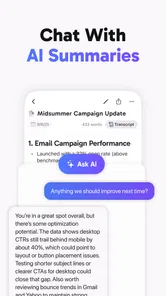
The biggest practical improvement over ordinary notes is that CraftNote begins with the conversation itself. A blank note asks you to predict what will matter before the discussion starts. A transcript lets you revisit the exact flow and then shape it into a clearer record. For household coordination, I would use the transcript as raw material and create a compact summary with three parts: decisions, tasks, and unresolved questions.
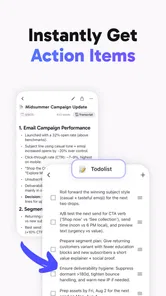
For example, after discussing a trip, the useful note might separate confirmed bookings from things still needing research. After a school conversation, it might distinguish dates from general advice. After a repair discussion, it might identify what has already been agreed and what still requires a call. This structure prevents the AI-generated organization from becoming a long paragraph that looks complete but does not tell anyone what to do next.
A non-obvious advantage is that the app can reduce “memory ownership.” In many homes, one person becomes the unofficial keeper of every appointment, instruction, and decision simply because they are better at writing notes. Recording the discussion gives everyone a shared starting point. It does not solve unequal participation by itself, but it makes it easier for another person to review the same information and take responsibility for a task.
I would also use short spoken markers during a conversation. Phrases such as “decision,” “follow-up,” or “question for later” create landmarks in the live transcript. They may sound slightly unnatural at first, but they make review faster. This is one of the most effective ways to get more from CraftNote without relying on assumptions about how its AI will interpret every informal exchange.
Compared with a traditional voice recorder, the attraction is the live text and organized notes rather than audio alone. Compared with a standard notes app, the advantage is not having to type continuously. Compared with a manual meeting template, the app is more flexible when the conversation changes direction. The compromise is that these automated approaches still need human correction, while handwritten notes can be more selective from the start.
Accuracy, review, and the right expectations
I would never treat an automatic transcript as an official record without checking it. Names, addresses, technical terms, accents, overlapping speech, and background noise can all make spoken language harder to interpret. Even a generally good transcript can change the meaning of a sentence through one missed word. For medical, legal, financial, or employment-related conversations, I would verify important details against the original speaker or a trusted document.
A good workflow is to listen and review in two passes. First, skim the generated note to understand the main subjects. Second, check every date, number, name, and commitment that could cause trouble if misunderstood. This is faster than rewriting the entire conversation manually, but it still respects the difference between an assistant and an authoritative record.
The live transcription can also affect how people speak. Some users may slow down or speak more clearly, which helps the result. Others may become uncomfortable and stop discussing sensitive matters naturally. In a household, I would explain the purpose before recording rather than placing the phone in the middle of a conversation without comment. Trust is more valuable than a complete transcript.
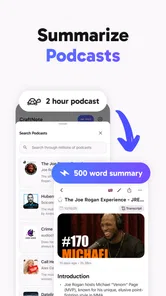
CraftNote’s artificial intelligence is most useful after the conversation, when a large amount of spoken material needs to become something readable. It is less impressive if you only need a two-line shopping list or a quick reminder. In those situations, a regular notes app may be faster because there is no recording, review, or cleanup stage.
Age, consent, and trust on a family device
The app has an Everyone content rating, so its store-facing age context is broad. That does not mean every recording situation is automatically suitable for every family member. A child may be able to understand how to start a note but not fully appreciate that other people’s voices and private comments are being preserved. I would show younger users the process and set clear household rules rather than assuming the age label answers every practical question.
My basic rule would be simple: ask before recording, explain who will see the note, and do not capture private conversations just because the phone is nearby. This matters even more when guests, classmates, colleagues, or service workers are present. The app can support coordination, but consent and good judgment remain outside the software.
For teenagers, CraftNote could be useful for revision discussions, project planning, or remembering instructions from a tutor. I would encourage them to mark the difference between a transcript and their own interpretation. That distinction helps prevent an automatically organized note from being mistaken for a complete understanding of the subject.
For older relatives, the live transcription may be helpful when remembering spoken instructions is difficult. However, the screen, speech clarity, and editing process should be tested in a calm setting. If the person finds the app distracting, a simple written checklist may serve them better. The best tool is the one that reduces effort rather than adding another technical task.
What the current release tells me about its place in the category
CraftNote is developed by JoyoLabs Dijital, and the current version is 2.5.6. It was released on June 20, 2025, and requires Android 8.0 or later. Those details make it accessible to people who are not using the newest phone, although the actual experience will still depend on the device, microphone, storage, and environment.
The app has a 4.5 average from around 42 thousand ratings, with over 500 thousand installs. That level of adoption suggests it has found an audience beyond a tiny experiment, but I would still judge it by the kind of work you need it to do. Popularity does not remove the need to check transcripts or understand the purchase choices.
Because it is free, CraftNote is easier to recommend as a trial than a paid-only note system. The free starting point is useful for households that are unsure whether AI transcription will actually fit their routine. At the same time, the presence of in-app purchases means the total cost can become more significant for people who use it heavily, so it is worth deciding whether the convenience justifies the selected option.
Who should use it, and who should choose something else
I would recommend CraftNote to students, freelancers, families coordinating complicated plans, interviewers, and anyone who regularly loses important details while listening. It is especially suitable when the conversation is long enough that manual notes become tiring but structured enough that a later summary will save time.
I would be more cautious about recommending it to someone who wants a private, minimal note pad. If your usual need is a grocery list, a password-free reminder, or a few typed ideas, recording and transcription may be unnecessary overhead. A plain notes app is simpler, quicker, and easier to keep entirely under your control.
I would also choose another solution when the main requirement is formal collaboration with strict permissions, audit trails, or a carefully controlled business archive. CraftNote’s appeal is its approachable capture-and-organize workflow, not a promise that it replaces every specialized meeting system. For confidential professional work, your organization’s approved tools and policies should come first.
People who dislike reviewing automated text may also be disappointed. The app saves effort at the capture stage, but some of that effort moves to verification and editing. My advice is to test it on the kind of conversation you actually have, not an ideal demonstration. If the cleanup takes longer than writing your own notes, the usual alternative may be the better choice.
My household verdict
After using CraftNote as an AI note-taking companion, I see its strongest role in shared understanding. It can turn a spoken discussion into something a household, study group, or small team can revisit without depending on one person’s memory. The most effective results come from clear spoken markers, purposeful titles, careful editing, and a defined plan for who reviews the note.
I like that it is free to begin, available for Android 8.0 and above, and focused on a problem people genuinely have: trying to listen and write at the same time. The Everyone rating also makes it approachable for family environments, provided adults still explain consent, privacy, and responsible use. Those boundaries are not optional extras when several people share one device.
My final recommendation is therefore conditional but favorable. Try CraftNote if your conversations regularly contain instructions, decisions, or follow-up tasks that are easy to forget. Keep a normal notes app for quick personal reminders, and do not use automated transcripts as unquestioned evidence. Its real strength is not recording everything; it is helping the right conversation become a clear, reviewable plan.
CraftNote – AI Note Taker Frequently Asked Questions
What should I check before installing CraftNote – AI Note Taker on my phone?
CraftNote – AI Note Taker is an app for productivity, and its Android version requires Android 8.0 or later. Before installing, check that your device meets that requirement and that you are downloading the app from the official store for your platform. It is also sensible to consider whether meeting recording, transcription, and AI-assisted notes fit the way you plan to work.
Who is the developer of CraftNote – AI Note Taker, and what devices can run it?
CraftNote – AI Note Taker is a productivity app developed by JoyoLabs Dijital. It is available for Android and iOS, with the Android version requiring Android 8.0 or later. If you are choosing between devices, check the relevant app store for compatibility with your particular phone or tablet before downloading.
What does CraftNote do with recorded meetings and spoken audio?
CraftNote is presented as an AI note-taking app for recording meetings, live transcription, and organizing notes. That makes it a potential fit for users who want to turn spoken discussions into written material they can revisit. Before using it in a meeting, consider whether participants should be told about recording and transcription, and review the app’s privacy information.
What is CraftNote – AI Note Taker used for?
CraftNote – AI Note Taker is designed to help users capture, organize, and improve written information in one place. It can be useful for class notes, meeting summaries, personal ideas, task planning, and research. The AI-focused features are intended to reduce manual work by helping structure notes, clarify content, and make important information easier to find later.
Does CraftNote – AI Note Taker require an internet connection?
An internet connection may be necessary for several AI-powered functions, especially when notes are processed online or synchronized between devices. Basic writing and reviewing features may work without a connection, depending on the platform version and the specific feature being used. Before relying on the app during travel or offline work, test which tools remain available without internet access.
Pros
- AI turns long recordings into concise
- organized notes.
- Useful summaries help review meetings
- lectures
- and interviews quickly.
- Search makes it easier to find details across saved notes.
- Clean interface keeps note-taking simple for new users.
- Export options make it convenient to share notes with others.
Cons
- AI summaries may miss context or misunderstand unclear speech.
- Recording and transcription can use significant battery and storage.
- Some advanced AI features may require a paid subscription.
- Privacy may concern users handling sensitive conversations or documents.
- Performance can vary with poor audio quality or limited internet access.











