

CPOS: Tap to Pay Card Reader
- 155.00
- 4.4
- Installs
- 10.00K
- Price
- Free

Screenshots
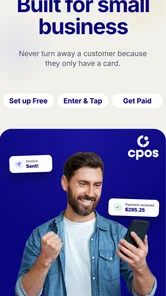
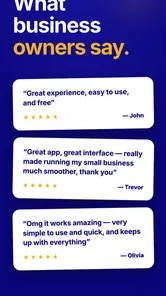
Analysis by Reviewed
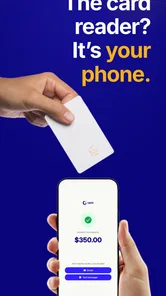
When I first looked at CPOS: Tap to Pay Card Reader, I treated it less like a traditional business app and more like a practical replacement for a small piece of checkout equipment. Its purpose is clear: it turns a compatible phone into a card reader, so a market seller, independent professional, or small shop can accept payments without carrying a separate terminal. That simple idea is also the main reason to consider it. The less equipment I need to bring to a customer, the easier it is to take a payment at the moment the sale happens.
At the same time, a phone-based card reader is not automatically the best answer for every business. My decision would depend on how often I take payments, how important a dedicated checkout setup is, and how comfortable I am relying on my phone during a transaction. CPOS is a free business app from CPOS, rated for Everyone, and its current version is 2.34.0. Those details make it approachable, but they do not remove the need to think about the workflow around it.
What I would check before choosing a phone-based reader
The first question I would ask is not whether the app is free. It is whether my phone can realistically become the payment point I need. CPOS requires Android 8.0 or later, so an older device may be the first obstacle. I would check the operating system before planning a busy sales day around it, especially if the phone is an older spare device rather than my everyday handset.
The second question is how I work. If I visit customers, sell at occasional events, or need to collect payment away from a counter, carrying a phone is usually more convenient than carrying a separate reader. If I run a fixed shop with several staff members, a dedicated checkout system may still feel more natural because it separates personal communication from business operations. The right choice depends on the payment situation, not just the app category.
I would also think about the phone itself. A payment workflow competes with calls, messages, battery use, and other apps. That does not make CPOS unsuitable, but it means I would prepare the device as part of the setup. I would keep it charged, remove unnecessary interruptions, and avoid beginning a customer transaction while the phone is already struggling with several tasks.
Another useful distinction is between accepting a payment and managing a whole business. CPOS is specifically presented as a card-reader app. I would therefore judge it primarily on how directly it helps me take a card payment, rather than expecting it to replace every accounting, inventory, receipt, staff-management, or customer-record tool I might use. That narrower focus can be a strength when I want a straightforward payment tool, but it can also mean I need other systems around it.
The app has reached over ten thousand installs, with an average rating of 4.4 from roughly two hundred ratings and more than one hundred reviews. I see that as useful reassurance that people are trying it, while still treating the rating as one signal rather than a guarantee that it will suit my exact phone, business, and payment routine.
More From Our News Desk

 Gmail
GmailGmail in a Busy Inbox: Who Benefits Most?
From first account to crowded workday, Gmail earns its place through dependable search and flexible sorting—but its best fit depends on how much inbox maintenance you can tolerate.

 Prime Video
Switching to Prime Video: What Changes in Your Viewing Routine
Prime Video can make a compelling second home for streaming, but switching means learning a different catalog, rental layer, and route from browsing to playback.

 Universal TV Remote Control
Universal TV Remote Control Works Best as a Reliable Backup
A phone remote earns its place through quick setup and reliable habits. Here is how to get more from Universal TV Remote Control—and where its limits show.

 Weather - By Xiaomi
Weather by Xiaomi Review: Clear at a Glance, Less Clear Up Close
Xiaomi’s weather app makes everyday forecasts quick to scan, but its calm surface can leave useful details and recovery paths harder to find than they should be.

 X
XX Under Pressure: Can It Recover When Posting Goes Wrong?
A resilience-focused review of X, examining setup, mistaken posts, interruptions, weak connections, and the gaps that matter when recovery needs to be dependable.

 Clash of Clans
Clash of Clans Is Won Between the Battles
Its raids are quick; its community is a long-term project of coordination, teaching, rivalry, and shared responsibility—with all the friction that entails.
Latest News



A realistic day-to-day scenario
Imagine I repair bicycles from a small workshop and occasionally collect a final payment at a customer's home. With a conventional setup, I might need to carry a separate terminal, remember its charging cable, and keep track of another device. With CPOS, my phone can be the starting point for the transaction. After finishing the repair, I can handle the payment without unpacking a larger checkout kit.
That scenario shows where the app makes sense: the payment happens close to the customer, the business is small, and portability matters more than a full counter system. I would still arrive with a backup plan for a weak connection, a low battery, or a customer who prefers another payment method. The app can simplify the equipment I carry, but it does not make ordinary transaction risks disappear.
Where CPOS is most convincing
The strongest part of CPOS is its low barrier to trying a mobile payment setup. The app is free, and the central promise is that I do not need dedicated hardware or a monthly fee to get started. For someone testing a new side business, that changes the initial decision. I can explore whether phone-based card acceptance fits my routine before committing to a larger equipment purchase.
This is especially appealing for businesses that move around. A personal trainer visiting clients, a photographer collecting a balance after a session, or a craft seller working at temporary locations may not want a permanent register. In those situations, a phone is already part of the working kit. Turning it into the payment point can reduce the number of objects I need to remember and maintain.
I also like the psychological simplicity of using one familiar device. A separate terminal can be perfectly useful, but it introduces another screen, another battery, and another item that needs to be stored safely. With CPOS, I would spend less time thinking about equipment and more time thinking about the customer interaction. That is a practical advantage, not merely a technical one.
There is a second benefit for very small operations: experimentation. A new seller may not know whether card payments will be occasional or central to the business. Starting with a free app can make it easier to offer card acceptance during a trial period, a seasonal activity, or a limited service launch. If the business later grows into a more complex checkout arrangement, the initial experience can still teach me what customers expect and where my process needs improvement.
The age rating of Everyone also makes the app feel broadly accessible from a content perspective. That does not mean every person should use it without preparation; payment handling still deserves care. It simply means the app is not positioned as an adults-only product, which suits a general business tool that may be used in different working environments.
Three practical habits that matter more than the download
My first tip would be to create a payment routine before the first real customer. I would decide where the phone sits, who holds it, when I confirm the amount, and how I verify that the transaction has completed. This prevents the common problem of improvising in front of a customer while switching between screens or searching for a charger.
My second tip is to separate payment readiness from phone readiness. A phone can be fully charged and still be a poor checkout device if notifications cover the screen, a call interrupts the process, or the device is cluttered with unrelated apps. I would use a dedicated work profile or a spare compatible phone when possible, not because CPOS requires it, but because a clean device makes mistakes less likely.
My third tip is to treat the app as one part of the record-keeping process. After a payment, I would make sure the sale is recorded in the place I use for my business accounts. A card-reader app can help complete the collection step, but I would not assume that the payment itself replaces an invoice, sales note, stock update, or tax record. This is an important trade-off for anyone comparing CPOS with a broader point-of-sale platform.
I would also test the complete customer journey, not just the first screen. That means checking how I enter an amount, how I know the payment succeeded, what I show the customer, and what I do immediately afterward. A short rehearsal can reveal whether the phone is comfortable to hold, whether the screen is visible in outdoor light, and whether my process feels professional enough for the type of work I do.
What the free starting point does and does not solve
Free access is valuable, but it should not be confused with a complete cost-free business system. I would still consider the cost of the phone, mobile connectivity, charging, administration, and any payment-related arrangements connected with accepting cards. The app lowers the equipment barrier; it does not eliminate every expense associated with taking payments.
That distinction is important when comparing CPOS with a traditional card terminal. A terminal may require an upfront purchase or a recurring arrangement, but it is designed specifically for payment work. CPOS is attractive when avoiding that extra hardware matters more than having a dedicated device. If I already own a reliable phone and only take payments now and then, the balance may strongly favor the app. If I process transactions continuously, the convenience calculation may change.
I would also avoid assuming that a phone-based reader is automatically faster. In a well-prepared setup, it can be quick because there is less equipment. In a poorly prepared setup, it can be slower because I am handling calls, messages, battery limits, and business administration on the same device. The app wins when I organize around its strengths; it becomes frustrating when I expect it to behave like a full counter terminal without changing my habits.
Where another type of solution may fit better
There are three broad alternatives I would compare with CPOS: a dedicated card terminal, a full point-of-sale system, and a manual or invoice-led payment process. I would not choose among them by assuming one category is universally superior. Each solves a different business problem.
A dedicated terminal may be better for a busy counter, a café, or a shop where payments happen all day. Its main advantage is separation. The device exists for checkout, so employees do not need access to a personal phone and the payment process is easier to standardize. CPOS is more compelling when portability and low setup friction matter more than that separation.
A full point-of-sale system may be the better fit when I need inventory, product catalogs, staff permissions, detailed sales reports, or a tightly connected receipt process. CPOS can be a sensible payment layer for a small operation, but I would not choose it expecting a complete retail management suite. For a business with several employees or a large range of products, the broader system may justify its extra complexity.
An invoice-based approach may still work for professional services where customers pay later or where card acceptance is occasional. In that case, the immediate convenience of a phone reader may not outweigh the value of a carefully managed billing process. CPOS makes more sense when collecting payment at the point of service is a meaningful part of the customer experience.
The trade-off is therefore quite clear. CPOS favors mobility, experimentation, and minimal equipment. A terminal favors dedicated operation. A full point-of-sale platform favors integrated management. An invoice workflow favors delayed payment and administrative control. I would choose the category that matches my busiest and most error-prone moment, not the category with the shortest setup description.
Questions I would answer before switching
Would I need new hardware? The appeal of CPOS is that the phone becomes the central device, so I would begin by checking whether my existing Android phone meets the minimum operating-system requirement and is suitable for regular business use. If I need to buy a new phone solely for the app, some of the savings from avoiding a reader may disappear.
Can I use it for a serious business? I would say it can be a reasonable choice for a small or mobile operation, particularly when card collection is only one part of the work. I would be more cautious about making it the only checkout foundation for a busy business with multiple staff members, high transaction volume, or demanding reporting needs. In those cases, I would compare the complete workflow with a dedicated or integrated system before changing over.
What happens if my phone is unavailable? This is the most practical question, and my answer is to prepare a fallback. A dead battery, damaged screen, lost phone, or interrupted connection can affect any phone-based process. I would keep another payment option available or arrange a clear way to invoice the customer later. That is not a criticism unique to CPOS; it is the cost of making the phone central to the transaction.
Will switching be difficult? For a small business with a simple sales routine, the change may be fairly manageable because the app reduces the amount of dedicated equipment involved. The harder part is not installing it; it is updating habits, records, customer communication, and backup procedures. I would run a short parallel period rather than abandoning my existing method immediately, especially if payments are important to daily cash flow.
Is it suitable for every customer? No payment method suits everyone. Some customers may prefer a different way to pay, and some environments may make a phone screen less comfortable than a dedicated terminal. I would present the option confidently but keep an alternative available instead of making the customer adapt to my equipment choice.
My recommendation after weighing the trade-offs
I recommend CPOS: Tap to Pay Card Reader to independent workers, mobile sellers, and small businesses that want to try card acceptance without committing to a separate reader or monthly fee. Its value is clearest when I already carry a suitable Android phone, take payments in different places, and want a compact setup. The free price makes it particularly sensible as a starting point rather than a major financial decision.
I would not make it my first recommendation for a large shop, a multi-person checkout team, or a business that needs payment, inventory, employee control, and reporting in one connected system. In those cases, a dedicated terminal or a broader point-of-sale product may be worth the additional setup. CPOS is not weakened by that comparison; it simply has a more focused job.
For me, the best way to adopt it would be a controlled trial. I would install the current version, check the phone requirement, prepare a charging and connectivity routine, test a few realistic transactions, and confirm how I will keep business records afterward. I would also decide in advance what I will do if the phone is unavailable. Those steps tell me more than the store summary alone because they test whether the app fits my actual working day.
CPOS has earned a solid level of interest, with more than ten thousand installs and a 4.4 average rating, but my final judgment is based on fit rather than popularity. If your priority is carrying less equipment and starting simply, this is a sensible app to try. If your priority is a full checkout operation with extensive business controls, I would look beyond a phone-based reader before switching.
Overall, I see CPOS as a practical bridge between cash-only work and a more formal payment setup. It gives a small operator a way to explore mobile card acceptance without immediately buying a terminal. Used with a prepared routine and a backup plan, it can make everyday collections noticeably easier. Used as a substitute for an entire business system, it may leave important needs uncovered. That balance is exactly why I would recommend it selectively, and why I think the right user will appreciate its straightforward approach.
CPOS: Tap to Pay Card Reader Frequently Asked Questions
Can I use CPOS for my type of business?
CPOS is a business app for accepting card and contactless payments through a compatible phone or tablet, so it may suit businesses that want a mobile checkout option rather than relying only on a traditional terminal. Before downloading, consider whether its payment setup and supported service fit the way your business operates. Availability and features can vary by location and account configuration.
What do I need to check before installing CPOS?
Check that your device runs Android 8.0 or later and has the features needed for contactless payments, including NFC. You will also need a reliable internet connection for payment processing and may need to complete merchant or account setup before taking payments. CPOS is free to download, but payment-processing charges or other service terms may apply when you use it.
What is CPOS: Tap to Pay Card Reader?
CPOS: Tap to Pay Card Reader is a mobile point-of-sale solution designed to let businesses accept card and contactless payments using a compatible smartphone or tablet. Instead of relying only on a traditional card terminal, the app can turn a supported device into a convenient checkout tool. Availability, supported payment methods, and features may depend on your country, device, operating system, and CPOS account configuration.
How does Tap to Pay work with CPOS?
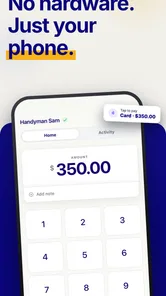
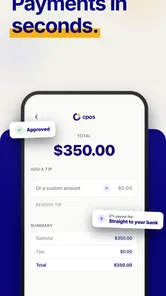
After installing the app and completing the required account or merchant setup, you can enter a transaction amount and ask the customer to tap a contactless card, phone, or wearable against the compatible device. The payment is then processed through CPOS’s payment infrastructure. A stable internet connection, NFC support, updated software, and an eligible device are generally required, while transaction approval remains subject to the card issuer and payment provider.
What devices and payment methods are supported?
Support can vary depending on the version of CPOS, your location, and the payment service connected to your account. In general, Tap to Pay services require a relatively recent Android or iOS device with NFC, secure system software, and an approved configuration. Customers may be able to pay with contactless debit or credit cards and mobile wallets, but you should verify the official compatibility list before downloading or purchasing equipment.
Pros
- Turns an iPhone or Android device into a convenient card terminal.
- Supports contactless payments without requiring customers to install an app.
- Useful for pop-up shops
- markets
- mobile services
- and small businesses.
- Reduces the need to carry or maintain a separate payment terminal.
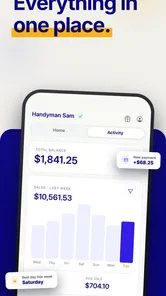
- Digital transaction records can simplify payment tracking and reconciliation.
Cons
- Device compatibility may be limited to selected phones and operating systems.
- A stable internet connection may be required to process some transactions.
- Transaction fees can reduce earnings
- especially for frequent low-value sales.
- Battery drain may become noticeable during busy trading periods.
- Payment features and availability may vary by country or account type.











