

Count the Kicks
- 336.00
- 4.2
- Installs
- 100.00K
- Price
- Free
Screenshots

Analysis by Reviewed
Pregnancy apps often try to do everything at once: appointments, symptoms, nutrition, development updates, reminders, and movement tracking. Count the Kicks takes a narrower route. It is a medical app from Healthy Birth Day, Inc. focused on helping expectant parents notice and record fetal movement, especially during the third trimester. After using it, I found that its value is less about offering a large toolbox and more about turning an important observation into a repeatable daily habit.
The basic idea is straightforward: when you are ready to pay attention to movement, you start a session and count. The app records the experience so you can look back at your usual pattern rather than relying on memory. That simplicity is its strongest quality, but it also means you need to approach it as a tracking aid, not as a replacement for professional medical advice.
My overall impression is that Count the Kicks works best when it becomes part of an established routine. It is free, available to an Everyone-rated audience, and the Android release requires version 7.0 or later. With a 4.2 average from around 992 ratings and more than 100K installs, it has clearly found an audience among people looking for a focused movement-counting tool rather than a complete pregnancy planner.
Building a dependable movement-counting routine
I focus here on making a movement-counting routine dependable without turning it into another source of pressure. A small preparation step—choosing a calm moment before opening the app—can make it easier to give each session your full attention. From there, the next question is how to handle a routine that gets interrupted or slips on a busy day.
The baseline workflow is deliberately simple
My recommended starting point is to choose one calm period of the day when you can sit or lie down without constantly switching tasks. Open the app, begin a counting session, and concentrate on the movements you notice. The important part is not making the process feel like a test you must rush through. It is creating a comparable routine so that changes are easier to notice over time.
This is where the app differs from simply writing a note in a phone diary. A handwritten record may capture a date or a vague impression, but it is easy to forget exactly what you meant later. A dedicated counter gives the activity a clear beginning and end, which reduces the mental work involved in recording it. I also found that starting the session before settling into the count helps prevent the common mistake of trying to reconstruct the details afterward.
A realistic example is an expectant parent who finishes dinner, puts the phone on silent, and spends a few minutes in the same comfortable place each evening. On a busy day, that person may be tempted to count while answering messages or doing household chores. The better habit is to treat the session as a small appointment. The app cannot create attention for you, but its focused purpose makes it easier to reserve that attention.
More From Our News Desk

 Instagram
Instagram’s Power Comes From Its Place in Your Phone
A close look at how Instagram turns Meta’s reach, recommendation systems and everyday camera habits into durable platform power—and what that costs users.

 Gmail
GmailGmail in a Busy Inbox: Who Benefits Most?
From first account to crowded workday, Gmail earns its place through dependable search and flexible sorting—but its best fit depends on how much inbox maintenance you can tolerate.

 Prime Video
Switching to Prime Video: What Changes in Your Viewing Routine
Prime Video can make a compelling second home for streaming, but switching means learning a different catalog, rental layer, and route from browsing to playback.

 Universal TV Remote Control
Universal TV Remote Control Works Best as a Reliable Backup
A phone remote earns its place through quick setup and reliable habits. Here is how to get more from Universal TV Remote Control—and where its limits show.

 Weather - By Xiaomi
Weather by Xiaomi Review: Clear at a Glance, Less Clear Up Close
Xiaomi’s weather app makes everyday forecasts quick to scan, but its calm surface can leave useful details and recovery paths harder to find than they should be.

 X
XX Under Pressure: Can It Recover When Posting Goes Wrong?
A resilience-focused review of X, examining setup, mistaken posts, interruptions, weak connections, and the gaps that matter when recovery needs to be dependable.
Latest News



Consistency matters more than turning every session into a performance. Movement can feel different depending on the baby’s position, the parent’s activity, and the time of day. I would not use one unusual session as a reason to panic, nor would I dismiss a concern because an app displays a previous pattern. If something feels concerning, the right next step is to contact a healthcare professional. The app supports observation; it does not interpret a medical situation for you.
What to do before the first session
Before relying on the record, I would spend a little time learning the counting flow when you are not distracted. Check where a session starts, how movement is entered, and where the completed record can be viewed. This small preparation makes the process less awkward when you are tired, uncomfortable, or trying to fit it into an already crowded evening.
I would also decide whether you want a partner involved. A partner can help protect the routine by reminding you at a suitable time or sitting nearby, but the person experiencing the movement should remain the one making the observations. That distinction keeps the record connected to the actual experience instead of turning it into a shared guessing exercise.
Another useful habit is to keep the phone charged enough for the session and avoid beginning when you know you will be interrupted. This sounds obvious, but interruption is one of the easiest ways to make a tracking habit unreliable. If a session is stopped halfway through, I would treat it as an interrupted attempt rather than trying to fill in missing entries from memory.
Why a dedicated counter can beat a general pregnancy app
General pregnancy apps are useful when you want weekly information, appointment preparation, checklists, or broad symptom notes. They can also become crowded. Movement counting may be one small card among many, and the surrounding features can make a focused task feel less immediate. Count the Kicks has an advantage here: its purpose is clear as soon as you open it.
The trade-off is equally clear. If you want one place for medication reminders, food notes, appointment questions, weight tracking, and fetal movement, this app will not replace a broader organizer. I would use it alongside a pregnancy planner rather than expecting it to become one. That separation can actually be helpful because a movement session remains a distinct health habit instead of disappearing inside a long list of unrelated entries.
Settings worth checking without overcomplicating the habit
Experienced use starts with checking the app’s available preferences rather than assuming the default arrangement is ideal. The most important setting is the reminder behavior, if enabled on your device and in the app. A reminder is useful only when it arrives at a realistic time. A notification during commuting, work, or sleep is easy to dismiss and may teach you to ignore future prompts.
I would choose a time connected to an existing routine, such as winding down for the evening, rather than an arbitrary hour. If your schedule changes frequently, a rigid reminder may be less useful than a manual habit. In that case, placing the app where it is easy to reach on your home screen can be more effective than adding repeated alerts.
It is also worth checking notification permissions in the phone’s system settings. A reminder cannot appear if notifications are blocked, but enabling every alert is not automatically better. I prefer allowing only the prompts that support the counting routine and leaving unrelated interruptions out of the process. This keeps the app present without making it feel demanding.
Privacy and comfort deserve practical attention too. Because this is a medical tracking app, I would review what information you are entering and decide who, if anyone, needs access to the phone or the record. I would not share screenshots casually, especially if they contain personal details. The app is most useful when it helps you communicate clearly with your care team, not when it encourages public comparison with other pregnancies.
One setting-related limitation is that a counter cannot compensate for an unsuitable environment. If the phone screen is too dim, notifications are muted at the wrong time, or the device is kept across the room, the workflow becomes harder. I would adjust the phone around the habit before blaming the app. Small changes, such as keeping the device nearby and choosing a quiet period, often matter more than repeatedly changing preferences.
Faster patterns for busy days
The quickest reliable pattern is to prepare before opening the app. Sit down, reduce distractions, and decide that the next few minutes belong to the session. Starting while still searching for a comfortable position or answering a message creates unnecessary friction. When the physical setup is ready first, the app becomes a short, focused step instead of another task to organize.
Another useful pattern is to keep the timing familiar without treating it as a rigid rule. If evenings are usually calm, use evenings. If mornings are more predictable, use mornings. The best time is the one you can repeat and during which you can pay attention. A theoretically perfect schedule that you regularly skip is less useful than a practical schedule you can maintain.
If you miss a planned session, I would not try to compensate by entering an invented result or squeezing two sessions together. Resume the routine at the next reasonable opportunity and make a note to discuss any genuine concern with your healthcare provider. Reliable tracking depends on honest entries. A neat-looking history is not more valuable than an accurate one.
For people who share household responsibilities, a partner can help protect the time without taking over the count. For example, a partner might handle dinner cleanup while the pregnant person completes the session, or agree not to start a conversation until it is finished. This is a non-obvious strength of a focused app: because the task is narrow, it is easier to explain to someone else and easier to defend as a small but important part of the day.
I would also avoid using the app while walking, driving, or multitasking. The purpose is observation, so speed should not be the main goal. A faster pattern means removing interruptions and preparation steps, not rushing through movement recognition. That distinction keeps convenience from undermining the quality of the record.
Reading the record responsibly
The stored history is most useful as a conversation aid. It can help you describe what your usual sessions have looked like and identify a change that deserves attention. I would look for broad personal patterns rather than comparing the record with another person’s experience. Pregnancy is not a competition, and a tracking app should not turn it into one.
When discussing the record with a clinician, be ready to explain the context around an unusual session: whether you were distracted, whether the session was interrupted, and whether you noticed a broader change. A single number without context may not tell the whole story. The app can make the information easier to organize, but the healthcare professional supplies the medical interpretation.
This is also where the app’s focused design can feel limited. It records the counting activity, but it is not a full clinical chart and should not be treated as one. If you need detailed symptom documentation, appointment notes, medication management, or direct communication with a care team, another tool may be a better fit alongside it.
Advanced limits and situations where I would choose something else
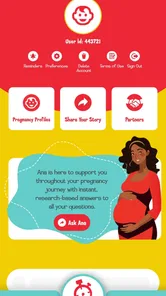
Count the Kicks is not the right choice for someone who wants a comprehensive pregnancy dashboard. Its narrow purpose is helpful for movement counting, but it may feel incomplete if you expect educational articles, calendar planning, or extensive journaling in the same app. A broader pregnancy application is more convenient for people who prefer one central place for every pregnancy-related task.
I would also be cautious about recommending it as the only tool for someone who struggles with notifications, has limited access to a compatible Android device, or needs a workflow shared across several caregivers. The Android version requires 7.0 or later, so an older phone may not be suitable. In a household where several people need to coordinate medical information, a clinician-approved communication method may be more appropriate than passing around a personal tracking app.
The app’s age rating makes it broadly accessible, but accessibility is not the same as medical suitability for every situation. A person with specific instructions from a healthcare provider should follow those instructions first. If a clinician has recommended a different counting method, timing, or record format, I would use Count the Kicks only if it fits that guidance.
There is also a psychological trade-off. Tracking can reassure some people because it gives structure to an uncertain experience. For others, checking a record repeatedly can increase anxiety. If the app makes you obsess over every session or compare results compulsively, a simpler paper record or a conversation with your care team may be healthier. The best tracking method is the one that supports appropriate attention without creating unnecessary fear.
What the current release tells me about everyday usability
The current version is 7.9.23, and the app has been available since April 1, 2014. That long presence suggests a tool built around a stable, specific need rather than a short-lived trend. I appreciate that the concept does not require constant learning: once the counting flow makes sense, the daily use should remain approachable.
At the same time, a focused app can feel less flexible than a modern all-in-one platform. People who want extensive customization may find the experience too controlled, while people who want a simple counter may appreciate exactly that restraint. My advice is to judge it by the quality of the routine it helps you maintain, not by how many extra screens or features it offers.
It is free to use, which removes a significant barrier for someone who wants a dedicated movement-counting tool without adding another purchase to pregnancy expenses. That does not make it automatically superior to a notebook or a broader app, but it makes trying the workflow relatively easy. I would give it several days of normal use before deciding whether its structure fits your habits.
My verdict after making it part of a routine
I recommend Count the Kicks to expectant parents who want a focused way to count and record fetal movement, particularly when they are entering the third trimester and want a repeatable habit. Healthy Birth Day, Inc. keeps the central experience understandable: open the app, concentrate on movement, record the session, and use the history as a reference when speaking with a professional.
Its best feature is not a flashy extra; it is the reduction of friction around a task that is easy to postpone or record inaccurately. The strongest results come from combining the app with a quiet time of day, sensible notification choices, honest entries, and a clear understanding of its medical limits. Those habits make the tool more dependable than simply installing it and hoping reminders will do all the work.
I would skip it if you are searching for a complete pregnancy manager, detailed clinical documentation system, or a substitute for professional guidance. I would also avoid turning its record into a source of comparison or reassurance that overrides a concern. Used in the right role, though, it is a practical medical app with a clear purpose, no purchase cost, and enough structure to help a simple daily observation become easier to maintain.
My final recommendation is straightforward: use it as a companion to your care, not as the care itself. If its focused counting workflow suits your schedule, it can be a useful addition to pregnancy planning. If you need broader organization, pair it with another trusted tool rather than forcing this app to do a job it was not designed to handle.
Count the Kicks Frequently Asked Questions
Is Count the Kicks free, and what devices can run it?
Count the Kicks is a free medical app from Healthy Birth Day, Inc. Its current version is 7.9.23 and it requires Android 7.0 or later. Before downloading, check that your device meets the operating-system requirement. The app is rated for Everyone, so its age classification is suitable for a general audience, although its pregnancy-tracking tools are specifically intended for expectant families.
What is Count the Kicks and who is it designed for?
Count the Kicks is a pregnancy app designed to help expectant parents track their baby’s movements during the third trimester. It provides a simple way to record kick counts, recognize a baby’s usual movement pattern, and notice possible changes. The app is mainly intended for pregnant users, although partners and healthcare professionals may also find the recorded information useful during discussions about pregnancy progress.
How does the kick-counting feature work?
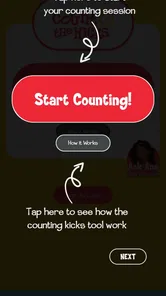
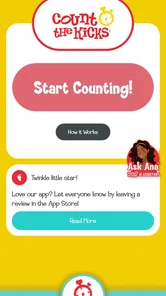
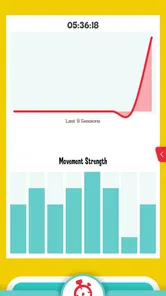
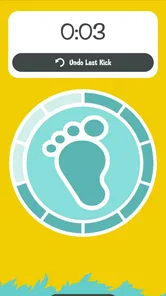
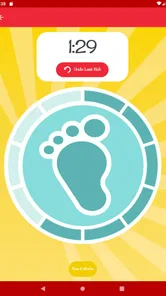
The app guides you through recording how long it takes to feel ten movements, such as kicks, rolls, or stretches. You start a session when your baby is active and tap the counter each time you feel movement. Over time, Count the Kicks stores your sessions and helps you compare them, making it easier to understand your baby’s normal activity pattern rather than relying on memory alone.
Is Count the Kicks a substitute for medical advice?
No. Count the Kicks is an educational and tracking tool, not a diagnostic service or replacement for your doctor, midwife, or maternity unit. If your baby’s movements seem reduced, stop, or feel noticeably different from the usual pattern, you should contact your healthcare provider promptly. Do not wait for the app to provide a warning before seeking professional medical guidance.
Can I use Count the Kicks throughout my pregnancy?
The app is primarily intended for use during the stage of pregnancy when healthcare providers recommend monitoring fetal movement, commonly beginning around the third trimester. The exact timing can vary depending on your pregnancy and medical advice. Before starting, it is best to ask your doctor or midwife when kick counting should begin and how the app fits into your personal care plan.
Pros
- Simple kick-tracking interface designed for quick daily use.
- Customizable reminders help maintain a consistent counting routine.
- Clear history makes it easy to review previous kick sessions.
- Supports early awareness of changes in fetal movement patterns.
- Educational guidance can help users understand kick counting better.
Cons
- Not a substitute for professional medical advice or emergency care.
- Requires regular phone access and consistent daily tracking.
- May increase anxiety when movement patterns naturally vary.
- Some features may depend on device notifications working correctly.
- Primarily designed for pregnancy kick counts
- limiting broader use.











