

CONTOUR DIABETES app (US)
- 1.70K
- 3.3
- Installs
- 100.00K
- Price
- Free
Screenshots
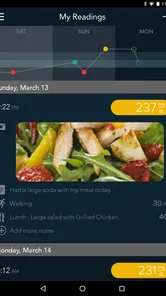
Analysis by Reviewed
Managing blood glucose is rarely difficult because of one isolated reading. The real challenge is keeping a useful record, remembering what was happening around each result, and turning that record into a conversation with a healthcare professional. That is the space where CONTOUR DIABETES tries to help. It is a free medical app from Ascensia Diabetes Care, designed to support blood glucose monitoring rather than replace clinical advice.
I approached it as I would any everyday health tool: not by asking whether it looks impressive, but whether it makes a repeated routine easier. The answer is mixed but generally positive. When paired with a compatible CONTOUR blood glucose meter, the app can make logging less dependent on paper notes and memory. Its value comes from building a clearer trail of readings and context. Its weaknesses appear when you expect it to work as a complete diabetes-management system, a diagnostic tool, or a substitute for professional interpretation.
From a single reading to a usable record
The starting condition is familiar. You check your blood glucose, see a number, and then have to decide what to do with it. A handwritten notebook can record the result, but it may not preserve enough context. A phone’s general notes app is flexible, yet it usually leaves the information scattered and difficult to review. A dedicated monitoring app has a more focused purpose: keeping readings in one place so patterns are easier to discuss later.
That focus is important. This is not a general wellness tracker dressed up as a medical product. Its identity is tied to blood glucose monitoring, and the developer’s connection with CONTOUR meters gives the workflow a clear center. If you already use compatible CONTOUR equipment, the app makes more sense than it does as a standalone download chosen at random from a crowded health-app category.
At the time of writing, the app is available free of charge, carries an Everyone age rating, and supports devices running Android 5.0 or later. It has been available since late 2016, and the current version is 3.5.0. Those details make it accessible to a broad range of Android users, including people who do not own a recent phone. Still, compatibility in practice depends on the meter and phone combination, so I would check that relationship before building a routine around it.
Setting up the routine without overcomplicating it
The first useful decision is deciding what role the app will play. I would not install it simply because it is free and then expect it to explain every result. I would install it with a specific workflow in mind: take a reading, bring that result into the app, add enough context to make it meaningful, and review the history before a healthcare appointment or whenever a pattern seems unusual.
That approach prevents a common mistake with health apps: collecting information without deciding how it will be used. A long list of readings is not automatically helpful. A smaller, consistent record can be more valuable if it shows when readings were taken and what was happening around them. The app is strongest when it supports that discipline rather than encouraging passive data accumulation.
More From Our News Desk

 Instagram
Instagram’s Power Comes From Its Place in Your Phone
A close look at how Instagram turns Meta’s reach, recommendation systems and everyday camera habits into durable platform power—and what that costs users.

 Gmail
GmailGmail in a Busy Inbox: Who Benefits Most?
From first account to crowded workday, Gmail earns its place through dependable search and flexible sorting—but its best fit depends on how much inbox maintenance you can tolerate.

 Prime Video
Switching to Prime Video: What Changes in Your Viewing Routine
Prime Video can make a compelling second home for streaming, but switching means learning a different catalog, rental layer, and route from browsing to playback.

 Universal TV Remote Control
Universal TV Remote Control Works Best as a Reliable Backup
A phone remote earns its place through quick setup and reliable habits. Here is how to get more from Universal TV Remote Control—and where its limits show.

 Weather - By Xiaomi
Weather by Xiaomi Review: Clear at a Glance, Less Clear Up Close
Xiaomi’s weather app makes everyday forecasts quick to scan, but its calm surface can leave useful details and recovery paths harder to find than they should be.

 X
XX Under Pressure: Can It Recover When Posting Goes Wrong?
A resilience-focused review of X, examining setup, mistaken posts, interruptions, weak connections, and the gaps that matter when recovery needs to be dependable.
Latest News



For someone new to digital monitoring, I would begin with a short trial period focused on consistency. Use the same general routine for entering or transferring readings, avoid changing several habits at once, and see whether reviewing the history actually helps you prepare questions. If the process feels like extra work every time, that is an important result too: a tool only helps when its recording burden is low enough to survive ordinary life.
The step-by-step flow I would use
My practical workflow begins with the meter, not the phone. I take the blood glucose reading according to the instructions for the meter and then make sure the result is represented in the app. Where the meter and app support the relevant connection, transferring the reading can reduce typing and lower the chance of copying a number incorrectly. That is a meaningful advantage over a generic notes application.
Next comes context. A result without timing or circumstances can be hard to interpret later. I would use the app’s available logging options to distinguish readings taken around ordinary daily events, such as meals or medication routines, when those details are relevant to my care plan. I would avoid adding decorative information just to make the record look detailed. The goal is not to create a diary of every minute; it is to preserve the details that help explain why a result may matter.
After several entries, I would review the history instead of reacting to each number in isolation. This is where a dedicated monitoring app can beat a paper sheet for convenience. A digital record is easier to scan, and recurring timing or context may become more visible. That does not mean the app has diagnosed a trend or decided what treatment should change. It means I have a better-organized starting point for a clinical conversation.
Finally, I would prepare for the handoff. Before speaking with a doctor, nurse, or diabetes educator, I would look through the recent record and note specific questions: whether a repeated pattern is worth discussing, whether a timing issue needs clarification, or whether a missing entry makes the record incomplete. The app’s usefulness is not limited to the moment of logging. It also lies in making the information easier to bring into the next decision.
Why meter connection matters more than it first appears
The most practical trade-off is the difference between automatic or assisted transfer and manual entry. If the app works smoothly with the CONTOUR meter you use, it can remove a small but repeated source of friction. That matters because health routines often fail through tiny interruptions: the phone is in another room, the result is entered later, or a busy morning makes the note easy to forget.
However, I would not assume that owning a CONTOUR meter guarantees an identical experience on every phone. Connection behavior can depend on the specific hardware and device setup. If transfer is unreliable, the advantage over a paper log becomes smaller. Before relying on the app for an important appointment, I would test the complete chain several times: take a reading, confirm that it appears correctly, check that the timing or related details are recorded as intended, and make sure I know how to find the history again.
This is one of the less obvious lessons of using a connected health tool: the handoff is part of the product. A reading that exists on the meter but never reaches the app is not useful for later review. Likewise, a record that is technically present but difficult to understand may not help during a short appointment. The best workflow is the one that remains dependable when I am tired, rushed, or away from my usual routine.
The handoff from personal tracking to clinical discussion
The app sits between two worlds. On one side is personal behavior: testing, recording, and remembering what happened. On the other is professional care, where a clinician considers readings alongside symptoms, treatment, meals, activity, medical history, and other information. The app can organize one part of that picture, but it cannot complete the clinical interpretation on its own.
I would therefore treat its record as conversation material, not as an instruction engine. If I notice readings that concern me, I would not use the app as permission to change medication or make an urgent decision without appropriate medical guidance. A clean graph or well-kept history can make a question easier to ask, but it does not turn a phone into a diagnostic device.
The handoff also works in the other direction. A healthcare professional may suggest what to monitor, when to test, or which context is important. The app can then serve as a place to follow that agreed routine. This makes it more useful for people who already have a monitoring plan than for someone hoping the app will create a complete plan from scratch.
For a family member helping another person, the same boundary matters. The app may help keep information organized on the person’s device, but it should not encourage a helper to interpret a reading beyond their role. The safest benefit is better communication: having a clearer record available when the person and their care team need to discuss it.
A realistic morning-to-appointment scenario
Imagine a person who checks blood glucose as part of a morning routine before breakfast. The meter provides the reading, and the app becomes the place where that result is retained. The person adds the relevant context rather than trusting memory. Later in the week, another reading is taken around a different daily event and recorded in the same system.
Nothing dramatic happens at the time of each entry. That is exactly why consistency matters. On the day before an appointment, the person reviews the record and notices that the readings they want to discuss are not isolated notes spread across messages, paper, and memory. They can describe when the readings occurred and ask a focused question about the pattern. The app has not made a medical decision, but it has improved the quality of the handoff.
Now consider the less tidy version. The person forgets to record two readings, changes phones, or discovers that the meter connection is not behaving as expected. The app cannot reconstruct what was never captured. This is why I would keep the workflow simple and verify transfers early rather than assuming the technical setup will take care of itself.
Where the flow breaks
The first break is dependence on the surrounding hardware. A general glucose log can be used with readings from different sources, while this app is most naturally suited to people within the CONTOUR ecosystem. If your meter is not compatible or you want one app to combine several devices, another solution may fit better.
The second break is expectation. The app supports monitoring, but monitoring is not the same as full diabetes education, treatment management, or emergency guidance. Someone looking for detailed coaching, broad nutrition planning, medication management, or a replacement for regular care may find the experience too narrow. That is not necessarily a flaw; it is a reason to choose according to the job you actually need done.
The third break is the human habit of logging. Even a well-designed record becomes incomplete when entries are delayed or context is added inconsistently. I would rather use a modest routine that I can maintain than attempt to document everything for a few days and then stop. If manual entry becomes the normal method, the app’s convenience advantage may diminish enough that a simpler log is more realistic.
There is also a review burden. Seeing more readings can create more questions, not fewer. That can be useful when it leads to a productive appointment, but stressful when a user starts treating every variation as a problem. I would use the history to identify topics for discussion, not to self-diagnose. The app is a record-keeping aid, and that distinction should remain visible.
How it compares with the usual alternatives
Compared with a paper notebook, the app offers a more searchable and structured place for digital records, especially when readings can move from a compatible meter into the phone. Paper still has one advantage: it works without battery, setup, or connection friction. For someone who rarely reviews records or strongly prefers handwriting, paper may be the better choice.
Compared with a general notes app, this medical tool has a narrower purpose and a workflow built around glucose readings. A notes app is more flexible for mixing symptoms, questions, and unrelated health information, but that flexibility can make blood glucose history harder to scan. I would choose the CONTOUR app when the main task is disciplined glucose monitoring, and a broader health journal when the main task is combining many kinds of observations.
Compared with a wider diabetes-management platform, this app may feel less ambitious. A larger platform can be attractive to people who want nutrition, activity, medication, appointments, and multiple devices in one place. The trade-off is complexity. The focused approach here can be easier to understand if blood glucose monitoring is the central need and the compatible meter is already part of daily life.
That comparison leads to a practical recommendation: choose the app around your existing workflow, not around the longest feature list. If the CONTOUR meter is already reliable for you and you mainly need a clearer record, the focused design is sensible. If your care routine depends on several brands, extensive lifestyle tracking, or advanced coordination, investigate a broader option before committing.
Who will get the most from it
I think this app is best for people who already monitor blood glucose and want to replace scattered notes with a more organized routine. It is also a reasonable starting point for someone who is comfortable using a phone but does not want to build a complicated spreadsheet. The free price removes one barrier to trying it, and the Everyone rating makes it approachable for households with different users, although health decisions should still remain guided by the appropriate professional.
It can also help a person prepare for appointments. The benefit is not that the app tells them what to say; it is that the record can make their own observations more concrete. A user who regularly forgets when a reading was taken may find contextual logging especially valuable, provided they keep the process consistent.
I would be more cautious about recommending it to someone who does not use compatible CONTOUR equipment, someone who wants extensive coaching inside the app, or someone who dislikes digital tracking altogether. I would also hesitate if the person needs an urgent answer about a concerning reading. This is not the right tool for replacing immediate medical support.
My final assessment after following the workflow
CONTOUR DIABETES is a focused medical app with a clear practical role: helping turn blood glucose readings into a more organized record. Its strongest path runs from a compatible meter, through consistent logging, to a better-prepared conversation with a healthcare professional. The value is quiet and cumulative rather than flashy.
Its rating sits at an average of 3.3 from around 3 thousand ratings, while the app has passed 100 thousand installs. Those figures suggest a product with a meaningful user base but not universal satisfaction. My experience with the workflow explains why opinions can vary: users who benefit from a smooth meter connection and simple record keeping may find it genuinely useful, while people expecting a complete diabetes companion may feel restricted.
After several years on the platform and with version 3.5.0 currently in use, I would recommend trying it when your main need is dependable glucose documentation within the CONTOUR ecosystem. I would not recommend treating it as a medical authority or assuming that installation alone will solve inconsistent monitoring. The best result comes from using it as a bridge between a reading and a well-informed clinical conversation.
In short, I would suggest it to a friend who wants a dedicated place for blood glucose records and already has the right meter. I would suggest a different category of app to someone seeking broad lifestyle coaching, multi-device flexibility, or urgent guidance. Used within its proper limits, this free app can reduce the small organizational burdens that make monitoring harder, while leaving the important medical decisions where they belong.
CONTOUR DIABETES app (US) Frequently Asked Questions
Is the CONTOUR DIABETES app free, and what does it require to run?
The CONTOUR DIABETES app is free to download and is intended for Android devices running version 5.0 or later, as well as iPhone users with a compatible device and operating system. It is a medical app developed by Ascensia Diabetes Care, with an Everyone age rating. Before installing, check that your phone’s operating system is supported and that you have a compatible CONTOUR meter if you want to sync readings.
Do I need a CONTOUR meter to use the app?
The app is designed to support blood glucose monitoring and is most useful when paired with a compatible CONTOUR meter. With a supported Bluetooth meter, readings can be transferred and organized in the app. If you do not have a compatible meter, some app functions may not be available, so check the official United States compatibility information for your model before downloading.
What is the CONTOUR DIABETES app used for?
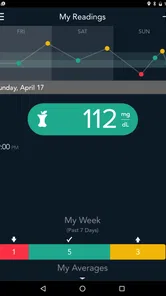
The CONTOUR DIABETES app is designed to help people manage blood glucose readings from compatible CONTOUR blood glucose meters. After pairing a supported meter, the app can automatically record results, display trends, organize readings in logbooks, and provide summaries that may be useful during conversations with a healthcare professional. It is a diabetes-management companion, not a replacement for medical advice, diagnosis, or treatment.
Which meters and devices are compatible with the CONTOUR DIABETES app?
Compatibility depends on the specific CONTOUR meter model, mobile operating system, and regional availability. The app is generally intended to work with selected Bluetooth-enabled CONTOUR meters, but not every meter or smartphone is supported. Before downloading, check the official compatibility information for the United States and confirm that your Android or iPhone meets the current operating-system requirements. Pairing may also require Bluetooth to remain enabled.
Can the app automatically transfer my blood glucose readings?
With a compatible Bluetooth CONTOUR meter, readings can usually be synchronized with the app after the devices are paired. This reduces manual entry and helps keep results organized in one place. Depending on the meter and app settings, you may also be able to add notes about meals, medication, exercise, or other events. If synchronization fails, readings may need to be entered manually or transferred after reconnecting the devices.
Pros
- Syncs glucose readings automatically with supported CONTOUR meters.
- Clear charts help identify patterns in blood sugar levels.
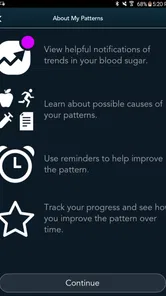
- Customizable reminders support regular testing and medication routines.
- Secure sharing can help caregivers follow important glucose trends.
- Available for iPhone and Android devices at no extra cost.
Cons
- Requires a compatible CONTOUR meter for its full functionality.
- Some features may vary depending on country
- device
- or meter model.
- Bluetooth pairing can occasionally require troubleshooting.
- Manual entries may be time-consuming for users with frequent readings.
- The app is not a replacement for professional medical advice.











