

Complete – Medication Tracker
- 1.17K
- 3.6
- Installs
- 100.00K
- Price
- Free

Screenshots


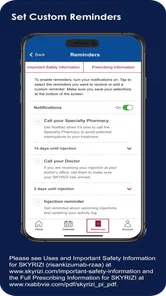
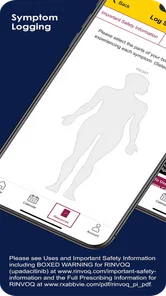
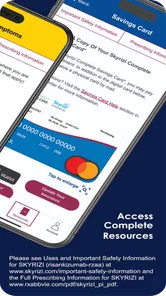
Analysis by Reviewed
I approached Complete – Medication Tracker as a practical medical app rather than something to open for entertainment. Its purpose is straightforward: help people keep medication information and daily treatment routines more organized. That sounds modest, but medication management is exactly the kind of task where a small amount of structure can prevent a lot of avoidable stress. My main question was not whether it looked useful on the first day, but whether it could remain helpful once the novelty disappeared.
The app is developed by AbbVie and is available free of charge for everyone. It has been around since September 9, 2015, and the current version is 19.5. With more than 100 thousand installs and an average rating of 3.6 from roughly 2.2 thousand ratings, it has clearly found an audience, although the rating also suggests that the experience is not universally smooth. I would treat it as a support tool for organizing treatment, not as a replacement for a doctor, pharmacist, diagnosis, or urgent medical care.
What Complete feels like during the first week
The first-week appeal comes from turning a vague responsibility into something more visible. When medication instructions live in several places—paper boxes, a discharge sheet, a patient portal, and memory—it is easy to lose track of what belongs to which routine. A dedicated tracker gives that information a home. Even before it becomes a habit, the act of arranging treatment details can make a complicated schedule feel less scattered.
I especially appreciate the medical context around the app. The store summary directs users to the indications and important safety information, including a boxed warning. That is not decorative legal language; it is a reminder that medication tools need careful reading. I would take time to review those notices before relying on the app, particularly when dealing with a serious condition, a medicine with prominent warnings, or instructions that have recently changed.
For a newly diagnosed patient, the most useful first step is not entering everything in a hurry. I would gather the medication containers, the latest written instructions, and the contact details for the prescribing clinic or pharmacy, then add information carefully. If a label is unclear, I would stop and ask a professional rather than guessing. A tracker can organize an instruction, but it cannot make an uncertain instruction safe.
This is also where the app can help family members. Someone assisting an older relative may need a shared understanding of what is being taken and when. Complete can serve as a central reference during conversations, appointments, or a pharmacy visit. I would still verify every change with the patient’s care team, because a personal tracker should reflect the current treatment plan rather than become the source of that plan.
One practical workflow is to use it immediately after an appointment. Instead of waiting until later, I would update the treatment information while the explanation is still fresh, then compare it with the printed instructions before leaving the clinic area. That habit reduces the chance of carrying an outdated routine into the next week. It also exposes contradictions early, when it is easier to ask a nurse or pharmacist for clarification.
More From Our News Desk

 Instagram
Instagram’s Power Comes From Its Place in Your Phone
A close look at how Instagram turns Meta’s reach, recommendation systems and everyday camera habits into durable platform power—and what that costs users.

 Gmail
GmailGmail in a Busy Inbox: Who Benefits Most?
From first account to crowded workday, Gmail earns its place through dependable search and flexible sorting—but its best fit depends on how much inbox maintenance you can tolerate.

 Prime Video
Switching to Prime Video: What Changes in Your Viewing Routine
Prime Video can make a compelling second home for streaming, but switching means learning a different catalog, rental layer, and route from browsing to playback.

 Universal TV Remote Control
Universal TV Remote Control Works Best as a Reliable Backup
A phone remote earns its place through quick setup and reliable habits. Here is how to get more from Universal TV Remote Control—and where its limits show.

 Weather - By Xiaomi
Weather by Xiaomi Review: Clear at a Glance, Less Clear Up Close
Xiaomi’s weather app makes everyday forecasts quick to scan, but its calm surface can leave useful details and recovery paths harder to find than they should be.

 X
XX Under Pressure: Can It Recover When Posting Goes Wrong?
A resilience-focused review of X, examining setup, mistaken posts, interruptions, weak connections, and the gaps that matter when recovery needs to be dependable.
Latest News



The app is free, which lowers the barrier for someone who wants to try a dedicated medication organizer without committing to a paid subscription. It is rated for Everyone, and it supports devices running Android 6.0 or later. Those details make it accessible to people using older compatible phones, although the actual comfort of the experience will still depend on screen size, eyesight, dexterity, and familiarity with mobile apps.
Who gets the most from the initial setup
I see the strongest first-week use case in people whose treatment has recently become more complicated: a new diagnosis, a change in prescriptions, a short-term course alongside regular medicines, or a family member taking responsibility for organization. The value is less obvious for someone taking one stable medicine with a routine they have followed for years and already manage comfortably.
That distinction matters. Installing a tracker does not automatically improve adherence. If the user dislikes entering health information, rarely checks the phone, or already has a reliable system, the app may become another abandoned icon. I would recommend beginning with one current treatment routine, learning whether the workflow feels natural, and expanding only if it genuinely reduces effort.
A useful but easily missed principle is to separate recording information from making medical decisions. I would use the app to keep a clear record and support a routine, but never to decide whether to stop, double, skip, or change a medicine. If a dose is missed or an unexpected reaction appears, the right next step depends on the specific medication and the person’s condition; the app should not be treated as an authority for that decision.
Why month-to-month value depends on routine
After the first week, the appeal changes. The satisfaction of setting up an organized record fades, and the app has to earn its place through repeated usefulness. In my view, that usefulness comes from reducing small acts of remembering: checking what belongs in a routine, preparing for a conversation with a healthcare professional, and keeping treatment information from becoming outdated in a drawer or message thread.
The key is to connect the app with an existing habit. I would check it at the same time as another dependable activity, such as preparing breakfast, getting ready for bed, or arranging a weekly pill organizer. The exact moment matters less than consistency. A tracker opened randomly is easy to forget; a tracker attached to a stable routine has a better chance of remaining relevant.
There is a second monthly use case that I find more valuable than simply looking at the app every day: appointment preparation. Before a visit, I would review the current medication information, note anything that has changed, and bring questions to the clinician or pharmacist. This can make a short appointment more productive. It is particularly useful when several healthcare professionals are involved, because the patient can arrive with a clearer account of the current treatment picture.
For caregivers, recurring value may come from periodic checks rather than constant monitoring. A relative might review the organization before a refill trip or before accompanying someone to an appointment. That avoids turning the app into a source of pressure. Medication support works better when it helps the person maintain independence where possible instead of making every dose feel like a supervised test.
Still, I would not confuse a well-organized record with proof that a treatment is working. The app cannot replace symptom tracking designed by a clinician, laboratory results, or professional review. If a person feels worse, experiences a new symptom, or is worried about an interaction, the correct action is to contact an appropriate healthcare professional. The tracker may help explain what was taken, but it does not interpret the situation safely on its own.
Another realistic scenario is travel. Before leaving home, I would review the treatment information and make sure the physical medicines, instructions, and relevant professional contacts are also ready. The app can support preparation, but it should not be the only source of information. Phones can lose power, become inaccessible, or fail at exactly the wrong moment. A written backup and the original labeled packaging remain sensible companions for important medication routines.
The difference between lasting value and novelty
Complete earns lasting space only when it removes a recurring source of uncertainty. If I open it and immediately know what I need to review, it has a clear role. If I must repeatedly reconstruct information, correct entries, or remember to maintain the tracker without receiving a practical benefit, its value drops quickly.
This is why I would judge the app by a simple question each month: does it make my next medication-related task easier? That task might be preparing for a consultation, helping a family member understand the routine, or checking that the information I carry is current. If the answer is consistently yes, keeping it installed makes sense. If the answer is no, a paper list, a calendar reminder, or a pharmacist-provided system may be more efficient.
Compared with a general notes app, a dedicated medical tracker feels more purposeful because the information is kept in a health-focused space rather than mixed with shopping lists and random reminders. Compared with a calendar, it is better suited to medication context, while a calendar may be faster for a single temporary reminder. Compared with a pill organizer, the app offers an information layer but cannot physically confirm that a medicine was taken. Each alternative solves a different part of the problem.
I would also avoid replacing a successful system merely because an app appears more modern. If a person already uses a clearly written medication chart that a caregiver and pharmacist understand, moving everything into a phone may create unnecessary friction. Complete is most convincing when it supplements a weak or scattered process, not when it disrupts a dependable one without offering a clear improvement.
Where maintenance starts to feel like work
The main maintenance burden is accuracy. Medication information becomes unsafe when it quietly becomes old. A prescription can change, a temporary course can end, a dose can be adjusted, or a medicine can be replaced. I would review the app after every treatment change and remove or update old information immediately, rather than trusting myself to remember what changed later.
That habit is more important than filling the app with every historical detail. A crowded record can be harder to interpret than a focused current one. I would keep the active treatment information easy to recognize and preserve older details only when they serve a clear purpose for a healthcare conversation. The goal is not to create an impressive archive; it is to make the current situation understandable.
A second maintenance issue is ownership. Someone needs to decide who updates the information when a doctor changes a prescription. In a household, that responsibility should be explicit. If the patient assumes a caregiver is updating the app while the caregiver assumes the patient is doing it, the record can drift away from reality. Agreeing on one person responsible for changes, with the patient still involved, prevents that quiet failure.
I would also schedule a calm review rather than waiting for a crisis. A monthly check can be enough for a stable routine, while a person with frequent changes may need to review it more often. This is not a medical schedule and should not override professional advice; it is simply a housekeeping habit that keeps the digital record aligned with real life.
Privacy is another reason to be deliberate. Health information deserves more care than an ordinary shopping list. I would avoid leaving the phone unlocked in a public place, think carefully before showing the screen to someone else, and use the device’s normal security protections. I would also keep in mind that the app is a convenience, not a reason to store every sensitive detail there without considering who may access the phone.
People often ask whether a medication tracker can replace a pharmacist’s counseling. My answer is no. A pharmacist can explain timing, interactions, side effects, and what to do when circumstances change. The app can help you bring better-organized information to that conversation, which is valuable, but it cannot provide the same personalized judgment.
Small sources of fatigue that can decide the outcome
The first source of fatigue is repeated data entry. Any health app asks the user to invest effort before it can return value, and that effort feels heavier when someone is ill, tired, or managing several responsibilities. I would set it up during a calm period, not in the middle of a rushed morning or immediately after receiving worrying news.
The second is alert fatigue. Medication support becomes less useful when every notification blends into the background. I would keep the routine focused and avoid creating reminders for information that does not need attention. If the app’s prompts no longer stand out, the right response is to simplify the surrounding routine rather than add more notifications.
The third is emotional fatigue. Some people do not want a phone to turn treatment into a constant presence. Seeing a medical task every day can be reassuring for one person and discouraging for another. I would use Complete if it makes the routine feel clearer, but I would stop using it if it increases anxiety without improving organization. A tool should support care, not make a person feel watched by their own device.
There is also a practical limitation in relying on a single digital record. A phone may be unavailable, shared with someone else, damaged, or out of power. For an important treatment, I would keep a concise backup in a secure physical form and retain the original pharmacy labels. That is not a criticism unique to this app; it is a sensible safeguard for any phone-based medical organizer.
People who need detailed symptom analysis, clinical decision support, direct professional communication, or emergency guidance should look beyond a tracker. Complete may be a useful companion, but it is not the right primary tool for those needs. Likewise, someone who refuses routine data maintenance will probably get more dependable results from a simpler paper method or help from a caregiver.
My long-term verdict on Complete – Medication Tracker
After the initial appeal fades, I think the app can justify permanent space for users who need a dedicated place to organize medication information and who are willing to keep it current. Its strongest quality is not novelty. It is the possibility of creating one repeatable workflow around treatment changes, appointments, caregiving, and everyday preparation.
The free price makes experimentation easy, and the broad device compatibility helps people using older supported phones. AbbVie’s medical focus also gives the product a more specific purpose than a generic notes tool. At the same time, the average rating of 3.6 tells me to set realistic expectations: the concept is useful, but the experience may not feel effortless for everyone.
I would recommend trying it to an adult managing a changing treatment plan, a caregiver who needs a clearer reference, or anyone whose medication information is currently spread across several unreliable places. I would not recommend depending on it alone for urgent questions, treatment decisions, or situations where a professional must interpret symptoms and risks.
My best advice is to judge it after a full routine cycle rather than after installation. Enter only accurate current information, connect checking it to an established habit, update it whenever a professional changes the plan, and keep a practical backup outside the phone. If those steps make appointments and daily organization easier, the app has earned its place. If maintaining it feels like another chore with no clear return, a simpler system may be the better long-term choice.
In the end, Complete – Medication Tracker is most successful when it stays in the background: present enough to reduce confusion, but not treated as a medical authority. Its lasting value depends less on how impressive the first setup feels and more on whether it helps a real person maintain an accurate, understandable treatment routine month after month.
Complete – Medication Tracker Frequently Asked Questions
Is Complete – Medication Tracker free to download?
Complete – Medication Tracker is a free medical app from AbbVie. It has an Everyone content rating and a 3.6 average from around 2,200 ratings, with over 100,000 installs. If you are considering it for medication management, remember that a free tracker can help organize a routine but does not replace professional medical advice or emergency care.
Which devices can run Complete – Medication Tracker?
The app requires Android 6.0 or later, so check your device’s operating system before downloading. Complete – Medication Tracker is a mobile app intended to support medication organization and reminders. If your device meets the system requirement, you can consider whether its tracking approach suits your routine and review the app’s safety information before relying on it for treatment management.
What is Complete – Medication Tracker used for?
Complete – Medication Tracker is designed to help you organize and monitor your medications in one place. You can typically record prescriptions, supplements, dosage instructions, schedules, and treatment details, then use reminders to help you take each medication on time. It is especially useful for people managing several medicines or supporting a family member’s daily treatment routine.
Does Complete – Medication Tracker replace medical advice?
No. Complete – Medication Tracker is an organizational tool, not a doctor, pharmacist, or emergency service. Its reminders and medication records should support—not replace—professional medical guidance. Always follow the dosage and timing instructions provided by your healthcare professional, and consult them before changing, stopping, or combining medications. If you experience a serious reaction or urgent symptoms, contact emergency services immediately.
Can I track different medications, doses, and schedules?
The app is intended for tracking multiple types of medication and treatment routines, including different doses and recurring schedules. Before downloading, check whether its available fields match your needs, such as tablets, liquid medicines, supplements, variable doses, or specific start and end dates. Complex treatments may still require confirmation with your doctor or pharmacist to avoid entering an incorrect schedule.
Pros
- Simple medication schedules make daily doses easy to organize.
- Dose reminders can help reduce the risk of missed medications.
- Useful tracking history for reviewing adherence over time.
- Supports managing multiple medications in one place.
- Clean interface is suitable for users with limited technical experience.
Cons
- Some advanced features may require a paid upgrade.
- Reminder reliability can depend on phone battery and notification settings.
- Manual medication entry may become time-consuming for complex treatments.
- No app can verify whether a dose was actually taken.
- Data-sharing and privacy options should be reviewed before adding health details.












