

Compass: Real Estate & Homes
- 139.00
- 4.5
- Installs
- 100.00K
- Price
- Free

Screenshots




Analysis by Reviewed
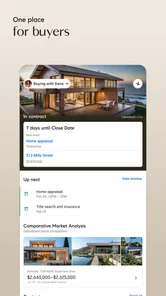
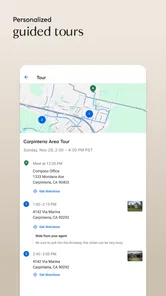
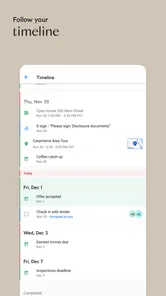
Finding a home is rarely a single search. It usually starts with a vague need, turns into saved possibilities, moves through conversations with an agent, and eventually becomes a decision involving money, timing, and paperwork. Compass: Real Estate & Homes is designed for that journey rather than for browsing listings in isolation. I found it most useful as a bridge between the first “what can I afford?” moment and a more focused conversation with a Compass real estate agent.
This is a free House & Home app from Compass Inc., available to everyone and compatible with Android devices running version 6.0 or later. Its audience is broad: buyers, sellers, and renters can all use it as part of a property search. The app has an average rating of 4.5 from around 910 ratings, with more than 100 thousand installs, which suggests a reasonably established user base without making it feel like an anonymous listing directory.
From a vague housing need to a practical next step
I use this section to show how Compass can turn an indistinct housing search into a manageable next step: first naming the kind of move, then deciding what deserves attention. A small shortlist can also reveal which compromises matter most to me, making the next conversation more focused. From there, I can look at how the app fits into the pace and demands of repeated searching.
Starting with the right question
The strongest way to use Compass is to begin with a clear purpose. I would not open it simply to scroll through attractive homes with no plan, because that can make every property look equally important. Instead, I would decide whether I am trying to buy, sell, or rent, then use the app to narrow the search around that goal.
For a buyer, the starting condition might be a preferred area, a rough budget, and a few non-negotiable needs. For a renter, it could be a move date, a commute, and the difference between an apartment that is merely available and one that actually fits daily life. A seller begins from the opposite direction: the property is known, but the questions concern positioning, timing, and how to begin working with an agent.
That distinction matters because a real estate app can either help organize a decision or encourage endless browsing. I found Compass more valuable when I treated each listing as a candidate to evaluate, not as entertainment. Saving a home only makes sense if I can later explain why it belongs on the shortlist.
Building a shortlist instead of collecting distractions
The practical workflow is straightforward: search for homes or apartments, inspect the available details, compare the options, and keep the most relevant ones in view. The useful habit is to create a small working shortlist rather than saving every attractive result. A home that looks perfect in a photo may be unsuitable because of location, layout, timing, or the kind of move involved.
More From Our News Desk

 Instagram
Instagram’s Power Comes From Its Place in Your Phone
A close look at how Instagram turns Meta’s reach, recommendation systems and everyday camera habits into durable platform power—and what that costs users.

 Gmail
GmailGmail in a Busy Inbox: Who Benefits Most?
From first account to crowded workday, Gmail earns its place through dependable search and flexible sorting—but its best fit depends on how much inbox maintenance you can tolerate.

 Prime Video
Switching to Prime Video: What Changes in Your Viewing Routine
Prime Video can make a compelling second home for streaming, but switching means learning a different catalog, rental layer, and route from browsing to playback.

 Universal TV Remote Control
Universal TV Remote Control Works Best as a Reliable Backup
A phone remote earns its place through quick setup and reliable habits. Here is how to get more from Universal TV Remote Control—and where its limits show.

 Weather - By Xiaomi
Weather by Xiaomi Review: Clear at a Glance, Less Clear Up Close
Xiaomi’s weather app makes everyday forecasts quick to scan, but its calm surface can leave useful details and recovery paths harder to find than they should be.

 X
XX Under Pressure: Can It Recover When Posting Goes Wrong?
A resilience-focused review of X, examining setup, mistaken posts, interruptions, weak connections, and the gaps that matter when recovery needs to be dependable.
Latest News



I would also separate “possible” from “ideal.” A possible property meets the basic requirements. An ideal one may offer a better neighborhood or layout but require a compromise elsewhere. Keeping that distinction in mind makes the later conversation with an agent more productive, because I can discuss trade-offs instead of simply saying that I like or dislike a listing.
One non-obvious advantage of this approach is that the app becomes a memory aid. Property searches quickly blur together, especially when several homes have similar photographs. A focused shortlist gives me a reference point for what changed in my preferences. If I repeatedly reject homes because of location even when they meet my budget, that is useful evidence that the search area needs adjusting.
Using the app as preparation for an agent conversation
Compass is not just a self-service search box. Its central promise includes working with Compass real estate agents, and that changes how I judge the experience. The app is most effective when it helps me arrive at a conversation with better questions and clearer priorities.
For example, instead of contacting an agent with a general request for “something affordable,” I could identify several properties that reveal a pattern: one has the right neighborhood but an unsuitable layout, another has the right size but a difficult commute, and a third fits the budget while missing an important feature. That gives the agent something concrete to work with.
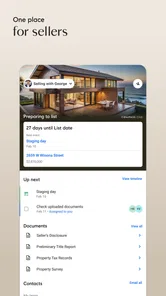
This is also useful for sellers. Before speaking with an agent, I can look at comparable-looking properties and think about how my own home might be presented in relation to them. I would not treat the app alone as a valuation tool, but it can help me understand the local conversation: what kinds of homes appear together, what details receive attention, and which compromises buyers or renters may be making.
What the handoff to a human adds
The handoff from app to agent is where Compass differs from a basic property board. A listing search can show possibilities, but an agent can help turn those possibilities into a sequence of actions. That may include clarifying priorities, arranging the next conversation, or helping me decide which options deserve attention first.
I appreciate that division of labor. An app is good at keeping a broad set of homes visible and making comparison easier. A person is better suited to the context around a property: why a listing may fit one buyer but not another, which concern deserves immediate attention, and how a seller or renter should frame the next step.
There is a trade-off, though. If I prefer complete independence and do not want an agent involved, this may not be the most natural choice. The app’s identity is connected to Compass’s agent network, so users looking only for a neutral collection of listings may prefer a marketplace whose main purpose is direct browsing and self-managed contact.
A realistic everyday scenario
Imagine I need to move while continuing to work in the same area. I start by searching for apartments that keep the commute manageable, then review each option with three questions in mind: can I live with the location, does the home support my routine, and is it worth discussing with an agent? I narrow the results to a few serious candidates rather than forwarding a long list to someone else.
Later, I return to those candidates and notice that the homes I liked most shared a practical feature rather than a decorative one, such as a more useful layout or a better position for my daily schedule. That insight changes the next search. Instead of chasing the most polished photographs, I focus on the characteristic that actually affected my decision.
The agent handoff then has a clear purpose. I can explain the shortlist, identify the compromise I am willing to make, and ask for help with the part of the process I cannot judge from a screen. The app has not replaced the professional; it has made my side of the conversation less vague.
Where the flow becomes less comfortable
The main limitation is that property decisions are more complicated than listing cards. Even a well-organized search cannot answer every question that matters in a home purchase, sale, or rental. A photograph and description do not substitute for seeing the property, understanding the surrounding area, checking practical conditions, or reviewing the obligations connected with the transaction.
I would therefore avoid treating a listing as a promise. The app is a starting point for research and communication, not a reason to skip personal verification. A buyer should still inspect the home and investigate the details that affect ownership. A renter should confirm the terms and suitability of the apartment. A seller should discuss pricing and presentation with a qualified professional rather than relying on visual comparison alone.
Another point of friction is emotional overload. Real estate searches can become tiring because the stakes are high and the inventory changes. If I keep opening the app without a defined next action, I can end up repeating the same browsing loop. My solution is simple: every session should have a purpose, such as refining the area, reviewing saved candidates, or preparing questions for an agent.
Who will get the most from Compass?
I think the app is a good fit for people who want a polished starting point for a serious housing search and are comfortable involving a Compass real estate agent when the decision becomes more specific. Buyers benefit from using it to turn broad preferences into a shortlist. Renters can use it to organize apartment possibilities before discussing the practical details. Sellers may find it helpful for beginning the process and understanding how nearby properties are presented.
It is especially suitable for someone who is early in the process and needs structure. The app can help answer the first useful question: what kind of property should I be discussing? It also supports a more informed handoff, because I can bring examples and priorities instead of relying on memory.
I would be more cautious if I wanted a completely agent-free experience, a highly specialized search outside Compass’s operating areas, or a single tool that handles every part of a transaction. In those cases, a broader marketplace, a local specialist, or direct professional advice may be a better companion. Compass works best when its search experience and human support are both part of the plan.
Small habits that make the search better
My first tip is to write down the reason for saving each property. “Good location,” “possible layout,” and “useful fallback” are more helpful than a large collection of unexamined favorites. This makes the shortlist easier to discuss and exposes weak preferences before they consume time.
My second tip is to compare compromises, not just features. If one home is attractive but inconvenient and another is less exciting but easier to live in, the better choice may become obvious only after I describe the trade-off in plain language. That description is also valuable when the agent takes over.
My third tip is to use the app at different stages rather than all at once. Early browsing helps define the market I am considering. A later review helps remove options that no longer fit. Returning with a specific question is more efficient than constantly refreshing the same search without changing the decision.
Finally, I would use the app to prepare, not to rush. A saved listing is not a commitment, and a conversation with an agent is not the same as accepting a property. The best result comes from letting each stage do its job: discovery first, comparison second, professional discussion third, and verification before any serious decision.
My overall experience
Compass: Real Estate & Homes feels most convincing when I use it as the front end of a real estate workflow. It helps me move from an undefined housing need toward a manageable set of possibilities, then gives me a natural path toward a Compass agent. That makes it more purposeful than a simple stream of listings, although it also means independent users may find the agent-centered approach less appealing.
The app is free, rated for Everyone, and its current version is 26.32.0, so it is accessible to a wide range of users with compatible devices. I would recommend it to a friend who wants to begin a serious search, organize thoughts before contacting an agent, or explore buying, selling, and renting through one real estate brand.
My recommendation is to use Compass with a shortlist and a question in mind. If I do that, the app can make the early stages clearer and the handoff to professional help more useful. If I only want casual browsing or complete independence from an agent, I would choose a different type of property app. For the right user, however, it offers a practical path from “I need a home” to “I know what to discuss next.”
Compass: Real Estate & Homes Frequently Asked Questions
Is Compass: Real Estate & Homes free to download?
Compass: Real Estate & Homes is free to download and is intended for people exploring homes to buy or rent, or properties to sell. You can use it to browse listings and review property information before deciding whether to contact a Compass real estate agent. The app is rated for Everyone and is available for Android devices running version 6.0 or later.
Who makes Compass: Real Estate & Homes, and is it available for iOS?
Compass: Real Estate & Homes is developed by Compass Inc. and focuses on helping people buy homes, sell properties, and rent apartments with Compass real estate agents. It is a House & Home app. If you are considering downloading it, check the app store on your device to confirm its availability and compatibility with your particular phone or tablet.
What is Compass: Real Estate & Homes used for?
Compass: Real Estate & Homes is designed to help users search for properties to buy, rent, or explore in different locations. The app lets you browse home listings, view photos and property details, check prices, and save interesting homes. It can be useful for casual browsing as well as for people actively planning a move or looking for a new investment.
Can I search for homes by location, price, and property features?
Yes, the app provides search tools that allow you to narrow listings according to factors such as city, neighborhood, price range, number of bedrooms and bathrooms, property type, and other available features. Search results can be adjusted as your requirements change, making it easier to focus on homes that match your budget, preferred area, and lifestyle.
Does Compass: Real Estate & Homes provide accurate and current listings?
The app is intended to display property information supplied through Compass and its associated real estate network, but listing availability and details can change quickly. Prices, photos, open-house schedules, and property status may not always update immediately. Before making a decision, contact the listing agent to confirm that the home is still available and that all information is correct.
Pros
- Detailed property listings with photos
- prices
- and key home information.
- Useful search filters help narrow results by location
- price
- and property type.
- Map-based browsing makes it easy to explore homes in preferred neighborhoods.
- Saved listings help users compare interesting properties later.
- Contact options make it convenient to reach agents or property owners.
Cons
- Listing availability and accuracy can vary by location and market.
- Some properties may have limited photos or incomplete descriptions.
- Frequent alerts may feel excessive unless notification settings are adjusted.
- Certain features may require creating an account or sharing personal details.
- The app is less useful in areas with limited Compass market coverage.







