

CommonSpirit - CO/KS/UT
- 142.00
- 4.4
- Installs
- 10.00K
- Price
- Free

Screenshots
Analysis by Reviewed
If you receive care through CommonSpirit Health in Colorado, Kansas, or Utah, CommonSpirit - CO/KS/UT is designed to put your patient-portal access on your phone. I found it most useful as a practical companion for keeping up with healthcare tasks between visits, rather than as a replacement for speaking with a clinic or handling urgent symptoms. The app is free, aimed at everyone, and developed by CommonSpirit Health.
That distinction matters for first-time users. A patient portal can feel less like a typical mobile app and more like a secure doorway into an existing healthcare account. The main value is not entertainment or discovery; it is having a more convenient route to your own care information and portal activity. If your care is connected to the covered CommonSpirit locations, the app can reduce the need to reach for a desktop browser every time you want to check what is happening with your care.
What to expect before you begin
The app is a medical tool for mobile access to the CommonSpirit Health patient portal serving CO, KS, and UT. I would approach it with one expectation: it should make portal access easier, but it cannot make healthcare administration instant. Your experience will still depend on your existing patient relationship, the information attached to your account, and how your care organization handles portal activity.
That makes this a better fit for an established patient than for someone simply looking for general health advice. It is not the kind of app I would install expecting symptom explanations, a broad medical encyclopedia, or an independent wellness program. Its purpose is narrower and more useful: helping eligible patients reach their healthcare account from a phone.
The current release is version 11.5.2, and the app runs on Android 9 or later. That minimum requirement is helpful for people using an older but still supported phone, although I would check the operating system before spending time troubleshooting an installation. On the Android store, it has a 4.4 average from around 282 ratings, with more than 10 thousand installs. Those figures suggest a real patient audience, but they should not be read as a promise that every hospital or account situation will feel identical.
One practical point is easy to overlook: the regional name is part of the product’s identity. If your healthcare connection is outside Colorado, Kansas, or Utah, this is not automatically the right portal app just because the CommonSpirit name looks familiar. I would first identify the organization connected to your care and then use the matching regional app or portal route. Choosing the wrong regional entry point can create confusion before you even reach the sign-in stage.
I also recommend installing it before you urgently need a record or portal message. The best time to test access is when you are calm, have your account details available, and can contact the clinic if something does not line up. A patient portal is much more reassuring after you have already confirmed that your account opens successfully.
More From Our News Desk

 Gmail
GmailGmail in a Busy Inbox: Who Benefits Most?
From first account to crowded workday, Gmail earns its place through dependable search and flexible sorting—but its best fit depends on how much inbox maintenance you can tolerate.

 Prime Video
Switching to Prime Video: What Changes in Your Viewing Routine
Prime Video can make a compelling second home for streaming, but switching means learning a different catalog, rental layer, and route from browsing to playback.

 Universal TV Remote Control
Universal TV Remote Control Works Best as a Reliable Backup
A phone remote earns its place through quick setup and reliable habits. Here is how to get more from Universal TV Remote Control—and where its limits show.

 Weather - By Xiaomi
Weather by Xiaomi Review: Clear at a Glance, Less Clear Up Close
Xiaomi’s weather app makes everyday forecasts quick to scan, but its calm surface can leave useful details and recovery paths harder to find than they should be.

 X
XX Under Pressure: Can It Recover When Posting Goes Wrong?
A resilience-focused review of X, examining setup, mistaken posts, interruptions, weak connections, and the gaps that matter when recovery needs to be dependable.

 Clash of Clans
Clash of Clans Is Won Between the Battles
Its raids are quick; its community is a long-term project of coordination, teaching, rivalry, and shared responsibility—with all the friction that entails.
Latest News



Setting up access without turning it into a guessing game
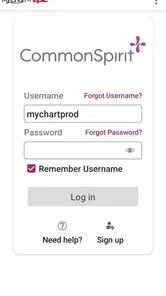
My first setup would be deliberately simple. Install the app from the official Android store, open it, and look for the route into your CommonSpirit patient portal. Keep the same sign-in information you use for the portal nearby, but avoid creating a second account just because the mobile screen looks unfamiliar. The app is meant to provide mobile access to your portal, so the important question is whether you can connect to the correct existing patient account.
If you are a new portal user, the smoothest preparation is to complete any enrollment or identity steps through the healthcare organization’s normal process first. Have the personal details associated with your medical record available, and use an email address or phone number you can actually access during setup. I would not rush through a verification screen with an old contact detail; fixing that later can be more frustrating than taking an extra moment at the beginning.
For an existing user, the first meaningful test is not browsing every screen. It is signing in and checking whether the account clearly belongs to you. Look for familiar personal or care information, then sign out and sign back in once if you want confidence that the process is repeatable. This small test is more useful than opening the app once and assuming everything is ready.
There is also a privacy habit I consider important with any medical app. Use it on your own phone or on a device protected with a screen lock, and do not leave an active portal session open on a shared device. I would also avoid discussing private health details in a public setting while the app is visible. Those are ordinary precautions, but they matter more here because the app connects to personal healthcare information.
If the app does not recognize your login, I would separate the problem into two possibilities: an account problem or an app problem. First, carefully recheck the sign-in details and confirm that you are entering the credentials for the CommonSpirit portal serving your region. If the same account works through the usual portal route but not in the app, updating the app, closing it fully, and trying again are sensible first steps. If access fails everywhere, contacting the healthcare organization’s support route is more productive than repeatedly guessing.
The first useful success: complete one small portal task
After signing in, I would not judge the app by how much information appears on the opening screen. I would choose one concrete task that matters to me and confirm that I can complete it from start to finish. For example, I might check for a recent portal update, review information related to an upcoming interaction with my care team, or confirm that the account is showing the right patient identity. The exact option available can depend on the connected healthcare account, so the goal is to verify your own access rather than hunt for a particular button.
This approach gives a first-time user a clear definition of success: the app opens the correct account and lets you reach the portal information you installed it to access. That is more reassuring than simply seeing a login screen. It also exposes problems early, when you have time to resolve them.
A useful habit is to treat the app as a place to check and organize care-related communication, not as a substitute for reading carefully. When you open a message or result, slow down and note what action it actually asks of you. A portal can present information efficiently, but medical wording still deserves attention. If something seems unclear or concerning, the right next step is to contact the relevant healthcare professional rather than trying to interpret it through the app alone.
For a realistic everyday scenario, imagine that I am leaving a clinic visit and want to keep the follow-up details close at hand. Instead of waiting until I am back at a computer, I can open the regional portal app later that day, check the account, and use whatever patient-portal functions are available to review the next step. The benefit is not dramatic; it is the removal of a small piece of friction at exactly the moment when details are easy to forget.
Another useful scenario is helping a family member stay organized while they manage their own care. I would still keep the patient’s privacy and account ownership clear, but a phone-based portal can make it easier for the patient to check their own information when away from home. I would not assume that one person’s login should be shared casually with another. If a caregiver needs access, the proper arrangement should come through the healthcare organization’s approved process.
My strongest setup tip is to test the app when you have a stable connection and enough time to read each screen. A rushed first attempt before an appointment can leave you unsure whether a problem comes from your credentials, your account, or the device. A calm test creates a dependable routine: open the app, sign in, verify the account, complete one small task, and close it securely.
Where first-time users are most likely to get confused
The most common source of confusion is assuming that every CommonSpirit-branded healthcare experience is interchangeable. The regional label matters, and the patient portal attached to your care may not behave exactly like a general health app. If you have accounts connected to different organizations, pay close attention to which one you are entering before reviewing anything sensitive.
Another point is the difference between mobile access and medical advice. Seeing a portal entry on your phone does not mean the app is monitoring your condition or responding immediately to a health emergency. I would never use it as the only route for urgent symptoms. For immediate danger, use emergency services; for a time-sensitive but non-emergency concern, contact the appropriate healthcare office directly.
Users may also wonder why a particular item is not visible. A portal is connected to a healthcare record and the organization’s workflow, so information may appear according to when it is released or entered. I would avoid assuming that an empty area means something went wrong. Check that you are in the correct account, refresh or reopen the app, and contact the care organization if an expected item remains unavailable.
It is equally important not to confuse an app login with an appointment confirmation. If I were preparing for a visit, I would use the app to review whatever appointment-related information is displayed, but I would still read the details carefully and contact the clinic if anything looks inconsistent. A successful sign-in proves access; it does not, by itself, confirm every administrative detail.
Notifications can create another small misunderstanding. A phone alert may tell you that something needs attention, but I would open the app and read the full context rather than relying on the short preview. On a shared or visible lock screen, previews can also reveal private information, so I would review the device’s notification settings if privacy is a concern.
Compared with using a browser, the app’s main advantage is convenience: it keeps the portal closer to the way I already use my phone. A browser can still be preferable when I need a larger screen, when I am using a computer I trust, or when I am having trouble identifying which regional portal is correct. Compared with calling the clinic, the app may be better for checking information at a convenient time, while a phone call remains the better option for clarification, urgent administrative issues, or anything that requires a person to interpret the situation.
That trade-off is why I would not describe this as a complete replacement for the usual alternatives. It is a third route between a desktop browser and a phone call. Its value is strongest for routine access, while the alternatives remain important when the situation is complicated or time-sensitive.
Who will get the most from it, and who should skip it
I think the app is a good choice for patients in the covered Colorado, Kansas, or Utah healthcare setting who already use or want to use their CommonSpirit patient portal from an Android phone. It is especially practical for people who check healthcare information while away from a computer, keep several appointments or follow-up details organized on their phone, or simply dislike navigating a mobile browser every time they need portal access.
It can also suit a first-time portal user who is willing to complete setup carefully. The path is manageable when you treat the first session as an account-verification exercise rather than expecting the app to explain everything automatically. Install it, connect to the correct portal, confirm the account, and complete one small useful action. That sequence gives you a dependable starting point.
I would skip it, or at least postpone installing it, if your care is not connected to the regional CommonSpirit portal it represents. I would also choose a browser or direct contact instead if you rarely use a smartphone, need a wide desktop view, or are trying to solve an urgent medical problem. The app cannot remove the need for professional advice, and it should not become an extra layer between you and urgent help.
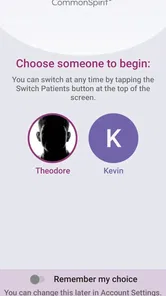
People who manage multiple patient accounts should be particularly careful. Convenience can become a liability if you stop checking whose information is open. I would sign out when appropriate, avoid sharing credentials, and confirm the patient identity before reading or acting on portal information. Those steps may feel slower, but they are worthwhile when one phone is used for more than one person’s care.
My next-step routine after the first login
Once the first session works, I would make the app part of a modest routine rather than opening it repeatedly without a purpose. Check it when you are expecting a portal update, after a healthcare interaction, or when you need to review information already connected to your account. This keeps the app useful without turning it into a source of unnecessary worry.
I would also keep a simple backup plan. Know how to reach the healthcare office directly, remember that a browser may be useful on a larger screen, and do not rely on a mobile portal for emergencies. If the app is temporarily inconvenient, your care should not depend on being able to solve a technical issue immediately.
From a review standpoint, CommonSpirit Health has kept the product focused. The developer is not presenting it as a broad medical platform; it is a regional patient-portal access app. That focus is its strength, because a patient who only needs a straightforward route into their account does not have to sort through unrelated wellness content. The limitation is just as clear: its usefulness depends heavily on whether you are the right patient for this regional portal and whether your account contains the information you need.
The free price also makes trying it low-risk, and the everyone age classification fits a healthcare access tool intended for a broad patient audience. Still, “free” does not mean every part of the healthcare experience is frictionless. Account enrollment, identity checks, clinic workflows, and support questions can still require patience. I would judge the app by whether it reliably gets me to the right portal information, not by expecting it to control those outside processes.
My recommendation is straightforward: if your care belongs to the CommonSpirit CO/KS/UT patient portal and you use Android, install it before your next important healthcare task. Start with one calm login, verify the account, and complete one meaningful check. The best first result is confidence that your own portal is reachable when you need it. For routine access, that is a useful improvement over hunting through a browser. For urgent care, complex questions, or an unrelated healthcare organization, I would choose a direct alternative instead.
After using it this way, I see CommonSpirit - CO/KS/UT as a focused medical access tool rather than an all-purpose health companion. That is not a weakness when its purpose matches your situation. If you are in the correct region and want your patient portal closer at hand, it is worth trying; if not, installing it will only add another account and another place to look.
CommonSpirit - CO/KS/UT Frequently Asked Questions
Is CommonSpirit - CO/KS/UT free to download?
Yes. CommonSpirit - CO/KS/UT is free to download, so you can install it and explore its available patient-portal features without paying for the app itself. Keep in mind that access to particular services may depend on your CommonSpirit provider, location, and patient account. Any healthcare charges or costs associated with care are separate from downloading the app.
Which devices can run CommonSpirit - CO/KS/UT?
The app is available for Android and iOS devices, with a minimum operating-system requirement of version 9. Before installing, check that your device meets this requirement and has enough available storage. Keeping your phone’s operating system and the app up to date can also help with compatibility and provide a smoother experience when you sign in or use patient-portal features.
What is CommonSpirit - CO/KS/UT?
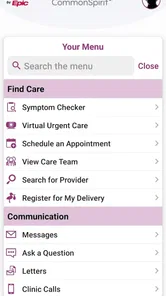
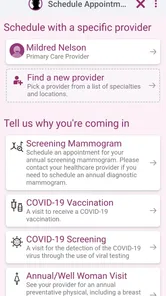
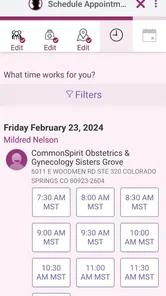
CommonSpirit - CO/KS/UT is a healthcare-focused mobile application designed for patients connected with CommonSpirit Health facilities in Colorado, Kansas, and Utah. Depending on your location and participating provider, the app may help you access health information, manage appointments, review messages, find care locations, and connect with available digital services from a mobile device.
What can I do with the CommonSpirit - CO/KS/UT app?
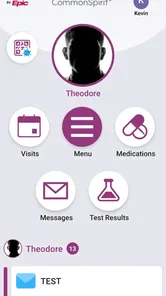
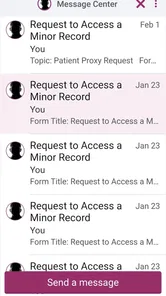
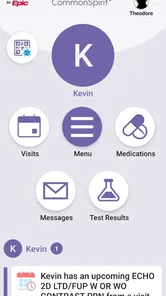
The available features can vary by hospital, clinic, and account type, but the app is generally intended to make everyday healthcare tasks easier. Users may be able to view portions of their medical information, check appointments, communicate with care teams, review test results, manage prescriptions, and locate nearby CommonSpirit services. Some options may require an activated patient account.
Do I need a CommonSpirit patient account to use the app?
Many of the app’s most useful functions require you to sign in with an eligible CommonSpirit patient portal account. If you are a new user, registration may require personal details, an activation code, or identity verification. Certain general features, such as searching for locations or reading health information, may be available without signing in, although access can differ by region and facility.
Pros
- Convenient access to health information across participating CommonSpirit locations.
- Appointment and care-management tools can reduce the need for phone calls.
- Useful for keeping provider details and medical resources in one place.
- May support easier communication with participating care teams.
- Available on mobile devices for quick access while away from home.
Cons
- Features may vary depending on your CommonSpirit facility and location.
- Some services require an existing patient account or portal enrollment.
- The app may offer limited value to users outside CO
- KS
- or UT.
- Login or verification issues could delay access to important information.
- Not a replacement for emergency care or direct medical advice.












