

CommonSpirit - AR/GA/KY/TN/TX
- 134.00
- 4.2
- Installs
- 10.00K
- Price
- Free

Screenshots
Analysis by Reviewed
Managing healthcare is rarely difficult because of one major task. It is difficult because small tasks are scattered: checking a recent visit, finding a message, remembering what happened at an appointment, and locating health information when you need it. CommonSpirit - AR/GA/KY/TN/TX is designed around bringing those pieces into one secure place, and after spending time with it, I found that its main value is less about doing something flashy and more about reducing the number of places I need to check.
This is a free medical app from CommonSpirit Health for people connected with the participating CommonSpirit services named in the app. It is rated for Everyone, has an average rating of 4.2 from around 255 ratings, and has passed 10K+ installs. The current version is 11.5.2, with Android 9 or later required. Those details make it feel like a focused patient-access tool rather than a general wellness tracker, symptom checker, or emergency-care replacement.
One place for health information and visit follow-up
I find that the most useful way to judge this app is to look at what happens when I need information at a particular moment, not just what it can hold. This section considers how access to recent care details and messages can simplify follow-up, while keeping the app’s role distinct from urgent help or a full personal health record.
The useful capability is consolidation
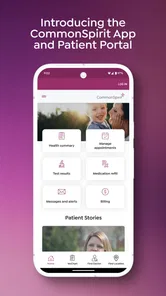
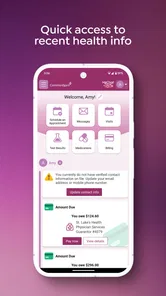
The feature I kept coming back to was the ability to access recent health information, visit details, and messages from one account area. That sounds simple, but it changes the way I handle routine healthcare. Instead of searching through email, paper documents, phone notes, and separate communication channels, I can begin in the CommonSpirit app and look for the information connected to my care.
The real benefit is continuity, not convenience alone. A visit does not end when I leave the clinic. I may later want to recall what was discussed, check a detail before contacting the office, or read a message that arrived after the appointment. Having those items together makes the app more useful as a reference point between visits.
I also appreciate that the app stays within a clear medical purpose. It is not trying to become a step counter, diet planner, medication marketplace, or social health community. That narrower focus helps set the right expectation: this is primarily a patient-access and communication companion for CommonSpirit-related care, not a complete personal health-management system.
Why this matters more than a long feature list
Many healthcare apps advertise several tools, but the practical question is whether they help me complete a real task with less confusion. Here, the central task is remembering where recent care information lives. That matters especially when I am dealing with more than one appointment, helping a family member stay organized, or trying to prepare a question for a clinician.
More From Our News Desk

 Gmail
GmailGmail in a Busy Inbox: Who Benefits Most?
From first account to crowded workday, Gmail earns its place through dependable search and flexible sorting—but its best fit depends on how much inbox maintenance you can tolerate.

 Prime Video
Switching to Prime Video: What Changes in Your Viewing Routine
Prime Video can make a compelling second home for streaming, but switching means learning a different catalog, rental layer, and route from browsing to playback.

 Universal TV Remote Control
Universal TV Remote Control Works Best as a Reliable Backup
A phone remote earns its place through quick setup and reliable habits. Here is how to get more from Universal TV Remote Control—and where its limits show.

 Weather - By Xiaomi
Weather by Xiaomi Review: Clear at a Glance, Less Clear Up Close
Xiaomi’s weather app makes everyday forecasts quick to scan, but its calm surface can leave useful details and recovery paths harder to find than they should be.

 X
XX Under Pressure: Can It Recover When Posting Goes Wrong?
A resilience-focused review of X, examining setup, mistaken posts, interruptions, weak connections, and the gaps that matter when recovery needs to be dependable.

 Clash of Clans
Clash of Clans Is Won Between the Battles
Its raids are quick; its community is a long-term project of coordination, teaching, rivalry, and shared responsibility—with all the friction that entails.
Latest News



A useful habit is to open the app shortly after a visit and review the available details while the appointment is still fresh. I can note what I need to follow up on, identify a message that requires a response, and avoid relying only on memory. This workflow is more valuable than opening the app randomly, because it turns the record into an active reminder rather than a passive archive.
The app is also a better fit for people who prefer digital organization over keeping folders of printed paperwork. If I already use my phone to manage calendars, banking, and appointments, placing health-related follow-up in the same general routine feels natural. The experience is not about replacing a conversation with a clinician; it is about making the information around that conversation easier to reach.
What I would check before depending on it
Before treating the app as my only source of healthcare information, I would make sure I can sign in successfully and see the relevant care details. Access to a patient app depends on having the right connection to the healthcare service, so downloading it alone does not guarantee that every person will see the same information. If a family member is managing care for someone else, I would also clarify whose account is being used and who is authorized to view messages and visit details.
That is an important distinction from a general notes app. A notes app lets me write anything, but it does not provide the same connection to clinical communication. CommonSpirit’s app is useful precisely because the information is tied to the healthcare relationship. If that relationship is not represented in the account, its value will be limited.
How the app fits into an ordinary healthcare routine
A patient app is most valuable when it fits naturally around appointments rather than demanding constant attention. I’ll look at how I would fold CommonSpirit access into ordinary phone habits, including the useful boundary between provider information and the reminders or notes I still keep elsewhere.
A realistic visit-to-follow-up workflow
Imagine I have a routine appointment in the morning and leave with several things to remember. Later that day, I open the app to review the visit details rather than trying to reconstruct the conversation from memory. If a message is available, I can read it in the same place instead of searching through unrelated inboxes. When I need to contact the office or prepare for the next step, I have a clearer starting point.
The important part of this scenario is timing. I would not wait until several weeks later, when details have become vague. I would use the app as a short post-visit check-in: review what is there, write down questions elsewhere if needed, and return when a new message or appointment-related detail becomes relevant. This makes the app part of a repeatable routine rather than another icon that I forget exists.
For someone coordinating care for a parent, the same approach can reduce scattered information, although the person should be careful about account access and privacy. The app can serve as a central place to check recent communication, but it should not encourage sharing login details casually. I would keep access limited to the appropriate person and use ordinary device security as an additional safeguard.
Where it is stronger than ordinary alternatives
The usual alternative is a mixture of phone calls, email, paper handouts, calendar entries, and personal notes. That mixture can work, but it creates gaps. A calendar may remind me that I had an appointment, yet it does not necessarily preserve the visit context. Email may contain a message, but it can be buried under unrelated mail. Paper is easy to misplace and difficult to search when I am away from home.
CommonSpirit - AR/GA/KY/TN/TX has a more direct role because it brings recent health information and visit communication together in a healthcare-focused space. I would choose it over a generic organizational app when my main concern is finding care-related information, not building a custom tracking system.
At the same time, a general notes app can still be better for personal observations. I might use notes to record symptoms, questions, dates, or details I want to discuss later. The CommonSpirit app and a notes app are not interchangeable: one is connected to provider-related information, while the other is flexible and entirely under my control. Using both can be more practical than expecting the medical app to become a complete journal.
What the app should not replace
I would not use this app as an emergency channel or as a substitute for urgent medical advice. A patient-access app is suited to reviewing information and handling ordinary follow-up, not deciding what to do during a serious or rapidly changing health situation. In those moments, I would use the appropriate emergency or clinical route instead of waiting for an app message.
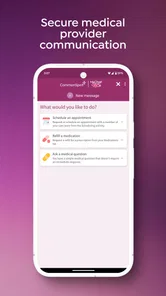
I also would not assume that a message system is the same as real-time conversation. Even when communication is available, I would treat it as a way to handle suitable care-related questions, not as a promise of immediate replies. That expectation keeps the app useful without turning it into a source of frustration.
The best scenario: staying organized after a visit
The hours after an appointment are when details are easiest to forget, so I see post-visit review as the clearest practical use. This section focuses on a small, repeatable routine that can help me turn available visit information into next steps without treating the app as a substitute for my calendar or clinical advice.
Why post-appointment use is the strongest fit
In my view, the app makes the most sense for people who often leave appointments with information they need to revisit. It is especially useful when a visit includes several follow-up points, when more than one household member is involved in healthcare, or when I tend to forget details after leaving the clinic.
The best workflow is simple. I would open the app after the appointment, review the recent information, and identify anything that needs action. If there is a message, I would read it carefully and separate information from tasks. For example, I might note a question to ask later, add a reminder to my regular calendar, or keep a personal record of symptoms outside the app. The app becomes the reliable place to check what the care team has made available, while my other tools handle reminders and personal notes.
This division of labor is one of the less obvious strengths. Trying to make one app handle every part of healthcare organization usually creates clutter. CommonSpirit’s focused role makes more sense when I let it manage access to care-related information and use other tools for planning, journaling, or household coordination.
A practical approach for caregivers
Caregivers may gain from having recent information easier to locate, but they also face a higher privacy burden. I would avoid leaving the app open on a shared device, and I would not forward sensitive messages simply for convenience. If another person needs access, the proper account arrangement is more important than finding a quick workaround.
For a caregiver, the app can help answer a narrow but important question: what information has recently been made available through the healthcare connection? It is less suitable as the sole system for tracking every medication, symptom, transport detail, and appointment. I would pair it with a separate calendar or care notebook instead of forcing all those tasks into one place.
When it is less useful
The app is not the right choice for someone looking for fitness coaching, nutrition planning, broad medical education, or a symptom-diagnosis tool. Its purpose is tied to CommonSpirit patient access, so a person without a relevant care relationship may find little reason to keep it installed.
It may also be less helpful for someone who prefers calling an office for every question or who rarely needs to revisit visit details. In that case, the app can feel like an extra step rather than a shortcut. I would also think twice if my phone runs an older operating system, since the app requires Android 9 or later. A device that cannot meet that requirement would make the service unavailable regardless of how useful the concept sounds.
The tradeoffs behind a secure patient-access tool
Putting care-related details in one account can make them easier to find, but it also changes how carefully I should handle my phone and account access. I’ll weigh that convenience against the setup and privacy considerations that matter when an app is tied to healthcare communication.
Convenience depends on access
The main tradeoff is that the app’s usefulness depends on the account and healthcare connection behind it. A general notes app works immediately because I create the content myself. A medical access app is more valuable when the right information is connected, but that also means the first setup and sign-in experience matter more.
If access is smooth, the centralized design saves time. If I encounter account confusion, missing context, or difficulty determining where a message belongs, the advantage becomes smaller. I would therefore judge the app by repeated use after setup, not only by the first launch. The question is whether it helps me find the information I actually need when I return to it.
Centralization can make privacy more important
Putting health information and messages in one place is convenient, but it also makes device privacy more important. I would use a screen lock, avoid handing an unlocked phone to someone else, and be careful when reviewing messages in public. These are ordinary precautions, yet they matter more when an app gathers sensitive personal information into a single access point.
This is one reason I prefer a focused medical app over sending health details through casual messaging services. A regular chat app may be familiar, but it is not the same environment as a healthcare-oriented account. Still, no app removes the need for sensible privacy habits, and I would not treat “secure place” as permission to ignore basic device security.
The interface has a job to do, not entertain
People accustomed to polished social or shopping apps may find a medical portal more functional than exciting. I see that as acceptable, provided the important areas are easy to locate. In healthcare, clarity matters more than animations or constant engagement. I would rather have a quiet app that helps me find a recent visit or message than a busy design that distracts from those tasks.
The downside is that a focused interface may feel limited to users expecting a complete health dashboard. If I want graphs, custom tracking, reminders, or lifestyle coaching, I would look elsewhere. CommonSpirit’s value comes from access and continuity, not from the breadth of a wellness platform.
Who gains the most from using it
Not everyone needs a dedicated patient-access app, and usefulness depends on having a relevant CommonSpirit care connection. I’ll finish by distinguishing the people most likely to benefit from it from those who would be better served by a general health tracker, personal notes, or another route to care.
Best match for regular CommonSpirit patients
I would recommend CommonSpirit - AR/GA/KY/TN/TX most readily to patients who already receive care through the relevant CommonSpirit services and want a single place to review recent information and messages. The app is particularly sensible for people who have recurring appointments, need to keep track of follow-up communication, or dislike managing healthcare through paper and scattered inboxes.
It can also suit people who are comfortable using a phone for practical administration but do not want a complicated health-management platform. The free price removes a financial barrier, and the Everyone age rating makes it broadly approachable as an app classification. Those details do not guarantee that every person will find it useful, but they make it easier to try if the CommonSpirit connection applies.
Who should choose something else or use it alongside another tool
I would not recommend it as a standalone solution for personal health records. Someone who wants to log daily blood pressure, track symptoms over time, manage exercise, or organize information from unrelated providers will probably need additional tools. A general notes app, calendar, specialist tracker, or broader health platform may be better for those jobs.
Likewise, people seeking immediate medical guidance should use the appropriate clinical or emergency option rather than depending on a patient-access app. CommonSpirit’s app is strongest in the space between appointments: checking what happened, reading available communication, and keeping the next step from getting lost.
My final assessment
After looking at the app through that everyday lens, I see its strongest quality in its restraint. CommonSpirit - AR/GA/KY/TN/TX does not need to replace every health tool to be worthwhile. Its job is to make recent care information, visit details, and messages easier to reach for the people connected to CommonSpirit Health.
My recommendation is straightforward: if CommonSpirit is part of your care and you regularly lose track of appointment information, this free app is worth trying. Use it after visits, check messages deliberately, and pair it with a calendar or personal notes for tasks it is not designed to handle. If you want a fitness tracker, diagnosis service, or universal medical record, choose a different tool. For focused patient access, though, the most valuable feature is having a dependable starting point between appointments.
CommonSpirit - AR/GA/KY/TN/TX Frequently Asked Questions
Is CommonSpirit - AR/GA/KY/TN/TX free, and what devices can run it?
The app is free to download, making it possible to try its available patient and health-information features without paying for the app itself. It runs on Android devices with Android 9 or later, so check your device’s operating system before installing. CommonSpirit is the app’s short store description, and its tools are intended for people who use participating CommonSpirit Health services.
What information and services can I access through CommonSpirit - AR/GA/KY/TN/TX?
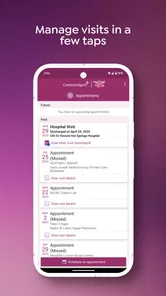
The app brings recent health information, visit details, and messages together in one secure place. Depending on your account and participating facility, it may also offer ways to look up providers and care locations, manage appointments, or reach patient-service resources. The specific options can differ by location, so the experience you see may depend on the CommonSpirit facility connected to your care.
What is CommonSpirit - AR/GA/KY/TN/TX?
CommonSpirit - AR/GA/KY/TN/TX is a healthcare-focused mobile application designed for patients and communities connected with participating CommonSpirit Health facilities in Arkansas, Georgia, Kentucky, Tennessee, and Texas. Depending on your location and available services, the app may help you access health information, find care locations, review provider details, manage appointments, and connect with other digital healthcare tools.
Which states and healthcare locations does the app support?
The application is intended for users associated with CommonSpirit Health services in Arkansas, Georgia, Kentucky, Tennessee, and Texas. Available features can vary by hospital, clinic, region, and account type, so not every location will provide the same options. Before downloading, check whether your preferred facility appears in the app and whether its patient services are supported.
Can I use the app to schedule appointments and manage my healthcare?
In supported locations, the app may allow you to search for providers, request or manage appointments, view certain health information, and access patient-service resources. The exact tools depend on the participating facility and your connection to its patient portal. Some appointments or specialized services may still require contacting the clinic directly by phone.
Pros
- Quick access to appointments
- messages
- and health records
- Supports multiple CommonSpirit regions in one app
- Prescription details are easy to review and manage
- Secure sign-in helps protect sensitive medical information
- Useful health resources are available directly in the app
Cons
- Features may vary depending on your hospital or region
- Some functions require an active CommonSpirit patient account
- Appointment availability depends on participating providers
- The app may request notifications and other device permissions
- Occasional updates or maintenance can temporarily limit access












