Common Sense Media
- 106.00
- 4.6
- Installs
- 100.00K
- Price
- Free

Screenshots




Analysis by Reviewed
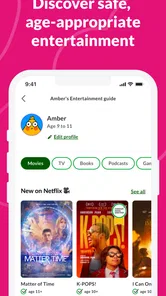
When I’m choosing something for a family movie night, the hard part often isn’t finding something to watch; it’s working out whether it suits everyone in the room. Common Sense Media is built for that decision: it helps parents and caregivers look into movies and TV before pressing play. I see its best use as a quick research stop when a title is unfamiliar, rather than another entertainment app to browse for its own sake.
Deciding what deserves a closer look
The most useful habit is to open the app with a specific question. Maybe a child has heard about a new series at school, or a film is already on the family’s shortlist. Looking up that title first gives me a way to focus on the concerns that actually matter to my household, instead of treating every possible issue as equally important.
I’d also use it when another caregiver is making the decision. If a grandparent, babysitter, or friend’s parent is choosing what the children watch, a short explanation grounded in a review can make the handoff clearer. The app is not a substitute for knowing a child, but it can give adults shared context when they have different levels of familiarity with a title.
A faster way to narrow down a watchlist
The app is free to download, is rated Everyone, and comes from Common Sense Media. Its focus on family-minded reviews makes it different from a streaming service’s own synopsis, which is usually designed to sell the show rather than explain what parents may want to know. With a 4.7 average from around 1,700 ratings and over 100,000 installs, it has attracted a substantial audience, though those figures alone can’t tell you whether a particular review will match your family’s boundaries.
In practice, I’d use it before a child asks to watch a popular title, or while comparing a few options for a weekend. Search for the name, read the review with your child’s age and sensitivities in mind, and decide whether it belongs on the list. That small step can be more useful than scrolling through a streaming catalog together and discovering a concern only after the film has started.
What is Common Sense Media?
At its core, Common Sense Media is a non-profit organization that provides education and advocacy to families to promote safe technology and media for children. With a plethora of media options available today, this app acts as a compass guiding you through the maze of movies, games, apps, and more. It breaks down content by age-appropriateness and educational value, helping you make informed decisions about what to consume.
How it fits into a parent’s routine
A realistic use case is a last-minute change of plan: the film someone picked is unfamiliar, guests are arriving soon, and there is no time to read a long discussion about every alternative. I’d look up the likely choice, check the review for the household’s main concern, and keep one backup title in mind. This makes the app a decision aid rather than a project that delays family time.
More From Our News Desk

 Gmail
Gmail in a Busy Inbox: Who Benefits Most?
From first account to crowded workday, Gmail earns its place through dependable search and flexible sorting—but its best fit depends on how much inbox maintenance you can tolerate.

 Prime Video
Switching to Prime Video: What Changes in Your Viewing Routine
Prime Video can make a compelling second home for streaming, but switching means learning a different catalog, rental layer, and route from browsing to playback.

 Universal TV Remote Control
 Works Best as a Reliable Backup
A phone remote earns its place through quick setup and reliable habits. Here is how to get more from Universal TV Remote Control—and where its limits show.

 Weather - By Xiaomi
Weather by Xiaomi Review: Clear at a Glance, Less Clear Up Close
Xiaomi’s weather app makes everyday forecasts quick to scan, but its calm surface can leave useful details and recovery paths harder to find than they should be.

 X
X Under Pressure: Can It Recover When Posting Goes Wrong?
A resilience-focused review of X, examining setup, mistaken posts, interruptions, weak connections, and the gaps that matter when recovery needs to be dependable.

 Clash of Clans
 Is Won Between the Battles
Its raids are quick; its community is a long-term project of coordination, teaching, rivalry, and shared responsibility—with all the friction that entails.
Latest News



There is a useful trade-off here. A streaming app is quicker for confirming whether a title is available and showing its trailer, while this parenting reference is better suited to questions about what a family might want to discuss or avoid. I would use the two in sequence: first narrow the choice here, then confirm availability in the service where I plan to watch. Neither tool does the other’s job particularly well.
Features Galore
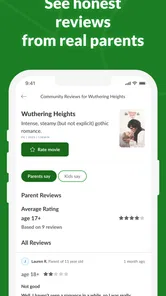
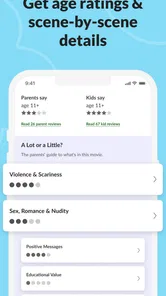
One of the standout features of this app is its comprehensive reviews. Each review covers everything from the positive messages a piece of media might convey to any potential red flags concerning violence or inappropriate language. It’s like having a trusted friend who's seen every show and played every game, giving you the lowdown before you hit play.
Another noteworthy feature is the Parent Tips section. Here, you'll find advice on how to talk to your kids about what they are watching or playing, along with suggestions for family-friendly activities. It’s not just about restricting content; it’s about fostering open discussions and understanding.
Turning a review into a family conversation
One practical way to use those discussion ideas is to read them before watching, then choose just one question that feels natural for your child’s age and interest. Afterward, I’d ask what they thought about a character’s choice or a difficult moment, rather than quiz them on the plot. That keeps the conversation open and makes a media guide useful even when the family decides a title is appropriate.
This is also where the app may be less useful for some parents. If you only want a single age recommendation and have no interest in context or follow-up conversation, a short label elsewhere may be faster. I prefer more explanation when I’m uncertain, but a longer review can feel like extra reading when the decision is straightforward.
Reading reviews with useful context
One detail I value in a family media guide is that a suitability judgment works best as a starting point, not a verdict. Two children of the same age can react very differently to suspense, rude humor, or a difficult theme. I’d scan the review for the particular issue that matters to my household, then use its discussion prompts to explain a choice instead of presenting an age label as an unquestionable rule.
That approach is especially handy when adults and children disagree about a title. A parent can check the concerns privately, then offer a clear reason for postponing it—or decide that a scene is manageable with a conversation afterward. The trade-off is that reading takes longer than glancing at a single age badge, but the extra context can prevent a blanket yes-or-no decision from missing what actually matters to your child.
Usability and Interface
Using the app is a breeze. The interface is straightforward, with everything neatly categorized and easy to find. Whether you're using it on Android or iOS, the experience remains consistent. The search functionality is robust, allowing you to quickly find what you're looking for without any hiccups. It's clear that the developers have put a lot of thought into making this app as user-friendly as possible.
For a realistic routine, I’d check a film while planning dinner or before a child’s friend comes over, then share the reasoning with the other parent so everyone is on the same page. It can also help build a short list of candidates before opening a streaming app, where recommendations may be shaped more by viewing history than by a family’s comfort level. If you’re already comparing titles, checking one at a time is usually more practical than trying to research every suggestion that appears on screen.
As a reference tool, it is not a replacement for the streaming service where you actually watch a film or show. The service catalog is better for availability, trailers, and starting playback; this app is more useful when your question is about suitability and conversation. I’d also avoid treating any single review as a promise that every family member will be comfortable. A child’s past experiences and personal sensitivities matter, and a parent may want to preview a title when a topic is especially delicate.
When a different approach works better
If the decision is about a very specific trigger or a child’s personal experience, I would not rely on a general review alone. I’d treat the review as a screening step, then decide whether to preview the title or ask another adult who knows the child well. That takes more time, but it is the more responsible option when a broad content description cannot settle a sensitive family question.
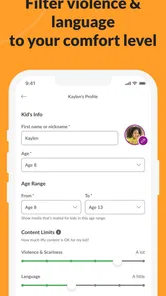
The app is also not the right choice for someone who wants controls that block or limit what a child can open. A review can inform a decision, but it does not replace device settings, supervision, or a conversation about boundaries. Likewise, if I already know the title and simply need to start it, going straight to the streaming service is more efficient.
Speed, reliability, and device fit
Because the main task is looking up and reading reviews, the app’s value depends more on reaching the right title than on flashy effects. I’d expect a simple reference workflow to feel lighter than video streaming, but I wouldn’t choose it as a way to watch media or assume every search will answer every question. If a result doesn’t settle a concern, checking the review’s detail and discussing it at home is more useful than relying on a quick label alone.
The Android release is version 1.10.14 and requires Android 7.0 or later. That makes the operating-system requirement a practical check before installing it on an older device. The app is free, with in-app purchases listed from $3.99 to $39.99 per item, so I’d look carefully at any purchase screen and decide whether the free experience already covers my needs. It is a better fit for caregivers who want a dedicated reference than for someone seeking a streaming player, a comprehensive parental-control system, or a catalog ranked only by popularity.
What to expect from regular use
I would keep expectations modest about speed and recovery: this is a reading and lookup tool, so a useful result depends on finding the right title and having enough time to consider it. For a decision made in the car or at a busy gathering, I’d search before the moment gets urgent rather than count on doing a full assessment while everyone waits. If a lookup does not resolve the question, that is a cue to pause or choose a familiar alternative, not to force a quick answer.
For reliability, the strongest routine is to use the app as one input alongside your own judgment. A review can help identify what to look for, but family standards differ, and context can change how a scene lands. I’d revisit my decision when the child is older or when the viewing situation changes; what works for a supervised family night may not be the same choice for independent viewing.
Plus, the app is regularly updated with new content and reviews, ensuring that you are always in the loop with the latest media trends. The commitment to keeping the content fresh and relevant is evident, and it’s something that users will definitely appreciate.
Who will get the most from it?
I think it suits parents and caregivers who regularly face unfamiliar choices and want more than a trailer or a one-line age label. It can also help families who want to use media as a starting point for conversation, since the guidance is not limited to a simple yes-or-no decision. If your household already has clear rules, the app can still be useful as a second opinion when a new title tests those rules.
It is less compelling if you mainly want a child-safe streaming catalog, hands-on screen-time controls, or a guarantee that every title has been reviewed in the way your family would review it. Those needs call for a different tool or a more personal check. I would start with the free download, try it on a few titles your family already knows, and see whether the style of guidance matches how you make decisions.
Final Thoughts
So, is Common Sense Media worth the download? Absolutely! For anyone overwhelmed by the sheer volume of media choices out there, this app is a lifesaver. It not only helps in choosing suitable content but also encourages meaningful conversations about media consumption.
In a world where the digital landscape is constantly evolving, having a trusted resource like Common Sense Media is invaluable. So, go ahead, give it a whirl, and let it guide you to make wiser media choices for your family.
Common Sense Media Frequently Asked Questions
Is the Common Sense Media app free to download, and are there in-app purchases?
The Common Sense Media app is free to download and is designed to help families explore trusted movie and TV reviews. It also includes in-app purchases priced from $3.99 to $39.99 per item, so it is worth checking the purchase details before choosing any optional paid content. The app is listed for everyone, and its store summary emphasizes reviews created with families in mind.
Which devices can run the Common Sense Media app?
The app is available for Android devices running version 7.0 or later. Before downloading, check that your device meets that minimum requirement and has enough available space for an installation. Common Sense Media is a parenting app focused on helping families navigate entertainment choices, so its usefulness will depend on whether you want to consult reviews while making decisions about movies and television.
What is Common Sense Media?
Common Sense Media is a platform that provides detailed reviews, ratings, and information about various media types, including apps, games, movies, and TV shows. It helps parents and educators make informed decisions about what content is appropriate for children. The platform is known for its comprehensive assessments that consider age-appropriateness, educational value, and overall quality. The app’s store summary particularly highlights trusted movie and TV reviews created with families in mind.
How does Common Sense Media rate apps and games?
Common Sense Media rates apps and games based on several criteria, including age-appropriateness, educational value, ease of use, and overall entertainment quality. The ratings are designed to help parents understand what to expect from the app or game and whether it aligns with their family's values. Detailed descriptions and user reviews are also provided to offer a well-rounded perspective. Families can use these insights alongside the app’s movie and TV reviews when considering entertainment options.
Is Common Sense Media free to use?
Yes, Common Sense Media is free to use. The platform offers a wealth of information, reviews, and ratings without any cost to the user. While the core content is freely accessible, users can choose to support the organization through donations, which help in maintaining and expanding the service. Additionally, some advanced features or resources might be available to members or subscribers. The app also offers optional in-app purchases, so review those details before making a purchase.
Pros
- Comprehensive content reviews
- User-friendly interface
- Parental controls included
- Age-appropriate recommendations
- Wide range of media covered
Cons
- Requires account setup
- Some content behind paywall
- Ads can be intrusive
- Limited offline access
- Occasional outdated reviews