Comics AI: Comic & Manga Maker
- 41.00
- 4.2
- Installs
- 10.00K
- Price
- Free
Screenshots
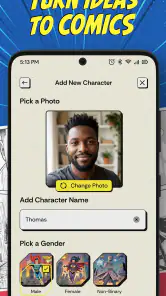
Analysis by Reviewed
I opened Comics AI: Comic & Manga Maker expecting a quick novelty tool, the kind of app that produces one amusing image and then disappears from my phone. Instead, I found a more interesting question: can an AI-assisted comic app become part of a regular creative routine, or is it mainly useful when I want a fast visual experiment? After spending time with it, my answer is cautiously positive. It is easy to approach, entertaining during the first sessions, and especially appealing if you want to turn a rough idea into a comic-like scene without learning a full drawing program.
This is an Android app in the Art & Design category from Superapp Labs. It is free to install, rated for Everyone, and currently sits at a 4.2 average from around 1,500 ratings. The app has passed 10,000 installs, so it is still a relatively small product rather than a heavily established creative platform. That matters because I approached it as a focused tool with room to grow, not as a replacement for professional illustration software.
What using it feels like during the first week
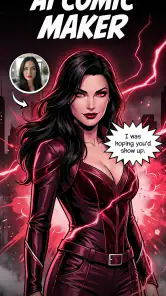
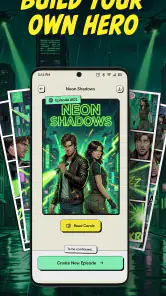
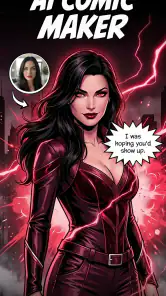
The main attraction is clear from the first session: I can start with an idea for a comic, manga-style scene, or manhwa-inspired moment and use AI to help turn that idea into something visual. The short store description calls it “Comics AI,” while the fuller positioning focuses on comic creation, manga generation, and making illustrated stories. In practice, that makes the app feel less like a traditional blank canvas and more like a creative prompt companion.
That distinction is important for newcomers. A conventional drawing app asks me to choose brushes, layers, colors, line widths, and canvas settings before I have made anything. Here, the first useful result can arrive much sooner. If I have a character concept, a dramatic exchange, or simply a visual mood in mind, the app gives me a way to explore it without first developing drawing technique. For someone who normally abandons creative ideas because the first step feels too demanding, that low barrier is a genuine strength.
I found the first week most enjoyable when I treated each generation as a draft rather than a finished page. The temptation is to expect a polished comic immediately, but AI-generated art is more useful when I ask it to help me discover direction. I might begin with a quiet school corridor, then shift the same idea toward a suspenseful manga panel, a softer romantic tone, or a more energetic action composition. That process makes the app feel like a visual sketchbook.
The best early habit is to save the idea behind an image, not just the image itself. I would write down the character role, emotion, setting, and intended panel purpose before changing the prompt. That small step helps me compare results and prevents a session from becoming a random stream of attractive but disconnected pictures. It also makes the app more useful for people who want to build a sequence rather than collect isolated illustrations.
Who gets the most from the initial novelty
The app is a good fit for casual creators, aspiring comic writers, social media users who want original visual material, and anyone curious about AI-assisted illustration. It can also help a writer test whether a scene has enough visual energy to become a comic panel. I would recommend it to a person who has stories in their head but lacks confidence with anatomy, perspective, or traditional drawing tools.
More From Our News Desk

Weather by Xiaomi Review: Clear at a Glance, Less Clear Up Close

X Under Pressure: Can It Recover When Posting Goes Wrong?

Clash of Clans Is Won Between the Battles

Android Auto Makes the Case for Quieter Car Software

MobiOffice: Transforming Mobile Productivity with Seamless Integration

EA SPORTS FC™ Mobile Soccer: Redefining Mobile Sports Gaming
It is less suitable for an artist who needs exact control over every line, a stable character model across many pages, or a carefully managed production pipeline. The speed of AI generation is attractive, but speed does not automatically provide consistency. If a project depends on the same character looking identical from panel to panel, I would still prefer a drawing application or a more specialized illustration workflow.
Parents and younger users may appreciate the Everyone age rating, but I would still encourage adults to guide children through the creative process. The rating makes the app broadly approachable; it does not turn every generated result into an automatically appropriate story for every context. The safest way to use it with younger creators is to focus on simple themes, review outputs together, and treat the tool as a prompt for storytelling rather than an unsupervised content machine.
Three practical workflows that make it more useful
My first recommended workflow is the “thumbnail before commitment” method. I start with a broad scene, generate a few directions, and choose only the composition that communicates the emotion I need. I then refine the wording around that one idea instead of repeatedly asking for completely different images. This reduces wasted experimentation and helps me judge whether the scene works before I spend time developing dialogue or a larger sequence.
The second is to separate character description from scene description. I keep a short, repeatable description for the character’s role, clothing, age range, and mood, then add the location and action afterward. Even when the results are not perfectly consistent, this gives the project a recognizable starting point. It is a more disciplined approach than changing every detail in every request, and it makes recurring characters easier to compare.
The third is to use the app for visual planning rather than pretending it is the entire comic studio. I can use a generated image to decide where a speech bubble might sit, whether a reveal needs a close-up, or whether a scene feels too crowded. Then I can finish the page in another tool if I need precise lettering, panel borders, editing, or manual corrections. That hybrid workflow is where I see the strongest practical value.
These approaches also answer a question many new users have: do I need to be a skilled artist to benefit from the app? No, but I do need to be willing to make editorial choices. The app can help produce visual possibilities; it cannot decide which one supports my story, whether a character’s expression is convincing, or whether the sequence makes sense. The human part moves from drawing every mark to selecting, directing, organizing, and revising.
Whether it still earns attention after the first month
The first-week experience is driven by surprise. After that, the important test is recurring value. I do not think this app automatically becomes a daily creative destination for everyone. Its long-term usefulness depends on whether I have a continuing project or a repeatable reason to generate comic material. Without that, the same basic loop can become familiar: describe an idea, inspect the result, adjust the request, and decide whether the image is worth keeping.
For a person developing a short comic, the app can remain useful month to month because each session serves a different story problem. One day I may be exploring a character introduction; another day I may be testing a setting or a dramatic beat. The value comes from applying the generator to a structured project. If I only open it to ask for random fantasy characters, the novelty is likely to fade much faster.
I would keep a simple project folder outside the app with three parts: a character note, a scene list, and a selection of images that establish the visual direction. This is not glamorous, but it changes the experience. It lets me return after a break without trying to remember what I was doing, and it makes the app part of a creative habit instead of a disposable amusement.
Another useful long-term role is idea triage. When I have several possible stories, I can use quick visual experiments to identify which premise has the strongest atmosphere. That does not mean the most attractive generated image represents the best story. It means the app helps me see which concepts deserve more writing time. For writers who struggle to choose between ideas, that can be more valuable than producing a finished-looking picture.
Compared with a normal drawing app, this tool saves time at the beginning but gives up control during refinement. Compared with a comic layout editor, it appears more focused on generating visual material than on managing a complete page-production process. Compared with searching for stock images, it offers a more direct connection to a personal concept, although the result may require more selection and correction. I see it as a front-end idea generator rather than a universal replacement for those alternatives.
The cost of keeping a project organized
The app itself is free, which makes experimentation easy to justify. It also includes in-app purchases ranging from $6.99 to $89.99 per item. That wide spread deserves attention before I become dependent on a paid workflow. A free starting point is useful, but recurring creative use can become less comfortable if I feel pressure to purchase repeatedly in order to continue exploring ideas.
My advice is to decide what success means before spending money. If I am only testing a story concept, the free experience may be enough to tell me whether the app belongs in my routine. If I am building a larger personal project, I would first establish a consistent prompt method and a manageable archive. Paying for more generation without improving that process can simply create a larger pile of inconsistent images.
The current version is 1.1.0 and requires Android 7.1 or later, so the technical entry point is fairly broad for Android users. Still, version numbers matter when judging longevity. A young app can change its interface, output style, or workflow as the developer develops it. That can be exciting, but it also means I would avoid making an important long-term project depend entirely on one in-app process without keeping my own notes and saved work.
Where fatigue begins
The biggest source of fatigue is not learning the basic controls; it is evaluating results. AI makes it easy to produce possibilities, but each possibility still needs a human decision. After several rounds, I may spend more time rejecting images than creating a coherent page. This is especially noticeable when I have a precise composition in mind and the generated result is close enough to be tempting but not accurate enough to use.
Character continuity is another pressure point. A single striking portrait is one thing. A character appearing across multiple panels, with the same visual identity and changing expressions, is much harder to manage with a prompt-driven process. I would not choose this app as my only tool for a long serial comic unless I was comfortable treating the outputs as loose references or revising them elsewhere.
There is also a creative fatigue that comes from overusing a familiar visual formula. If every scene is generated from similar wording, the project can begin to feel assembled rather than authored. I avoid that by writing the scene in plain story language first: who wants what, what changes, and what the reader should notice. Only afterward do I translate that idea into visual instructions. This keeps the narrative in charge of the image.
Users who want exact lettering should be particularly realistic about the app’s role. AI-generated visuals can suggest where dialogue belongs, but a readable comic depends on deliberate typography, spacing, and editing. I would create the art concept here, then handle final text and page composition in a tool designed for those tasks. That extra step is not a failure; it is simply the trade-off for getting fast visual ideation.
When another option is the better choice
I would skip this app if my main goal were professional page preparation, detailed manual painting, or strict control over anatomy and perspective. A traditional drawing application is better when I need layers, corrections, and repeatable editing. A dedicated comic editor is better when panel arrangement, speech balloons, and page export are the center of the job. This app makes more sense when the difficult part is imagining a visual direction and getting a starting point quickly.
I would also be cautious if I dislike iterative experimentation. The app rewards patience with wording, comparison, and selection. Someone looking for a single button that reliably produces a complete, publication-ready manga page may become disappointed. The more specific my expectations, the more I need to accept that the generator is a collaborator with unpredictable suggestions, not a precise production assistant.
For everyday use, I can imagine opening it during a commute or a short break to test a scene for a story I am writing. I might generate a visual reference for a character’s first appearance, save the strongest direction, and return to the manuscript with a clearer sense of mood. That is a realistic recurring use case because it does not demand that the app create an entire comic every time I open it.
After the novelty fades, I think the app earns space only when I give it a defined job. Used as a casual image toy, it may eventually feel repetitive. Used as a fast visual notebook for comic ideas, scene blocking, and early concept decisions, it has more staying power. The difference is not hidden magic; it is the workflow I build around it.
My long-term verdict is favorable, with boundaries. Superapp Labs has made a friendly entry point for AI-assisted comic and manga experimentation, and the free access makes it easy to discover whether that style of creation suits me. The 4.2 average and modest install base suggest an app that is attracting interest while still feeling like an evolving product rather than a mature industry standard.
I recommend keeping it if it helps you move from “I have an idea” to “I can see the scene.” I would not keep it as my only art tool, and I would not pay for extended use before proving that I have a repeatable project workflow. For beginners, writers, and visual storytellers, it can remove the intimidating blank page. For experienced artists seeking precision, it is better treated as a source of rough inspiration. That balance is what gives Comics AI lasting value: not the promise of effortless finished comics, but the practical ability to make early creative decisions faster.
Comics AI: Comic & Manga Maker Frequently Asked Questions
What devices and operating systems can run Comics AI: Comic & Manga Maker?
Comics AI: Comic & Manga Maker is an Android app with a minimum operating system requirement of Android 7.1. Before downloading, check your device’s Android version and available storage, especially if you plan to create and keep many illustrated pages. The app is listed in the Art & Design category, so it may suit users looking for a creative tool rather than a comic-reading app.
Who develops Comics AI: Comic & Manga Maker, and how established is it?
The app is developed by Superapp Labs and has reached over 10,000 installs. It has an average rating of 4.2 from around 1,500 ratings, with 41 written reviews. Those figures offer an initial sense of how users have responded, but individual experiences can differ, so it is worth checking recent reviews for comments about the creation process and features that matter to you.
What is Comics AI: Comic & Manga Maker, and what can I create with it?
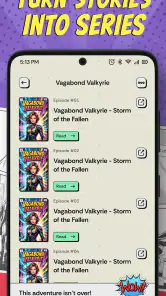
Comics AI: Comic & Manga Maker is a creative app designed to help users produce comic strips, manga-style pages, and illustrated stories with the assistance of artificial intelligence. You can typically generate characters, scenes, dialogue, and visual layouts from written ideas, then arrange panels and add text. It is useful for beginners who want to experiment with storytelling without drawing every element manually.
Do I need drawing or design experience to use Comics AI: Comic & Manga Maker?
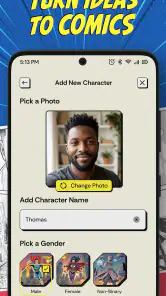
No advanced drawing skills are usually required. The app is intended to simplify comic creation through templates, automated image generation, character tools, and editable panels. Beginners can start with a short description and refine the result, while more experienced creators may appreciate the ability to adjust layouts, captions, characters, and visual details. However, producing consistent characters and polished pages may still require patience and several revisions.
Is Comics AI: Comic & Manga Maker free to download and use?
The application is free to download, but some features can be restricted by credits, subscriptions, advertisements, or in-app purchases. AI image generation and premium templates are commonly limited in free versions. In-app purchases range from $6.99 to $89.99 per item, so check the app’s current pricing, credit system, renewal terms, and export restrictions before creating a large project. These conditions can change with updates.
Pros
- Turns simple ideas into comic-style images quickly.
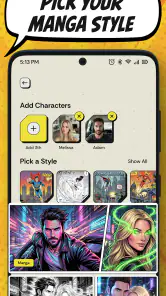
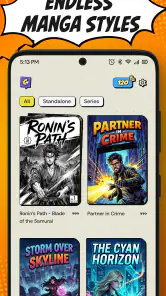
- Offers manga-inspired visual styles for creative projects.
- Useful for making character concepts and storyboards.
- Easy to experiment with different prompts and themes.
- Can help beginners create comics without drawing skills.
Cons
- AI results may vary noticeably between repeated generations.
- Detailed scenes can produce inconsistent characters or backgrounds.
- Some advanced features may require in-app purchases.
- Generated artwork may need manual editing before publishing.
- Privacy terms should be checked before uploading personal images.
- Category
- Art & Design
- Version
- 1.1.0












