Color Phone Call Screen App
- 42.00
- 4.5
- Installs
- 1.00M
- Price
- Free

Screenshots


Analysis by Reviewed
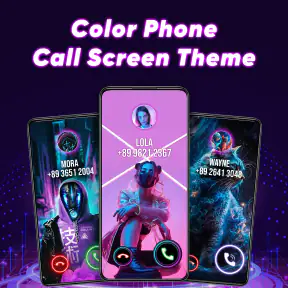
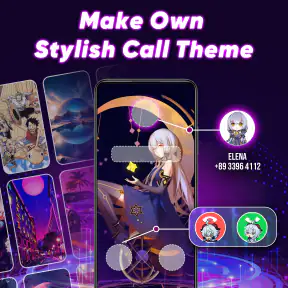
Have you ever felt like your phone calls are just a bit too... boring? Enter the Color Phone Call Screen App, an app that jazzes up your call screen with vibrant themes and eye-popping animations. It’s like giving your phone calls a little party of their own!
Personalize Your Call Screen
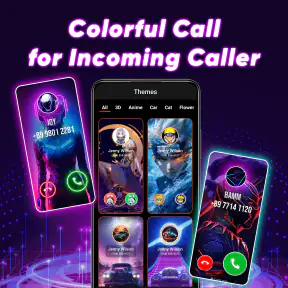
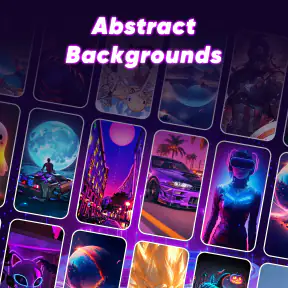
When I first downloaded the Color Phone Call Screen App, I was immediately impressed with how easy it was to navigate. The app offers a wide range of colorful themes and animated effects that you can apply to your call screen. Whether you’re into neon lights, flashy animations, or subtle aesthetics, there’s something here for everyone. I particularly enjoyed the ability to change themes based on my mood or even the season. It's like having a wardrobe for your phone!
Easy to Use and Fun
One of the first things I noticed was how user-friendly the app is. Setting up your new call screen is as simple as a few taps. The interface is intuitive, and I appreciated the quick tutorial that guided me through selecting and applying a theme. Plus, the app doesn’t bombard you with annoying ads, which is always a win in my book. It keeps the experience smooth and enjoyable.
Why It Stands Out
Now, you might be wondering, "What makes this app different from all the other call screen apps out there?" Well, aside from the sheer variety of themes, the app also offers customizable options that allow you to tweak the animations and colors to your liking. This level of personalization is something I haven’t seen in many other apps, and it really sets the Color Phone Call Screen App apart from the rest.
Moreover, the app is updated regularly with new themes, ensuring that there’s always something fresh to try. And if you’re worried about battery consumption, rest assured that the developers have optimized the animations to be as battery-friendly as possible. My phone didn’t experience any noticeable battery drain, which was a pleasant surprise.
Final Thoughts
In a world where we use our phones for just about everything, it’s nice to have an app that adds a bit of personality to our daily interactions. The Color Phone Call Screen App does just that, offering fun and flair with every call. If you’re looking to spice up your phone experience, give this app a whirl. It’s a small change that can make your device feel brand new.
So, ready to transform your call screen into a visual delight? Download the app and let the fun begin!
More From Our News Desk

Clash of Clans Is Won Between the Battles

Android Auto Makes the Case for Quieter Car Software

MobiOffice: Transforming Mobile Productivity with Seamless Integration

EA SPORTS FC™ Mobile Soccer: Redefining Mobile Sports Gaming

How Microsoft OneDrive Became a Mobile Productivity Giant

How Google Translate Breaks Language Barriers Effortlessly
Color Phone Call Screen App Frequently Asked Questions
What is the Color Phone Call Screen App and how does it work?
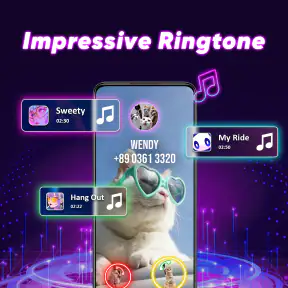
The Color Phone Call Screen App is designed to make your incoming calls more visually appealing by allowing you to customize the call screen with various themes and colors. It works by replacing the default call screen with a personalized one, offering a range of effects and animations. Users can select from a variety of templates, ensuring each call notification is vibrant and unique, enhancing the overall user experience.
Is the Color Phone Call Screen App free to use or are there any in-app purchases?
The app is free to download and use, providing a basic set of themes and features at no cost. However, it does offer in-app purchases for premium features, such as exclusive themes, ad-free experience, and additional customization options. These purchases enhance the functionality and personalization possibilities, allowing users to fully tailor their call screens to their liking.
Can the Color Phone Call Screen App affect the performance of my device?
While the Color Phone Call Screen App is designed to be lightweight and optimized for performance, it may consume additional resources such as battery and memory due to the animations and effects. Most modern devices handle these demands well, but users with older or less powerful devices might experience a slight decrease in performance during usage.
How can I customize my call screen using the Color Phone Call Screen App?
Customizing your call screen with the Color Phone Call Screen App is straightforward. Once installed, you can browse through a library of themes and select the ones you like. You can also adjust settings such as the brightness, animations, and color schemes. The app provides a preview feature, allowing you to see how your call screen will look before applying any changes, making customization easy and intuitive.
Is the Color Phone Call Screen App secure and does it protect my personal information?
The app prioritizes user privacy and is designed to protect your personal information. It does not access or store personal data such as contact lists or call logs. However, like any app, it's recommended to review the permissions requested during installation to ensure you're comfortable with the access granted. Regular updates are provided to maintain security and functionality.
Pros
- Customizable call screen themes.
- Wide variety of vibrant colors.
- Easy to navigate interface.
- Frequent updates with new themes.
- Low battery consumption.
Cons
- Contains ads in free version.
- Limited themes without purchase.
- May not support all devices.
- Requires internet for updates.
- Some features are paid.
- Category
- Personalization
- Version
- 40












