CollX: Sports Card Scanner
- 2.80K
- 4.5
- Installs
- 1.00M
- Price
- Free

Screenshots
Analysis by Reviewed
When I sort a box of sports cards, I want a quick way to identify what I have before deciding which cards deserve closer research. That’s where CollX: Sports Card Scanner can help: it lets me scan cards, keep track of a collection, and explore buying or selling with other collectors. I see it as a handy first pass, not a substitute for checking a card’s condition and comparing prices before a sale.
A practical first pass through a collection
My most useful routine is to work through one small stack at a time. I scan a card, check that the identification looks right, then move on rather than stopping to investigate every estimated value. That keeps a shoebox project manageable and makes it easier to spot cards I want to inspect more carefully later. For anyone wondering whether scanning replaces sorting by hand, I’d say it makes the initial inventory easier, but I would still separate cards by sport, player, or set when I need a careful review.
For example, if I find a few cards while tidying up after a game, I can use the app to start identifying them and save the more interesting possibilities for a calmer look later. Lighting, glare, and how clearly a card is framed can affect what a camera-based scan picks up, so I try to keep the card flat and the image clear. If a result seems surprising or the card looks unusual, I treat that as a prompt to verify its details, not as proof of its value.
Turning a quick scan into a useful record
A good inventory session needs a purpose. If I’m sorting cards inherited from a relative, I’d begin by scanning in batches and marking mentally which results need a closer look, rather than trying to settle the collection’s worth in one sitting. If I’m cataloging cards I already know well, I can use the scan as a faster way to build a digital overview. In either case, I’d keep valuable-looking or hard-to-identify cards aside until I can check their exact version and condition.
That distinction matters because a card’s identity is only part of the story. A scan may help me recognize a player or issue, but corners, surface wear, centering, and other condition details are still things I need to inspect myself. When I’m preparing a possible sale, I’d take a separate, careful look at the physical card and avoid treating a broad estimate as a guaranteed selling price. The app is most useful when it helps me decide what deserves attention next.
Discover the Magic of CollX
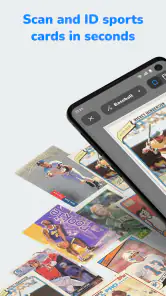
So, what’s the deal with CollX: Sports Card Scanner? It’s your personal card expert right in your pocket. The app is designed to scan and identify sports cards just by snapping a picture. Yup, it’s that simple! You don’t need to be a card guru to figure out if that Michael Jordan card is worth a couple of bucks or a small fortune.
How It Works
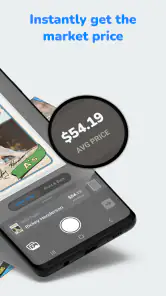
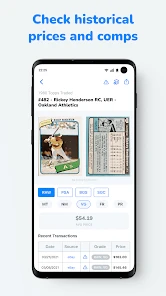
Using the app is as easy as pie. Once you download and install it, the interface guides you through the process. You just point your phone’s camera at the card, and voila! The app’s AI does the heavy lifting, analyzing and identifying the card’s details. The best part? It provides real-time market values, so you’re always in the know.
More From Our News Desk

Clash of Clans Is Won Between the Battles

Android Auto Makes the Case for Quieter Car Software

MobiOffice: Transforming Mobile Productivity with Seamless Integration

EA SPORTS FC™ Mobile Soccer: Redefining Mobile Sports Gaming

How Microsoft OneDrive Became a Mobile Productivity Giant

How Google Translate Breaks Language Barriers Effortlessly
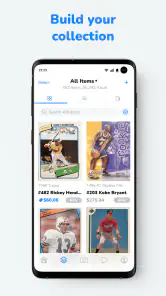
The accuracy is pretty impressive, but remember, it’s always a good idea to double-check with a second source if you’re planning to sell. The app also allows you to organize your collection digitally, making it a breeze to keep track of what you have.
Settings and habits that save time
I’d build a repeatable habit around the scan-and-check process rather than trying to race through a whole collection. Before a session, I make sure the cards are easy to reach and the work area has even light; that small bit of preparation can reduce blurry or reflective images. After scanning, I review uncertain matches before relying on them. A quick note of which cards need a second look is more useful than treating every result as final.
For a larger collection, I’d also decide what I want the digital inventory to do for me: help locate cards, give me a broad overview, or prepare a shortlist for possible sale. Those are different jobs. An app-based catalog is convenient when I’m away from home, while a spreadsheet or a carefully arranged physical collection may suit someone who wants custom fields or a highly controlled record. I wouldn’t assume that a scan alone captures every detail a serious buyer will ask about.
Repeatable patterns for busy collectors
Experienced collectors can make the process smoother without relying on magic shortcuts. I’d choose a consistent order—perhaps by sport, then by player or set—and finish one small group before starting another. That reduces the chance of losing track of which cards I’ve already checked. If a card produces an uncertain or unexpected match, I’d move it to a separate review pile instead of repeatedly scanning it and interrupting the flow.
There’s also a practical trade-off between capturing everything and creating a useful catalog. For a personal collection, recording every common card may take more time than it saves if I rarely need to find them again. I’d prioritize cards I might trade, sell, insure, or simply want to locate quickly, then expand the record as needed. That selective approach is especially helpful when sorting a large box over several evenings: each session produces something useful, without turning the hobby into an endless data-entry task.
Where the shortcuts have limits
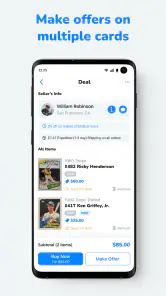
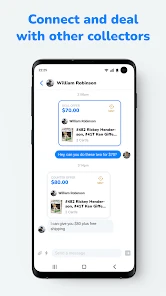
The community and marketplace side may be useful when I’m ready to connect with other collectors, but buying or selling still calls for ordinary care. I’d inspect the exact card, compare its condition and version, and agree on the details before making a deal. A broad value estimate can help me decide what to research; it should not settle a negotiation by itself. Condition, special editions, and small differences between similar cards can matter, which is why checking a second source remains a sensible step.
That trade-off is central to using a scanner well: speed helps with discovery, while human checking matters for decisions with money attached. If I mainly want to follow sports news, manage a fantasy team, or look up a single card once in a while, a dedicated reference source or a simple manual search may be a better fit. CollX makes more sense when I have a pile to identify, want a digital record, or enjoy the collector-to-collector side of the hobby.
Choosing the right tool for the job
Compared with searching card names manually, scanning is appealing when I don’t know exactly what I’m holding or have a lot to sort. A manual reference can still be better for a single card when I already know its player and year, because I can go straight to the details I care about. A spreadsheet offers more control over personal fields and notes, while a physical filing system can be easier for someone who prefers not to maintain an app-based catalog. I see CollX as a practical middle ground: recognition and collection organization sit alongside a collector community, rather than the app being only a lookup page.
It’s a particularly good fit for someone who enjoys browsing and organizing cards, has enough of a collection to benefit from a searchable digital record, or wants to explore potential trades and sales. It’s less compelling if the goal is a definitive appraisal, a custom database with carefully chosen fields, or an occasional lookup that takes only a minute. I’d also think about how often I’ll use the social and marketplace side before paying for optional extras; a casual user may be perfectly happy keeping to the basic routine.
Features That Stand Out
One feature that really caught my attention is the community aspect of the app. You can connect with other collectors, trade cards, and gain insights from the community. It’s like having a sports card convention right in your pocket!
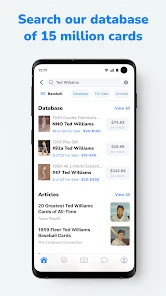
Additionally, the app’s library is vast. With a database that covers a wide range of sports and years, it’s unlikely you’ll come across a card that stumps CollX. The ease of use, combined with its comprehensive database, makes it a must-have for any card enthusiast.
A realistic day-to-day use
Imagine finding a stack of cards while clearing a shelf before guests arrive. I wouldn’t try to price every card on the spot. I’d scan a manageable handful, check whether the results look plausible, and set aside anything that seems unusual or potentially worth researching. Later, I could compare those cards with another reference and inspect their condition in better light. That workflow makes the app useful even when I only have a short window to sort, while avoiding the common mistake of confusing quick identification with a finished valuation.
If I were preparing cards to trade, I’d use the same separation of tasks: identify and organize first, then verify the specific card and its condition before discussing a deal. The collection view can help me keep track of what I have, but I’d still make sure the physical cards are stored and grouped in a way that makes them easy to retrieve. A digital list is only helpful if I can match an entry to the actual card without guesswork.
A good fit for collectors, with a few caveats
CollX is a sports app from developer CollX, and its mix of scanning, collection tracking, and collector connections gives it a more hands-on focus than a general price-search tool. It’s free to start, rated for Everyone, and has an average rating of around 4.5 from about 13,000 ratings. It has passed a million installs, which suggests a sizable audience, though popularity alone doesn’t tell me whether a particular card will scan cleanly.
The app is currently at version 2.2.59 and requires Android 7.0 or later. In-app purchases range from $6.99 to $99.99 per item, so I’d check what an upgrade includes before paying; casual scanning may be all some collectors need. The key question is whether I’ll use the catalog and community often enough to justify any optional spending. If I only have a handful of cards and prefer not to maintain a digital collection, I’d skip the extra setup and use a manual lookup when needed.
Questions worth settling before you start
One sensible question is whether scanning alone is enough to decide what a card is worth. I wouldn’t use it that way. I’d take the match and estimate as a starting point, then verify the exact issue and compare the card’s condition with relevant examples before pricing or trading it. That extra check is especially important when two cards look nearly identical or a small variation could change what a collector wants.
Another question is whether the app makes sense for a small collection. It can, if you enjoy keeping a digital record or expect to add cards over time; if you have only a few and rarely revisit them, a simple manual note may be quicker. And if you’re cautious about spending, I’d begin with the free experience and decide later whether any paid option solves a problem I actually have. The right choice depends less on how impressive scanning looks and more on whether I’ll use the resulting catalog.
Final Thoughts
In the world of sports card collecting, knowledge is power. CollX: Sports Card Scanner empowers you with just that. Whether you’re a seasoned collector or a newbie just dipping your toes into the world of sports cards, this app is a fantastic tool to have in your arsenal. It’s a fun, engaging way to interact with your collection and discover the hidden stories behind each card.
So, if you’ve got a stack of cards waiting to be sorted, give CollX a go. You might just find that diamond in the rough you’ve been looking for!
CollX: Sports Card Scanner Frequently Asked Questions
Can I scan a card before deciding whether CollX is right for my collection?
Scanning is a central part of CollX: the app is designed to help collectors scan sports and trading cards, explore their prices, and track a collection. That makes it a practical place to start if you want to see how a scanning-based collection tool fits your routine. You can download the app for free and decide whether its features suit your needs.
Does CollX help me keep track of the cards I own?
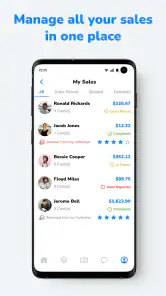
Yes. CollX is designed to help users track their trading and sports cards as well as scan and price them. This can be useful if you want to organize a collection and revisit information about your cards instead of relying only on memory or separate notes. The app brings collection tracking together with scanning and the option to buy and sell with others.
Can I use CollX to buy or sell sports cards, or is it only for scanning?
CollX is more than a scanner: it is designed to help collectors scan, price, and track trading and sports cards, and it also lets users buy and sell with others. That makes it useful both when you want to identify cards you already own and when you want to explore trading with the collector community. The app is free to download, though optional in-app purchases are available.
Who is CollX: Sports Card Scanner designed for?
CollX is aimed at sports card collectors who want a convenient way to identify cards, keep track of a collection, and explore prices and trading. It can suit newcomers who are learning about their cards as well as established collectors organizing what they own. The app is rated for Everyone, so its audience is not restricted to adults, though buying and selling decisions should be made thoughtfully.
What is CollX: Sports Card Scanner?
CollX: Sports Card Scanner is a mobile application designed for sports card enthusiasts. It allows users to quickly scan and identify sports cards using their device's camera. The app leverages advanced image recognition technology to provide detailed information about each card, including its value, rarity, and more. It's a handy tool for collectors looking to manage their collections efficiently.
Pros
- Fast and accurate card scanning.
- Supports a wide variety of sports cards.
- User-friendly interface.
- Regular updates with new features.
- Offline scanning capability.
Cons
- Occasional misidentification of cards.
- Lacks a detailed tutorial for beginners.
- Some features require in-app purchases.
- Limited social features for card trading.
- May drain battery quickly during use.
- Category
- Sports
- Version
- 2.2.59





