CLZ Books - library organizer
- 725.00
- 4.7
- Installs
- 100.00K
- Price
- Free

Screenshots
Analysis by Reviewed
I came to CLZ Books with a familiar problem: shelves full of books, a few boxes in storage, and no reliable answer when someone asked whether I already owned a particular title. A spreadsheet could handle the basics, but maintaining one felt like another chore. A notes app was even less useful once editions, authors, and ISBNs started getting mixed together. This app takes a more focused approach to that exact situation by turning a phone into a personal book-cataloging tool.
Developed by CLZ, this free Books & Reference app is designed around building a searchable record of a collection rather than helping me read, buy, or borrow books. That distinction matters. I would not choose it as an e-reader or a general reading tracker. I would choose it when the main question is, “What do I own, where is it, and what should I do with it next?”
Its store presence is strong enough to suggest that the idea works for many collectors: it has a 4.7 average from around 3.7 thousand ratings and more than 100 thousand installs. It is rated for Everyone, and the app is free to install, although in-app purchases range from $0.99 to $19.99 per item. The store summary also presents a paid yearly plan costing US $20, so I would check the current purchase screen carefully before committing to a large catalog.
From an unorganized shelf to a usable library
I look at the speed question in practical terms: scanning can spare me repeated typing, but it does not make cataloging instantaneous. In the next section, I’ll focus on what happens when a collection is large or messy, and why a steady batch-by-batch routine is more useful than trying to race through every shelf.
Starting with the real problem
The best way to use this app is not to treat cataloging as a one-time race. I found the process more manageable when I started with the books I actually needed to identify: the shelves in my office, the novels packed in a hallway box, or the titles I might accidentally buy again. That gives the catalog an immediate purpose instead of leaving me with a huge unfinished project.
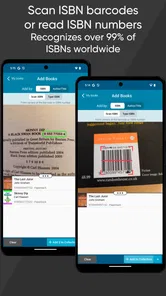
The central input method is ISBN scanning. I point the phone at the barcode on a book, let the app identify the edition, and then check the result before moving on. This is much faster than typing a title and author for every item, particularly with books that have long subtitles or authors whose names are easy to misspell. The scan-first workflow is the app’s most convincing advantage over a spreadsheet.
There is also an important collector’s habit to develop: I do not assume that a matching title means a matching edition. A paperback, hardcover, translated edition, and anniversary printing can all represent the same work while having different ISBNs. When the physical copy in my hand matters, I verify the cover and publication details rather than blindly accepting the first match. That small pause prevents the catalog from becoming tidy but inaccurate.
More From Our News Desk

Weather by Xiaomi Review: Clear at a Glance, Less Clear Up Close

X Under Pressure: Can It Recover When Posting Goes Wrong?

Clash of Clans Is Won Between the Battles

Android Auto Makes the Case for Quieter Car Software

MobiOffice: Transforming Mobile Productivity with Seamless Integration

EA SPORTS FC™ Mobile Soccer: Redefining Mobile Sports Gaming
Scanning in a practical order
I recommend working shelf by shelf, not author by author. A shelf-based route keeps the physical books and the digital list synchronized. I scan one section, inspect the entries, and only then move the books back. This makes duplicate detection easier because I can immediately compare similar covers and editions instead of trying to remember what I scanned earlier.
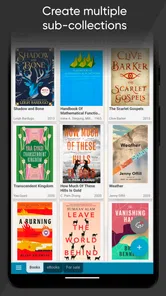
For a mixed collection, I would separate the workflow into clear groups: books at home, books in storage, and books currently loaned out. Even if the initial goal is simply to record ownership, these groups become useful later. A catalog is far more valuable when it answers practical questions about location and availability, not just when it displays a long list of titles.
Scanning is not equally smooth for every physical book. Older copies may have damaged, tiny, or missing barcodes. Oversized books and awkward dust jackets can also make it harder to position the camera. In those cases, I expect to slow down and use manual searching or editing rather than repeatedly forcing the scanner to work. The app saves time overall, but it does not remove the messiness of a real-world collection.
Checking the record before moving on
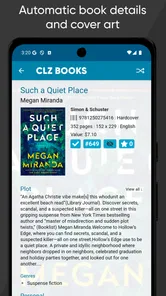
After a scan, I treat the returned record as a draft, not as unquestionable truth. I check the title, author, cover, and edition against the object in front of me. This is especially important when a book has been reprinted or when several editions share a similar cover. A fast catalog filled with wrong editions is less useful than a smaller catalog that I trust.
This verification step is one of the trade-offs of the app. Barcode recognition reduces typing, but it shifts some responsibility to me. The app can identify a book quickly; it cannot inspect the condition of my copy, notice a signed page, or know that two copies are stored in different rooms unless I add that information. I see this as a reasonable limitation, but new users should plan for review time rather than expecting a completely automatic inventory.
Adding the details that make ownership useful
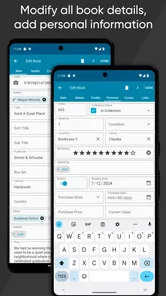
A basic title list is only the beginning. I get more value when I add personal information that a public bibliographic record cannot know: whether I have read the book, whether it belongs to a particular family member, where it is stored, or whether it is waiting to be lent. The exact fields I care about depend on the collection, but the principle is consistent: use the catalog to record decisions and context, not just facts printed on a cover.
One non-obvious use is preparing for a move. I can scan by physical area, then use the resulting organization to pack boxes with a clear relationship between the books and their intended destination. Another is estate or household planning. If several people share a library, personal notes and location labels can reduce the awkward process of opening every box to find one title.
For collectors who buy frequently, the app can also act as a shopping safeguard. Before purchasing a book at a secondhand shop, I can search the collection and check whether I already own that edition. This is more useful than relying on memory, especially when a familiar title appears under a different cover. The app does not need to replace a wish list to prevent duplicate purchases; a trustworthy ownership record can do that job on its own.
Handling the handoff between phone and physical shelf
The key handoff is from the camera to the catalog, and then from the catalog back to the shelf. I scan the book, confirm the record, add the personal context, and return the physical copy to a deliberate location. If I skip the final step, I may have a well-organized digital list but still waste time searching the room.
I find it helpful to establish a simple location vocabulary before entering hundreds of books. “Office shelf,” “bedroom case,” and “storage box” are more useful than vague labels such as “home.” Consistent wording also makes later searching easier. I would avoid creating too many categories at the beginning, because a complicated system can discourage regular updates.
There is another handoff when a book leaves my possession. Lending a book changes the catalog from a record of ownership into a small accountability system. I would update the relevant personal note or location immediately, while the borrower and date are still clear in my mind. Waiting until later defeats the purpose of having a current inventory.
What the finished catalog gives me
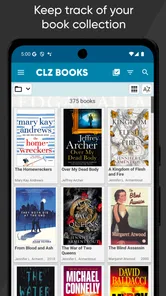
Once a meaningful portion of the collection is entered, the benefit becomes less about scanning and more about confidence. I can search instead of walking from shelf to shelf. I can distinguish a title I own from one I merely want. I can identify gaps in a series and decide whether buying the next volume makes sense. The result is a working reference library rather than a decorative list.
This is where CLZ Books compares well with the usual alternatives. A spreadsheet offers flexibility, but I would need to design columns, type bibliographic information, and maintain consistency myself. A notes app is quick for a few titles but becomes difficult to search and standardize as the collection grows. General reading trackers are often better for recording books I have finished, while this app’s purpose is closer to inventory management.
Dedicated cataloging also changes the quality of the information. A spreadsheet can be excellent if someone enjoys building and maintaining it, but the barcode-centered workflow removes much of the repetitive entry. For me, that is the deciding difference. I am more likely to keep a system current when adding a physical book takes a scan and a short review rather than a miniature data-entry session.
Where the workflow breaks down
The biggest weakness is the initial labor. A large library still has to be handled book by book. Scanning makes each entry easier, but it does not make a thousand physical objects appear in the catalog instantly. Anyone expecting a completely hands-off inventory may become frustrated, particularly if many books have damaged barcodes or unusual editions.
Accuracy can also suffer when I move too quickly. A scan may find a plausible match that is not the exact copy I own, and a duplicate can slip through if I fail to compare editions. This is not a reason to reject the app; it is a reason to build verification into the routine. I would rather scan a smaller batch carefully than create a large catalog that needs a second cleanup project.
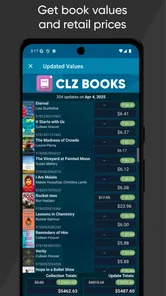
The subscription question is another practical consideration. The app is free to start, but the store summary points to a US $20 yearly plan, while individual in-app purchases are listed from $0.99 to $19.99. For a small collection, a paid plan may feel unnecessary if I only want a short-term inventory. For a serious collector, the time saved by a specialized workflow may justify the cost. I would decide based on how often I buy, lend, move, or search books—not simply on the number of titles already on the shelves.
Platform and device age may matter as well. The current version is 11.1.3 and requires Android 6.0 or later, so I would check compatibility before planning a cataloging weekend around an older phone or tablet. The app is available as an Android app in this context, and its Everyone rating makes it suitable for general household use, including a shared family collection.
Who should use it, and who should skip it
I recommend it to readers with a physical library that has outgrown memory. It is particularly useful for people who buy used books, collect series, share books with family, or need to manage books across several rooms. It also suits anyone who wants a searchable ownership record without designing a database from scratch.
I would be more cautious if the goal is only to track reading progress. If I mainly want to record what I finished this month, a simpler reading journal may feel lighter. The same applies to someone with only a handful of books and no risk of duplicate purchases. In that situation, the scanning workflow may be more structure than necessary.
I would also skip it if I dislike maintaining personal records. The app can make cataloging efficient, but it cannot decide where every book belongs or keep loan details current without my participation. Its value grows through consistent use. A neglected catalog is still a neglected catalog, even when the first setup was convenient.
My recommended routine for keeping it current
I would begin with one shelf and create a repeatable rhythm: scan, verify the edition, add the location, and put the book away. After that, I would update the catalog whenever a new book enters the home, not save several months of additions for one exhausting session. The same rule applies to lending and returning books: make the change at the moment the physical handoff happens.
For a family collection, I would agree on location names and ownership labels before anyone starts scanning. For a collector, I would decide in advance whether condition, signed status, or duplicate copies deserve personal notes. These choices prevent the catalog from becoming inconsistent and make later searches much more meaningful.
My final view is that CLZ Books is strongest when it is treated as a practical inventory tool, not a novelty scanner. Its barcode-led entry makes the first step less tedious than building a spreadsheet, while its usefulness comes from the decisions I attach to each record afterward. The friction is real: physical scanning takes time, matches need checking, and the paid plan deserves consideration. Still, for anyone who regularly asks where a book is, whether it is already owned, or which edition is on the shelf, this app offers a sensible path from scattered books to a dependable personal library.
CLZ Books - library organizer Frequently Asked Questions
Can I try CLZ Books before paying for a subscription?
CLZ Books is free to download, and it offers in-app purchases for users who want access to paid options. The store summary describes the service as US $20 per year, while the available in-app purchase options range from $0.99 to $19.99 per item. Check the current plan and purchase details in your app store before subscribing, as those terms help you decide whether the organizer fits your needs.
Is CLZ Books suitable for new readers as well as serious collectors?
Yes. CLZ Books is a Books & Reference app for organizing a personal collection, so it can be useful whether you own a handful of favorites or keep a more extensive library. Its barcode-scanning and search options make it approachable for everyday cataloging, while tags, filters, and editable records provide more structure for collectors. The app is rated for Everyone, making it suitable for a broad range of users.
What is CLZ Books, and what can I use it for?
CLZ Books is a mobile library organizer designed to help you catalog, browse, and manage a personal book collection. You can add books by scanning their barcodes, searching online databases, or entering details manually. The app can display information such as titles, authors, publication data, cover images, and reading status, making it easier to keep track of both physical and digital collections.
How do I add books to my CLZ Books collection?
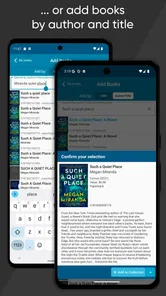
The quickest way to add many physical books is usually the barcode scanner, which can identify a book and retrieve its details automatically. You can also search by title, author, ISBN, or other information when a barcode is unavailable. After selecting a match, you can review and edit the imported data, add personal notes, assign tags, and record details such as purchase information or the book’s location.
Does CLZ Books require a subscription or an internet connection?
CLZ Books is generally offered as a subscription-based service, so users should check the current pricing and plan details on the official Google Play or App Store listing before downloading. An internet connection is normally needed when searching online databases, downloading cover images, or synchronizing data. Once information is stored on the device, many browsing and editing features may remain available offline.
Pros
- Quick barcode scanning makes adding books to your library simple.
- Detailed catalog records include covers
- authors
- editions
- and publication data.
- Custom fields help track signed copies
- reading status
- and purchase details.
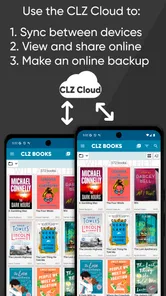
- Cloud syncing keeps your collection available across supported devices.
- Powerful search and filtering tools make large libraries easy to browse.
Cons
- The subscription cost may feel high for users with small collections.
- Some catalog details may need manual correction or completion.
- Scanning works best with clear
- recognized ISBN barcodes.
- The app can feel overwhelming until its many options are learned.
- An internet connection may be needed for catalog lookups and syncing.













