CLZ Comics comic book database
- 4.95K
- 4.8
- Installs
- 100.00K
- Price
- Free

Screenshots
Analysis by Reviewed
I like to know what I already own before buying another issue, and that is the practical appeal of CLZ Comics: it turns a comic collection into something I can search and manage instead of relying on memory or handwritten notes. It is a comics cataloging app from CLZ, available free to install, with in-app purchases ranging from $1.99 to $89.95 per item. The app has a 4.8 average from around 14,000 ratings, and more than 100,000 installs. Those figures suggest an established audience, though popularity alone is not a reason to hand over your collection details without thinking about how you want to use the app.
A useful tool, with a clear job
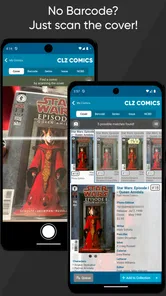
The core task is straightforward: build a personal catalog of the comics you own and keep it useful as your shelves grow. The store description focuses on scanning covers with your device camera, while the published experience also describes barcode scanning and manual entry. That gives you more than one way to add a book, which matters when you have a mixed collection or encounter an issue that is awkward to identify by its barcode.
I would treat the catalog as a practical record, not as a replacement for examining a physical comic. Before adding a newly bought issue, check the details that distinguish it from nearby editions, then confirm the entry rather than assuming every scan has settled the question. This small habit can prevent a collection from accumulating near-duplicate records. It is especially useful for readers who buy several issues from the same series or want their wish list to reflect the exact editions they are seeking.
Privacy-minded use without guesswork
Collection records can reveal more than a reading preference: they may show what someone is collecting, which series they follow, and what they plan to buy. I would avoid entering notes that I would not want associated with my account, and I would look at the app’s current permission prompts and account choices on my own device before enabling anything. I can’t judge privacy practices from a feature description alone, so I would not take cloud syncing as proof of a particular security policy or assume that a camera permission means continuous camera access.
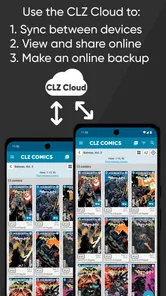
That cautious approach does not make the app difficult to use. It simply separates what the catalog needs from what a user might prefer to keep private. If you choose to scan, use the camera for the cover or barcode when adding an issue, then close that workflow; if you would rather not grant camera access, manual entry is the alternative described for building the collection. For anyone deciding whether online syncing suits them, the sensible question is whether access across devices and an online backup are worth keeping a collection record in the cloud.
Who gets the most from it
The strongest fit is a collector with enough books that searching, sorting, or remembering gaps has become a chore. Cover art and issue details make browsing more like looking through a virtual shelf than scrolling through a bare list, while publisher, series, and writer-based organization offers different ways to answer “what do I own?” A casual reader with only a handful of comics may find a simple note or spreadsheet easier, especially if they do not need a wish list or visual browsing.
Cost deserves a close look before you build a large catalog. The app is free to install, but its store summary describes a US $20-per-year plan, and in-app purchases are listed from $1.99 to $89.95 per item. I would check the current purchase options in the app before committing time to cataloging, then decide whether the functions I expect to use justify the ongoing cost. The age rating is Everyone, and version 10.5.1 supports Android 6.0 and newer.
More From Our News Desk

Weather by Xiaomi Review: Clear at a Glance, Less Clear Up Close

X Under Pressure: Can It Recover When Posting Goes Wrong?

Clash of Clans Is Won Between the Battles

Android Auto Makes the Case for Quieter Car Software

MobiOffice: Transforming Mobile Productivity with Seamless Integration

EA SPORTS FC™ Mobile Soccer: Redefining Mobile Sports Gaming
If you want a simple, offline-first inventory and have no interest in artwork, detailed records, or browsing views, a spreadsheet may suit you better. If you actively track a collection, though, a dedicated comic database can save time that a generic notes app cannot: it is organized around issues and series rather than asking you to invent your own fields. My advice is to test the workflow with a small group of comics first, including one you add manually, before cataloging every box.
Making a collection useful beyond the shelves
A catalog becomes more valuable when I use it at the moment I need an answer. Before heading to a shop or a convention, I can check a series on my phone rather than trying to remember which issue I last bought. The wish list can help turn that quick check into a practical buying plan: I can note a gap while browsing at home, then consult it when I am surrounded by tempting covers and more likely to buy a duplicate.
For a household with more than one reader, the catalog can also make collection conversations more concrete. If someone asks whether a particular run is already on the shelf, a searchable record is easier to consult than asking whoever usually remembers where everything is. I would still treat the app as a guide rather than a substitute for checking a box when an edition or condition matters. That distinction keeps the digital list useful without pretending it captures every detail of the physical books.
Small habits that prevent a messy database
My main practical tip is to catalog in batches instead of trying to process an entire long box in one sitting. Add a short run, review the results, and correct any uncertain matches while the relevant issues are still in front of you. This is less exciting than scanning everything at once, but it reduces the chance that a mistaken edition quietly becomes part of the collection record and later affects what you think you own.
It also helps to decide how you will use the catalog before choosing how much detail to maintain. If your main goal is avoiding duplicate purchases, prioritize accurate issue identification and a dependable wish list. If you mainly enjoy browsing, cover images and organization by series or creator may matter more. Trying to record every possible detail can make upkeep feel like a second hobby; the best system is the one you will actually update after a new purchase.
How it compares with simpler alternatives
A spreadsheet is flexible, familiar, and easy to tailor, but it asks you to create and maintain the structure yourself. That can work well for a small collection or someone who only needs a title and issue number. A general notes app is even lighter, yet it can become awkward when you want to filter a long list by series or browse covers. CLZ Comics is aimed at the collector who wants a purpose-built comic record rather than a blank page, and that specialization is its clearest advantage over those basic options.
The trade-off is that a dedicated catalog brings its own workflow and cost decisions. If you rarely add comics, or you strongly prefer keeping every record in a local file that you control, a spreadsheet may feel more comfortable. If you regularly buy, sort, or hunt for missing issues, the specialized organization can save enough effort to justify learning the app. I would choose based on how often I need the catalog, not on how large I hope the collection might become someday.
Questions worth settling before you commit
Will scanning identify every comic perfectly? I would not plan around that assumption. Scanning offers a faster way to start, but I would verify close editions and use manual entry when an issue is difficult to identify. Can I avoid using the camera? Manual entry provides another route, though it takes more hands-on work. Those are useful distinctions to test with a few books before deciding whether the setup suits your collection.
Is the app free in the sense of having no ongoing cost? It is free to install, but the listed purchase range and the yearly plan described in the store summary mean I would inspect the options and terms in the app before relying on a particular set of features. Does a cloud backup automatically settle privacy concerns? No: I would review the current account and permission choices and decide whether online access is a trade-off I want. That is a personal decision, not a reason to assume either that cloud storage is unsafe or that it is risk-free.
Finally, will it work for a very small collection? It can still help if you want a wish list or enjoy a visual catalog, but the time spent entering a few books may outweigh the convenience. I would start with a sample rather than committing to a full inventory. That low-effort trial is the best way to judge whether the database fits your habits, especially if you are comparing it with a spreadsheet or a handwritten list.
If you're a comic book enthusiast like me, then you know the struggle of keeping track of your ever-growing collection. That's where CLZ Comics comes in. This nifty app is like a personal librarian for your comic books, making it easier than ever to organize and catalog your stash.
Getting Started with CLZ Comics
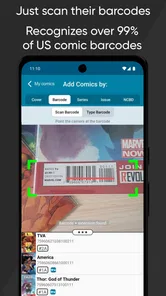
First things first, let's talk about the setup. Installing CLZ Comics is a breeze. Available for both Android and iOS, it takes just a few minutes to download and install. Once you fire up the app, you're greeted with a clean, user-friendly interface that’s super intuitive. The app walks you through the process of adding comics to your database, which you can do manually or by scanning the barcode. I mean, how cool is it to just scan a barcode and have all the details pop up?
Features that Make Life Easier
Now, let's dive into the features. One of my favorite things about CLZ Comics is the cloud syncing. It’s such a relief knowing that my collection is backed up online, safe from any local mishaps. This feature is particularly handy if you switch devices or want to access your collection on multiple devices. Another highlight is the extensive comic database that the app taps into. Whether you're collecting Marvel, DC, or indie comics, the app’s database is impressively comprehensive.
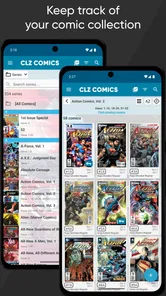
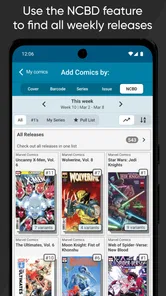
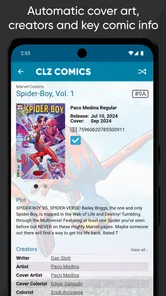
The app also offers a wish list feature, which is perfect for keeping track of the comics you’re on the hunt for. And if you’re someone who loves diving into the details, you’ll appreciate the app's ability to provide information on each comic, including cover art, creators, and storylines.
Why You’ll Love It
What really sets CLZ Comics apart is its seamless user experience. Even if you're not tech-savvy, the app's design makes it easy to navigate through your collection. Plus, the customer support is top-notch. Any queries or issues are handled swiftly, making the overall experience smooth and enjoyable.
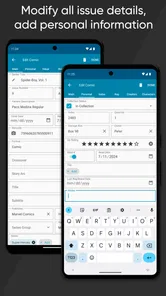
And let's not forget about the customization options. You can organize your comics by series, publisher, or even by the writer. It’s like having a personalized comic library right in your pocket. Plus, the app gives you the option to view your collection in various ways - as a list, in cover view, or even in a shelf view, which is particularly pleasing to the eye.
The Final Verdict
In conclusion, if you're serious about your comic book collection, CLZ Comics is a must-have tool. It's not just an app; it's a reliable companion for every comic book lover. With its robust features and user-friendly interface, it’s truly a game-changer in the world of comic book databases. So, go ahead, give it a try, and take your comic collecting to the next level. Trust me, once you start using it, you’ll wonder how you ever managed without it!
CLZ Comics comic book database Frequently Asked Questions
Is CLZ Comics mainly for reading comics or organizing them?
CLZ Comics is a comic book database app for cataloging a collection, rather than an app for reading comic books. Its focus is keeping your collection organized, with camera-based scanning to help add comics and a database for recording collection details. If you want to read digital issues, this app’s purpose is different; it is designed for collectors who want an inventory.
Can I add comics by scanning their covers?
Yes. CLZ Comics uses your device’s camera to scan comic covers, which can make cataloging quicker than entering every item manually. The app’s store summary specifically highlights cover scanning, and the published app details also describe barcode scanning as a way to look up comic information. A camera is useful for this feature, while manual cataloging may suit situations where scanning is not convenient.
Does CLZ Comics work on my device?
CLZ Comics is available for devices running Android 6.0 or later. It is a comic book database app from developer CLZ, intended for organizing a comic collection rather than reading comics. Before downloading, check that your device meets the minimum operating-system requirement and has a camera available if you want to use cover scanning.
What is CLZ Comics and what does it offer?
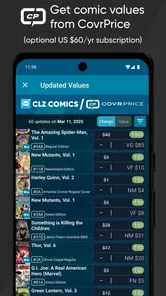
CLZ Comics is a comprehensive comic book database app designed for collectors and enthusiasts. It allows users to catalog their comic book collections with ease, offering features such as scanning barcodes for automatic entry, detailed comic information, and the ability to track your collection's value. This app is perfect for maintaining an organized and up-to-date comic book inventory.
Can I use CLZ Comics for free, or is there a subscription fee?
CLZ Comics offers a free trial, allowing users to explore its features for a limited period. After the trial, a subscription is required to continue using the app. The subscription fee unlocks full access to the app's extensive database, barcode scanning, and cloud synchronization features, ensuring your collection is always backed up and accessible. The app is listed as free to download, with in-app purchases ranging from $1.99 to $89.95 per item; its store summary also mentions US $20 per year.
Pros
- User-friendly interface
- Comprehensive database
- Regular updates
- Offline access
- Customizable lists
Cons
- Subscription-based model
- Limited free features
- Requires internet for sync
- Occasional bugs
- No dark mode













