CLZ Music, CD/vinyl collection
- 445.00
- 4.7
- Installs
- 100.00K
- Price
- Free

Screenshots
Analysis by Reviewed
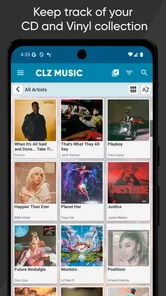
I have always found physical music collections easier to enjoy than to manage. CDs and vinyl records are satisfying to own, but once a shelf grows beyond a few dozen albums, remembering exactly what is there becomes surprisingly difficult. CLZ Music approaches that problem as a focused cataloging app for music lovers who want a searchable record of their albums without typing every detail by hand.
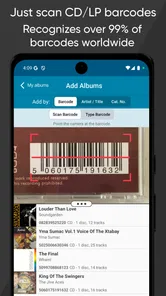
In my experience, its best idea is also its most practical one: use the barcode on an album to start the catalog entry. That makes it much more useful than a basic notes app or spreadsheet for anyone building a serious collection. Instead of recording only an artist and title, I can organize a library around the physical releases I actually own, which matters when different editions, formats, and packaging begin to overlap.
The app comes from CLZ, a developer known for collection-management tools, and sits in the Music & Audio category. It is free to install, rated for Everyone, and has built a strong audience with a 4.7 average from around 3.7 thousand ratings and more than 100 thousand installs. The current version is 11.1.3, and it runs on Android 6.0 or later. There are in-app purchases ranging from $0.99 to $19.99 per item, so the free entry point is useful, but anyone planning to maintain a large collection should pay attention to the app’s ongoing cost before committing.
Starting with a reliable collection workflow
The cleanest way to use the app is not to begin by entering every album randomly. I get better results by choosing one shelf, box, or section at a time and working through it in a consistent order. Scanning a barcode gives the catalog a starting point, then I check that the release shown matches the copy in my hand before moving on. That small verification step is important because the same album can appear in several physical editions.
A barcode is a shortcut, not a guarantee that every detail will perfectly describe your copy. Older records, unusual pressings, imported releases, and albums with similar packaging deserve a closer look. When I rush through scanning, the collection may look complete while quietly containing mismatched editions. A slower first pass saves time later, especially if I care about distinguishing a standard CD from a deluxe package or a particular vinyl release.
For a casual collection, cataloging only the obvious information may be enough. For a larger one, I recommend deciding in advance what “owned” means. Do promotional copies count? What about duplicates, damaged discs, albums kept at another address, or records that belong to a family member? The application is most useful when the rules stay consistent. Otherwise, searching the catalog later can produce an attractive but unreliable picture of what is really available.
A realistic everyday example is preparing for a house move. I can scan a shelf before packing it, search the catalog when I wonder whether a particular album is already boxed, and use the saved collection as a reference while checking for duplicates. The value is not just the initial scan. It is having a dependable memory of the collection when the physical items are spread across rooms, storage boxes, or different shelves.
More From Our News Desk

Weather by Xiaomi Review: Clear at a Glance, Less Clear Up Close

X Under Pressure: Can It Recover When Posting Goes Wrong?

Clash of Clans Is Won Between the Battles

Android Auto Makes the Case for Quieter Car Software

MobiOffice: Transforming Mobile Productivity with Seamless Integration

EA SPORTS FC™ Mobile Soccer: Redefining Mobile Sports Gaming
I also like the app for shopping decisions. Before buying a used CD, I can check whether I already own that title. This is especially helpful with artists whose albums I collect gradually, where the cover may look familiar but the exact release is easy to forget. The app does not replace careful inspection of a second-hand item, but it reduces the most common mistake: buying something I already have because I remembered the artist but not the album.
What to check before trusting a scanned entry
My advice is to compare the catalog result with the physical release rather than assuming the first match is correct. Look at the artist, album title, format, cover, and any edition information that matters to you. If the result feels close but not exact, treat it as a draft entry. That habit is more valuable than scanning quickly, because the usefulness of a collection depends on the accuracy of its small details.
This is also where the app’s focus becomes clear. It is designed for cataloging music albums, not for acting as a streaming player, a discovery service, or a replacement for a digital music library. If your listening life is almost entirely based on streamed playlists, CLZ Music may feel like extra work. Its purpose is strongest when ownership of physical media matters to you.
Settings and habits that make the catalog easier to maintain
Experienced users will get more from the app by treating its settings and organization choices as part of a routine rather than something to configure once and forget. I would begin by deciding how much detail I genuinely intend to maintain. A highly detailed catalog can be rewarding, but only if I am willing to keep it updated when I buy, sell, lend, or replace albums.
The most useful setting is the one that supports your own collection structure. Some people think primarily in artists, others in formats, genres, shelves, or ownership status. I find it helpful to use the app’s available sorting and filtering choices to answer real questions: Which albums do I own by this artist? Which records are in a particular format? Which part of the collection still needs checking? A catalog becomes much more valuable when its organization reflects decisions you actually make.
Before scanning a large batch, I would also review how new items are handled and how the app presents collection information. Small choices about display and sorting can affect whether the catalog feels quick to browse or cluttered. The right arrangement is personal, but the principle is universal: configure the view around the way you search, not around the way the app first happens to show the data.
One useful habit is to separate cataloging from cleanup. During the first pass, I focus on getting each album into the collection. Later, I correct questionable matches, add personal notes where they are genuinely useful, and resolve duplicates. Trying to make every entry perfect while scanning a whole shelf can turn a simple task into a tedious one. A two-stage workflow keeps momentum without abandoning accuracy.
I would also establish a regular maintenance trigger. For me, that could be after a record-shopping trip, when a parcel arrives, or before reorganizing a shelf. Adding new purchases immediately is easier than rebuilding a memory of them weeks later. The same applies to items that leave the collection. A catalog that is accurate only once a year is less helpful when I am standing in a shop deciding what to buy.
Use consistent rules for duplicates and editions
Duplicates are one of the places where personal judgment matters. If I own two copies because one is sealed and one is played, I may want both represented. If I accidentally bought the same standard edition twice, I may prefer one entry with a note rather than two indistinguishable records. CLZ Music can support a careful cataloging habit, but it cannot decide what ownership means for me.
The same trade-off applies to editions. Collectors who care deeply about pressing details should inspect each result and record meaningful distinctions rather than assuming the barcode tells the entire story. On the other hand, a listener who only wants a dependable list of albums may find that level of precision unnecessary. I would not recommend turning every catalog entry into a research project unless those distinctions affect buying, selling, insurance, or collection planning.
Another practical choice is deciding whether the catalog should represent only the music I personally keep or also items temporarily lent out. I prefer to keep the item in the collection and mark its situation in a consistent way if the app allows the kind of organization I need. That preserves a complete ownership history while making it easier to remember where a disc or record has gone.
Faster patterns for scanning and searching
The fastest approach is batch work with a repeatable rhythm. I place several albums within reach, scan one, verify the basic match, set it aside, and continue. I avoid switching constantly between scanning, rearranging shelves, and researching obscure details. That separation reduces mistakes and makes the process feel more like sorting than data entry.
It is tempting to scan an entire shelf without looking at the results, especially when the barcode process is working smoothly. I would resist that temptation. A quick visual check after each scan catches wrong editions early, while the album is still in my hand. Correcting an error immediately is usually easier than trying to identify it later among hundreds of similar entries.
For a large collection, I would work in clearly defined batches: one artist section, one shelf, or one box. That gives me a natural stopping point and makes it easier to resume without wondering where I left off. It also creates a simple audit method. After finishing a batch, I can compare the physical area with the catalog before moving to the next one.
Search becomes more powerful when I use it for decisions instead of browsing aimlessly. Before shopping, I search for the artist or album I am considering. Before lending something, I look it up so I can confirm that it is part of the catalog. Before planning a listening session, I can browse the collection by the categories and details I have chosen to maintain. These are modest uses, but they turn the app into a practical reference tool.
A less obvious benefit is reducing duplicate purchases during periods when my collection is stored out of sight. If albums are packed away, the app becomes a portable memory of the shelves. I can check ownership from my phone without opening every box. That is where a cataloging app earns its place: not while I am staring directly at the shelf, but when the shelf is unavailable.
Keep the catalog useful rather than exhaustive
There is a point where extra detail stops improving the experience. If I spend several minutes researching every release before adding it, I am less likely to maintain the collection after future purchases. My preferred balance is to capture the information needed for identification and retrieval, then add deeper notes only for albums where the distinction matters.
This approach also helps people who are sharing the collection with someone else. A family member can search a clear album entry without needing to understand a complicated personal coding system. If the catalog is meant only for a specialist collector, more precision may be worthwhile. If it is a household reference, clarity usually wins.
Because the app is free to install but includes paid items, I would test the basic workflow with a representative portion of the collection before investing heavily in a long-term catalog. Scan a few ordinary albums, a duplicate, and an older or unusual release. That trial tells me more than a quick look at the store page because it reveals whether the matching and editing process fits my patience and collection style.
Where the app’s focused design reaches its limits
CLZ Music is not the right choice for everyone. If I want automatic listening history, recommendations, social sharing, or a streaming catalog, I would look elsewhere. A spreadsheet may also be better for someone who wants total control over custom fields and does not mind entering information manually. A general notes app can be faster for a tiny collection, although it becomes harder to search and keep consistent as the library grows.
The barcode-centered workflow is convenient, but physical music is messy. Some items may not scan cleanly, and a close database match may still require manual checking. Collectors with many rare, regional, or heavily customized releases should expect more hands-on work. The app reduces repetitive typing; it does not remove the responsibility of identifying what is actually on the shelf.
There is also a commitment issue. A collection catalog is only as good as its maintenance. If I stop adding purchases or fail to update items I sell and lend, the search results gradually become less trustworthy. That is not a flaw unique to this application, but its value can make the neglect more noticeable. I would skip it if I know I will not keep a routine, because a half-finished catalog may create more confusion than a simple shelf list.
The pricing model deserves a realistic look as well. The app costs nothing to download, while in-app purchases are listed from $0.99 to $19.99 per item and the store summary refers to a US $20 yearly cost. For a small collection, this may feel like a reasonable way to begin. For a dedicated collector, the recurring expense should be weighed against how often the catalog will be used and whether its convenience replaces enough manual work to justify it.
Device compatibility is another practical consideration. The minimum operating-system requirement is Android 6.0, which covers older Android devices but still means I should check the phone or tablet I plan to use before building the catalog around it. If I am choosing a device specifically for a music-room collection, I would also prioritize a camera that makes barcode scanning comfortable and a screen large enough for browsing long lists.
Who benefits most from this particular tool?
I would recommend it most strongly to people with a growing CD or vinyl collection who regularly forget what they own. It is also a good fit for collectors who buy used music, maintain multiple shelves, lend albums to friends, or want to distinguish physical ownership from digital access. The barcode workflow is especially appealing when the alternative is spending an evening creating a spreadsheet by hand.
I would be more cautious for someone with only a handful of albums, someone who wants a music player rather than a catalog, or someone whose collection consists mainly of releases without reliable barcodes. Those users may find a simpler list or a broader music application more suitable. The focused design is a strength only when the problem is specifically organizing physical music.
For serious collectors, the decision depends on the desired level of detail. If I want a convenient inventory for browsing and shopping, the app’s speed is attractive. If I need a fully customized archival database with unusual fields, complex valuation records, or a research-grade history of every pressing, I would compare it carefully with a purpose-built database or spreadsheet workflow before moving everything over.
My strongest practical tip is to start with the albums I use most often, not necessarily the easiest shelf. That immediately tests whether the catalog answers useful questions in daily life. Once I trust the workflow, I can expand to storage boxes and less frequently accessed items. This avoids spending hours cataloging material before knowing whether the app will become part of my routine.
My verdict after making the workflow repeatable
CLZ Music works because it addresses a very specific frustration: owning physical music is enjoyable, but remembering and organizing it is not always easy. Scanning gives the process a practical starting point, while search and collection views turn the result into something I can use when shopping, moving, lending, or planning what to play.
I would not describe it as effortless in every situation. Barcode matches still need attention, unusual editions can demand manual judgment, and a large catalog requires a maintenance habit. The free installation is helpful, but the in-app purchase structure means I would test the experience first and consider the yearly cost as part of the decision. Those points matter because the app is most valuable as a long-term record, not as a one-day scanning experiment.
What separates it from a basic spreadsheet for me is the combination of a music-specific workflow and the ability to begin with the physical item in front of me. What separates it from a streaming service is equally important: this is about the albums I own, not merely the tracks I can access. That distinction makes it a strong companion for a real CD or vinyl collection, while making it a poor substitute for playback and discovery tools.
My recommendation is straightforward: if your shelves are growing and you often ask yourself whether you already own an album, try the app with one representative batch. Use consistent rules, verify unusual releases, and add new purchases while they are still fresh. The real advantage appears when scanning becomes a small repeatable habit rather than a one-time cataloging project. With that mindset, CLZ Music is a focused and useful collection companion; without it, even a well-designed catalog can quickly become another neglected list.
CLZ Music, CD/vinyl collection Frequently Asked Questions
Can I export or share my CLZ Music collection with someone else?
A well-organized catalog is useful not only for browsing, but also for keeping a record of what you own. CLZ Music is designed to manage collection details in one place, and its cloud features help you access your catalog across supported devices. If you want to share or export a list for another purpose, check the app’s current options and account settings before building your workflow around a particular format.
Who is CLZ Music best suited for?
CLZ Music is most useful for listeners who own a physical music collection and want more structure than a basic notes app or spreadsheet can provide. It can suit someone cataloging a modest shelf as well as a dedicated collector keeping track of CDs, vinyl, and other formats. If you mainly stream music and do not need to document physical releases, its collection-focused tools may be more than you need.
What is CLZ Music, and what can I use it for?
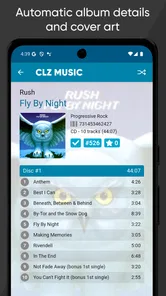
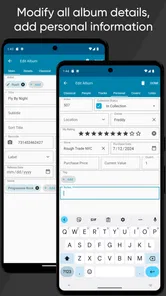
CLZ Music is a collection-management app designed for people who own CDs, vinyl records, albums, and other music formats. After testing its cataloging tools, I found it useful for creating a searchable personal library with cover art, artist details, release information, purchase data, and notes. It is especially helpful when your collection has grown too large to manage reliably with spreadsheets or memory alone.
How do I add CDs and vinyl records to my CLZ Music collection?
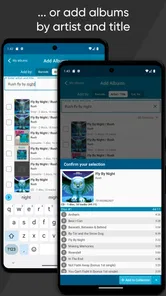
The fastest way to add physical music is usually by scanning the barcode on a CD, box set, or other release. You can also search the extensive online music database manually when a barcode is missing or difficult to read. Once a match appears, you can review the release details before adding it. For uncommon pressings, imports, or records with different editions, manual editing may still be necessary.
Does CLZ Music work offline, and is my collection synchronized across devices?
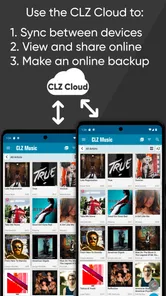
CLZ Music allows you to view and manage much of your collection when you are away from an internet connection, which is convenient while browsing record stores or checking what you already own. Cloud synchronization is available for keeping your data backed up and accessing it on supported devices. You should sign in with the same account and allow syncing to complete before switching devices or relying on a recent backup.
Pros
- Scans barcodes quickly and usually identifies common releases accurately.
- Supports CDs
- vinyl
- cassettes
- and digital albums in one collection.
- Detailed catalog fields help track editions
- formats
- and purchase information.
- Cloud syncing keeps your collection available across supported devices.
- Powerful filters make it easy to find albums by artist
- genre
- or format.
Cons
- Full access requires a recurring subscription after the trial period.
- Rare or regional releases may need manual searching or data entry.
- Some catalog details can require corrections for specific pressings.
- The interface may feel dense for users with smaller collections.
- Cloud-based features depend on an active internet connection.













