Cloaked: Protect your privacy
- 3.15K
- 4.5
- Installs
- 100.00K
- Price
- Free

Screenshots

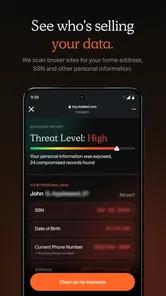
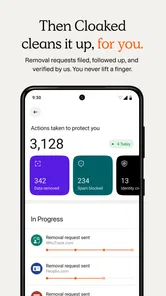

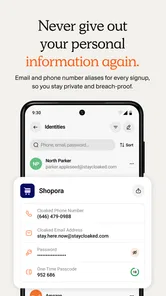
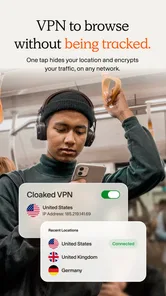
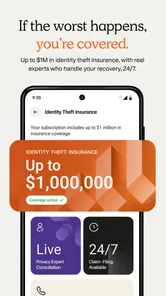
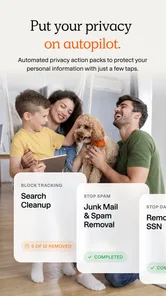
Analysis by Reviewed
Protecting personal information online often sounds like a job for security experts, but my first impression of Cloaked: Protect your privacy was much more practical: it is aimed at people who want a simpler way to think about privacy while using everyday online services. It belongs in the productivity category, although its real purpose is reducing the amount of personal information you hand over during ordinary digital tasks.
I found the app most appealing when I stopped treating it as a dramatic “lock everything down” solution and instead used it as part of a calmer routine. Signing up for a newsletter, trying a new service, contacting a seller, or creating an account can all involve information I would rather not reuse everywhere. Cloaked is designed around that privacy-minded way of working, and the result feels more useful for prevention than for cleaning up a problem after it has already happened.
The app is free to install, with optional in-app purchases ranging from $4.49 to $143.99 per item. That pricing range makes it important to understand your own needs before paying for anything. I would begin with the free experience, learn the workflow, and only then decide whether the additional options fit the way I use online accounts.
What to expect before you begin
The developer is cloaked, and the app has built a solid audience: it has an average rating of 4.5 from around 15 thousand ratings, alongside roughly 3.1 thousand written reviews and over 100 thousand installs. Those figures suggest that the idea is easy for many people to understand, but they should not be mistaken for a guarantee that every privacy concern disappears automatically.
The most useful expectation is this: Cloaked can help you make more deliberate choices about what information you share, but it still depends on your decisions. Privacy tools work best when they are used at the moment you create an account or communicate with a company. If you install the app and never change your habits, the benefit will be limited.
I also would not approach it as a replacement for every other security measure. It does not make weak passwords sensible, remove the need for careful account recovery, or turn suspicious messages into safe ones. Its strength is narrower and more focused: it gives privacy-conscious users a way to separate parts of their online identity instead of using the same personal details everywhere.
That distinction matters for first-time users. Someone looking for a password manager, a device-cleaning utility, or a general antivirus app may be expecting the wrong kind of product. Cloaked makes more sense for a person who regularly signs up for services, shops online, tests unfamiliar apps, or wants more control over how reachable they are.
More From Our News Desk

Weather by Xiaomi Review: Clear at a Glance, Less Clear Up Close

X Under Pressure: Can It Recover When Posting Goes Wrong?

Clash of Clans Is Won Between the Battles

Android Auto Makes the Case for Quieter Car Software

MobiOffice: Transforming Mobile Productivity with Seamless Integration

EA SPORTS FC™ Mobile Soccer: Redefining Mobile Sports Gaming
Who will get the most from it
I think the best match is someone who has accumulated too many online accounts and has started noticing how often the same personal details are requested. Freelancers, online shoppers, people joining communities, and anyone who frequently tests new services can benefit from a more separated approach.
It can also suit a person who wants to avoid giving a new company their primary contact details immediately. For example, imagine ordering a replacement part from a store you have never used. You need the store to reach you about the order, but you may not want that contact route to become part of a long-term marketing database. A privacy-focused workflow lets you treat that interaction as a limited relationship rather than automatically connecting it to everything else in your digital life.
On the other hand, I would hesitate to recommend it as a first choice to someone who wants a completely automatic experience. Privacy involves small decisions, and those decisions can feel like extra work compared with simply filling in a familiar form. If your priority is speed above all else, a conventional account workflow may feel more convenient.
Setting up the app without overthinking it
The app supports devices running Android 10 or later, so compatibility is one of the first practical checks to make. It is available for users of all ages under its Everyone content rating. Once installed, I would approach setup with one simple goal: do not try to reorganize your entire online life in one sitting.
Start by deciding which upcoming interaction would benefit most from more separation. It might be a new shopping account, a service you are only testing, or a website that asks for contact information before you know whether you will keep using it. Choosing one real situation makes the purpose of the app much clearer than exploring menus without a task in mind.
During setup, read each prompt rather than tapping through automatically. Privacy applications often influence how you handle future sign-ups, so understanding the basic flow is more valuable than finishing quickly. I recommend keeping your first experiment deliberately low-risk: use a service where you can easily recognize whether messages arrive correctly and where you do not depend on the account for an urgent task.
A useful habit is to keep a short private note about why you created a particular privacy-based contact route. This is not busywork. After several weeks, separate details can become confusing, especially if you use them for different stores, subscriptions, or temporary conversations. A note such as “replacement part order” or “trial service” makes later decisions much easier.
Another sensible setup choice is to decide in advance which accounts deserve your most stable contact details. Your bank, medical provider, employer, and close personal contacts are not the same as a discount newsletter or an unfamiliar retailer. Cloaked is more helpful when you use it selectively rather than applying the same rule to every account.
Your first meaningful success
The first successful action should be something you can verify immediately. I would choose a new, non-essential service and use Cloaked as part of the sign-up process, then check whether the service can communicate with you as expected. The point is not merely completing registration; it is proving that the privacy workflow fits naturally into something you already do.
Once the account is active, pay attention to the follow-up experience. Can you identify which service is connected to the information you used? Do you know where to look if you want to stop receiving messages later? These questions are more important than simply creating another account, because privacy becomes manageable when you can trace and control each connection.
Here is a realistic everyday example. I might be comparing several meal-delivery services and want to test one without immediately using the contact details tied to my personal life. I would create the account through the privacy workflow, complete one small order or trial interaction, and then observe which messages arrive. If I decide not to continue, I can treat that relationship separately instead of wondering whether cancelling it will affect unrelated services.
This approach also reduces a common mistake: using one personal address for every promotion, delivery update, forum, and trial. When a single contact route becomes noisy, it is difficult to tell which company shared or misused it. Separating interactions does not solve every privacy issue, but it can make unwanted contact easier to identify and manage.
The first win is not hiding everything; it is knowing exactly which online relationship you are creating. That mindset helped me understand the app better than any broad promise about privacy. It turns an abstract concern into a repeatable action: choose the service, use a deliberate contact route, record the purpose, and review it later.
Confusion that can appear in normal use
The biggest source of friction is mental rather than technical. Many people are used to entering the same details everywhere, so a privacy-first workflow can initially feel slower. You may pause to decide which identity detail belongs to which service, whether a new account deserves long-term access, and how you will recognize the conversation later.
That extra thought is useful, but it can also become tiring. I would not create separate arrangements for every tiny interaction. Use the app where the privacy benefit is meaningful: unfamiliar companies, services you are testing, public-facing activity, or situations where you expect promotional messages. For trusted services that you use constantly, a stable and well-maintained account may be the more practical choice.
Another point of confusion is assuming that separating contact information also separates every other part of your identity. It does not automatically make your browsing habits anonymous, prevent a company from recognizing your device, or protect you from voluntarily sharing personal details in a conversation. Keep your expectations precise. Cloaked can support a privacy habit, but it is not a magic curtain around your entire digital life.
Users may also wonder whether they should move all existing accounts immediately. I would avoid that. Start with new accounts and situations where you can clearly see the benefit. Migrating old services can create unnecessary confusion, particularly if an account is connected to billing, recovery, work, or important records. A gradual approach is safer and easier to maintain.
The optional purchase model is another reason to go slowly. Because individual in-app items can cost from $4.49 up to $143.99, I would not treat every paid option as automatically necessary. First identify the problem you are trying to solve, then check whether the free experience already covers your intended use. A privacy tool should improve your control, not pressure you into buying before you understand the workflow.
How it compares with familiar alternatives
The usual alternative is simply using your main email address and personal contact details for every registration. That approach wins on convenience, but it creates one large trail that is difficult to organize later. Cloaked is more deliberate: it asks you to think in terms of separate relationships, which can make unwanted communication easier to recognize.
A password manager solves a different problem. It is excellent for creating and storing unique passwords, and I would still consider one essential for account security. Cloaked complements that habit rather than replacing it. A unique password protects access to an account; a separated contact route limits how widely that account is connected to your personal identity.
Disposable email services can be convenient for one-off registrations, but they may be a poor fit when you need reliable follow-up, account recovery, or ongoing communication. Cloaked is more suitable when privacy and continuity both matter. The trade-off is that you have to manage the relationship instead of treating the address as something you will never need again.
Using a second personal email account is another common workaround. It is easy to understand, but it usually remains a broad bucket containing many unrelated services. Cloaked’s more focused approach is valuable when you want to distinguish one interaction from another rather than merely moving all low-priority mail into a second inbox.
Small habits that make the experience better
My first tip is to name or record each privacy route according to the service and purpose, not just the date it was created. “Travel newsletter” tells you much more later than “new account.” This is especially helpful when you are deciding whether a message is legitimate or whether a contact route has started receiving unrelated promotions.
Second, review your privacy arrangements after a major change in your online life. If you stop using a service, finish a temporary project, or no longer need a shopping account, that is a good moment to decide whether the related contact route should remain active. The benefit of separation is strongest when you also maintain it.
Third, use the app before you need it urgently. Creating a privacy-focused account while rushing to complete a time-sensitive purchase is when mistakes are most likely. Try the workflow with a low-pressure registration first, so you already know how you want to organize future accounts.
Fourth, pair the app with ordinary security discipline. Use unique passwords, keep recovery information current, and be cautious with unexpected messages. Cloaked can reduce exposure, but it cannot tell you whether every request for information is honest. Privacy and security overlap, but they are not identical.
Who should skip it
I would skip Cloaked if you are unwilling to maintain any separation between online services. The app’s value comes from a change in behavior, and there is no advantage in installing it merely to continue entering the same information everywhere without reflection.
I would also choose another solution first if your urgent need is password storage, malware protection, encrypted file storage, or anonymous browsing. Those are different jobs. A password manager, security suite, or privacy browser may be a better starting point depending on the problem you are actually experiencing.
It may not be ideal for people whose work depends on a single, carefully managed professional identity. In that setting, consistency and easy recognition can matter more than separating every interaction. The right choice depends on whether your priority is presenting one trusted identity or limiting how widely your personal details travel.
My next-step recommendation
After trying the basic workflow, I would not immediately attempt a complete privacy overhaul. Pick one category where you regularly deal with unfamiliar services, such as online shopping, newsletters, or short-term trials. Use Cloaked there for a few weeks and notice whether you can identify contacts more clearly, reduce unwanted messages, or feel more comfortable trying a service.
Then ask yourself three practical questions: do I know which service each contact route belongs to, can I still receive important messages, and is the extra organization worth the effort? If the answers are positive, expand gradually. If the process feels confusing or the benefit is too small, there is no reason to force it into every part of your life.
Version 2.89.7 is the current version, and the app’s continued presence in the productivity space makes it a reasonable option to test for privacy-conscious account management. Still, I would judge it by the quality of your own routine rather than by its rating or install count. The real measure is whether it helps you make cleaner, more intentional choices when a new service asks for personal information.
My overall view is favorable, with an important qualification: this is a tool for people who are ready to participate in their own privacy. It is not a one-tap shield, and it can introduce a little extra planning. In return, it offers a more thoughtful alternative to handing the same details to every website and business.
For a first-time user, the safest path is simple. Install it, choose one low-risk sign-up, complete that interaction carefully, and keep a note of what you created. If that first experience feels manageable, Cloaked can become a useful part of your everyday digital routine. If you want completely invisible protection with no decisions or maintenance, a different kind of app will probably suit you better.
For me, the strongest reason to recommend it is not the promise of perfect privacy. It is the way the app encourages a more organized relationship with online services. Cloaked is most valuable when it helps you decide what each service needs to know—and what it does not.
Cloaked: Protect your privacy Frequently Asked Questions
What devices and operating systems can I use with Cloaked?
Cloaked is a mobile app for safeguarding online privacy, with a minimum operating-system requirement of version 10. Before downloading, check that your device meets that requirement and that Cloaked is available for it through your app store. The app is free to download, though in-app purchases are available for users who want access to paid options.
How popular is Cloaked, and what do users think of it?
Cloaked has an average rating of 4.5 from around 15,000 ratings, and users have also shared around 3,100 written reviews. Those opinions can help you get a sense of how people describe their experience, but privacy needs differ from person to person. Read recent feedback alongside the app’s features and terms to decide whether it suits the way you want to manage online contact details.
Is Cloaked available for both Android and iOS?
Cloaked is a mobile app for safeguarding online privacy, and its minimum operating-system requirement is version 10. Before downloading, check that your device meets the requirement and that the app is available for your device through its app store. The app is free to download, though some features may involve in-app purchases.
Who develops Cloaked, and is it suitable for general users?
Cloaked is developed by cloaked and is listed for a general audience, with an Everyone content rating. Its focus is privacy and productivity: it helps you manage alternate contact details for online interactions. The app has an average rating of 4.5 from around 15,000 ratings, so you can also read user feedback to see how people describe their experience.
What is Cloaked: Protect your privacy used for?
Cloaked is a privacy-focused app designed to help users create and manage alternate contact details, such as phone numbers and email addresses. These details can be used when signing up for services, shopping online, or communicating with businesses, helping you avoid sharing your primary information and reducing unwanted messages, spam, and exposure of personal data.
Pros
- Creates private phone numbers and emails for safer online sign-ups.
- Lets you disable or delete aliases when they receive unwanted messages.
- Helps separate personal contacts from shopping
- work
- and temporary accounts.
- Includes tools for managing identity exposure from one central dashboard.
- Useful for reducing spam and limiting the spread of your real contact details.
Cons
- Many privacy features require a paid subscription after the trial period.
- Some services may reject Cloaked numbers or email aliases during verification.
- Managing numerous aliases can become confusing without regular organization.
- Account recovery may be difficult if you lose access to your primary details.
- Privacy protection depends on trusting Cloaked with information stored in its system.











