Clip Studio Paint
- 2.51K
- 4.5
- Installs
- 10.00M
- Price
- Free

Screenshots
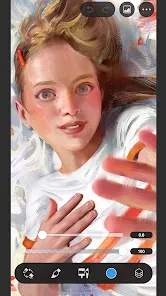
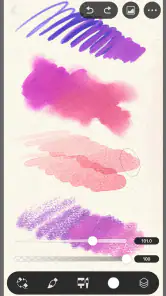
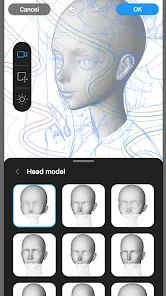
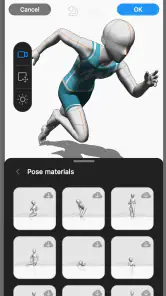
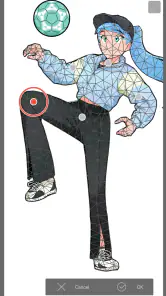
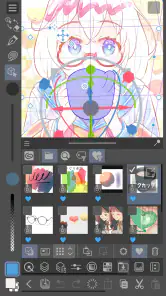

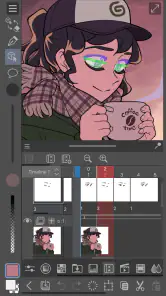
Analysis by Reviewed
My first useful result with Clip Studio Paint would not be a finished illustration; it would be a clean sketch I could reopen and continue without losing the idea. That is a sensible way to approach this art and design app: it has room for serious drawing and painting, but its range can feel like a lot when you first open it. I’d give myself one small goal, such as sketching a character or testing a brush, rather than trying to learn every panel at once.
Who will feel at home here
I’d recommend it to someone who wants to move beyond a basic sketching app and work on drawings with more control over brushes, layers, and finishing details. It also suits comic-minded artists and people who like building an image gradually, from rough lines to polished color. If all you want is a quick note with a doodle, a simpler drawing app may get you there faster; Clip Studio Paint makes more sense when you expect to return to the work and refine it.
A low-pressure first session
For a first session, I’d create a small canvas, choose one brush that feels comfortable, and draw a simple object from the room. Then I’d try a second layer for a different part of the sketch, so changing one area does not mean redrawing everything. This tiny exercise teaches a useful habit: separate rough exploration from the lines you want to keep. It also gives you a practical feel for the interface before you commit to a larger project.
Where its depth asks for patience
The trade-off is that a large toolkit can slow down someone who only wants to tap once and start drawing. Brush choices and asset options invite experimentation, but they can also become a detour when your goal is simply to finish a picture. I’d resist downloading or adjusting everything at the start. Pick a few tools, learn where the controls you use most often live, and expand your setup only when a project gives you a reason.
In everyday use, I can imagine opening it during a commute or a quiet break to rough out a character pose, then returning later to refine the face and clothing. That kind of stop-and-start workflow is where a capable mobile art app earns its place. For a quick social post, a lightweight editor may be faster; for an illustration that needs several passes, the extra control here is more valuable than a minimal interface.
Clip Studio Paint is an app that has made waves in the digital art community, and it’s easy to see why. Let me walk you through my experience with this creative powerhouse and why I think it’s a must-have for artists on the go.
Getting Started with Clip Studio Paint
First things first, downloading and setting up Clip Studio Paint is a breeze. Available on both Android and iOS, this app ensures you can create wherever you are. Once installed, the user interface is pretty intuitive, even if you’re not a tech wizard. The layout is clean, with tools and features easily accessible, making it simple to dive right into your creative projects.
More From Our News Desk

Weather by Xiaomi Review: Clear at a Glance, Less Clear Up Close

X Under Pressure: Can It Recover When Posting Goes Wrong?

Clash of Clans Is Won Between the Battles

Android Auto Makes the Case for Quieter Car Software

MobiOffice: Transforming Mobile Productivity with Seamless Integration

EA SPORTS FC™ Mobile Soccer: Redefining Mobile Sports Gaming
A Treasure Trove of Tools
One of the standout features of Clip Studio Paint is its extensive range of tools. Whether you’re sketching, inking, or painting, there’s a brush for every need. The brush customization options are unparalleled, allowing you to tweak everything to your heart’s content. Plus, the app offers a vast library of assets—textures, tones, and 3D models—that you can download and integrate into your work, adding an extra layer of depth to your creations.
Performance and Functionality
Performance-wise, Clip Studio Paint runs smoothly, even on older devices, which is a huge relief. Nobody wants to be in the middle of an artistic breakthrough only to have their app crash, right? The app’s response time is quick, with minimal lag, making it ideal for detailed work. You can easily zoom in and out without losing fidelity, which is crucial for those intricate details.
Community and Learning Curve
For those new to digital art, the learning curve might seem steep at first, but fear not! The app boasts a supportive community and a plethora of tutorials to help you get started. Whether you’re watching YouTube tutorials or joining forums, there’s always someone ready to lend a hand. Plus, the developers frequently update the app, adding new features and ironing out any kinks.
Another cool feature is the ability to share your work directly from the app to social media platforms, allowing you to showcase your creations and get feedback from fellow artists. It's like having a mini art gallery in your pocket!
Final Thoughts
In conclusion, Clip Studio Paint is more than just an app; it’s a gateway to endless creativity. Its robust set of features, combined with its user-friendly interface, makes it a top choice for both budding artists and seasoned pros. Whether you’re working on a comic, a painting, or just doodling, Clip Studio Paint is there to help bring your ideas to life. So, if you’re on the fence about trying it out, I say go for it! You won’t be disappointed.
What to know before installing
CELSYS,Inc. makes this free art and design app, which is rated for Everyone. It has an average rating of 4.5 from around 30,000 ratings, with about 2,500 written reviews and over 10 million installs. Version 4.2.1 is the current release. The app is free to install, while in-app purchases range from $0.99 to $119.99 per item, so I’d check the purchase options before settling into a long-term workflow. That matters if you are comparing it with a simpler app whose main appeal is a more straightforward cost and setup.
Make the tools work for you
A useful way to avoid getting lost in the asset library is to treat it as a project aid, not a requirement. For example, when drawing a room or a small comic panel, a downloaded texture or tone can help establish a surface quickly; it is still worth checking whether it supports the mood of the image rather than adding detail for its own sake. Likewise, a 3D model can help you think through a pose or viewpoint, but I’d use it as a reference and make the final drawing decisions myself. The advantage is flexibility; the cost is time spent browsing and learning what fits your style.
Choosing between mobile and a simpler option
Compared with basic phone drawing apps, Clip Studio Paint gives me a more involved workspace for brush-led illustration and layered projects. That depth is useful when I want to revise a line or build up a piece in stages, but it is not automatically better for every task. A simple app can be the right choice for a fast annotation or an occasional doodle, especially if menus and customization feel distracting. I’d also be cautious about starting a demanding project on a small screen if precise control is important to you; a stylus and a comfortable working setup can make the experience much more pleasant.
A practical next step
Once the first sketch feels manageable, I’d save a version before making a major change, then try adjusting one brush setting or adding a single downloaded asset. That creates a small, reversible experiment rather than turning setup into a project of its own. If the app clicks, move on to a short comic panel or a more finished study; if you mostly need quick, casual marks, there is no shame in choosing a lighter tool. My recommendation is to try Clip Studio Paint when you want room to grow, while giving yourself permission to learn it one useful action at a time.
A first finished study without overplanning
For a first result that feels complete, I’d choose a subject with a clear silhouette, such as a mug, a plant, or a simple character head. Start with loose shapes on one layer, then put the lines you want to keep on another. Add only a restrained color pass afterward. This is more useful than trying to reproduce a complicated reference because it lets you notice how the brush responds, how layers help you correct decisions, and where zooming is genuinely useful. The goal is not to master the app in one sitting; it is to finish a small image and know how you made it.
Keeping revisions manageable
One practical habit is to make a duplicate or save a separate version before a major change to the composition or color. That gives you a way back if an experiment does not work, and it can make trying a bolder direction less intimidating. I’d also keep early sketches and final line work visually separate rather than repeatedly erasing the rough drawing. When a piece becomes busy, hide or reduce the visual prominence of the rough layer so it stops competing with the marks you are evaluating. These small choices make a layered workflow feel purposeful instead of messy.
When a phone is enough, and when it is not
A phone is handy for collecting ideas, sketching during spare moments, and making compact illustrations. It is less comfortable when a project depends on sustained precision, many small corrections, or a broad view of the canvas. I would not judge the app solely by a quick finger-drawn test if the device supports a stylus; input method and screen space change how enjoyable detailed work feels. On the other hand, if you only want to annotate a screenshot or make a quick visual reminder, the app’s depth may be unnecessary. A basic drawing tool is a perfectly reasonable alternative for that kind of task.
Finding a personal workflow among the options
Compared with a minimalist sketching app, this one asks for more decisions but gives you more room to develop a drawing in layers and refine its appearance. Compared with a desktop art setup, the mobile version is appealing for portability, though a smaller display naturally makes some intricate edits less comfortable. I’d choose it when the same project needs both a quick first sketch and careful follow-up work, especially if drawing and comic-style experimentation are part of the plan. If your priority is simply applying a filter, adding text, or making a fast post, a focused image editor will usually be a quicker fit.
Making asset browsing purposeful
It is tempting to browse textures and other assets before you have a picture to use them in. I get more from the library when I first identify a specific problem: perhaps a panel needs a clearer surface, or I want help thinking through a pose. Then I can test one relevant asset and judge whether it serves the drawing. Treating downloaded material as optional support also helps keep the finished piece personal. An asset can save effort, but it cannot decide what the image should communicate, and browsing without a concrete need can absorb the time I meant to spend drawing.
Who should take the slower route
If you are new to digital art, you do not need to understand every panel before making something worthwhile. I’d learn one brush, one layer-based correction, and one way to save or share a result, then let the next project introduce another tool. That gradual approach is especially helpful for someone who feels overwhelmed by settings. Artists already comfortable with layered illustration may prefer to explore more deeply from the outset, while casual users may be happier elsewhere. The important distinction is whether you want a drawing space that can grow with your practice or just a quick place to make a mark.
My recommendation after a realistic trial
I’d give Clip Studio Paint a fair trial by making a small sketch, returning to it later, and finishing one clear detail rather than measuring success by how many tools I have explored. The free install makes it possible to see whether the workflow suits you, but I would review the in-app purchase options before building a routine around features that may involve a purchase. With an average rating of 4.5, around 30,000 ratings, and over 10 million installs, it has clearly found a wide audience, though those figures cannot tell you whether its interface matches your habits. My own recommendation is straightforward: try it if you want a capable mobile art workspace and are willing to learn gradually; choose a simpler app if speed and minimal controls matter more than room to refine.
Clip Studio Paint Frequently Asked Questions
Can I use Clip Studio Paint for comics, illustrations, and animation?
Clip Studio Paint is a digital art app for drawing and painting, with tools suited to illustration, comics, and animation. Its customizable brushes, vector layers, 3D models, and animation features give creators different ways to build and refine their work. If you mainly want a simple sketchpad, its range may feel extensive, but it can be useful for projects that need more than basic drawing.
Is Clip Studio Paint suitable for beginners, or is it mainly for experienced artists?
Clip Studio Paint can suit beginners as well as experienced artists. Its broad set of creative tools gives new users plenty to explore, while more practiced creators can use features such as vector layers, 3D models, and animation tools in their work. The interface and options may take time to learn, so beginners may find it helpful to start with one type of project and build familiarity gradually.
Can I use a stylus or work on a tablet with Clip Studio Paint?
Clip Studio Paint is available on mobile devices, including smartphones and tablets, and is designed for drawing and painting. A tablet can provide more room for a canvas and controls than a phone, which may make longer creative sessions easier. If you plan to use a stylus, check how it works with your particular device and app setup before relying on it for a project.
Does Clip Studio Paint work offline, and can I save my artwork locally?
You can use Clip Studio Paint as a creative app for drawing and painting, but it is sensible to plan how you will keep your work safe. Make sure you understand the saving and backup options available on your device before beginning a project you cannot easily recreate. An internet connection is needed for downloading and updating the app, while your usual access to projects can depend on how you choose to store them.
Can I move projects between devices or continue working on another platform?
Clip Studio Paint is available on both Android and iOS, which gives mobile artists options for using the app on different devices. Moving a project between devices depends on how you save or transfer your files, so check that process before switching devices mid-project. Keeping a separate copy of important work is a sensible precaution, especially when you are working across a phone and tablet.
Pros
- Highly customizable interface
- Cross-platform compatibility
- Extensive brush library
- Frequent updates and improvements
- Supports 3D models and assets
Cons
- Steep learning curve
- Expensive subscription model
- Resource-intensive on older devices
- Complex licensing system
- Limited free version features
- Category
- Art & Design
- Version
- 4.2.1