Cleanfox - Mail & Spam Cleaner
- 6.73K
- 4.7
- Installs
- 10.00M
- Price
- Free

Screenshots


Analysis by Reviewed
I like the idea behind Cleanfox - Mail & Spam Cleaner: instead of asking me to reorganize every message, it focuses on recurring newsletters and unwanted mail that quietly pile up. That makes it most useful as a cleanup tool, not a replacement for an email app. If your inbox feels busy because of subscriptions you no longer read, it can give you a more direct way to deal with them.
A focused tool, not another inbox
That distinction is the key to deciding whether Cleanfox belongs on your phone. I would not open it to compose a message, search for an old conversation, or keep track of a time-sensitive request. I’d use it when the problem is repetitive mail: the promotional messages that keep returning even though I stopped paying attention to them weeks ago.
That narrow purpose is a strength, but it also sets expectations. An inbox can feel messy for many reasons, including important messages that need replies, attachments that need saving, or a long thread that is hard to follow. A newsletter-focused cleaner can help with one particular kind of clutter; it does not turn all those other jobs into a single simple task. I find that more honest and useful than treating it as an all-purpose email solution.
Why a cleanup queue can help
The most useful mental model is a review queue, not an automatic verdict on what matters. When a service repeatedly sends email, it can be tempting to label every message from that sender as junk. But a shop might send promotions alongside receipts, and a travel company might mix offers with booking information. I would check the sender and the role those messages play in my life before making a lasting decision.
This also helps avoid a common cleanup mistake: treating unsubscribing and deleting as the same action. Unsubscribing is about stopping future newsletter mail; deleting is about clearing messages already in the account. They solve different parts of the problem. I’d decide whether I want to keep receiving a sender’s messages first, then decide whether the existing backlog is worth removing.
For a first pass, I’d choose senders I recognize and no longer need, rather than trying to clear everything in one sitting. That makes it easier to notice exceptions and reduces the chance of removing a mailing list that still serves a practical purpose. The app is most helpful when it turns a vague feeling of inbox overload into a set of concrete choices.
Getting Started with Cleanfox
Setting up Cleanfox was a breeze! All you need to do is download the app from your respective app store, and it supports both Android and iOS, which is a big plus. Once installed, you simply connect your email account to the app. I was pleasantly surprised by how seamless the integration was—no hiccups or glitches.
You May Like

Clash of Clans Is Won Between the Battles

Android Auto Makes the Case for Quieter Car Software

MobiOffice: Transforming Mobile Productivity with Seamless Integration

EA SPORTS FC™ Mobile Soccer: Redefining Mobile Sports Gaming

How Microsoft OneDrive Became a Mobile Productivity Giant

How Google Translate Breaks Language Barriers Effortlessly
Interface & Usability
The interface is clean, intuitive, and easy to navigate. I loved how everything was laid out in a straightforward manner, making it super easy even for someone who's not tech-savvy. The home screen provides an overview of your inbox, displaying the number of emails categorized as spam or newsletters. It’s like having a personal assistant who knows exactly what’s been cluttering your email space.
That simplicity matters because inbox cleanup can become a project of its own. I would approach the results as a review queue rather than approve every suggestion at once: recognize a sender, decide whether the messages are still useful, then act. A newsletter from a shop might be noise today but still carry a receipt or account notice I need later, so checking the sender before unsubscribing is a sensible habit.
Features that Stand Out
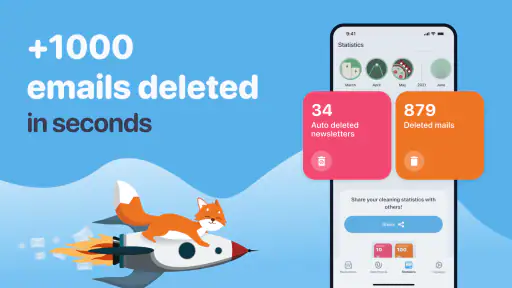
One of the standout features of Cleanfox is its ability to analyze your subscription emails. It gives you the option to delete old emails or unsubscribe from newsletters with a single tap. What I appreciated most was the visual representation of how much space each subscription was taking up in my inbox. Trust me, seeing those numbers can be quite the eye-opener!
A practical way to use that view is to sort out subscriptions in small batches. I’d start with obvious one-off promotions, then pause on senders that also deliver order updates, travel details, or service notices. Unsubscribing handles future messages from a mailing list, while deleting existing mail addresses the backlog; those are different decisions, and it helps to make them deliberately rather than treat them as one button press.
Another feature worth mentioning is the environmental aspect. Cleanfox promotes digital cleanup as an eco-friendly act, encouraging users to reduce their carbon footprint by managing their email storage more efficiently. It’s a small step, but it feels good knowing you're contributing to a greener planet.
Using it without rushing
One useful habit is to make the cleanup a decision session rather than a race to reach an empty inbox. I’d pay attention to senders that appear frequently but are still valuable, such as a community group or a service that sends occasional account notices. Keeping a subscription is not a failure to clean up; the point is to remove the mail I no longer want, not to make every inbox look the same.
If a sender is hard to identify, I would leave it alone and check a recent message in my usual email app. That small detour is preferable to guessing from a name or assuming that all repeated mail is promotional. It is also a good reason to avoid cleaning while distracted: a quick tap can be convenient, but the decision should still be deliberate.
The visual summary can help reveal patterns that are easy to miss one message at a time. A sender may not seem bothersome on a busy day, yet a long run of messages from the same source can make it clear why the inbox feels crowded. I’d use that perspective to choose what to review first, while remembering that frequency alone does not tell me whether a subscription is useful.
Performance and Efficiency
In terms of performance, Cleanfox did not disappoint. It swiftly scanned through my emails, and within minutes, I had a neat list of all the potential junk. The app is efficient, and I didn’t experience any lag or crashes during the process. It’s refreshing to see an app that delivers on its promises.
For a realistic routine, I’d use it after a busy week of shopping or signing up for services, when promotional mail tends to become noticeable, rather than wait until every message feels unmanageable. A short, selective pass makes it easier to spot subscriptions I genuinely want to keep. If a sender’s messages are mixed with important correspondence, I’d leave that choice for a careful review instead of relying on a broad cleanup.
Additionally, the app sends you periodic reports on your email cleaning activities, which is a nice touch. It makes the whole process feel rewarding, knowing how much digital clutter you’ve managed to eliminate.
A practical routine for busy inboxes
Imagine finishing a week of online shopping and finding that promotional messages have begun to crowd out delivery updates and personal mail. I’d open Cleanfox when I have a few uninterrupted minutes, identify familiar mailing lists I no longer read, and deal with those first. Then I’d leave anything tied to orders or accounts for a closer look in my regular mail app. That approach makes the tool useful without asking it to make judgment calls on my behalf.
For someone who signs up for newsletters often, a periodic review is likely to feel more manageable than waiting until the inbox is overwhelming. The goal is not to inspect every message every time; it is to notice which recurring sources are no longer earning a place in the inbox. I’d also avoid making a cleanup session a substitute for normal inbox habits, since it is designed around subscriptions rather than the full range of email tasks.
There is a trade-off in this workflow: a focused cleaner can make bulk decisions easier, but convenience can encourage broad actions. I’d treat each sender as a separate choice, especially where one mailing list includes both marketing and useful service messages. If I’m unsure, I’d keep the subscription for now and revisit it later instead of choosing speed over confidence.
Where It Fits—and Where It Doesn’t
Cleanfox is a productivity app developed by Foxyteam, and it is free to use. Its average rating is 4.7 from around 295,000 ratings, with about 6,700 written reviews and over 10 million installs. It is rated for Everyone; the app was released on January 4, 2017, and version 3.30.25-1185 requires Android 7.0 or later.
Compared with cleaning an inbox manually in Gmail, Outlook, or Yahoo, the main appeal here is having subscription-focused cleanup gathered in one place. Your regular mail app remains the better choice for replying, searching across conversations, and handling everyday correspondence. Cleanfox is more like a specialist pass for recurring clutter than an all-purpose inbox manager, so I wouldn’t install it expecting it to replace those apps.
The comparison is not simply about which app has more tools. The mail app you already use is usually the natural place to handle messages one by one, especially when you know exactly what you want to search for or archive. Cleanfox makes more sense when the repetitive nature of subscriptions is the problem and you want to review those senders together. If your inbox is already tidy, opening another app for occasional individual deletions may add friction instead of saving time.
It suits people who use a supported Gmail, Outlook, or Yahoo account and have accumulated mailing lists they rarely open. Someone who gets only a few emails, prefers to keep every subscription, or wants detailed control over each message may be better off using the inbox tools they already know. Since the app connects to an email account, I’d also take time to read its account-access prompts and make sure I’m comfortable before proceeding; convenience is useful, but email is personal.
Who should use it, and who should pass
I’d recommend it most to people whose inbox gets crowded through recurring promotions and newsletters, particularly if they have been meaning to unsubscribe but never get around to doing it. It may also suit someone who has several familiar senders to review and prefers a focused cleanup session over opening message after message in the standard inbox. The Android and iOS availability makes it relevant to people using either mobile platform, while the named mail services give a clear sense of the accounts it is aimed at.
I would skip it if the main problem is not subscriptions. Someone trying to organize work threads, preserve important attachments, or manage complex correspondence will get more value from the normal tools in their email service. I’d also be cautious if I strongly prefer not to connect email to a separate cleanup app. In that case, manual filtering and unsubscribe controls inside the mail app are a slower but more direct alternative.
Another reasonable question is whether the app replaces spam protection. I’d think of its subscription cleanup as distinct from deciding whether a suspicious message is malicious or fraudulent. If an email looks unsafe, I would use the reporting and security options in my email provider rather than treating a newsletter-cleanup workflow as a security check. That distinction matters because unwanted promotional mail and dangerous messages are not the same problem.
There is also a useful middle ground for people who are unsure about granting access or making broad changes: start by reading the account prompts carefully, then use the app only if the access feels appropriate. The convenience of seeing subscriptions grouped for review is real, but it should not override personal comfort with account access. For email, I think that is a sensible threshold rather than an unnecessary complication.
Final Thoughts
Overall, Cleanfox - Mail & Spam Cleaner is a must-have for anyone looking to tidy up their inbox without breaking a sweat. It’s user-friendly, efficient, and adds a touch of eco-consciousness to your digital routine. Whether you’re a busy professional or just someone tired of wading through endless spam, this app is definitely worth checking out.
If clutter-free emails and a cleaner planet sound appealing, give Cleanfox a try. You might just find it’s the solution you’ve been searching for!
My recommendation
My recommendation is more specific than “everyone with email should install it.” I’d try Cleanfox when recurring newsletters are clearly a source of clutter and I’m ready to review those subscriptions, but I would keep my usual mail app as the place for everything else. The value comes from having a focused way to make cleanup decisions, not from replacing the familiar inbox or making every email problem disappear.
Used thoughtfully, it can make a neglected cleanup feel approachable: begin with senders you recognize, separate stopping future mail from clearing old messages, and pause whenever a subscription also carries information you may need. If that sounds like the kind of small, practical reset your inbox needs, it is worth a look. If you want detailed control over every message or would rather not connect another app to your email, your provider’s built-in tools are the better fit.
Cleanfox - Mail & Spam Cleaner Frequently Asked Questions
Is Cleanfox free to download, and what can I use it for?
Cleanfox is a free app for cleaning up an email inbox and blocking spam. It can help you review unwanted messages and newsletters, then choose whether to delete them or unsubscribe. Its focus is practical inbox maintenance rather than replacing your regular email app, so you can use it as a companion when you want to tidy your mailbox.
Who develops Cleanfox, and is it a well-established app?
Cleanfox is developed by Foxyteam and is a productivity app for managing inbox clutter. It has an average rating of 4.7 from around 295,000 ratings, with about 6,700 written reviews and over 10 million installs. Those figures suggest it has been used by a broad audience, though your own experience will depend on your email setup and cleanup preferences.
Can I use Cleanfox to manage more than one email account?
Cleanfox is intended to help with email inbox cleanup, including for people who use services such as Gmail, Yahoo, and Outlook. If you have several accounts, check each one during setup and review the access requested before connecting it. This makes it easier to see which inbox you are cleaning and to choose carefully what actions to take.
What is Cleanfox and how does it work?
Cleanfox is an app designed to help users manage their email inboxes by identifying and removing spam, newsletters, and unwanted emails. The app scans your inbox, detects spam and newsletters, and gives you the option to delete them or unsubscribe directly. This helps in decluttering your inbox and improving email efficiency.
Is Cleanfox safe to use with my email account?
Yes, Cleanfox is safe to use. The app uses secure protocols to access your email account and does not store any of your emails on its servers. It only performs actions that you authorize, such as deleting or unsubscribing from unwanted emails. Your privacy and data security are prioritized in its operations. As with any inbox tool, review the permissions and confirm each cleanup action before proceeding.
Pros
- Efficiently cleans spam emails.
- Simple
- user-friendly interface.
- Supports multiple email providers.
- Provides insights on email habits.
- Reduces digital carbon footprint.
Cons
- Limited features on free version.
- Occasional syncing issues.
- No desktop application available.
- Privacy concerns with data access.
- Can mistakenly flag important emails.

- Category
- Productivity
- Version
- 3.30.25-1185











