Claude by Anthropic
- 15.51K
- 4.5
- Installs
- 50.00M
- Price
- Free

Screenshots




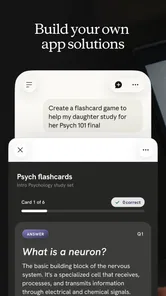
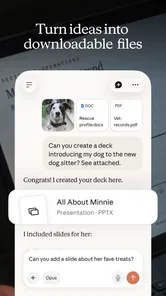


Analysis by Reviewed
I started thinking about Claude less as a personal gadget and more as a shared household tool: the kind of app someone opens to untangle a confusing message, plan a meal, or make a chore list easier to follow. That framing matters, because an AI assistant can help with coordination, but it is not automatically a shared family calendar or a reliable record of who promised to do what. I find it most useful when one person brings a clear task and checks the result before passing it along.
One household, separate conversations
If several people use the same phone or tablet, I would treat each conversation as belonging to the person who started it. Before handing over a device, close or leave the chat in a state you are comfortable showing; a draft question or earlier exchange may contain personal details. I would not use a shared account as a substitute for separate personal spaces, especially for work, health, finances, or private family matters. The practical boundary is simple: share the device when needed, but think carefully before sharing an account or conversation.
For a low-stakes example, one person could ask Claude to turn a list of ingredients already at home into a few dinner ideas, then show the suggestions to everyone. Another could ask it to rewrite a household message so the request sounds clear rather than irritated. Those are useful starting points, but I would still check ingredients, timing, and tone myself. The assistant can help a family get unstuck; it cannot know everyone’s preferences or settle a disagreement on its own.
Coordination without handing over judgment
For household planning, I get better results when I include the constraints that actually shape the decision: who is eating, what needs using soon, how much time is available, and what must be avoided. A vague prompt tends to invite broad suggestions; a short, specific one gives the conversation something concrete to work with. I also like asking for a result in a useful form, such as a concise checklist or a message I can edit before sending. That turns a chat into a practical draft rather than another place to manage.
There is a trade-off, though. Claude can help organize information you provide, but I would not assume it has the current household schedule or that a proposed plan has been added to anyone’s calendar. If coordination needs to persist, a dedicated calendar, shared notes app, or family task manager is usually the better source of truth. I see the assistant as a thinking and drafting partner alongside those tools, not a replacement for them.
Age, trust, and sensible boundaries
The app is rated Teen, which is useful context for families deciding whether it is appropriate on a shared device. That rating is not a substitute for an adult’s judgment about a particular young person or conversation. I would explain that AI responses can sound confident without being correct, and encourage younger users to check important school, health, or safety advice with a trusted person. For homework, it can be more helpful to ask for an explanation of a step than to request an answer to copy; the first supports learning, while the second can undermine it.
I would also avoid entering sensitive details simply because the chat feels conversational. A household can agree on a few easy rules: do not type passwords or payment details, pause before sharing someone else’s private information, and verify anything with real consequences. Those habits are useful whether one person or several use the app, and they keep convenience from turning into oversharing.
More From Our News Desk

Weather by Xiaomi Review: Clear at a Glance, Less Clear Up Close

X Under Pressure: Can It Recover When Posting Goes Wrong?

Clash of Clans Is Won Between the Battles

Android Auto Makes the Case for Quieter Car Software

MobiOffice: Transforming Mobile Productivity with Seamless Integration

EA SPORTS FC™ Mobile Soccer: Redefining Mobile Sports Gaming
Getting Acquainted with Claude
First things first, let's talk about what Claude actually is. Essentially, it's an AI assistant designed to make your life a bit easier by handling various tasks. Think of it like having a super smart friend who's always ready to help out. From setting reminders to answering questions, Claude is like that trusty sidekick we all need.
User Experience and Interface
Jumping into the app, the first thing I noticed was how sleek the interface is. It's got a minimalistic vibe, which I absolutely adore because who wants to deal with clutter, right? Navigating through the app is a breeze, and everything feels intuitive. Even if you're not super tech-savvy, you'll find your way around without a hitch.
Now, I must say, the personalization aspect is pretty impressive. Claude learns from your interactions, tailoring responses to better suit your style. It's like the app gets to know you over time, which makes using it feel more personal and less robotic.
Features That Stand Out
One of the features that really caught my eye was Claude's ability to handle complex queries. Whether you're looking for the best pizza place in town or need assistance with a math problem, Claude's got your back. It's like having a pocket-sized encyclopedia that's also a great conversationalist.
Another cool aspect is the app's integration with other services. Claude can sync with your calendar, send emails, and even control smart home devices. It's like having one app to rule them all, making it a versatile tool for managing daily tasks.
Room for Improvement
While Claude is quite the marvel, it's not without its quirks. Occasionally, the AI might miss the mark on more nuanced queries, but hey, nobody's perfect, right? The team at Anthropic seems committed to making continuous improvements, so I'm optimistic about future updates smoothing out these bumps.
Also, while the app offers a lot of features, some of the more advanced ones may require a bit of a learning curve. But once you get the hang of it, you'll find it immensely rewarding.
Choosing it for your routine
Claude is a productivity app from Anthropic PBC, and I would recommend it most to people who regularly need to turn messy thoughts into a clear plan, draft, explanation, or first version of code. A student trying to understand a difficult concept, a freelancer shaping a client email, or a household member comparing options for a weekend plan can all get value from a back-and-forth conversation. It is less compelling if you only need a timer, a dependable reminder, or a fixed checklist; those focused tools are quicker and more predictable.
Compared with a conventional search engine, Claude is better suited to synthesizing a question and refining an answer through follow-ups, while search remains preferable when I need to inspect current sources directly. Compared with a notes app, it can help reshape rough material but is not where I would keep the final, authoritative version of an important document. I use it to make a first draft or expose gaps in my thinking, then verify facts and move anything worth keeping into the appropriate tool.
Getting more useful answers
A small workflow makes a noticeable difference: give the assistant the audience, purpose, constraints, and desired format in the opening request. If the first answer is too long, ask it to preserve the key points while cutting the rest; if it misses a constraint, state that constraint plainly rather than starting over. For a longer task, I would ask it to show assumptions or separate what is known from what needs checking. That makes review easier and reduces the chance that a polished-sounding answer slips through without scrutiny.
For example, on a busy weekday I might paste a rough list of errands and ask for a sensible order, while making clear which appointment time cannot move. I would check the suggested sequence against actual travel and opening hours before relying on it. That distinction is important: Claude can structure the problem, but the person using it remains responsible for real-world details. The same approach works for turning meeting notes into action items or converting a complicated explanation into questions to ask an expert.
One useful refinement is to ask for options rather than a single polished recommendation. If I am deciding how to word a difficult message, I can request a direct version and a warmer version, then choose the one that sounds like me. For a household decision, asking it to list trade-offs can make disagreement more specific: people can respond to the actual priorities instead of debating a vague suggestion. This works best when I supply the priorities myself; the assistant should not be expected to know which family preference matters most.
Cost, availability, and everyday fit
The app is free to download, with in-app purchases listed from around seven dollars to two hundred and fifty dollars per item, so I would check the purchase terms before choosing anything paid. It has a 4.6 average from around 155,000 ratings, and more than five million installs. Those figures suggest a widely used app, but they do not tell me whether its answers will suit my needs; a few real tasks are a better personal test. The content rating is Teen, and the current version is 1.251124.27; it was released on July 11, 2024, and requires Android 8.0 or later.
One practical question is whether the free app is enough for a casual user. I would begin with the tasks I actually expect to do—rewriting a note, exploring a topic, or organizing a plan—and see whether the available experience meets that need before considering an in-app purchase. The listed purchases vary considerably in price, so I would read the terms for the particular option rather than assume every paid item works the same way. If I only ask an occasional question, a paid plan may not be worthwhile; frequent use for demanding work could make the calculation different.
Another question is how well it fits into a household routine when people have different needs. I would keep the workflow simple: one person prepares a draft or explanation, then shares only the useful part through the family’s normal channel. That avoids treating a chat as a permanent group workspace and gives others a chance to correct details before acting. If several people need to update the same list over time, a shared document or task app is more suitable because everyone can refer to the same maintained record.
One question people often have is whether they need to be good at prompting. In my experience, no special technique is required: ordinary language works, and a follow-up can correct the direction. The more precise the task, the less back-and-forth I tend to need. Another sensible question is whether to trust the output as final. I would not, especially for current, medical, legal, financial, or safety-sensitive matters; use it to organize questions and understand options, then verify with a dependable source or qualified person.
For everyday use, I would also separate brainstorming from decision-making. Claude can help generate dinner possibilities from ingredients or turn a school assignment into smaller questions, but a person still needs to check allergies, instructions, and what is appropriate to submit. That division is not a weakness unique to this app; it is the sensible way to use a fluent AI assistant. The advantage is speed in getting a first structure, not a guarantee that the structure is correct.
All in all, Claude by Anthropic is a solid AI assistant that's worth checking out if you're in the market for a digital helper. It's user-friendly, packed with features, and has the potential to become even better over time. Whether you're a tech enthusiast or just someone looking to simplify your life, this app is definitely worth a shot. So go ahead, give it a whirl and see how it fits into your daily routine!
My household verdict
For a household, I would use Claude as an optional helper for drafting, explaining, and getting a plan started—not as a shared memory, a family-control system, or the final authority on important decisions. It suits curious teens and adults who are willing to review answers and keep private information out of casual chats. If your main need is dependable scheduling, clear account separation, or a permanent shared record, choose a dedicated tool for that job and keep Claude in a supporting role.
My best test for whether it belongs in your routine is straightforward: bring it one real, low-risk task that currently takes too much effort, such as clarifying a message or organizing a list, and judge the result against your own standards. If the conversation saves time while leaving you in control, that is a useful role for it. If you need guaranteed accuracy, persistent shared records, or a tool that acts without your review, I would choose something more specialized instead.
Claude by Anthropic Frequently Asked Questions
Can Claude help me work with documents, writing, and code?
Claude is presented as an AI assistant for writing, coding, and solving complex tasks, so it may be useful when you need help drafting or refining text, thinking through a coding problem, or organizing an idea. It is best treated as a collaborative tool rather than an automatic authority: review its suggestions and check important details before relying on them.
Do I need an account to start using Claude?
Before downloading, it is worth considering whether you are comfortable setting up and using an account with an AI assistant. Claude is designed for interactive help with tasks, so getting started involves engaging with the service rather than using it as a standalone offline utility. Keep your sign-in details secure, and take a moment to review the app’s setup and privacy choices.
Can I use Claude for school or work tasks?
Claude’s focus on writing, coding, and complex problem-solving makes it relevant to both personal and professional productivity. It can help you explore ideas or work through a task, but its output should still be checked, especially when accuracy or originality matters. For school or workplace use, follow the rules that apply to your institution or organization and avoid sharing sensitive material unnecessarily.
What devices and operating systems can run Claude by Anthropic?
Claude is a productivity app for mobile devices, and the Android version requires Android 8.0 or later. Before downloading, check that your device meets this minimum requirement and that you are choosing the official app by Anthropic PBC. The app is also available on iOS, so users can access Claude on either major mobile platform.
Is Claude by Anthropic free to download, and what does it cost to use?
Claude is free to download, so you can try the app without paying upfront. It also offers in-app purchases, with listed items ranging from around $7 to $250 each. Those purchases may suit people who want access to additional options, while the free download gives users a way to explore the assistant before deciding whether to spend.
Pros
- User-friendly interface for seamless interaction.
- Advanced AI provides accurate and relevant answers.
- Supports multiple languages for global accessibility.
- Fast processing speed enhances user experience.
- Customizable settings for personalized use.
Cons
- Requires internet connection for full functionality.
- Occasional inaccuracies in less common queries.
- Limited offline capabilities.
- Subscription-based model may be costly for some.
- High data usage when processing large tasks.











