Chatbot AI - Chat & Ask AI
- 788.00
- 4.5
- Installs
- 10.00M
- Price
- Free

Screenshots



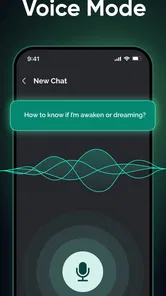
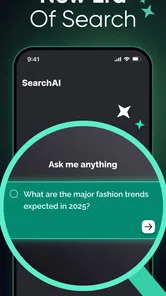
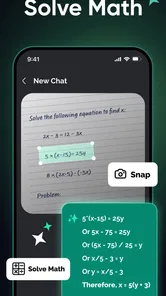
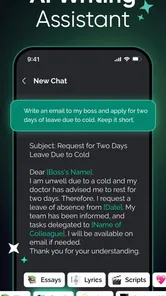
Analysis by Reviewed
I find the most useful way to approach Chatbot AI - Chat & Ask AI is as a conversational workspace, not as an all-purpose replacement for the tools already on your phone. It is a free productivity app from Newway Apps, and its focus is asking questions and working with AI models such as DeepSeek V3 and R1. That makes it worth trying if you want a chat-based place to explore ideas, get explanations, or shape a rough draft. I would still check important answers before acting on them: convenience does not make an AI response automatically reliable.
Make the first exchange easy to judge
For a first test, I would choose a low-stakes question whose answer I can assess. Asking for a plain-language explanation of a paragraph or a few alternative subject lines shows how well the assistant follows direction without making an important decision depend on it. I would then add one instruction at a time—shorter, more casual, or aimed at a beginner—so I can see whether the response changes in the way I asked.
This is also a practical way to decide whether the conversational format suits me. Unlike a conventional search result, a chat response is already phrased as an answer and can be refined with follow-ups. That saves effort when I need help shaping an idea, but it can hide where a claim came from. If I need evidence or want to compare original sources, I would use web search alongside the chat rather than treating a polished reply as a citation.
A practical routine for everyday questions
I use a small, repeatable routine for everyday questions: state the task, include the one or two constraints that matter, then check the answer before acting on it. That keeps a chat useful without turning it into a place to store commitments or make decisions for me. When a question has real consequences, I treat the reply as a starting point and verify the important details elsewhere.
Start with one clear task
When I open an AI chat app, I get better results by giving it a specific job rather than typing a broad prompt like “help me plan.” For example, I might ask it to turn a few errands into a sensible order, explain a confusing paragraph in plain language, or suggest a polite reply to a message. Then I can follow up with the constraint that matters, such as keeping the answer brief or making the tone warmer. This step-by-step approach is easier to steer than expecting a perfect answer from one vague request.
A realistic use is a busy morning: I have a meeting later, a short list of errands, and a message I have been putting off. I can ask for a draft and a suggested order for the errands, then review both myself. I would not treat the result as a verified calendar entry or send the message without reading it. The app is best used to get from a blank page to a workable starting point, not to hand over the final decision.
Build repeatable habits, not assumptions
For recurring tasks, I keep a small set of prompt patterns in my own notes: the task, the audience, any limits, and the format I want back. A request such as “summarize this for a beginner in three short points” is easier to assess than an open-ended instruction. Reusing a pattern also helps me notice when the answer misses a key condition. This is a practical shortcut, not a special app feature, and it keeps the process consistent across chats.
More From Our News Desk

Weather by Xiaomi Review: Clear at a Glance, Less Clear Up Close

X Under Pressure: Can It Recover When Posting Goes Wrong?

Clash of Clans Is Won Between the Battles

Android Auto Makes the Case for Quieter Car Software

MobiOffice: Transforming Mobile Productivity with Seamless Integration

EA SPORTS FC™ Mobile Soccer: Redefining Mobile Sports Gaming
I would also separate unrelated topics rather than letting one long conversation become a catch-all. That makes it simpler to see which details belong to the current question and to restate context when starting something new. If the answer will affect money, health, work, or a sensitive personal decision, I use the chat to prepare questions and compare options, then check the result with a dependable source or qualified person.
Check the controls and the trade-offs
Before making the app part of a daily routine, I would look through its available settings and any purchase prompts, then decide whether the free experience suits my needs. The app is free to download, with in-app purchases listed from $0.99 to $49.99 per item, so I would avoid tapping through an upgrade screen without first checking what is being offered. Its current version is 9.8.19, and it runs on Android 6.0 or later. It is rated for Everyone, but that age label does not mean every generated answer is suitable for every situation; younger users still benefit from adult guidance.
The trade-off with conversational AI is that a fluent reply can sound more certain than it deserves. I would not use it as the sole source for current facts, exact instructions, or anything where a mistake has real consequences. Nor would I assume a chat can set reminders or connect to another phone app just because those tasks would be handy: I would first confirm that the specific action is available in the version I am using. For simple reminders, a dedicated clock or calendar app is more dependable.
Who will get the most from it?
This is a good fit for people who like asking follow-up questions and want help with first drafts, explanations, brainstorming, or breaking a task into steps. Compared with searching the web, a chat can be more convenient when I want an answer phrased for my particular question; compared with a notes app, it can help develop an idea instead of merely storing it. But search is still the better choice when I need to inspect original sources, and a focused writing or planning tool may suit me better when I need structured documents or dependable task tracking.
I would skip it if I mainly want offline reference material, guaranteed factual answers, or automation that runs without my review. The app has attracted a 4.5 average from around 83,000 ratings and more than 10 million installs, which suggests broad interest, but popularity is not proof that its answers will fit my needs. I treat it as a useful assistant to consult, not an authority to obey.
Settings worth checking before settling in
I would take a moment to inspect the controls that are actually available in my version, rather than assuming that another AI app’s options are present here. The useful questions are simple: can I change how I interact with the assistant, are there choices that affect the experience, and do any prompts ask me to pay? Checking before I build a habit keeps the app’s boundaries clear and helps me avoid confusing a general chat with a dedicated service or phone feature.
I also keep sensitive details out of prompts unless they are truly necessary. For a draft reply, I can replace names and identifying specifics with placeholders, then put the right details back after reviewing the wording. That small adjustment often preserves the useful context while limiting what I share. For work documents, private correspondence, or personal records, I would follow the rules that apply to the information rather than assuming a chatbot is an appropriate place to paste it.
Faster patterns that keep answers useful
One efficient pattern is to ask for a first pass and a critique separately. I might request a short draft, then ask it to point out unclear wording or list assumptions it made. I still make the final edits, but splitting creation from review can expose a weak spot I missed on a quick read. It is especially helpful for everyday writing, where the main value is often getting unstuck rather than producing a finished piece untouched.
Another pattern is to give the assistant the shape of the answer I can actually use. If I need to compare two choices, I can ask for the same criteria for each and then check the claims that matter. If I am learning a topic, I can ask for an explanation followed by a few questions to test my understanding. These are prompt habits, not guaranteed app functions; their value comes from making the request easier to evaluate and the response easier to apply.
For a multi-step task, I would ask for a checklist, then handle each item outside the chat and return only when I have new information. This avoids treating the conversation as a live task manager. For example, I can get a packing checklist for a trip, verify it against my own plans, and tick items off in a notes or checklist app. The chatbot helps generate and refine the list; a tool designed to track completion is the better place to manage it.
Where a conversational assistant reaches its limits
Chat is strongest when the task can be described in words and the result can be reviewed by a person. It is less suitable when I need an action to happen automatically, a record to remain organized over time, or a claim to be traceable to a reliable source. That distinction matters because a conversational answer can feel like a completed task even when it has only suggested what to do. I use it for thinking and drafting, then move the result into the tool responsible for the real-world job.
I would also be cautious about long conversations that accumulate many conditions. A later answer may overlook an earlier detail, so for anything important I restate the essential requirements instead of trusting the whole chat history to carry them forward perfectly. If the response changes after I clarify a point, I check the full result again rather than editing only one sentence. That costs a little time, but it is safer than assuming a small correction has left every other part intact.
These limits make it a poor substitute for specialist advice or authoritative instructions. I can use a response to organize questions before speaking with a professional, or to understand unfamiliar terminology, but not to settle a medical, legal, financial, or safety-critical decision on its own. The same caution applies to facts that may have changed: when freshness matters, I verify them with a source that can show where the information came from.
Getting Started with Chatbot AI
First off, installing Chatbot AI - Chat & Ask AI was a breeze. Just a quick download and you're welcomed by an intuitive interface that’s user-friendly and appealing. From the get-go, the app feels like it’s been designed with the user in mind. No complicated setups or confusing menus, just straightforward interaction.
Features That Stand Out
Now, onto the features. What really caught my attention was the app's ability to handle a variety of tasks. Whether you're looking to set reminders, get news updates, or even have a casual chat, this app has got you covered. The versatility is genuinely impressive.
One feature I particularly loved is the personalized responses. It's as if the app learns from your interactions and tailors its responses to suit your preferences. This makes the whole experience feel more engaging and personal. Plus, the ability to integrate with other apps on your phone is a nifty bonus!
Performance and User Experience
Performance-wise, I found the app to be smooth and reliable. It responds quickly to queries and doesn’t lag, which is crucial when you’re on the go and need quick answers. The developers have clearly put a lot of effort into ensuring the app runs seamlessly.
The user experience is further enhanced by the app's sleek design. It’s minimalistic, yet functional, and doesn’t bombard you with unnecessary ads or pop-ups. This clean interface really helps in keeping the focus on what matters - the interaction.
Mastering the useful middle ground
For me, the strongest routine is a modest one: use the assistant to create options, explanations, or a first draft, then apply human judgment and a more suitable tool to finish the job. That balance makes a general-purpose chatbot more useful than trying to force it into roles it may not fill. I would reach for it when I want conversational help quickly, but switch to search for sources, a calendar for commitments, or a word processor for final documents.
That also answers who should pass. If you prefer fixed menus, predictable workflows, or a tool that stores and organizes work in a structured way, a focused productivity app may feel more dependable. If you are comfortable refining a prompt and checking what comes back, this app can be a convenient place to explore a question without first deciding exactly what the finished answer should look like.
Wrapping It Up
In conclusion, Chatbot AI - Chat & Ask AI is a solid choice for anyone looking to add a smart assistant to their daily routine. It’s packed with features, easy to use, and offers a personalized touch that makes it stand out from the crowd. If you're in the market for an app that can handle tasks with ease and offer a friendly chat whenever you need it, this might just be the app for you.
So, why not give it a whirl? You might just find that perfect companion you've been looking for in your digital life!
Chatbot AI - Chat & Ask AI Frequently Asked Questions
Is Chatbot AI free to download, and what should I know about optional purchases?
Chatbot AI - Chat & Ask AI is free to download, so you can try the app without paying upfront. It also offers in-app purchases, with individual items ranging from $0.99 to $49.99. Check the options presented in the app before buying, and consider whether any paid features suit the way you plan to use the assistant.
Which AI models does Chatbot AI use?
The app’s store summary highlights DeepSeek V3 and R1, describing Chatbot AI - Chat & Ask AI as an open chat with a smart assistant built on the latest AI models. You can use the conversational interface to ask questions and explore ideas. Responses are generated by AI, so review answers carefully when you need dependable information or are making an important decision.
Is Chatbot AI suitable for younger users?
Chatbot AI - Chat & Ask AI has an Everyone age rating, making its stated content classification suitable for a broad audience. It is a conversational AI app, so younger users may benefit from an adult’s guidance when interpreting responses or deciding what to share in a chat. As with any online service, avoid entering sensitive personal details into conversations.
Can Chatbot AI help with school, work, or everyday tasks?
Chatbot AI - Chat & Ask AI is a productivity app built around an open chat with a smart assistant using AI models, including DeepSeek V3 and R1. You can ask questions and use its conversational format for a range of tasks, from exploring a topic to working through an idea. As with any AI assistant, review important answers carefully, especially when accuracy matters.
What is Chatbot AI - Chat & Ask AI and what can it do for me?
Chatbot AI - Chat & Ask AI is an advanced conversational application designed to assist users by providing instant responses to queries across a wide range of topics. It leverages artificial intelligence to understand and generate human-like text. Whether you need help with general knowledge, recommendations, or specific problem-solving, this app can assist you effectively. It's like having a smart assistant in your pocket, ready to help at any moment.
Pros
- User-friendly interface with intuitive design.
- Provides quick and accurate responses.
- Supports multiple languages for global users.
- Integrates with various platforms easily.
- Regular updates enhance functionality.
Cons
- Requires internet connection to function.
- Limited free version features.
- Occasional lag in response time.
- Privacy concerns with data handling.
- Subscription required for premium features.











