

CharacterHub: OCs, Art, Lore
- 11.00
- 4.7
- Installs
- 10.00K
- Price
- Free

Screenshots
Analysis by Reviewed
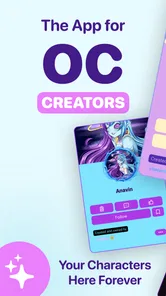
I approached CharacterHub: OCs, Art, Lore as a place to organize creative ideas rather than as a conventional drawing program. That distinction matters. If you create original characters, keep notes about their stories, or want one home for artwork and character development, the app has a clear purpose. If you mainly need advanced brushes, layer controls, or professional image editing, you may find a dedicated art tool more suitable.
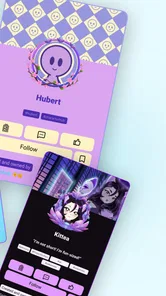
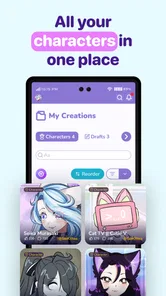
What makes this app interesting is the way it treats a character as more than a single picture. A design can be connected to the thoughts, history, relationships, and visual references that help make that character feel complete. In my experience, that makes it especially appealing to illustrators, writers, role-players, comic creators, and anyone who has a folder full of disconnected sketches and half-finished ideas.
It is a free app in the Art & Design category, developed by CharacterHub, with a Teen content rating. Its average rating is 4.7 from around 68 ratings, and it has passed 10K installs. Those figures suggest a growing but still fairly focused community, which fits the app’s specialized purpose better than the broad appeal of a general social network or a basic sketchbook.
How I would decide whether CharacterHub fits
I would judge the app by whether it helps me return to a character, not by how much I add during the first burst of enthusiasm. In this section, I’d focus on a small trial: choose one character you’re actively developing and see whether its art and notes become easier to use together. That gives us a practical basis for weighing its longer-term appeal.
Start with the kind of creative problem you want to solve
The first question is not whether you draw every day. It is whether your characters need a home. I often see original-character projects scattered across a phone gallery, cloud folders, notes, chat messages, and unfinished documents. That setup works briefly, but it becomes difficult to remember which design is current, where a reference came from, or how a character’s personality connects to the story around them.
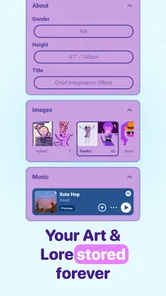
This is where CharacterHub makes the strongest case for itself. It is built around collecting and sharing original characters and art, so the organizing idea is more specific than “make an image.” You can think through a character as a continuing project instead of treating every illustration as an isolated file.
That focus also gives the app a different audience from a typical drawing application. A beginner who has just invented a character may appreciate having a structured place to develop the idea. An experienced artist may value it as a reference space, especially when a character appears in several outfits, timelines, or versions. A writer may use the visual material to keep descriptions and story details close together.
More From Our News Desk

 Gmail
GmailGmail in a Busy Inbox: Who Benefits Most?
From first account to crowded workday, Gmail earns its place through dependable search and flexible sorting—but its best fit depends on how much inbox maintenance you can tolerate.

 Prime Video
Switching to Prime Video: What Changes in Your Viewing Routine
Prime Video can make a compelling second home for streaming, but switching means learning a different catalog, rental layer, and route from browsing to playback.

 Universal TV Remote Control
Universal TV Remote Control Works Best as a Reliable Backup
A phone remote earns its place through quick setup and reliable habits. Here is how to get more from Universal TV Remote Control—and where its limits show.

 Weather - By Xiaomi
Weather by Xiaomi Review: Clear at a Glance, Less Clear Up Close
Xiaomi’s weather app makes everyday forecasts quick to scan, but its calm surface can leave useful details and recovery paths harder to find than they should be.

 X
XX Under Pressure: Can It Recover When Posting Goes Wrong?
A resilience-focused review of X, examining setup, mistaken posts, interruptions, weak connections, and the gaps that matter when recovery needs to be dependable.

 Clash of Clans
Clash of Clans Is Won Between the Battles
Its raids are quick; its community is a long-term project of coordination, teaching, rivalry, and shared responsibility—with all the friction that entails.
Latest News



I would also consider how public or social you want your creative work to be. The app is designed around sharing as well as storing, so it makes more sense for someone who enjoys showing original work or browsing character-focused creativity. If you want a completely private notebook with no interest in presenting your ideas, a local notes app may feel simpler and less distracting.
The practical questions I would ask before moving
Before making it part of my routine, I would decide what role it should play. Is it the main archive for finished character profiles, a development board for unfinished concepts, or a showcase for art that is already complete? The answer changes how much effort the app deserves. Using it only as an image bucket would overlook its most useful angle, while expecting it to replace a full illustration suite would create frustration.
I would also think about how much detail I actually maintain. Some creators enjoy writing extensive lore, while others prefer a name, a visual reference, and a short reminder. CharacterHub is more compelling for the first group, but it can still help the second group if they use it as a lightweight index rather than forcing every character into a long biography.
A useful test is to choose one active character and build a complete entry around that idea. Add the current art, the essential personality notes, and the story information you repeatedly forget. After using that entry for a few days, you can judge whether the structure helps you create or merely gives you another place to update.
Why the app’s age and device requirements matter
The app is rated Teen, so it is not positioned as a children’s creative space. That is relevant for parents and younger users deciding whether it belongs in a family device setup. The minimum operating-system requirement is Android 8.0, which keeps it accessible to many older Android phones while still excluding devices that have not been updated in a long time.
The current version is 1.296. I would keep the app updated when possible, particularly because a community-oriented creative app benefits from ongoing compatibility and interface improvements. I would not choose a device solely for this app, but checking the operating-system requirement before installing avoids an unnecessary surprise.
Where CharacterHub wins, and where another tool may fit better
Its character-centered organization is the clearest reason to choose it, while specialized drawing software, private notes, or a portfolio may be better for narrower needs. I’d compare tools by the work you actually repeat: developing a cast, producing polished images, keeping private drafts, or reaching an audience. With that distinction in mind, the next section can weigh where CharacterHub earns a regular place and where a different tool is the more sensible fit.
Its biggest strength is the character-first workflow
Most art apps begin with a canvas. CharacterHub begins with the subject. That small change affects how I use it. Instead of asking what I should draw next, I can ask what this character still needs: a clearer silhouette, a stronger backstory, a different outfit, or a place in the wider narrative.
That is a meaningful advantage for original-character work. A drawing application is excellent at producing pixels, but it does not automatically help me remember why a character wears a particular color or how a design changed during development. A general notes application can store that information, but it usually separates the text from the visual identity. CharacterHub sits between those approaches by keeping the creative context together.
One non-obvious benefit is that it can reduce decision fatigue. When I open a blank canvas, I have to invent both the task and the result. When I open a character-centered collection, the next step can be more concrete: revise an accessory, add a relationship, clarify a motivation, or upload a better reference. For long projects, those smaller prompts can make it easier to continue.
A useful workflow for artists with unfinished ideas
I would use the app in stages rather than waiting for a character to be “finished.” First, I would create a basic identity for the concept. Next, I would add the strongest available visual reference, even if it is only a rough sketch. Then I would write a short description of the character’s role and the details that must remain consistent.
After that, I would add development material selectively. A useful rule is to keep one section for facts that should not change and another for ideas that are still flexible. This prevents early guesses from becoming accidental canon. It also makes the entry more helpful when I return to it after a break.
The trade-off is that organization takes time. The app can make a creative project easier to understand, but it cannot decide which details matter. If I upload every variation without labeling my thinking, the collection can become another messy archive. The best results come from treating each entry as an editorial space, not just a storage bin.
Why writers and role-players may get more from it than casual sketchers
For a writer, a character image can act as an anchor for voice, behavior, and setting. I might look at the design and notice that the character’s clothing suggests a social background, or that an old scar should affect a scene. Keeping those observations near the artwork can make visual and written development reinforce each other.
For role-playing, the advantage is continuity. A character may acquire new relationships, possessions, or history over time. A dedicated character space makes it easier to review those changes before starting a new scene. This is particularly helpful when several characters share a world and the details need to remain consistent.
One practical tip is to write notes that answer future questions rather than merely describing the present image. Instead of recording only “wears a long coat,” I would note what the coat communicates, when the character wears it, and whether it has story significance. That turns a visual archive into a creative reference tool.
Where a dedicated drawing app is still the better choice
If your main goal is painting, CharacterHub should not be the only tool you consider. A specialized drawing app is generally the better choice when you need precise brush behavior, complex layer management, detailed masking, or a workflow built around producing finished illustrations. The character-centered approach is valuable, but it is not a substitute for every part of digital art creation.
I would also choose a conventional image editor when the task is technical rather than narrative. Preparing a print-ready composition, retouching a photograph, designing a logo, or making exact layout adjustments calls for tools built around those jobs. CharacterHub makes more sense before and after those tasks: as the place where the character is developed and presented, not necessarily where every final pixel is produced.
Where a notes app, portfolio site, or social network may fit
A notes app can be better for private world-building that contains long drafts, research, or general planning unrelated to characters. It may also be faster for someone who wants to type immediately without arranging visual material. The downside is that the character’s identity can become buried among ordinary lists and documents.
A portfolio site is stronger when your priority is professional presentation. It can offer more control over branding, navigation, and the way finished work is shown to clients or visitors. CharacterHub is more focused on the character itself and the creative community around it, so I would not treat it as an automatic replacement for a formal portfolio.
A broad social network may provide a larger audience, but it can be noisy and less organized for long-term character development. Posts disappear into timelines, while a dedicated character collection can remain useful as the project grows. The choice comes down to whether you want conversation and reach first, or continuity and character context first.
Understanding the free model before committing
The app is free to install, which makes experimenting with one character low-risk. However, in-app purchases range from $0.99 to $199.99 per item. That is a wide range, so I would review any purchase screen carefully and avoid assuming that every useful part of the experience is included without cost.
My approach would be to begin with the free experience and decide whether the organization actually improves my work before spending anything. A paid option is easier to justify when it removes a specific limitation that affects an active project. It is harder to justify paying simply because I like the idea of becoming more organized.
I would also keep a personal backup habit for important artwork and writing. Even when an app is convenient, irreplaceable creative material should not exist in only one location. Saving finished images and maintaining a simple list of key character facts gives me more control if I later change tools.
The real cost of switching from scattered files
Moving into CharacterHub is not just an installation decision. The first cost is sorting. If your existing material is spread across folders, you will need to decide which image is current, which notes are still valid, and which ideas belong together. That work can feel tedious, but it is also an opportunity to remove duplicates and outdated versions.
I would not migrate an entire archive in one sitting. I would start with the characters I am actively drawing or writing, then add older concepts only when I return to them. This keeps the transition manageable and lets the app prove its value before it becomes another large organizational project.
A second cost is learning a new habit. The app becomes useful when I return to it while creating, not only when I upload something polished. After a drawing session, I might add a note about a design decision. After writing a scene, I might update a relationship or conflict. Those small updates prevent the character record from becoming stale.
The benefit of that habit is subtle: I spend less time reconstructing my own intentions. When I revisit a concept weeks later, I can see not only what it looks like but also what I was trying to do with it. That continuity is the main reason I would accept the effort of switching.
Three ways I would get more value from it
- Separate canon from exploration: mark mentally, or through clear wording in your notes, which details are fixed and which are experiments. This protects the character from accidental contradictions.
- Use images as prompts: do not upload artwork only as proof of completion. Add sketches that raise questions about clothing, expression, setting, or movement, then use those questions to guide the next session.
- Build connections deliberately: when several characters belong to the same world, record the relationships and shared context that affect future scenes. The value comes from the network around the characters, not only from individual portraits.
These methods are more useful than simply collecting a large number of entries. A smaller, well-maintained character library can support a project better than a huge archive that I never revisit.
Who should skip it
I would skip CharacterHub if I only want a fast sketchbook and have no interest in character profiles, lore, or sharing. Opening a specialized app can feel like unnecessary overhead when the entire job is drawing a quick idea and moving on.
I would also look elsewhere if my work depends on advanced professional production tools. The app’s identity is centered on original characters and art organization, so a serious illustrator may need to pair it with a dedicated drawing application rather than expect one app to handle everything.
Finally, I would be cautious if I dislike community-facing creative platforms. The sharing angle is part of the appeal, but not everyone wants feedback, discovery, or a public presentation layer around personal projects. For those users, a private writing or file-management system may offer a calmer experience.
My recommendation after weighing the trade-offs
I recommend CharacterHub to creators who repeatedly return to the same original characters and want their artwork, identity, and lore to stay connected. It is especially well suited to people who are building a cast over time rather than producing unrelated images. The app’s strongest contribution is not replacing a canvas; it is giving the character a continuing home.
I would recommend trying it with one meaningful project instead of importing everything immediately. Create a character entry, add the most useful art, write only the details you actively need, and see whether the structure changes how easily you continue. If it helps you find ideas and maintain consistency, expand gradually.
If you are comparing it with a drawing app, choose the drawing app for brushwork and production, and choose CharacterHub for character development and presentation. If you are comparing it with notes, choose notes for broad private writing, and choose CharacterHub when visual identity and sharing are central. If you are comparing it with a social network, choose the social network for reach, and choose this app when you want your characters to remain the focus.
With a Teen rating, support for devices running Android 8.0 or later, and a free starting point, it is easy to test without turning the decision into a major commitment. The in-app purchase range means I would still pay attention before buying anything, but I would not let that stop a careful trial.
My final view is positive but specific: CharacterHub is best understood as a creative home for original characters, not an all-purpose art studio. When that is the problem you need to solve, it offers a more natural workflow than a gallery, a generic notes app, or a fast-moving social feed. When your priority is technical illustration or private general-purpose writing, another category of tool will probably serve you better.
CharacterHub: OCs, Art, Lore Frequently Asked Questions
Who is CharacterHub: OCs, Art, Lore designed for?
CharacterHub: OCs, Art, Lore is an art and design app for people who create original characters, artwork, and fictional worlds. It may suit writers, illustrators, roleplayers, and anyone who wants a dedicated place to develop and share creative projects. Its focus is on bringing character information, art, and lore together, rather than serving only as a general-purpose notes app or image gallery.
What is CharacterHub: OCs, Art, Lore used for?
CharacterHub: OCs, Art, Lore is designed for creators who want to organize and present original characters, artwork, stories, worldbuilding notes, and related lore in one place. After exploring the app, its main appeal is the ability to keep creative projects structured instead of scattering information across notes, galleries, and social platforms. It can be useful for writers, artists, roleplayers, and anyone developing a personal fictional universe.
Can I create and customize original character profiles?
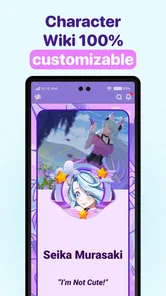
Yes. The app focuses on building detailed profiles for original characters, allowing users to collect important information such as names, appearances, personalities, backgrounds, relationships, abilities, and story details. The customization options make it possible to adapt a profile to different creative projects, whether you are designing a single character, developing a large cast, or maintaining reference material for a comic, novel, game, or roleplaying campaign.
Can I upload artwork and connect it to my characters or stories?
CharacterHub: OCs, Art, Lore supports combining visual artwork with written character and world information, which makes it easier to keep references together. Users can showcase illustrations, concept art, and other creative material alongside the profiles or lore they belong to. This organization is particularly helpful when a project contains multiple versions of a character, recurring locations, relationships, or visual details that need to remain consistent.
Is CharacterHub suitable for sharing creative work with other users?
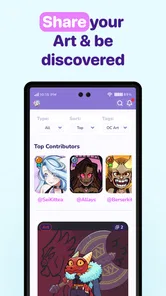
The app is not limited to private note-taking; it is also aimed at presenting original characters and creative worlds to a community. Depending on the profile and visibility settings available in your version, you may be able to share character pages, artwork, and lore with other users. Before publishing personal material, review the privacy controls carefully, especially if your work is unfinished, commissioned, or intended to remain private.
Pros
- Helps organize original characters
- artwork
- and detailed lore in one place.
- Character profiles can be customized with rich backstories and visual references.
- Community browsing makes it easy to discover inspiration from other creators.
- Useful for writers
- artists
- and roleplayers developing fictional worlds.
- Supports sharing creative projects and receiving feedback from other users.
Cons
- Some advanced customization options may require a paid subscription.
- Large community feeds can make it difficult to find highly specific content.
- Public profiles may require careful privacy management for unfinished projects.
- The app can feel overwhelming when managing many characters or worlds.
- Content quality and feedback vary considerably between different community members.











