

Cartoon Photo Editor: Facee
- 35.00
- 4.1
- Installs
- 1.00M
- Price
- Free

Screenshots
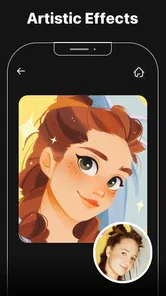
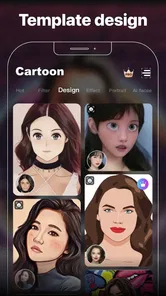
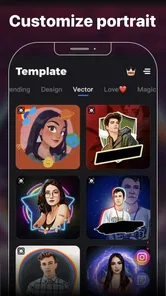
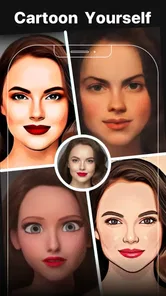
Analysis by Reviewed
I approached Cartoon Photo Editor: Facee as a quick creative tool rather than a full video-editing studio, and that distinction matters. Its appeal is immediate: take a normal photo, apply a cartoon or anime-inspired look, and turn an ordinary portrait into something suitable for a profile image, message, post, or personal collection. I found the experience most enjoyable when I treated the effects as starting points instead of expecting every result to look like a carefully illustrated portrait.
The app sits in the video players and editors category, although its main attraction is clearly still-image styling. It is free to install, rated for Everyone, and works on devices running Android 6.0 or later. The developer is Palette Cartoon Photo Editor APP. With an average rating of 4.1 from around five thousand ratings and more than a million installs, it has found a sizeable audience without presenting itself as a professional design package.
How Cartoon Photo Editor: Facee feels today
I find Facee easiest to judge as a shared creative tool: one person can pick a photo, while others offer opinions on which cartoon treatment feels right. That casual back-and-forth can be fun, but it also makes it worth thinking about whose image is being edited and where the finished version will go. The next section looks at simple boundaries that keep a quick experiment comfortable for everyone.
A fast route from ordinary photo to cartoon portrait
The strongest part of the app is the short path between choosing a picture and seeing a transformed version. That makes it useful when I want a playful result without learning layers, masks, brushes, or complicated adjustment panels. The focus is on visual experimentation: I can try a stylized treatment, compare the mood with the original, and decide whether the result is worth saving or sharing.
This simplicity is also its main limitation. A one-tap effect can be convenient, but it does not give the same control as a dedicated photo editor with manual retouching, color curves, selective adjustments, and detailed export settings. I would use Facee for a quick visual change, not for preparing a polished campaign image, restoring an old photograph, or matching a precise brand style.
The app’s store summary highlights three-dimensional cartoon effects and cute anime filters, and those themes describe the experience better than a general-purpose editor label does. The results are intended to be noticeable. They are not subtle corrections designed to preserve every natural detail of a face. If you prefer a portrait that still looks almost untouched, the more expressive filters may feel excessive.
Choosing the right source photo
One of the practical lessons I learned is that the input image matters more than the effect name. A front-facing portrait with clear lighting usually gives the app a better starting point than a dark group photo, a heavily cropped image, or a face partly hidden by hair and accessories. Before applying a filter, I recommend choosing a picture where the face is large enough on screen and the main features are easy to distinguish.
More From Our News Desk

 Instagram
Instagram’s Power Comes From Its Place in Your Phone
A close look at how Instagram turns Meta’s reach, recommendation systems and everyday camera habits into durable platform power—and what that costs users.

 Gmail
GmailGmail in a Busy Inbox: Who Benefits Most?
From first account to crowded workday, Gmail earns its place through dependable search and flexible sorting—but its best fit depends on how much inbox maintenance you can tolerate.

 Prime Video
Switching to Prime Video: What Changes in Your Viewing Routine
Prime Video can make a compelling second home for streaming, but switching means learning a different catalog, rental layer, and route from browsing to playback.

 Universal TV Remote Control
Universal TV Remote Control Works Best as a Reliable Backup
A phone remote earns its place through quick setup and reliable habits. Here is how to get more from Universal TV Remote Control—and where its limits show.

 Weather - By Xiaomi
Weather by Xiaomi Review: Clear at a Glance, Less Clear Up Close
Xiaomi’s weather app makes everyday forecasts quick to scan, but its calm surface can leave useful details and recovery paths harder to find than they should be.

 X
XX Under Pressure: Can It Recover When Posting Goes Wrong?
A resilience-focused review of X, examining setup, mistaken posts, interruptions, weak connections, and the gaps that matter when recovery needs to be dependable.
Latest News



This is especially important for anime-style treatments. Stylization can make a small difference in the eyes, mouth, or hair look much larger than it would in a regular color filter. When the source photo is already busy, the cartoon result can become visually confused. A simple background and a relaxed expression generally make the finished image feel more intentional.
A useful workflow is to keep the original image untouched, test the effect, and compare both versions before deciding. I would not overwrite the source, particularly when the transformed image is being prepared for a profile picture or a family message. The original gives me a second option if the filter looks fun at first but becomes tiring after a few minutes.
Where the app fits among familiar alternatives
Compared with a conventional photo editor, Facee is quicker but narrower. Apps built around manual editing are better when I need to brighten only the face, remove a distracting object, correct perspective, add text with precise placement, or create a consistent series of images. Facee is better when the central question is simply, “What would this picture look like as a cartoon?”
Compared with social-media camera tools, it feels more focused on transforming an existing image than on capturing a live moment. That makes it a better match for photos already sitting in my gallery. On the other hand, a social camera may be more convenient when I want to preview an effect while framing a new selfie or recording a short clip.
Compared with dedicated anime or avatar services, the attraction here is the straightforward photo-editor format. I can begin with a real picture instead of building a character from separate choices. The trade-off is that a specialized avatar app may offer more control over identity, clothing, pose, or illustration style. Facee is for a quick reinterpretation of a photo, not for constructing a detailed virtual character.
Small workflows that make the results more useful
I found three habits particularly helpful. First, I test the same portrait with several styles before judging the app. A filter that looks too strong on one face may work well with another expression or background. Second, I crop before applying an effect when the subject is surrounded by unnecessary scenery. Giving the face more visual space often makes the result feel cleaner.
Third, I use the app for a purpose rather than applying effects randomly. For example, I might create a playful profile image, a birthday greeting, or a matching set of portraits for a private group chat. Having a destination in mind makes it easier to reject an attractive but impractical result. A highly exaggerated face may be amusing in a message but unsuitable for a work profile.
Another useful trade-off is consistency. If I am making several images for the same occasion, I try to use similar source photos and keep the visual treatment in the same family. Mixing a soft cartoon look with an intense anime effect can make the collection feel accidental. The app encourages experimentation, but a little restraint produces a more coherent final set.
What the current release tells existing users
The current version is 2.2.0, while the app was released on October 28, 2020. That history suggests a product with time to establish its basic identity around cartoon portrait effects rather than a brand-new experiment. I see the present release as a continuation of a focused concept: fast stylization for users who want a visible change without a long editing session.
For someone installing it now, the version number is most useful as a reference point when checking compatibility or comparing the experience with an older installation. I would not assume that a newer version automatically means a complete redesign. The important question is whether the current workflow suits the way I edit photos: select an image, explore a stylized treatment, and keep the result that feels right.
Existing users who already enjoy the app’s look should find the current release familiar in spirit. The product’s identity remains easy to understand, which is valuable for casual users who do not want to relearn an editor every time they open it. At the same time, anyone hoping for a move toward detailed professional controls may find the focused approach less satisfying.
Free access and the point where costs matter
The app is free, but it includes in-app purchases ranging from $0.99 to $31.99 per item. That means I can try the basic experience without paying upfront, yet I would still check the purchase screen carefully before committing to anything. A free starting point is helpful for testing whether the visual style actually suits my photos, especially because cartoon effects are highly personal.
My advice is to evaluate the unpaid experience with one or two real use cases before considering an optional purchase. If the available tools already produce the kind of image I want, there may be no reason to spend more. If the effect I need is behind a purchase, I would compare that cost with the frequency of use: paying for an occasional joke image feels different from paying for a regular content workflow.
I would also avoid treating the highest-priced item as automatically better. A larger purchase may make sense only for someone who uses the app often and understands exactly what it adds. For a casual user, a conventional editor with a broader free toolkit may offer better overall value, even if its cartoon results are less specialized.
Where the experience still falls short
The biggest gap is control. A filter-based editor can produce an appealing result quickly, but it may also make decisions I would prefer to make myself. If the face looks too smooth, the colors feel too intense, or the background competes with the subject, I may need another app to finish the image. That extra step reduces the advantage of using a single-purpose tool.
There is also a creative limitation in relying on preset looks. Presets are excellent for discovery, but they can make different photos feel similar. Users who want a distinctive visual signature may eventually outgrow the app unless the available controls let them fine-tune the result enough. For professional portraits, product photography, or client work, I would choose an editor where every important visual decision remains adjustable.
The category label can create another expectation problem. Because the app appears among video players and editors, some people may expect substantial video tools. I would not install it primarily for timeline editing, transitions, audio work, or detailed motion effects. Its clear strength is the cartoon treatment of photos, so users seeking a full video workflow should look elsewhere.
Privacy-conscious users should also make their own comfort decision before selecting personal images. I would begin with a non-sensitive picture when trying any photo-effect service for the first time, then review the app’s current permission and privacy information on the device or store page. That is a sensible habit for any editor handling portraits, particularly when the image includes children, relatives, or people who have not agreed to public sharing.
Who will enjoy it most
I think Facee is a good match for casual creators, families, students, and anyone who wants a quick change of mood in a familiar photograph. It is especially approachable for people who find advanced editors intimidating. The Everyone age rating also makes its general presentation accessible to a broad audience, although adults should still guide younger users when sharing personal photos or making purchases.
It can be useful in everyday situations. Imagine receiving a group selfie before a friend’s birthday. Instead of spending time designing a card, I could try a cartoon treatment, crop the image around the faces, and send the most successful version in a message. The result does not need to be perfect; it only needs to feel personal and playful. That is exactly the kind of small task where the app earns its place.
I would skip it if my priority were natural-looking retouching, advanced image correction, detailed typography, professional exports, or serious video production. I would also skip it if I dislike exaggerated facial effects. The app’s value depends on enjoying visible transformation, and no amount of convenience can compensate if that style is not what I want.
What I would watch in future updates
For future development, I would pay attention to whether the app expands control without losing its quick workflow. Adjustable intensity would be particularly useful because it could let me keep the cartoon character while reducing an effect that feels too strong. Better ways to compare the original and edited versions would also help users make decisions instead of relying on memory.
I would also watch for improvements that make repeated work easier. If I am preparing several portraits for the same event, consistent cropping, style matching, and straightforward saving become more important than simply adding another dramatic filter. Those practical details would improve the app for real use without changing its approachable identity.
At the same time, I would prefer clear separation between confirmed improvements and hopeful expectations. The current release gives me a focused cartoon-photo tool, not a promise of a complete creative suite. I judge it on what it does now: turning selected portraits into playful stylized images with relatively little effort.
My recommendation after using it
Cartoon Photo Editor: Facee is worth trying if you want a free, friendly way to experiment with cartoon and anime-inspired portraits. Its best quality is immediacy: I can start with a familiar photo and quickly see a very different version. The app is easy to understand, and its focused purpose makes it less intimidating than a large editor filled with professional controls.
My recommendation comes with a clear condition: use it for expressive, casual images rather than demanding precision. Keep the original photo, choose source images carefully, compare several treatments, and think about where the final picture will be used. Those habits make the results more reliable and help avoid paying for tools before you know you need them.
With a 4.1 average and over a million installs, it has enough traction to be a reasonable experiment for Android users whose devices meet the minimum requirement. I would not call it a replacement for a complete photo or video suite, but I would recommend it to a friend who wants a quick cartoon portrait for a profile, greeting, or private message. Its real strength is turning a simple photo into a playful idea without demanding much editing knowledge.
Cartoon Photo Editor: Facee Frequently Asked Questions
Can I save or share the cartoon portraits I create?
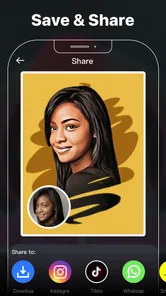
Cartoon Photo Editor: Facee is intended for making portraits and artwork that you can use as profile pictures, social media posts, avatars, or images to share with friends. Once you have finished editing, look for the app’s export or sharing options and choose the destination that suits you. Check the final image before posting, especially if it includes a personal photo or identifying details.
What kinds of cartoon effects and filters does the app offer?
Cartoon Photo Editor: Facee focuses on illustrated effects, artistic filters, face-focused edits, and decorative adjustments. Its store summary highlights 3D cartoon effects and cute anime filters, making it a fit for users who want a stylized portrait rather than a general-purpose photo editor. The available choices can shape how a picture looks, so trying a few options can help you find a style that suits your image.
What is Cartoon Photo Editor: Facee, and what can I do with it?
Cartoon Photo Editor: Facee is a photo-editing app designed to transform ordinary pictures into cartoon-style portraits and creative artwork. After selecting an image from your gallery or taking a new photo, you can apply illustrated effects, artistic filters, face-focused edits, and other decorative adjustments. It is mainly intended for creating profile pictures, social media posts, avatars, and fun images to share with friends.
Does Cartoon Photo Editor: Facee require an internet connection to work?
The basic editing experience may work with photos already stored on your device, but some features can depend on an internet connection. Online processing, additional effects, advertisements, cloud-based tools, or content downloads may not be available offline. If you plan to use the app while traveling or with limited data, it is best to test the essential filters first and check which tools remain accessible without Wi-Fi or mobile internet.
Is Cartoon Photo Editor: Facee free to download and use?
Cartoon Photo Editor: Facee can generally be downloaded without an upfront charge, although the free version may include advertisements, locked effects, or optional purchases. Availability of premium tools and subscription terms can change depending on the platform and region. Before confirming any payment, review the in-app purchase screen carefully, including renewal details, trial conditions, and whether removing ads or unlocking filters requires a one-time or recurring fee. The app is free to download, with optional in-app purchases ranging from $0.99 to $31.99 per item.
Pros
- Turns selfies into cartoon-style portraits in just a few taps.
- Offers multiple artistic filters for different cartoon looks.
- Simple interface makes editing accessible for beginners.
- Useful cropping and adjustment tools improve portrait framing.
- Edited images can be saved and shared quickly.
Cons
- Some effects may look repetitive after extended use.
- Certain filters and tools may require in-app purchases.
- Results can vary depending on lighting and photo quality.
- Ads may interrupt editing
- especially in the free version.
- Privacy details should be checked before uploading personal photos.












