AI Catch: AI Video Generator
- 129.00
- 4.7
- Installs
- 1.00M
- Price
- Free

Screenshots
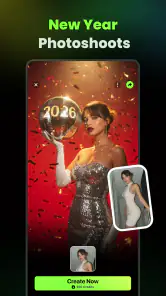

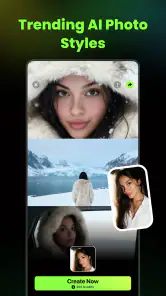
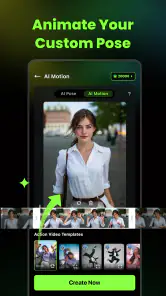

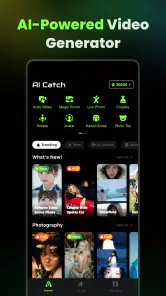
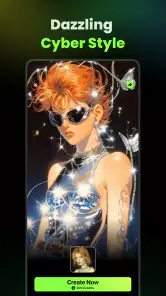
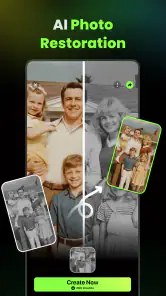
Analysis by Reviewed
I’d treat AI Catch as a quick way to turn photos or clips into a more stylized video, rather than as a full editing studio. That distinction matters: its appeal is the promise of letting AI do much of the assembly, while a traditional editor gives you more direct control over every cut. If you want something shareable without spending an evening learning a timeline, that trade-off can be useful.
Who is likely to enjoy it
I can see this fitting casual creators, social-media users, and anyone who has a folder of photos they rarely do anything with. For example, after a family day out, you could gather a few pictures and short clips, try a visual treatment, then decide whether the result feels right for sharing. It is also a reasonable starting point if you find a blank editing timeline intimidating and would rather begin with a template or an automated suggestion.
It is less suited to someone who needs frame-by-frame precision, carefully timed captions, or a consistent style across a batch of client videos. In those cases, a conventional mobile editor is usually the safer choice because its manual controls make the result easier to reproduce. I would also avoid relying on an AI-generated edit for an important presentation until you have checked every transition, title, and image yourself.
A practical workflow, not just a one-tap result
For better results, I’d choose a small set of images and clips that already tell a simple story instead of feeding in everything from an event. A clear beginning, a few varied moments, and a strong closing shot give an automated editor better material to work with. This is a useful trade-off: the app may save time on assembly, but thoughtful selection still makes a noticeable difference to the finished video.
I’d also watch the first preview with the sound on and then check it once more with captions or overlays in mind. Music can change the mood, while a text label that looks harmless on one shot may cover a face or important detail in another. If the app lets you adjust those elements, use that control selectively rather than adding text and effects to every scene.
Keeping a project suitable for its audience
Before sharing a video, I’d consider not only whether the images look good but whether the treatment fits the people in them. A playful effect might work for a private birthday recap and feel out of place in a school update or a work announcement. Keeping a natural copy alongside the stylized version gives you a safer alternative if the finished edit feels too dramatic after you watch it again.
For a family project, I’d also show the draft to someone who knows the people and context before posting it publicly. Automated edits can emphasize a moment in a way that changes its tone, and a quick second opinion is often more useful than adding another effect. That small review step helps make the app’s speed an advantage without handing it the final say.
More From Our News Desk

Weather by Xiaomi Review: Clear at a Glance, Less Clear Up Close

X Under Pressure: Can It Recover When Posting Goes Wrong?

Clash of Clans Is Won Between the Battles

Android Auto Makes the Case for Quieter Car Software

MobiOffice: Transforming Mobile Productivity with Seamless Integration

EA SPORTS FC™ Mobile Soccer: Redefining Mobile Sports Gaming
Hey there! So, I recently got my hands on this app called AI Catch: AI Video Generator, and let me tell you, it’s pretty impressive. If you're like me and love creating videos but don't exactly have Spielberg-level skills, this app might just be your new best friend. Let's dive into what makes it tick and whether it's worth your time.
Getting Started with AI Catch
First things first, downloading and setting up AI Catch: AI Video Generator is a breeze. Available on both Android and iOS, it takes just a few taps to get it up and running. Once you've got it installed, the app greets you with a clean and intuitive interface. Everything is laid out in a way that feels logical, so even if you're not the most tech-savvy person, you’ll feel right at home.
Features That Shine
Now, let's talk about the features. The app boasts some pretty cool tools that make video creation feel like a walk in the park. You start by choosing a theme or template, and trust me, there are plenty to suit any mood or occasion. Whether you're making a birthday tribute or a professional presentation, there's something here for everyone.
What really sets this app apart is its AI-powered editing capabilities. You simply upload your clips or photos, and the AI does its magic by stitching everything together seamlessly. It analyzes the content to suggest the best transitions and effects, which saves you tons of time and effort. Plus, the AI video generation ensures that even the most mundane footage looks polished and engaging.
Making a short social post feel intentional
One practical way I’d use the automated approach is to create a short recap for a group chat or social feed, where the goal is to share a mood rather than document every detail. I’d pick a few clips with different kinds of movement, add a couple of still images for context, and keep the text minimal. That mix gives the sequence some variation while avoiding the feeling that every moment has been treated as a separate effect demo.
If a first result feels busy, I wouldn’t immediately change the entire style. I’d remove one or two weaker images, reconsider the opening shot, and preview again. In a template-driven workflow, the order and quality of the source material can matter as much as the chosen look. This is a useful way to make a quick edit feel more personal without turning the process into a long manual project.
User Experience
One of the things I loved about AI Catch is how user-friendly it is. The developers clearly put a lot of thought into making the app accessible. There are helpful tips and hints along the way, so you're never left wondering what to do next. The simplicity doesn’t mean it skimps on functionality, though. You have control over various aspects of the video, like adjusting the music, tweaking the speed, and adding text overlays.
The app also supports high-definition output, so your videos look crisp and professional. Sharing is a breeze, too. With a few taps, you can post your creations directly to social media, send them via email, or save them to your device.
Choosing the right source material
For a better first attempt, I’d avoid mixing clips with very different lighting or camera orientations unless that contrast is part of the story. A collection of landscape footage, for instance, may sit together more naturally than a mix of portrait and landscape shots. If you do want to combine them, check the preview edges and framing carefully; an automated composition can’t know which detail you consider essential.
I’d also start with copies of the files I plan to use and keep the originals separate. That way, a creative experiment does not become the only version of a moment I care about. This is especially helpful when trying a strong cartoon-like or otherwise stylized treatment: the appeal is in changing the look, but the original may still be the version you want to keep or share later.
Making the Most of AI Catch
To really get the most out of AI Catch: AI Video Generator, I recommend experimenting with different templates and effects. The app offers a free version with basic features, but if you’re serious about video creation, the premium version unlocks a treasure trove of additional tools and effects. The subscription is reasonably priced, especially considering the quality of the content you can produce.
Another tip is to take advantage of the built-in tutorials. They’re concise and to the point, giving you the skills you need to enhance your videos further. You'll be surprised at how quickly you can go from amateur to pro with a bit of practice.
What the current version tells me
AI Catch is a video-making app from Palette Cartoon Photo Editor APP, and its current version is 1.2.3. It arrived on Aug 26, 2025, so it is still a relatively new option in a crowded category. That gives me a reason to approach it as an evolving tool rather than assume every workflow is already as polished as a long-established editor’s.
The current user response is encouraging: it has a 4.7 average from around 49,000 ratings, with over 1 million installs. Those figures suggest that many people have found a reason to try it, but they do not tell me whether its AI style will suit your footage. I’d judge that by testing a short, low-stakes project before building a regular workflow around it.
What to check before making it a habit
For someone using AI Catch occasionally, the main test is whether the results are worth the extra step of reviewing them. I’d make one small project from familiar material, note which choices I had to correct, and see whether the saved time outweighs that cleanup. If you repeatedly find yourself adjusting the same timing or layout issue, that’s a sign a manual editor may suit that particular job better.
It is also worth deciding where the finished video will be watched before you spend time polishing it. A clip made for a phone screen may not need the same careful framing as something shown on a larger display. I’d check the final file in its intended setting, especially if the video contains text or a key detail near the edge of the image.
Costs, compatibility, and a sensible first test
The app is free to install, with in-app purchases ranging from $4.99 to $99.99 per item. I would explore the free experience first and only consider paying after identifying a specific tool or effect I genuinely want. Before confirming any purchase, check the current offer and billing details in the app; a broad price range is not enough to tell you which option fits your needs.
It is rated Mature 17+ and requires Android 7.0 or later. That makes the age label worth checking if the app is for a younger family member, and the Android requirement useful to confirm before trying to install it on an older device. The listing identifies Android compatibility; I would check the relevant store for availability on the device you plan to use rather than assume the same version and requirements apply everywhere.
When another editor makes more sense
AI Catch’s assisted style is most appealing when speed and visual novelty matter more than exact control. If I were assembling a video with a fixed script, matching a brand’s visual rules, or syncing a voiceover to precise moments, I would reach for a timeline editor first. That kind of work depends on repeatable decisions, and manually placing each element usually makes it easier to spot and correct small timing problems.
On the other hand, a conventional editor can ask more of a beginner: choosing cuts, arranging a sequence, and balancing sound all take attention. For a casual clip, that effort may be unnecessary. I see the strongest use for AI Catch as a quick creative starting point, not a universal replacement for every editor on a phone.
Where it sits among video editors
Compared with a standard editor built around a timeline, AI Catch’s template-led approach is aimed more at getting a first draft quickly than at controlling every edit. That can be the right choice for a casual recap or a playful social post, where a quick visual idea matters more than exact timing. A manual editor is better when you need dependable pacing, precise audio cuts, or repeatable branding; neither approach is automatically better for every project.
One useful habit is to keep an untouched copy of your original clips before experimenting. It gives you room to try a dramatic effect without losing the natural version, and it makes it easier to switch to another editor if the generated style does not fit. I would also preview the saved result on the device where you plan to share it, since a video that looks good in an editing screen can feel different once viewed in a feed.
What I would watch as it develops
Because version 1.2.3 belongs to a relatively new product, I’d pay attention to whether the app becomes more predictable for repeat projects as it develops. For regular users, useful progress would mean being able to reach a similar result without rebuilding the workflow from scratch each time. That is a practical expectation to watch for, not a claim about changes that have already happened.
I’d also judge future improvements by how much they help with the unglamorous parts of editing: making a revision, checking a finished file, and keeping a project consistent. More effects are not automatically more useful if the basic process still needs lots of correction. For now, I’d base my decision on the current experience and treat any hoped-for refinements as a bonus rather than a reason to install it.
Final Thoughts
All in all, AI Catch: AI Video Generator is a fantastic tool for anyone looking to create stunning videos without the hassle. Its AI-driven features make video editing accessible to everyone, and the end results are nothing short of amazing. While there are other video editing apps out there, the combination of ease-of-use and powerful features really makes this one stand out.
If you're looking to impress your friends with your newfound video editing prowess or simply want to create memorable moments with ease, give AI Catch a try. It might just become your go-to app for all things video.
My recommendation is to begin with one short project, compare a couple of styles, and inspect the exported result before deciding whether it belongs in your regular toolkit. If you enjoy the quick, assisted approach, it can be a friendly way to make more from the photos and clips you already have. If you need predictable professional control, use it for ideas and move the final edit into a timeline-based app.
AI Catch: AI Video Generator Frequently Asked Questions
Can AI Catch: AI Video Generator create animated videos?
Yes. AI Catch is presented as an AI video generator with animation and AI effects, making it a possible option if you want to give a video a more stylized or animated look. Its focus is AI-assisted creation and editing, so it may suit people who want to experiment with effects as well as those polishing existing footage.
Do I need video-editing experience to use AI Catch?
AI Catch is described as accessible to beginners, with an interface intended to guide users through video creation. If you have not edited videos before, starting with a simple project can help you get comfortable with the tools before trying more ambitious ideas. It is also aimed at casual users, though people with different editing experience may approach its features in their own way.
Can I use AI Catch to make videos for social media?
AI Catch’s store summary describes it as a way to create viral-style videos with animation and AI effects, so it may appeal if you want to make eye-catching content to share. The app also focuses on creating and enhancing videos. Before relying on it for a particular platform, consider whether the available editing options suit the style of video you want to produce.
What operating-system version do I need to install AI Catch?
For Android users, AI Catch requires Android 7.0 or later. Checking your device’s software version before downloading is a simple way to avoid compatibility surprises. The app is also described as available for iOS, but it is sensible to check the requirements displayed for your specific device and store before installing.
Is AI Catch suitable for making videos from existing footage?
AI Catch is described as an app for generating videos and enhancing existing footage, so it may be relevant if you already have clips you want to edit. Its focus includes AI-assisted video creation and effects, which can offer ways to give footage a different look. Starting with a short, simple project is a practical way to see whether its tools suit your editing style.
Pros
- User-friendly interface simplifies video creation.
- Wide range of templates for diverse needs.
- High-quality output with minimal effort.
- Fast processing speeds save time.
- Supports multiple file formats for convenience.
Cons
- Limited free version features available.
- Requires a stable internet connection.
- Occasional rendering glitches reported.
- Subscription can be costly for some users.
- No offline editing capabilities.
- Category
- Video Players & Editors
- Version
- 1.2.3












