

Candy Race Launcher
- 594.00
- 4.6
- Installs
- 10.00M
- Price
- Free

Screenshots
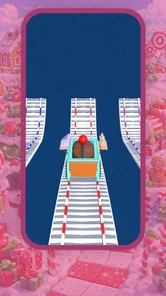
Analysis by Reviewed
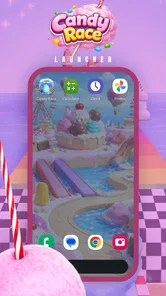
I’d approach Candy Race Launcher as a way to give my phone a more playful identity, rather than as a game suggested by its racing-themed name. Its central appeal is the candy-inspired visual style: instead of leaving the home screen looking like a standard phone setup, it offers a more colorful mood for the place I return to throughout the day. I’d try it if I wanted a cheerful change, while keeping one practical question in mind: does the new look still feel comfortable when I’m checking my phone in a hurry?
That focus makes Candy Race Launcher a distinctive fit for people who enjoy bright, themed phone layouts. It is a free personalization app from Gamnest, and the name points to a sweet, playful style. I wouldn’t assume that it turns phone use into a racing game. The useful test is whether the theme makes everyday taps feel more enjoyable without making familiar apps harder to spot.
A good fit for a quick visual refresh
If I were deciding whether to install it, I’d first ask what I actually want to change. If I only want a different background image, changing the wallpaper is a smaller adjustment and leaves the rest of my habits untouched. If I want the home screen to have a more unified, whimsical character, a themed launcher is the more relevant kind of choice. The difference is commitment: I’m choosing a broader visual impression, not just a picture behind my icons.
That distinction is useful when deciding how much change feels welcome. Someone who likes to switch phone styles now and then may enjoy a theme that makes the device feel less generic. Someone who has carefully arranged a familiar screen may prefer to keep that layout and add color more cautiously. I’d choose the scale of change that matches the reason I’m personalizing the phone, rather than assuming that a stronger visual makeover is automatically better.
I’d also think about where I use the phone. A cheerful theme may feel right on a personal device that I check between errands, messages, and music. On a phone that I use mainly for work, a quieter appearance may be easier to live with. The important point is not whether a bright design is objectively good or bad; it’s whether it suits the moments when I rely on the screen.
A candy theme changes the feel of familiar phone routines
I see this section as a useful reminder that a themed screen changes the atmosphere of ordinary phone checks, not the tasks themselves. The practical question is whether that extra color stays welcome when I’m opening an app quickly or sharing the phone with someone else. With that distinction in mind, it’s easier to judge how the theme fits into a real day.
Why the visual capability matters
Most personalization choices are either small accents or broad changes. A new wallpaper is easy to try, but it leaves the rest of the screen largely as it was. A launcher-style approach can make the overall home-screen experience feel more coordinated. Candy Race Launcher’s defining draw is that themed identity: instead of choosing an isolated image, I’m choosing a playful mood for the place I return to throughout the day.
More From Our News Desk

 Gmail
GmailGmail in a Busy Inbox: Who Benefits Most?
From first account to crowded workday, Gmail earns its place through dependable search and flexible sorting—but its best fit depends on how much inbox maintenance you can tolerate.

 Prime Video
Switching to Prime Video: What Changes in Your Viewing Routine
Prime Video can make a compelling second home for streaming, but switching means learning a different catalog, rental layer, and route from browsing to playback.

 Universal TV Remote Control
Universal TV Remote Control Works Best as a Reliable Backup
A phone remote earns its place through quick setup and reliable habits. Here is how to get more from Universal TV Remote Control—and where its limits show.

 Weather - By Xiaomi
Weather by Xiaomi Review: Clear at a Glance, Less Clear Up Close
Xiaomi’s weather app makes everyday forecasts quick to scan, but its calm surface can leave useful details and recovery paths harder to find than they should be.

 X
XX Under Pressure: Can It Recover When Posting Goes Wrong?
A resilience-focused review of X, examining setup, mistaken posts, interruptions, weak connections, and the gaps that matter when recovery needs to be dependable.

 Clash of Clans
Clash of Clans Is Won Between the Battles
Its raids are quick; its community is a long-term project of coordination, teaching, rivalry, and shared responsibility—with all the friction that entails.
Latest News



That can be more meaningful than it sounds. A phone is used in little bursts: checking a message, opening a map, finding a work app, or glancing at the screen before putting it away. A consistent visual theme makes those brief moments feel less generic. For someone who likes candy colors and whimsical design, the effect may be a small daily pleasure. For someone who prefers neutral icons and minimal visual noise, the same style may become tiring quickly.
I’d treat the theme as a personal preference rather than a productivity feature. It does not make a task intrinsically faster just because the screen looks more playful. Its value is whether the appearance feels inviting and whether the important apps remain easy to recognize. That distinction helps avoid a common disappointment: expecting a decorative change to improve phone organization by itself.
What to check during a first try
When testing a themed launcher, I pay attention to ordinary actions rather than judging it from a single attractive screen. Can I spot the apps I use most without pausing? Does the visual style remain pleasant after several unlocks? Do the screens feel orderly, or does the theme draw my eye away from the information I came to check? These are useful tests for Candy Race Launcher because its strongest promise is aesthetic, so comfort matters more than a quick first impression.
I also recommend trying it during a normal day, not only while setting it up. A design can look charming when viewed deliberately and feel overly busy when I’m in a hurry. If the phone is shared with family, or if someone else often picks it up to make a call, familiar visual cues may matter more than a highly themed appearance. Personalization works best when it adds character without making basic navigation feel like a puzzle.
Before settling on any launcher, I would check how the home screen behaves with the apps I actually use and whether I’m comfortable making it the default starting point. That is a more useful measure than counting decorative details. It also gives me a clear reason to keep or remove the app: if the themed screen makes everyday access feel pleasant, it earns its place; if I keep searching for familiar icons, the novelty is not worth the friction.
A realistic everyday use case
Imagine reaching for your phone during a short break to open a messaging app, then switching to music before heading out. With a candy-themed home screen, the benefit is not a special new workflow; it is that those repeated transitions happen against a more cheerful visual backdrop. If the apps you need are easy to find, the style can make an ordinary routine feel more personal. If you have to hunt for them, the decoration has started working against the reason you picked up the phone.
That is why I would make the most-used apps the test case. Don’t decide based only on a screen you rarely visit. Use the main home screen for your actual routine, and see whether the theme still feels readable when you are moving quickly. This is a simple, practical way to judge a visual launcher without assuming unconfirmed features or spending time redesigning every part of the phone.
How it compares with lighter personalization
Compared with changing only a wallpaper, a themed launcher is a more committed choice because it can affect the overall home-screen impression. A wallpaper is the safer route if I want a quick visual refresh while keeping familiar layouts and habits intact. A launcher makes more sense when I want a stronger, coherent style and am willing to adapt to a different presentation.
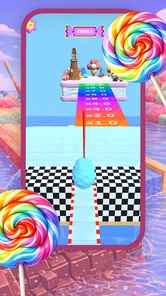
It also differs from a game with candy or racing imagery. The phrase “race” may create expectations of competition, levels, or driving, but Candy Race Launcher belongs to phone personalization. I would choose it for its visual character, not for gameplay. That makes it appropriate for someone who wants a themed device, but not for a player looking for an actual racing title.
People who already use a carefully arranged home screen should weigh the change more cautiously. Their current setup may be plain, but it may also be quick and familiar. Replacing that with a themed look is worthwhile only if the visual enjoyment outweighs any relearning. If the goal is simply to make one part of the screen brighter, a wallpaper or a limited set of visual tweaks may be a better fit than changing the overall launcher experience.
Where the tradeoff appears
The main tradeoff is that distinctive styling is not universally comfortable. Candy colors and a playful theme can bring personality, yet they may be a poor match for a restrained work phone or for someone who wants a low-distraction screen. I would also think about long-term use: a theme that delights me for an afternoon may feel too strong after weeks of frequent checking. The best choice is the one I still like when the novelty has worn off.
Another consideration is familiarity. Any change to the home-screen presentation can make routine app-finding feel different, even when the apps themselves have not changed. I would avoid switching just before a busy day if I rely on muscle memory to open essential apps quickly. Trying the look when I have a few quiet minutes gives me room to decide whether the visual shift feels natural.
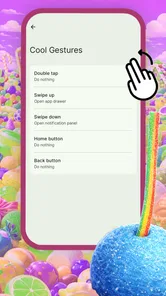
There is also a difference between personalization and customization depth. Candy Race Launcher’s clearest identity is its theme, so I would not choose it on the assumption that it offers every fine-grained control found in more configurable alternatives. If I care most about adjusting individual details, or want a subdued design that blends into a work-focused setup, a more neutral option may suit me better. The right decision depends on whether I want this particular visual mood, not simply “more settings.”
Who is most likely to enjoy it
I can see Candy Race Launcher working well for someone who likes playful graphics, enjoys refreshing their phone’s look, and is happy to prioritize personality over a strictly minimal screen. It can also suit a person who wants their device to feel less generic without treating personalization as a major project. Since it is free, trying the style is an accessible way to find out whether a candy-led look fits, though free does not automatically mean it will match everyone’s habits.
It is less suitable for people who prefer understated visuals, depend on a carefully established home-screen arrangement, or want a game rather than a phone-personalization app. It may also not be the best choice for a device that needs to remain visually restrained in professional settings. In those situations, a simple wallpaper change or a more neutral launcher is a more sensible alternative than forcing a theme that does not feel like you.
The app is rated for Everyone, and it has an average rating of 4.6 from around 70,000 ratings, with more than 10 million installs. Those figures suggest that many users have chosen to try it, but they cannot tell me whether its particular style will suit my own screen habits. I would use them as background, then make the decision based on readability, comfort, and whether I enjoy seeing the theme repeatedly.
Practical details and my verdict
Candy Race Launcher is on version 1.0.3 and requires Android 8.0 or later. Those details are worth checking before trying it, especially if the phone is older or running a version near that minimum. The app is free, so the main cost to consider is not a purchase but the time spent trying a different home-screen style and deciding whether it feels right.
For a sensible trial, I’d avoid rearranging everything at once. First see whether the themed presentation works with the routine you already have: messages, maps, calls, or whichever apps you open without thinking. If the app-finding feels natural, there’s little reason to turn the trial into a full redesign. If it feels awkward, that’s useful feedback too; the theme is optional, and returning to a simpler look may be the better choice.
One question worth answering before making the switch is whether a launcher is the right level of change at all. If I only want a brighter lock-screen or background image, a wallpaper is less disruptive. If I want a racing game, this is the wrong category entirely. If I want a coordinated candy-inspired home-screen mood, this app is the more direct experiment. Being clear about that goal helps me avoid judging it for something it is not meant to provide.
My recommendation is straightforward: give it a try if you want a cheerful, candy-inspired identity for your phone and are open to changing how the home screen feels. Judge it by how quickly you reach your everyday apps, not just by whether the design makes you smile at first glance. If the theme stays enjoyable while you use the phone normally, it delivers the kind of personal touch it is built for. If you want a quiet interface, a racing game, or detailed control over every visual choice, I’d look elsewhere. For the right person, the best part is simple: your routine phone screen gets a more playful personality.
Candy Race Launcher Frequently Asked Questions
What is Candy Race Launcher?
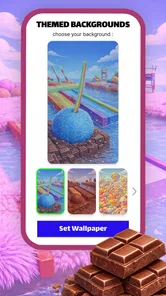
Candy Race Launcher is an Android launcher that gives your device a colorful, candy-themed appearance. It can change parts of the home-screen experience, such as icons, wallpapers, and visual styling, depending on the features included in the version you install. It is primarily a customization app rather than a racing game, so check the app listing and screenshots to confirm that its look and tools match what you want.
How do I install and set up Candy Race Launcher?
Download Candy Race Launcher from a trusted app store or the developer’s official source, then follow the installation prompts. After opening it, you may be asked to choose it as your default home app; this lets it display your home screen when you press the Home button. Explore its settings to adjust the appearance, and remember that the exact setup steps can vary by Android version and by the app’s current release.
Is Candy Race Launcher free, and does it include ads or in-app purchases?
Availability, pricing, advertisements, and in-app purchases can differ by store, region, and version. Review the app’s current listing before downloading, including its pricing details and any notes about advertising or optional purchases. A free download does not necessarily mean every theme or feature is free. If you prefer an ad-free experience or want to avoid extra charges, check these details and your purchase settings first.
Will Candy Race Launcher work on my phone, and can I change back to my previous launcher?
Compatibility depends on your device, Android version, and the requirements shown on the app’s store page. Before installing, check that your phone meets those requirements and that the launcher has recent compatibility information. You can generally switch back by opening Android’s default home-app settings and selecting your previous launcher. Uninstalling Candy Race Launcher may also restore the prior setup, but verify your icon and home-screen arrangement afterward.
What permissions or privacy details should I check before downloading Candy Race Launcher?
A launcher may need access to certain device features to provide its home-screen functions, but the permissions requested can vary between versions. Read the permissions and privacy information on the app’s store listing, and consider whether each request makes sense for the features you plan to use. Avoid granting optional access without a clear reason, and consult the developer’s privacy policy for details about information collection, use, and sharing.
Pros
- Bright candy-themed visuals give the launcher a playful look.
- Icon pack helps create a more coordinated home screen.
- Customizable wallpapers add a personal touch.
- Simple layout is easy for new launcher users to navigate.
- Lightweight design can suit users who prefer a less cluttered home screen.
Cons
- Candy styling may not appeal to users seeking a minimalist look.
- Some themes or features may require extra downloads.
- Customization options may be limited compared with advanced launchers.
- Changing launchers can disrupt your existing home-screen layout.
- Ads or promotional content may interrupt the experience.












