CamCard - BCR (Western)
- 638.00
- 4.1
- Installs
- 50.00K
- Price
- $0.99

Screenshots


Analysis by Reviewed
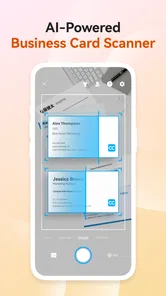
When I meet someone at an event, the awkward part usually begins after the handshake: I have a paper business card in one hand, my phone in the other, and no good place to put the contact details. CamCard - BCR (Western) is built around removing that small but persistent problem. It scans business cards, turns the printed information into a digital contact, and also supports the idea of keeping a digital business card ready to share. After using it as a business-focused app rather than treating it like a simple camera tool, I found it most useful for people who regularly collect contacts and actually follow up with them.
The app comes from INTSIG and sits in the Business category. It is available for Everyone, costs $0.99, and also includes optional purchases ranging from $3.49 to $399.99 per item. That pricing deserves attention because the best choice depends on how often you scan, how much you need to process, and whether you want to rely on the basic experience or add paid capabilities. My overall impression is favorable, but I would not recommend it automatically to someone who only receives a card once or twice a year.
How CamCard feels in everyday business use
The central workflow is easy to understand: point the phone at a paper card, capture it, check the recognized details, and save the result in a form that is easier to search than a drawer full of cards. That sounds simple, but the useful part is not the photograph itself. The real benefit is the transition from a physical object to an actionable contact. I can search for a person later, copy a phone number into a message, or use the stored information when preparing a follow-up.
I tested the idea in a realistic situation: after a small networking meeting, I had several cards from people working in different fields. Instead of entering each person manually, I scanned them while the conversations were still fresh. The process saved time, but I still treated recognition as a first draft rather than unquestionable truth. Names, email addresses, company names, and unusual job titles deserve a quick review, especially when the card uses a decorative font, a dark background, or multiple languages. That checking habit is one of the most important ways to avoid carrying a small scanning error into future communication.
The strongest habit is to review every recognized field before you depend on it. A fast scan is valuable only when the final contact is accurate. I found it helpful to compare the result with the card immediately, while I still remembered who the person was and why I wanted to stay in touch. Waiting until later makes mistakes harder to spot and turns a convenient tool into another cleanup task.
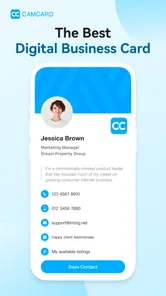
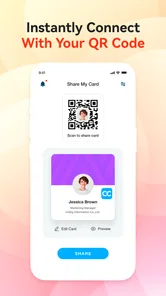
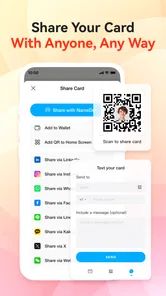
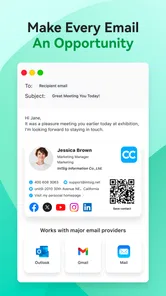
The digital business card side gives the app a broader purpose than a paper-card archive. A person who attends meetings, visits clients, or works independently can use a digital identity when carrying printed cards is inconvenient. This is especially practical when contact details change, because a digital profile can be easier to maintain than reprinting a stack of cards. Still, I would think about the recipient before choosing this route. Some people prefer a familiar paper card, while others are happy to receive a digital contact immediately.
Where it is more useful than manual entry
Manual entry remains the most dependable option for a single important contact, but it becomes tiring when several cards arrive together. CamCard is better suited to batches of ordinary business cards, provided I take a moment to verify the results. The time saving is not just about typing. It also reduces the chance of postponing the task until the cards disappear into a bag or desk drawer.
More From Our News Desk

Weather by Xiaomi Review: Clear at a Glance, Less Clear Up Close

X Under Pressure: Can It Recover When Posting Goes Wrong?

Clash of Clans Is Won Between the Battles

Android Auto Makes the Case for Quieter Car Software

MobiOffice: Transforming Mobile Productivity with Seamless Integration

EA SPORTS FC™ Mobile Soccer: Redefining Mobile Sports Gaming
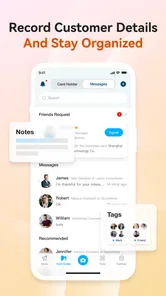
Another useful workflow is separating capture from follow-up. I can scan cards during an event, add a short note about the conversation, and then return to those contacts later. That prevents me from interrupting a useful conversation just to type everything into a phone. The app becomes more valuable when it supports a routine: capture first, correct details, add context, and contact the person while the meeting is still recent.
For a small sales team or a consultant, this can create a more consistent starting point than letting every person store cards differently. It does not replace a full customer relationship system, and I would not pretend that it does. However, it can act as a practical bridge between offline networking and a searchable contact list, particularly for people who do not need a large business platform.
Small details that make the workflow better
I recommend photographing cards under even lighting and placing them on a flat, uncluttered surface when possible. That sounds obvious, but it matters more than rushing through a crowded table. Reflections, shadows from your hand, and a card tilted at an angle can make the recognition stage less reliable. A few extra seconds at capture time are usually preferable to correcting several fields later.
I also found it useful to keep the original card available until the contact has been checked. The image is not merely a backup; it provides context when the text layout is ambiguous. A card may contain a main office number, a direct line, a messaging number, and a fax number. If the recognition result places those into the wrong fields, the picture helps me decide what belongs where.
A less obvious advantage is the ability to treat contacts according to their next action rather than their storage location. Someone I met at a conference may need a message tomorrow, while another person may simply be worth remembering. Adding that distinction during or immediately after scanning makes the collection more useful than a flat pile of names. The app is at its best when I use it as part of a follow-up system, not as a digital warehouse.
There is also a trade-off between speed and control. Automatic recognition is convenient, but manual entry gives me a chance to standardize company names, job titles, and notes as I go. If I am building a carefully organized address book, I prefer to slow down and correct the contact immediately. If I am processing a large number of cards after an event, I accept a faster first pass and schedule a review before sending messages.
What the current version tells me about the product
The current version is 7.89.5.20260807, and the app requires operating system version 10 or later. Those details matter to existing users because compatibility is part of the experience: an older phone may not be able to install or update it, while a supported device should be evaluated against the current release rather than an old memory of how the app worked years ago.
CamCard has been around since February 9, 2010, which gives it a much longer product history than many newer scanning tools. I see that longevity as a sign that the basic problem remains real, not as a guarantee that every part of the experience will suit modern habits. The product has had time to move beyond simply photographing cards, and its combination of scanning and digital sharing reflects that broader direction.
At the same time, I would separate confirmed current details from expectations. A newer version number can indicate ongoing maintenance, but it does not by itself tell me that every workflow has been redesigned or that recognition will be perfect on every card. Existing users should judge the present release by the tasks they perform today: capture quality, correction effort, contact organization, and the convenience of sharing a digital identity.
The app has an average rating of 4.1 from around 4.1 thousand ratings, with 638 written reviews. I read that as a generally positive but not flawless reception. It fits my own conclusion: the concept is useful and the core workflow can save time, yet the value depends heavily on the quality of the cards being scanned and how much attention the user gives to verification.
How the update path affects people who already use it
For an existing user, the most important question is not whether the app has a long history but whether the current release still fits an established routine. Someone who already has a large collection should approach an update carefully in practical terms: make sure important contacts are accessible, review how the current interface handles scanning, and avoid assuming that an old capture habit is still the most efficient one.
The current release may be a good reason to revisit features that were previously ignored. A user who only photographed cards might benefit from creating a digital card for situations where paper is inconvenient. Another user may discover that adding notes immediately makes the contact list far more useful. My advice is to test the complete path with a few low-risk cards first, then move on to an important collection once the process feels familiar.
Paid access also changes the calculation for returning users. The initial price is modest, but optional purchases can become substantial depending on the item, reaching as high as $399.99. I would not pay for extras simply because they exist. First, I would identify the exact bottleneck: scanning volume, sharing needs, organization, or another business requirement. If the basic workflow already solves the problem, staying with it may be the sensible choice.
For a team, the decision is more complicated. A shared process can be helpful, but every person should know who checks recognition errors and where the final contact belongs. Without that agreement, the app may produce several inconsistent versions of the same person. CamCard can support a disciplined workflow, but it cannot create one automatically.
Where the app still asks for patience
Recognition is the obvious point of friction. Printed business cards are not standardized enough for a scan to be trusted blindly. Logos may resemble text, phone numbers can be split across lines, and a compact card may include several addresses. I would be particularly cautious with international contacts, uncommon names, and cards that mix scripts or use very small lettering. The app reduces typing; it does not remove the need for judgment.
The second limitation is that a card scanner is only as useful as the organization that follows it. If I scan everything and never add a note, assign a purpose, or make a follow-up plan, I have simply replaced a paper pile with a digital pile. The app can make information searchable, but I still need a personal habit for deciding what deserves attention.
Price is another consideration for occasional users. Someone who receives one card every few months may find the built-in contacts app faster and more familiar. A camera image stored in a clearly named album can be enough for a very small personal need. In that situation, paying for a specialized business tool may add more structure than the user actually wants.
I would also skip it if the main requirement is a complete sales pipeline, detailed customer histories, team assignment, or advanced reporting. CamCard belongs at the contact-capture end of the business workflow. A dedicated customer relationship platform is a better choice when the job continues far beyond saving a name and number. The two types of tools can complement each other, but they solve different problems.
Who should choose it, and who should look elsewhere
I would recommend CamCard to freelancers, recruiters, consultants, salespeople, event attendees, and small business owners who regularly move between paper introductions and digital follow-up. It is especially suitable for someone who wants a focused tool instead of building a spreadsheet or manually typing every card into a phone.
It is less convincing for a person who rarely networks, already has a reliable contact-management system, or dislikes reviewing automatically captured information. It is also not my first choice for someone who needs a complete shared database with strict team controls. In those cases, the familiar phone contacts app may be enough for light use, while a professional customer platform may be better for ongoing relationship management.
Compared with a basic camera app, CamCard offers a more purposeful route from image to contact. Compared with manual entry, it is faster for groups of cards but requires verification. Compared with a full business database, it is lighter and easier to start with but narrower in scope. That middle position is its real identity: more useful than a photo folder, less demanding than a full sales system.
The install base is over 50 thousand, which suggests that the app has found a specific audience rather than trying to be a universal everyday utility. I think that is appropriate. Its usefulness is tied to a particular behavior: meeting people, receiving business cards, and wanting the information to remain available after the meeting ends.
What I would watch before making it part of a long-term workflow
If I were deciding whether to use it for years rather than for one event, I would watch how comfortably the current version handles three things: accurate recognition on the cards I actually receive, easy correction after scanning, and a dependable way to turn saved contacts into follow-up actions. Those are more meaningful to me than a long feature list.
I would also pay attention to the balance between the inexpensive entry price and the optional purchases. A low initial cost is attractive, but business users should understand their likely volume and requirements before committing to extras. For a solo professional with occasional networking, the calculation may be simple. For a team processing many contacts, the total cost and working method deserve a deliberate review.
Finally, I would watch whether the digital business card remains genuinely convenient for the people receiving it. Sharing is only successful when the other person can use the result without confusion. Paper cards still have a place, especially in settings where exchanging something physical feels natural. The best approach may be to keep both options available and choose based on the situation.
My final view is that CamCard - BCR (Western) earns its place when business-card capture is a recurring nuisance, not a rare event. I like the way it turns a moment of networking into a contact I can search and act on, and I appreciate that it reaches beyond scanning by including a digital business-card angle. I would still verify every important result, resist buying extras without a clear reason, and avoid treating it as a replacement for a full customer-management system.
For the right user, the app makes a small professional task noticeably smoother. For the wrong user, it can feel like unnecessary organization around a problem that does not occur often enough to matter. My recommendation is straightforward: if you regularly leave meetings with cards in your pocket, try it as a capture-and-follow-up tool; if you only need an occasional record, your phone’s existing contacts and camera may be the simpler answer.
CamCard - BCR (Western) Frequently Asked Questions
Who develops CamCard - BCR (Western), and what devices can run it?
CamCard - BCR (Western) is a business app developed by INTSIG. It requires Android 10 or later, so check your device’s operating system before downloading. Its focus is scanning business cards and turning the printed details into digital contacts, making it most relevant to people who regularly collect professional contact information.
What is CamCard - BCR (Western) used for?
CamCard - BCR (Western) is a business card scanning and contact management app. After photographing a paper card, it uses optical character recognition to extract details such as names, companies, phone numbers, email addresses, and websites. You can then review the result, correct mistakes, organize contacts, and use the saved information instead of manually typing every detail.
How accurate is CamCard’s business card recognition?
Recognition is generally fast and works well with clear, standard business cards, especially when the card is flat, well lit, and photographed directly. However, accuracy can vary with unusual fonts, decorative layouts, low lighting, glare, handwritten information, or cards containing multiple languages. It is worth checking the scanned contact before saving, because names, job titles, and numbers may occasionally require manual correction.
Does CamCard - BCR (Western) support Western languages and international contacts?
The Western edition is designed primarily for business cards using Western languages and layouts. It can be useful for contacts from different countries, but the exact recognition quality may depend on the selected language, typography, and card design. Users who regularly scan cards written in Asian or less-supported scripts should verify language compatibility before downloading, as another edition or alternative scanner may be more suitable.
Can scanned contacts be exported or synchronized with other services?
CamCard is intended to do more than simply store photographs of business cards. Depending on the app version, account type, device, and available settings, contacts may be organized, shared, backed up, or exported to address-book and other supported services. Before relying on it for important business records, review the current export and synchronization options, since features and limits can change between free and paid plans.
Pros
- Scans business cards quickly with generally accurate text recognition.
- Supports multiple languages for international contacts.
- Lets you add notes and tags to keep contacts organized.
- Offers contact sharing and export options for easier follow-up.
- Syncs card data across devices when using a supported account.
Cons
- Some advanced features require a paid subscription.
- Recognition accuracy can drop with unusual layouts or poor lighting.
- Cloud syncing may raise privacy concerns for sensitive contact data.
- The interface can feel busy when managing a large card collection.
- Some users may encounter limits on scans or exports in the free version.












