Calendar - Easy Planner
- 600.00
- 4.6
- Installs
- 1.00M
- Price
- Free
Screenshots
Analysis by Reviewed
I started using Calendar - Easy Planner because I wanted a calmer way to turn loose plans into something I could actually follow. Many calendar apps feel designed for office teams, shared projects, or people who enjoy adjusting endless settings. This one takes a more direct productivity approach: open the calendar, add what matters, place it at the right time, and use reminders to keep the day moving.
That simplicity is the main reason I can imagine recommending it to a friend. It is a free calendar app from Glad Appvestor, aimed at everyday planning rather than complicated project management. It is available for users aged Everyone, runs on Android 10 or later, and has reached over one million installs. The current version is 3.5, while its release date was November 29, 2024.
From a messy plan to a usable day
The most useful way to judge this app is to follow a normal planning task from beginning to end. Imagine I have a busy weekday ahead: a morning appointment, a work deadline, a grocery stop after work, and a reminder to call a family member. I do not need a team workspace or a large task database. I need those intentions to become visible, timed items that I can check without thinking too hard.
That is where the app’s straightforward design makes sense. Instead of treating planning as a separate project, I can use the calendar as the place where plans become concrete. The difference sounds small, but it changes how I behave. A vague thought such as “buy groceries later” is easy to forget. A scheduled item gives it a position in the day and a reminder that can bring it back to my attention.
The first useful habit is to enter the appointment that cannot move. I would add the fixed event before filling the rest of the day. This creates an anchor, making it easier to see where flexible activities belong. I then add the deadline, the errand, and the call. The order matters: starting with immovable commitments prevents me from building an attractive schedule that is impossible to keep.
I also found it helpful to write event names as actions rather than vague labels. “Prepare documents” is more useful than “documents,” and “call Dad” is more useful than “phone.” A simple calendar cannot decide what an item means for me, so the quality of the result depends heavily on how clearly I enter it. This is one of the app’s quiet trade-offs: it reduces setup friction, but it does not replace thoughtful planning.
Adding plans without turning planning into work
Calendar - Easy Planner is best suited to quick entry. I can treat each event as a small handoff from my brain to the schedule. The moment an idea has a time or a deadline, I place it in the calendar instead of trusting memory. That workflow is especially useful when I am moving between errands, work, and personal responsibilities.
More From Our News Desk

Weather by Xiaomi Review: Clear at a Glance, Less Clear Up Close

X Under Pressure: Can It Recover When Posting Goes Wrong?

Clash of Clans Is Won Between the Battles

Android Auto Makes the Case for Quieter Car Software

MobiOffice: Transforming Mobile Productivity with Seamless Integration

EA SPORTS FC™ Mobile Soccer: Redefining Mobile Sports Gaming
For a morning appointment, I would enter the event while I still know the exact time. For the grocery stop, I would choose a realistic period after work rather than placing it at an imaginary “sometime today.” For the phone call, I would allow a little flexibility. This distinction prevents the calendar from becoming too rigid. Not every plan deserves the same level of precision.
A practical tip is to leave breathing room around events that involve travel, preparation, or other people. If I schedule every minute, the calendar may look efficient but become stressful as soon as one activity runs late. The app can organize my commitments, but it cannot make a crowded day less crowded. I get better results when I use it to expose conflicts instead of hiding them behind optimistic times.
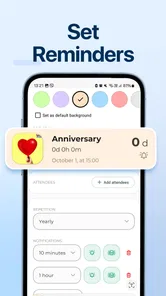
The reminder function is also more valuable when I use it selectively. I would set an earlier reminder for something that needs preparation, such as gathering documents, and a closer reminder for a simple call. If every item produces an alert, the notifications lose their meaning. The strongest workflow is not “remind me about everything”; it is “remind me about the things I am most likely to overlook.”
How the calendar hands plans back to me
Planning is only half the job. The important handoff happens later, when the app gives the information back to me at the right moment. I may create an event in a quiet moment, then rely on the calendar during a completely different situation: walking out the door, finishing a meeting, or deciding whether I have time for one more task.
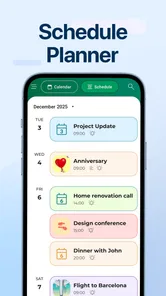
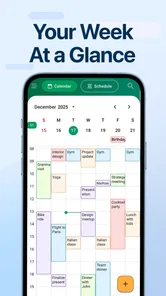
This is where a simple layout can be an advantage. I do not want to reconstruct my entire week to answer a small question such as “what comes next?” A focused calendar should help me scan the day and understand the sequence of commitments quickly. The app’s purpose is not to entertain me or make planning feel like a hobby. It is to reduce the number of details I have to hold in my head.
For a family routine, I could use the same flow for school-related activities, appointments, shopping, and calls. For independent work, I could separate focused tasks from meetings by giving each a clear place in the day. For personal goals, I could schedule recurring moments for practice or exercise, as long as I remain realistic about how often I can maintain them.
One non-obvious benefit of this approach is that it helps reveal hidden transitions. A calendar entry may take thirty minutes, but getting ready, traveling, or switching attention can take longer. When I review the day as a sequence rather than a list, I notice those gaps. That lets me move an event earlier, combine errands, or remove an unnecessary commitment before the day becomes difficult.
Where it fits beside familiar alternatives
Compared with a paper planner, this app is more useful when reminders matter. Paper is excellent for free-form notes, sketches, and long-term reflection, but it cannot actively return a forgotten appointment to my attention. A phone calendar also travels with me, which makes it more practical for plans that change during the day.
Compared with a large all-purpose calendar platform, the appeal here is restraint. Bigger alternatives may be better for shared calendars, work accounts, detailed collaboration, or a household that needs several people to edit the same schedule. If those are central to my routine, I would choose the more specialized option. Calendar - Easy Planner makes more sense when I mainly want a personal planning surface without the weight of a larger system.
It also differs from a task manager. A task list tells me what needs doing, while a calendar asks when I will do it. I would not use this app as a complete replacement for a detailed task system if I had projects with many subtasks, dependencies, or extensive notes. The best combination may be to keep complex project details elsewhere and put only the next meaningful action into the calendar.
That distinction prevents a common mistake: filling a calendar with every small task. If I schedule tiny actions too aggressively, the day becomes a wall of obligations. I prefer using the app for appointments, deadlines, time-sensitive errands, and tasks that genuinely benefit from a planned slot. Smaller items can remain flexible until they need a specific place.
The everyday result after the schedule is built
When the workflow succeeds, the result is not a perfect day. It is a day with fewer avoidable surprises. I know what is fixed, what needs preparation, and where I have room to adjust. That is a realistic benefit, and it is more valuable to me than a complicated collection of planning tools I never open.
For the weekday example, the morning appointment becomes the first anchor. The deadline gets a dedicated block rather than being left to the end of the day. The grocery stop is placed near the route home, and the call receives a reminder that prevents it from disappearing into the evening. Each item has moved through the same chain: intention, scheduled time, reminder, action.
The app is also useful for people who repeatedly say, “I will remember that.” I know that feeling, and it is usually unreliable when the day gets busy. Entering a plan immediately creates a small pause, but that pause is often shorter than the time spent recovering from a forgotten commitment. The value comes from consistency, not from adding dozens of events at once.
Its popularity gives the app some helpful context. It holds a 4.6 average from around 4.7 thousand ratings, with roughly 595 written reviews. Those figures suggest that many users find the basic experience worthwhile, although they do not tell me whether it matches every individual workflow. I still judge it by the kind of planning I actually need.
The free price makes it easy to try without committing money at the start. There are in-app purchases ranging from $2.99 to $39.99 per item, so I would look carefully at any optional upgrade before buying. For a person who only needs a dependable personal calendar, the free starting point is appealing. Someone expecting every advanced planning need to be covered without additional cost should examine the available options before settling in.
Small habits that make the app more effective
My first recommendation is to perform a short evening review. I would check the next day, move anything that is no longer realistic, and make sure important events have enough preparation time. This turns the calendar from a storage box into an active planning tool. It also catches conflicts while they are still easy to solve.
My second recommendation is to use descriptive event wording. A title should tell me what action is expected when I see it quickly. Adding the purpose directly into the event reduces the need to remember why I created it. This is especially useful for appointments that require documents, calls that need a topic, or errands that are easy to postpone.
My third recommendation is to schedule outcomes, not just activity. Instead of blocking time for “work,” I would define the result I want from that block, such as finishing a draft or preparing a list. The calendar remains simple, but the scheduled period becomes easier to evaluate. At the end of the day, I can tell whether the time was used well.
A fourth insight is to protect recovery time after demanding commitments. If an appointment is emotionally or mentally heavy, placing another important task immediately afterward may look efficient but often fails in practice. A calendar is most honest when it reflects how I really operate, including pauses and delays.
Where the workflow starts to break
The app’s simplicity can become a limitation when my planning needs grow. If I need detailed project breakdowns, extensive notes, collaboration, or a shared household schedule, a more specialized calendar or task platform may serve me better. This is not a flaw in a personal planner; it is a boundary worth recognizing before I move all my planning into it.
Another weak point is user discipline. The app can remind me about an event, but it cannot decide whether the event is still relevant. If I keep postponing items without reconsidering them, the calendar becomes cluttered with intentions rather than commitments. I need to review and delete plans that no longer matter instead of allowing them to compete for attention.
There is also a difference between remembering an event and completing a task. A notification may tell me that something is due, but a complicated task can still feel too large to start. For those situations, I would pair the calendar entry with a separate checklist or break the work into a few scheduled actions. Expecting one simple calendar app to manage every layer of a project would lead to disappointment.
Users who prefer highly customized views may also find the experience less satisfying than a feature-heavy alternative. Some people want elaborate categories, deep integrations, or extensive control over every part of their schedule. I understand that preference, but it is almost the opposite of what attracts me here. The app works best when I value quick capture and clear timing over endless adjustment.
Because it is an Android app requiring Android 10 or later, device compatibility is another practical consideration. On a supported phone, the experience is aimed at everyday use rather than specialist planning. I would still check that my phone meets the minimum operating-system requirement before relying on it for an important routine.
Who should use it and who should look elsewhere
I would recommend Calendar - Easy Planner to students managing classes and deadlines, workers organizing appointments and focused blocks, parents tracking personal commitments, and anyone who regularly forgets plans unless a reminder brings them back. It is particularly suitable for people who have tried more complicated productivity systems and abandoned them because entering information felt like work.
I would be more cautious about recommending it to a team that needs shared editing, a project manager handling dependencies, or a user whose calendar is also a detailed archive of documents and project notes. Those needs call for tools built around collaboration or task depth. A simple personal calendar should not be judged as though it were a full project-management suite.
For me, the deciding question is easy: do I need a clean place to schedule and remember personal commitments, or do I need a complete system for managing work with other people? If the first answer is true, this app has a sensible workflow. If the second is true, I would keep looking or use it only as one part of a broader setup.
After following the complete path from a loose thought to a scheduled action, I see the app as a practical productivity companion rather than a revolutionary planner. Its strength is that it keeps the central loop understandable: enter a plan, give it a realistic place, receive a reminder, and act on it. That clarity is easy to underestimate until a busy day proves how useful it can be.
My final recommendation is to try it if your main problem is remembering and arranging everyday commitments. Start with a small number of real events, leave space between demanding activities, and review the next day before going to bed. If that routine makes your schedule easier to follow, the app is doing exactly what I need from a personal calendar. If your workflow depends on collaboration, deep task management, or extensive customization, a more powerful alternative will probably be the better long-term choice.
Calendar - Easy Planner Frequently Asked Questions
Who develops Calendar - Easy Planner, and what devices can install it?
Calendar - Easy Planner is a productivity app developed by Glad Appvestor. It is available for Android devices that run Android 10 or later, so checking your device’s operating system before downloading can help avoid compatibility problems. The app is rated for Everyone, making it suitable for a broad audience looking for a calendar and planning tool.
What is Calendar - Easy Planner, and what can I use it for?
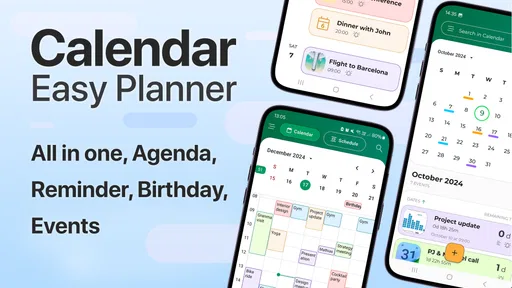
Calendar - Easy Planner is designed to help you organize appointments, tasks, reminders, and personal plans in one convenient place. After exploring its main features, it feels particularly useful for users who want a simpler alternative to more complex productivity platforms. You can use it to manage daily activities, review upcoming commitments, and keep your schedule easier to follow.
Is Calendar - Easy Planner suitable for beginners?
Yes, the app is generally suitable for beginners because its focus is on straightforward calendar and planning tools rather than an overwhelming number of advanced options. The layout is easy to understand, and most users should be able to create events, check dates, and manage plans without much preparation. It is also practical for anyone who prefers a clean and uncomplicated planning experience.
Can I create reminders and recurring events in Calendar - Easy Planner?
Calendar - Easy Planner is intended for managing more than one-time appointments. Depending on the version and device, users may be able to create reminders, schedule repeated activities, and organize regular commitments such as meetings, classes, birthdays, or household routines. Before relying on it for important deadlines, check the available notification and recurrence settings on your device.
Does Calendar - Easy Planner work without an internet connection?
Many basic calendar functions can usually be accessed offline, including viewing saved plans and adding or editing local events. However, features that depend on synchronization, cloud storage, shared calendars, advertisements, or online account services may require an internet connection. If offline access is important to you, test the app after installation and confirm how your information is stored.
Pros
- Simple layout makes daily planning quick and easy
- Useful reminders help prevent missed appointments
- Supports recurring events for regular tasks and routines
- Lightweight design runs smoothly on most modern devices
- Helpful for organizing work
- school
- and personal activities
Cons
- Advanced collaboration features may be limited
- Some useful options may require in-app purchases
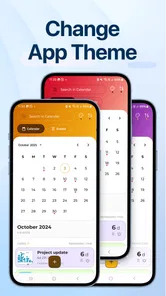
- Customization choices can feel basic for power users
- Calendar views may lack detail compared with full suites
- Privacy practices should be checked before adding sensitive events











