Calendar 2026
- 151.00
- 4.6
- Installs
- 1.00M
- Price
- Free
Screenshots
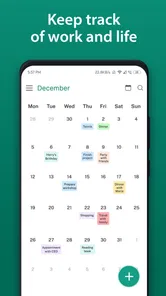
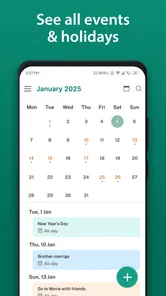
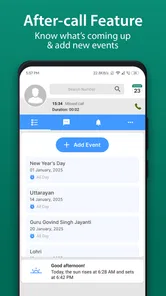
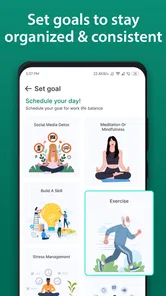
Analysis by Reviewed
I spent time using Calendar 2026 as a practical planning tool rather than treating it as just another date viewer. It is a free productivity app from Vruksh Raj, built around organizing tasks and appointments while also offering an aftercall feature. That focus makes it more useful for people whose days are shaped by small commitments, follow-ups, and changing schedules than for someone who only needs to check what day a holiday falls on.
My first impression was that the app aims to keep planning in one place. Instead of moving between a calendar, a task list, and notes after a phone conversation, I could think of the day as a sequence of commitments that needed preparation and follow-up. That is a sensible approach for students, freelancers, parents, sales workers, home-based professionals, and anyone who often says, “I’ll deal with that later,” after a call.
The app is listed for Everyone, costs nothing to download, and has reached over one million installs. Its average rating is 4.7 from around eight thousand ratings, which suggests that many people find the basic idea worthwhile. I still think the right question is not whether it is popular, but whether its particular planning style matches the way you remember and act on commitments.
How Calendar 2026 works in everyday planning
I look at everyday planning here as a chain: a date gives an appointment its place, while the task and aftercall flow can help carry the resulting responsibility forward. The useful test is whether that chain feels quick enough to maintain when a day is already busy. With that in mind, I’d pay particular attention to how easily the app lets me scan and act on the schedule.
Readability and navigation for a busy day
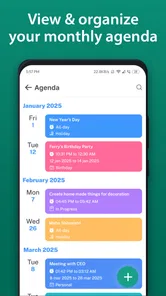
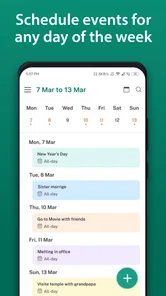
The most useful way to approach this app is to treat the calendar as a visual map of responsibilities. A date view can tell me when something happens, but the real value comes from connecting that date with the action attached to it. An appointment without preparation is easy to overlook; a task without a time context can remain unfinished. Calendar 2026 is aimed at closing that gap.
I found this especially helpful when planning a day with different kinds of obligations. A morning appointment, an afternoon task, and a follow-up after a call do not carry the same urgency, yet they can all compete for attention. Putting them into one planning flow makes it easier to see whether the day is realistic or overloaded.
The app’s short store description calls it “Calendar 2026,” while its longer summary points toward schedules, tasks, appointments, and aftercall use. That difference matters. Someone expecting a simple monthly calendar may find the planning approach more involved than anticipated, while someone who wants a lightweight organizer may appreciate the extra purpose behind each entry.
More From Our News Desk

Weather by Xiaomi Review: Clear at a Glance, Less Clear Up Close

X Under Pressure: Can It Recover When Posting Goes Wrong?

Clash of Clans Is Won Between the Battles

Android Auto Makes the Case for Quieter Car Software

MobiOffice: Transforming Mobile Productivity with Seamless Integration

EA SPORTS FC™ Mobile Soccer: Redefining Mobile Sports Gaming
For readability, I would recommend starting with a small test rather than entering an entire year of commitments immediately. Add one appointment, one task connected to it, and one follow-up. This reveals whether the sequence feels natural to you and whether the visual organization helps you scan the day quickly.
A useful habit is to review the next day at the end of the current one. I would not use that review to rewrite everything. Instead, I would look for three things: appointments that require preparation, tasks that depend on another person, and calls that need a later action. This makes the app serve as a decision aid rather than a passive record of dates.
Why the aftercall idea is more important than it first appears
The aftercall feature is the most distinctive part of the app’s purpose. Many calendar tools are good at recording an event before it happens, but the work created by a phone conversation often comes afterward. A call can produce a promise, a document to send, a question to verify, or a date to remember. If that result stays only in memory, it is easy to lose.
I see a practical workflow here for customer service, freelancing, family administration, and medical or school coordination. After ending a call, I can turn the conversation into a scheduled action while the details are still fresh. The important insight is to avoid writing a vague note such as “follow up.” A better entry identifies the action and the point at which it matters, such as sending a file after receiving information or checking back after a promised response.
This approach also helps people who have difficulty switching between mental contexts. The call ends, but the responsibility does not. Capturing the next step immediately reduces the need to remember a second task later. It is a small workflow improvement, but it addresses a common weakness in ordinary calendar use.
Motor considerations and the effort of entering information
Any planning app creates a trade-off between detail and effort. A very short entry is fast but may not be useful later. A detailed entry is clearer but takes more interaction. For users with limited dexterity, hand fatigue, tremors, or difficulty with repeated touch actions, that trade-off deserves attention.
My advice is to prepare a compact personal format and use it consistently. Put the action first, then the person or subject, then the important timing detail. This avoids repeatedly editing an entry because the essential information was left out. For example, “Send revised form to school” is more useful than “school,” while still being quick to create.
I would also avoid using the calendar as a storage place for long explanations. If an entry becomes a paragraph, it may be harder to scan and more tiring to edit. The app works best when the calendar contains the next visible action and the appointment context, not every detail of the conversation that led to it.
People who rely on alternative input methods should test the complete workflow on their own device, especially the transition from an appointment to an aftercall action. The app is a productivity tool, not an accessibility-certified product, so the experience can depend on the phone, operating system, display settings, and input method being used.
Sensory comfort and visual organization
Calendar information can become overwhelming when too many items are placed on the same day. This is not only a design issue; it affects concentration. A crowded schedule can make every item appear equally urgent, even when some tasks are flexible. I found that the app is easier to use when I separate fixed commitments from actions that can move.
For users with visual processing difficulties, a short, consistent naming style may be more valuable than adding lots of detail. Use the first words of an entry to communicate its purpose. “Call,” “send,” “prepare,” and “check” make a list easier to scan than entries that begin with a person’s name or a long topic.
Users with light sensitivity or other sensory preferences should adjust their device display in the way that feels comfortable and then check whether the calendar remains easy to read. I would not assume that a preferred phone-wide setting automatically makes every screen ideal. The important test is whether dates, appointment details, and action text can be distinguished without prolonged concentration.
For people who are easily distracted, the app can be used as a deliberately narrow view of the day. Rather than loading every possible idea into it, I would record only commitments and actions with a clear time or consequence. A separate note system may be better for brainstorming, while Calendar 2026 handles what must happen and when.
Situational access: where the app fits beyond the desk
Good planning tools are not used only under perfect conditions. I can imagine using this app between appointments, after a short phone call, while managing a household, or during a workday where plans change repeatedly. In those situations, the key benefit is not elaborate organization. It is the ability to capture a useful next step before attention moves elsewhere.
Consider a realistic example. I receive a call from a service provider who says a document will arrive later. Instead of trusting myself to remember, I create a follow-up tied to the expected action. If the document arrives, I can mark the task mentally as complete; if it does not, the scheduled reminder gives me a clear reason to act. The calendar becomes a safety net for a dependency, not just a list of meetings.
Another useful scenario is a parent coordinating school matters, errands, and family appointments. The day may contain several short tasks that are individually simple but difficult to hold in mind together. Recording the appointment and its follow-up in the same planning environment can reduce the number of separate memory cues needed.
For a student, the app may be most useful when an appointment creates preparation work. A meeting with a tutor, advisor, or group can lead to reading, document preparation, or a later submission. Entering the follow-up immediately helps prevent the common mistake of remembering the meeting but forgetting what it required.
People working in noisy, rushed, or interruption-heavy environments may benefit from entering only a few words at first and refining them later. The priority is to capture the commitment. A perfect description is less important than creating a reliable prompt before the moment disappears.
How it compares with ordinary calendar and task apps
A standard calendar is usually strongest when the main need is time-based scheduling. A task manager is often better for lists that do not belong to a particular date. Calendar 2026 sits between those approaches by treating appointments and resulting actions as connected parts of planning.
That makes it appealing if your main problem is follow-through. You may not need a large project-management system; you may simply need to remember what a conversation created. In that case, the aftercall orientation is more relevant than a long list of advanced planning options.
On the other hand, users managing complex projects, shared teams, recurring workflows, or extensive notes may prefer a dedicated task manager or a full-featured calendar platform. Those tools are usually better suited to collaboration and deep project structure. I would not choose this app merely because it has a calendar if your real requirement is team coordination or detailed project control.
The trade-off is simplicity versus breadth. Calendar 2026 makes sense when you want a focused personal organizer that connects schedules with actions. It is less convincing as a replacement for every productivity tool you already use.
Remaining barriers and practical limitations
The biggest barrier is the need to maintain the system. No calendar can compensate for entries that are never made or follow-ups that are written too vaguely. The aftercall workflow is valuable only if I use it immediately and consistently. For someone who dislikes recording details after conversations, the feature may remain unused.
There is also a cognitive cost to putting too much into one place. Combining appointments, tasks, and follow-ups can improve continuity, but it can also make a day look heavier than it is. I would keep flexible ideas out of the main schedule and reserve it for actions that have a genuine consequence.
New users may also need time to decide how much information belongs in each entry. This is not a flaw unique to this app, but it affects the experience. If every task is written differently, scanning becomes slower. A repeatable naming pattern and a short daily review make the system much easier to manage.
People who need strong collaboration, extensive customization, or a highly specialized accessibility workflow should compare the app carefully with tools designed for those purposes. Calendar 2026 can support practical personal planning, but I would not assume it covers every need simply because it combines several planning ideas.
The current version is 1.3.9 and it requires Android 10 or later. That makes the operating-system requirement an important first check before installing. Anyone using an older Android phone should confirm compatibility before reorganizing their planning routine around it.
Who should use it, and who should skip it
I would recommend Calendar 2026 to people who regularly lose track of what happens after an appointment or phone call. It is also a good fit for anyone who wants a free way to connect a schedule with concrete next actions without adopting a large project-management system.
It may suit users who prefer visual planning, short entries, and a single place to review commitments. It can also help people who experience frequent interruptions, because capturing the next step after a call reduces reliance on memory.
I would skip it if you want only a bare calendar for checking dates, or if you need shared planning across a team. I would also look elsewhere if your workflow depends on elaborate projects, extensive notes, or specialized input and display behavior that must be guaranteed rather than tested personally.
An inclusive verdict based on real use
My overall view is positive, with a clear condition: the app is most useful when I treat it as a follow-through tool, not merely as a calendar. Its combination of tasks, appointments, and aftercall planning addresses a real everyday problem—the gap between agreeing to do something and actually remembering to do it.
From an inclusive-use perspective, its strongest quality is flexibility of purpose. A student, caregiver, freelancer, or busy professional can adapt the same basic planning idea to different routines. Short entries, consistent wording, and immediate follow-up capture can reduce memory pressure and make interrupted days easier to recover from.
Its limits are equally important. The app does not remove the effort of entering information, and the best experience will vary with personal motor, visual, sensory, and device preferences. I would test the complete process on my own phone before relying on it for important commitments, especially if I use alternative input methods or need very specific display behavior.
For a free productivity app developed by Vruksh Raj, Calendar 2026 offers a focused idea rather than an attempt to replace every organizer. I would recommend trying it with one week of appointments and follow-ups. If that small experiment helps you remember the action after a conversation, it has earned a place in your routine. If it only adds another screen to maintain, a simpler calendar or a dedicated task app will probably serve you better.
My recommendation: choose it when the hardest part of your schedule is remembering what comes next, particularly after calls and appointments. Its value is less about filling a calendar and more about turning commitments into visible, manageable actions.
Calendar 2026 Frequently Asked Questions
Is Calendar 2026 suitable for planning work and personal schedules?
Calendar 2026 is a productivity app with a schedule planner for tasks, appointments, and an after-call feature. It can help bring work and personal plans into one place, making it easier to keep track of upcoming commitments. The app is free, and its Everyone age rating makes it broadly suitable for users who want a calendar-based planning tool.
What is Calendar 2026 and what can I use it for?
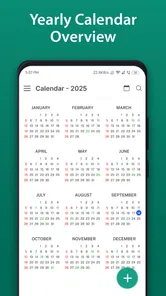
Calendar 2026 is a practical calendar app designed to help you view the entire year, check dates, and organize important events. It can be useful for planning holidays, appointments, birthdays, work schedules, school activities, and personal reminders. The app also offers a schedule planner for tasks and appointments, along with an after-call feature. Before downloading, users should check the app description to confirm whether it includes extra tools such as notes, event notifications, widgets, or holiday information.
Does Calendar 2026 work without an internet connection?
In most cases, a basic calendar displaying dates and months should remain available without an internet connection once the app is installed. However, features such as automatic holiday updates, synchronization, advertisements, cloud backup, or shared calendars may require online access. If offline use is important to you, review the app’s permissions and store information carefully, as functionality can vary between Android and iOS versions.
Can I add events, reminders, and personal notes to Calendar 2026?
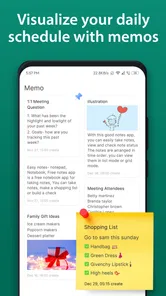
The answer depends on the specific version of Calendar 2026 you download. Some calendar apps are simple date viewers and only show the yearly layout, while others allow users to create events, add notes, and receive reminders. Calendar 2026 is described as including a schedule planner for tasks and appointments, as well as an after-call feature. Before installing, check the screenshots and feature list to verify whether event management is included and whether notifications require additional permissions.
Does Calendar 2026 include public holidays and important dates?
Calendar 2026 may include selected public holidays, observances, or notable dates, but the available information can depend on your country, language, and the app’s built-in database. Users should not assume that every regional holiday is included. After installation, check the location or calendar settings and compare the listed dates with an official local source, especially when planning work, travel, or school activities.
Pros
- Simple monthly layout makes dates easy to scan.
- Useful for checking weekdays and planning appointments quickly.
- Covers the full 2026 year in one convenient reference.
- Lightweight design should use minimal storage and battery.
- Helpful for spotting weekends
- holidays
- and important dates.
Cons
- May lack reminders or alerts for upcoming events.
- Limited planning tools compared with full calendar apps.
- Holiday information may vary by country or region.
- No guarantee of synchronization across multiple devices.
- A static calendar can become outdated if plans change.











