ButterflyMX
- 1.16K
- 4.8
- Installs
- 500.00K
- Price
- Free

Screenshots
Analysis by Reviewed
I judge a building-access app less by its flashiest feature than by how it behaves when I’m in a hurry, away from home, or trying to let someone in without interrupting my day. ButterflyMX is built around that everyday problem: it connects a smartphone with an intercom and entry system at a property. When a building supports it, that can replace some of the friction of keys and fobs. The important caveat is that it depends on the building’s setup; downloading an app alone won’t turn an ordinary entrance into a smart one.
What the app is best at
The clearest benefit is handling a visitor remotely rather than having to reach the entrance in person. That is useful when a friend arrives before you do, or when you are carrying shopping and do not want to search for a key. I would also think of it as a practical building tool, not a general home-automation app: its value comes from the access system it connects to, rather than from adding lots of unrelated controls to a phone.
ButterflyMX, Inc develops the app, which sits in the productivity category and is free to install. Its broad audience is reflected in an Everyone age rating. It has a 4.8 average from around 14,000 ratings, with more than 500,000 installs. Those figures suggest that many people find the service useful, but they do not tell me whether a particular building has equipped its entrance for it. That is the first thing I would check with a landlord or building manager before relying on it.
Where convenience has limits
Remote access is only convenient if the phone, connection, and building equipment cooperate at the moment you need them. I would keep a backup plan for getting into my own building rather than assuming a phone will always be enough, especially when travelling or dealing with a low battery. Visitors also need clear instructions: a digital access option can save a trip downstairs, but only if the person arriving knows which entrance to use and what to do when they get there.
There is another trade-off worth considering. A digital method may be easier to manage than passing around physical keys, yet it also makes building entry dependent on software and the property’s installed hardware. If you want a standalone smart lock for a privately owned home, an app tied to a shared building intercom may not be the right purchase. In that situation, a lock designed for your own door gives you a more direct fit.
The New Age of Entry Systems
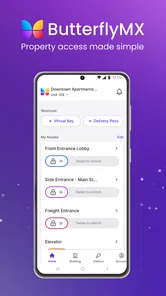
So, what exactly is ButterflyMX? In simple terms, it’s a smart intercom system that integrates seamlessly with your smartphone. Gone are the days of fiddly keypads and missing key fobs. With this app, your phone becomes the key. I was skeptical at first—would it be more hassle than help? But, surprise, surprise, it’s as smooth as butter. The app allows you to open doors, grant access to visitors, and even manage multiple properties if you’re a jet-setter or property manager.
Setting Up and First Impressions
Getting started with the app was a breeze. After downloading it from the app store, the setup was quick and painless. The user interface is intuitive, which is a big win for someone like me who isn’t exactly tech-savvy. Within minutes, I was navigating through the features like a pro. The design is clean, and everything is right where you’d expect it to be. No hidden menus or confusing jargon, just straightforward functionality.
More From Our News Desk

Weather by Xiaomi Review: Clear at a Glance, Less Clear Up Close

X Under Pressure: Can It Recover When Posting Goes Wrong?

Clash of Clans Is Won Between the Battles

Android Auto Makes the Case for Quieter Car Software

MobiOffice: Transforming Mobile Productivity with Seamless Integration

EA SPORTS FC™ Mobile Soccer: Redefining Mobile Sports Gaming
A useful routine for residents and visitors
A realistic way I would use the app is to prepare for a delivery or planned visit instead of waiting until the doorbell rings. I would confirm the visitor knows the building entrance, keep my phone available, and respond when the intercom call arrives. If I were sharing access with a service provider, I would choose the narrowest access window that suits the visit and remove access when it is no longer needed. That small habit keeps convenience from turning into an open-ended invitation.
For someone comparing options, the choice is less “app versus app” than “building intercom versus the alternatives available at this address.” A traditional buzzer may be simpler and does not ask residents to rely on a smartphone, while a physical key or fob can remain useful as a fallback. ButterflyMX makes the strongest case when remote visitor handling matters and the building already supports its system. If all you need is entry to a small private home, a conventional lock or a home-focused smart lock may be less dependent on shared property infrastructure.
Features That Wow
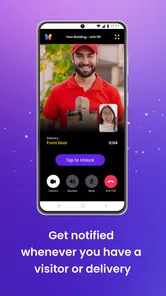
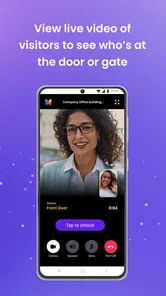
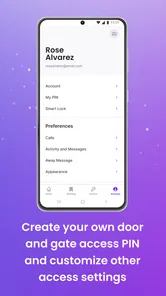
One of the standout features for me was the video calling capability. When someone buzzes your apartment, you get a live video feed of who’s at the door. This means no more guessing games or unwelcome surprises. Plus, you can let them in with a simple tap, whether you’re at home or halfway across the city. Talk about convenience! Another feature worth mentioning is the virtual keys option. You can send digital keys to friends, family, or service providers. These can be temporary or permanent, and you have full control over who gets access and for how long.
Real World Use
In practice, ButterflyMX has made my life a lot easier. I was able to grant access to the delivery guy when I wasn't home, and it felt like magic. For property managers, it’s a game changer. Managing multiple units from one dashboard saves time and reduces stress. The app also logs entries and exits, providing an added layer of security and peace of mind.
For a resident, the most useful detail in a busy week is making access decisions before the rush: check that a guest has the right instructions, decide whether their access should be temporary, and avoid sharing a longer-lasting option when one visit is all that is needed. For a manager, centralized handling can be more practical than tracking physical copies of keys, but it still depends on keeping resident and visitor instructions current. I would treat entry records as a helpful reference, not as a reason to stop using ordinary judgment about who should be admitted.
One question worth settling before depending on the app is what happens in your building if your phone is unavailable. I would ask management which backup method residents can use and how visitors should reach someone if an intercom call is missed. I would also check how access is arranged for a new resident or a replacement phone, since the property’s process matters as much as the app itself. Those are sensible setup questions, not signs that the service is difficult; answering them early makes the everyday experience less stressful.
ButterflyMX was released on September 25, 2013, and the long-running presence helps explain why residents may encounter it in established properties. Still, the app’s usefulness is local: it is strongest where the building has adopted the system and residents know how to use it. If your property is not equipped for it, there is little reason to install it just in case. The right next step is to ask the building manager whether the entrance supports ButterflyMX and what resident setup involves.
But it’s not just for big apartment complexes. Even smaller buildings can benefit from the streamlined access control it offers. Plus, the app integrates with several smart home systems, making it a versatile addition to any tech-savvy home.
Who benefits most from the setup
I see the best fit as residents who routinely coordinate arrivals: people who receive parcels, have family visit, or need to arrange occasional access for a cleaner or repair worker. It is especially useful when the resident is often away from the entrance but still wants to answer an intercom call and make a decision in the moment. The convenience is less compelling for someone who rarely has visitors and is already happy with a key or standard buzzer.
Property managers may value the ability to handle access digitally across multiple units, but the change only pays off if residents understand the process. A manager should think through how new occupants learn to use the system, how visitor directions stay accurate, and what the backup procedure is. A building with residents who prefer not to use smartphones may need a reliable alternative alongside the app, rather than treating digital entry as the only route.
Small habits that prevent access headaches
Before a planned visit, I would send concise directions that identify the correct entrance and explain what the visitor should do when they arrive. That reduces the chance of a call coming through while I am distracted and unsure who is waiting. For temporary access, I would double-check the intended duration and recipient before sharing it; convenience is valuable, but access should match the visit rather than outlast it by default.
I would also test the routine at a low-pressure time, such as when a friend is expected, instead of making the first attempt during a delivery rush. That gives both sides a chance to learn where the intercom call appears and what the resident needs to do. It is a modest bit of preparation, but it can reveal whether phone notifications are easy to notice in your normal routine and whether your visitor understands the entrance instructions.
Video can help a resident make a more informed choice than a buzzer alone, but it should not be treated as proof of identity. If I am not expecting anyone, I would still pause before admitting a caller, and I would avoid granting access just because a person sounds confident. The useful distinction is that the app can help me see and respond remotely; the decision about who should enter remains mine.
How it compares with ordinary entry options
A traditional intercom has an obvious advantage: it is familiar and does not require every resident to use an app. A key or fob is direct and can work without handling a visitor call, though it is less convenient when someone needs to be admitted while the resident is away. A home smart lock may offer a better match for someone controlling a single private door, while ButterflyMX is most relevant when a shared property has chosen compatible entry equipment.
That distinction also answers whether it is worth installing before moving into a building. I would first ask the property manager whether the system is in place and how residents receive access. If it is not part of the building, another app cannot provide the same connection to the entrance. If it is installed, the next useful question is what residents should use when their phone is unavailable, not whether the app can replace every physical backup.
The Final Verdict
So, is ButterflyMX worth the download? In my humble opinion, absolutely. It’s a well-thought-out app that delivers on its promises. From the seamless user experience to the robust security features, it’s a must-have for anyone looking to modernize their building’s access system. Whether you’re a tenant, landlord, or property manager, this app has something to offer. It’s not just about opening doors; it’s about opening up a world of convenience and control. And who doesn’t want that?
My recommendation is specific: if your building already uses the system and you regularly receive visitors or deliveries, it is worth trying as a way to make those arrivals easier. If you are choosing access equipment for a standalone home, or your building has no compatible intercom, I would look at alternatives made for that situation instead. The app’s rating and reach are encouraging, but the deciding factor is still whether the property’s hardware and your own access needs line up.
ButterflyMX Frequently Asked Questions
Can I use ButterflyMX without living in a building that has its system?
ButterflyMX is designed to work with a participating building’s access system, so downloading it by itself does not unlock a property or create building access. Residents, visitors, and property managers can use the app when the building has ButterflyMX equipment and the appropriate account setup. If you are visiting, ask your host or building staff how you should be invited to use it.
Which access tasks can I handle from the ButterflyMX app?
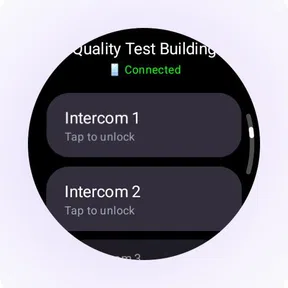
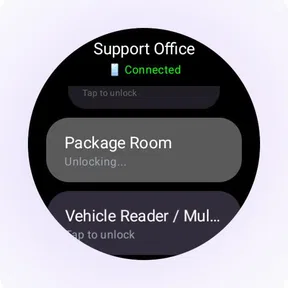
ButterflyMX is a smart intercom system that lets users manage building access from their smartphones. Its features include video calling, virtual keys, and delivery PINs, helping residents, visitors, and property managers handle entry without relying solely on a traditional intercom interaction. The options available in practice depend on the building’s setup and the permissions attached to your account.
Is ButterflyMX free to download, and who can use it?
ButterflyMX is a free Productivity app from ButterflyMX, Inc, with an Everyone age rating. It is designed for people who use a participating building’s ButterflyMX access system, including residents and visitors, as well as property managers. Downloading the app alone does not provide access to a building; its usefulness depends on the access setup available where you live or visit.
What is ButterflyMX and how does it work?
ButterflyMX is a smart intercom system that allows users to manage building access from their smartphones. It integrates with existing building hardware and provides features like video calling, virtual keys, and delivery PINs, facilitating seamless and secure access control for residents, visitors, and property managers.
Is ButterflyMX compatible with my building's existing hardware?
ButterflyMX is designed to be compatible with most existing building hardware, making it a versatile choice for property managers. The system can be retrofitted to work with current intercom setups, reducing the need for extensive renovations or replacements, and ensuring a smooth integration process.
Pros
- User-friendly interface with intuitive navigation.
- Seamless integration with smart home devices.
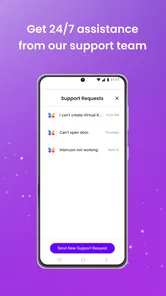
- Reliable and quick response from support team.
- Real-time video communication with visitors.
- Secure and encrypted access control system.
Cons
- Limited functionalities in free version.
- Occasional connectivity issues reported.
- Requires stable internet connection.
- Some features need premium subscription.
- Initial setup can be slightly complex.











