

Bump Pulse: Contraction Timer
- 9.00
- 4.6
- Installs
- 10.00K
- Price
- Free

Screenshots
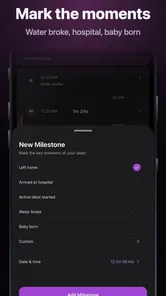
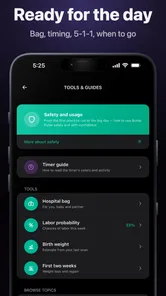
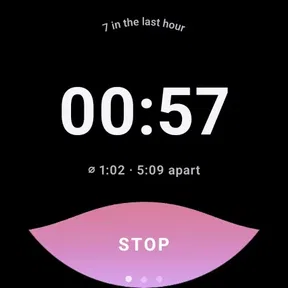
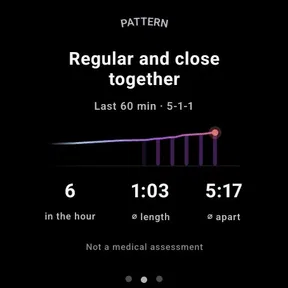
Analysis by Reviewed
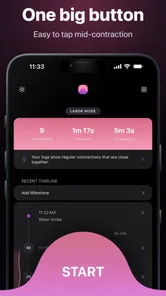
When labor begins, the person having contractions should not also have to manage a complicated phone workflow. That is the main reason I found Bump Pulse: Contraction Timer worth considering. It is a parenting app from Developer On Wheels that focuses on timing contractions, counting them, and sharing the live information with a partner. In a stressful household moment, that narrow purpose is a strength: one person can concentrate on breathing and comfort while the other watches the timing.
I approached it as a practical tool rather than a medical authority. It does not replace advice from a midwife, doctor, or hospital, and contraction patterns should always be interpreted alongside professional guidance. What it can do is turn a series of uncomfortable, easy-to-forget moments into a readable record. That makes it useful for couples preparing for labor, especially when both people want to stay involved without passing one phone back and forth.
How Bump Pulse fits into a shared labor routine
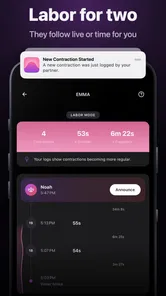
The most natural setup is simple: the pregnant person keeps the phone nearby, while the partner handles the timer when possible. The app’s live partner-sharing focus is particularly relevant here. Instead of asking the person in labor to announce every start and stop, the partner can take responsibility for recording the events and following the developing pattern. That division of work feels more considerate than treating the timer as another task for the person already dealing with pain.
A realistic evening scenario shows where this matters. Contractions may begin while the household is still deciding whether they are regular, whether to rest, or whether to contact a care provider. The partner can begin timing, note the sequence, and share the current view with the other person. If the couple later needs to describe what has been happening, they have a record to discuss rather than relying on memory. I would still write down any instruction from the care team separately, because an app’s timing display should support that conversation, not replace it.
There is also a useful household boundary here. A shared device can be convenient, but it should be treated as a deliberate tool, not a phone that everyone casually uses. If several people handle the same device, the person responsible for timing should be clear before the next contraction starts. Otherwise, a well-meaning relative could tap at the wrong moment or interrupt the routine. The app is most helpful when one person owns the process and another person remains the focus of care.
I like this division because it recognizes that timing is not the same as caregiving. The partner can watch the screen while also preparing water, checking a bag, contacting the appropriate professional, or helping with breathing. The app does not create that teamwork by itself, but its shared approach gives the household a practical place to organize it.
What the focused design gets right
Many general pregnancy apps try to cover appointments, fetal development, checklists, articles, and reminders. Those can be useful during the months before birth, but they are not necessarily what a couple needs during an active contraction. Bump Pulse is more focused. Its value comes from reducing the number of decisions around the timer: start the event, stop it, watch the sequence, and keep the partner involved.
More From Our News Desk

 Gmail
GmailGmail in a Busy Inbox: Who Benefits Most?
From first account to crowded workday, Gmail earns its place through dependable search and flexible sorting—but its best fit depends on how much inbox maintenance you can tolerate.

 Prime Video
Switching to Prime Video: What Changes in Your Viewing Routine
Prime Video can make a compelling second home for streaming, but switching means learning a different catalog, rental layer, and route from browsing to playback.

 Universal TV Remote Control
Universal TV Remote Control Works Best as a Reliable Backup
A phone remote earns its place through quick setup and reliable habits. Here is how to get more from Universal TV Remote Control—and where its limits show.

 Weather - By Xiaomi
Weather by Xiaomi Review: Clear at a Glance, Less Clear Up Close
Xiaomi’s weather app makes everyday forecasts quick to scan, but its calm surface can leave useful details and recovery paths harder to find than they should be.

 X
XX Under Pressure: Can It Recover When Posting Goes Wrong?
A resilience-focused review of X, examining setup, mistaken posts, interruptions, weak connections, and the gaps that matter when recovery needs to be dependable.

 Clash of Clans
Clash of Clans Is Won Between the Battles
Its raids are quick; its community is a long-term project of coordination, teaching, rivalry, and shared responsibility—with all the friction that entails.
Latest News



That focus also makes it easier to decide whether it belongs on your phone before labor. If you want a broad pregnancy companion, this is not a replacement for one. If you already have those other resources and need a dedicated contraction tool, the narrower approach is more appealing. I would install it before the due period rather than waiting until the first intense contraction, simply so both people can understand the workflow while calm.
One non-obvious benefit of a dedicated timer is psychological. A couple can agree in advance that the partner will operate it unless the situation makes that impossible. That removes a small argument from an already demanding moment. It also stops the pregnant person from feeling that every contraction must be announced, explained, and documented personally.
Setup boundaries matter more than extra features
The app is free to install, with in-app purchases listed at $3.99 per item. That makes trying the basic experience relatively approachable, but I would still look at any purchase prompt carefully before using it in a shared household. A partner may assume that “free” means every part of the experience is included, while the person who installed it may have a different understanding. Agreeing on whether optional purchases are acceptable avoids an awkward discussion during labor.
The current version is 3.4.2, and the app supports Android 7.0 or later. That compatibility is helpful for households using an older spare phone, although I would test the actual device in advance rather than assuming an old handset will be comfortable to operate. Screen responsiveness, battery condition, notification behavior, and available storage can all matter when the phone is being used repeatedly over several hours.
There is a practical setup tip I would not skip: decide where the phone will live. A bedside table, charging point, or partner’s pocket is better than moving it around the home every time a contraction begins. If the device is shared with other family members, keep the labor timer accessible but avoid handing it around. The goal is a predictable workflow, not a communal gadget.
I would also run through the start-and-stop action with both people. The partner should know what counts as the beginning and end of a contraction according to the couple’s care instructions, rather than guessing from the app’s interface. This is one of those small preparations that seems unnecessary until discomfort makes every extra question feel difficult.
Sharing helps coordination, but it does not replace communication
The live partner-sharing element is the app’s clearest difference from a timer used by one person. In the best case, the pregnant person can remain focused on coping while the partner monitors the evolving pattern. The partner can then communicate calmly: not by making medical claims, but by reporting what has been recorded and asking the care provider what to do next.
That distinction is important. A timer can show spacing and duration, but it cannot know the full clinical situation, the person’s history, or the instructions given by a care team. I would avoid treating any on-screen pattern as an automatic signal to travel, call, or wait. Those decisions belong to the household’s professional guidance and the symptoms being experienced, not to a single app screen.
Shared information can also reduce duplicated effort. If one person is timing while another is packing, arranging transportation, or contacting family, both do not need to maintain separate notes. The partner can provide a concise update when asked. This is especially useful when the household has agreed beforehand that only one person will communicate with relatives, so the laboring person is not flooded with messages.
Still, sharing introduces a coordination risk: people may assume that seeing the same information means they have the same responsibilities. I would make those responsibilities explicit. One person times, one person supports, and one person contacts the care team if needed. If the phone changes hands, say so clearly. That simple rule is more valuable than trying to make everyone interact with the app at once.
Another trade-off is attention. Live information can reassure a partner that something is being tracked, but it can also encourage constant screen watching. The partner should not spend every second staring at the display while missing signs that the other person needs water, reassurance, a position change, or quiet. In my view, the app works best as a background coordination aid, not as the center of the room.
Account and device boundaries in a family setting
For a couple, a shared labor tool does not need to become a general family account. I would keep the app’s use limited to the adults directly involved in the birth and avoid assuming that every household member should have access to the same information. Labor details are personal, and convenience should not automatically override privacy or comfort.
This is particularly relevant when the phone is normally used by children, roommates, or visiting relatives. The app is rated for Everyone, but that age classification describes suitability of the app’s content; it does not mean a child should be responsible for timing contractions or interpreting what the information means. An older child might help fetch a charger or give the phone to the partner, but the adults should retain control of the record and the decisions around it.
I appreciate the difference between an Everyone rating and a family-management system. The app can be accessible in a household without being treated as a child-facing education product or a substitute for adult supervision. Parents should set their own boundaries around who touches the device, who sees the screen, and who communicates updates.
If the household uses one phone for several people, I would prepare a simple handoff plan. The partner can keep the device during the timing period, while other family members use another phone for calls or messages. If only one handset is available, charging it fully and keeping a power source nearby becomes more important than any cosmetic customization. A labor timer is only useful when the device is available at the moment it is needed.
Trust also matters between partners. The person in labor should not feel monitored or judged by the numbers on the screen. Contractions can be unpredictable, and the app should be used to support comfort and communication rather than to pressure someone because a pattern looks different from expectations. The best shared workflow is collaborative: the partner records, listens, and follows professional advice.
Who will benefit most, and who should choose another option?
I think Bump Pulse is a strong fit for couples who want a dedicated contraction tracker and expect one partner to take an active organizing role. It is also suitable for households that prefer a focused tool instead of a large pregnancy app filled with unrelated sections. The free entry point makes it reasonable to test before labor, while the shared design gives it a clear purpose beyond simply pressing a timer alone.
It may be less suitable for someone who wants extensive pregnancy education, appointment management, nutrition guidance, or a long-term parenting dashboard. Those needs call for a broader app or a combination of tools. It is also not the right choice for a person who expects automatic medical interpretation. The app can organize observations, but it should not be treated as a diagnosis engine or an authority on when to seek care.
I would also think twice if the household has unreliable device access or if the partner is unlikely to be present. A single-user timer may be simpler when there is no second person available to share the workload. Likewise, if the laboring person strongly prefers not to have contractions logged by someone else, the sharing feature may add pressure rather than relief. The best app is the one that matches the person’s preferences and care plan.
Compared with manually using a stopwatch and notes, this app should feel more purpose-built for the situation because the timing and partner involvement are brought together. Compared with a full pregnancy suite, it should feel less distracting. The trade-off is breadth: its usefulness depends on whether contraction tracking is the specific problem you are trying to solve.
The app’s early release date of May 10, 2025, also places it in a relatively new phase of its life compared with long-established pregnancy platforms. That is not automatically a problem, and its 4.6 average from around 95 ratings suggests that early users have responded positively. I would nevertheless judge it by a short pre-labor test on the actual household devices, rather than relying only on a rating or assuming that a focused app will fit every routine.
A practical preparation checklist without turning the app into a medical plan
Before labor, I would install it on the phone that is most likely to be available, confirm that the device meets the Android requirement, and let both partners try the basic timing action. Keep the phone charged, identify who will operate it, and decide where it will stay. These steps sound ordinary, but they address the most likely sources of friction: a missing device, an unfamiliar control, or two people assuming the other person is recording.
Next, agree on what information the partner will report if the care team asks. The app can help organize the timing, but the couple should follow the instructions they were given about symptoms, contact, travel, and emergency situations. If those instructions differ from what friends or online discussions suggest, the professional plan should take priority.
I would also decide when to stop focusing on the timer. Once the partner has enough information to speak with the care provider, the household may need to shift attention toward comfort, transport, or urgent care. Continuing to stare at the screen is not a sign that the app is being used correctly. A good workflow knows when the tool has done its job.
Finally, be transparent about optional purchases. Since individual in-app items cost $3.99, the person managing the phone should know whether the household wants to buy anything and why. There is no reason for a purchase decision to become part of the labor routine. Make it beforehand, or leave it for later.
My household verdict
After looking at it as a shared household tool, I see Bump Pulse as a focused and sensible option for couples who want one person to manage contraction timing while the other concentrates on labor. Its strongest idea is not simply counting contractions; it is assigning the counting task to the partner and making the information easier to coordinate. That can remove a surprisingly tiring responsibility from the person who needs support most.
The limitations are equally clear. It is not a complete pregnancy information system, it does not replace professional judgment, and shared access needs boundaries. Families should keep children and uninvolved relatives from becoming accidental operators, and couples should avoid turning the timing display into a source of pressure. The app works best when it remains a quiet assistant rather than a decision-maker.
With a free starting point, an Everyone age rating, support for Android 7.0 and later, and a current version of 3.4.2, it is easy to consider for a pre-labor trial. Developer On Wheels has kept the concept centered on a real moment of need, and the early response—an average of 4.6 from around 95 ratings—makes it worth a look. My recommendation is to test it together before labor, assign clear device responsibilities, and use its record to support conversations with your care team rather than letting it make those decisions for you.
Bump Pulse: Contraction Timer Frequently Asked Questions
Is Bump Pulse: Contraction Timer free to download?
Bump Pulse: Contraction Timer is free to download, with in-app purchases listed at $3.99 per item. Its main purpose is to help expectant parents time and organize contractions, while live partner sharing is part of its labor-focused feature set. Check the purchase details in your app store before confirming any optional purchase, and make sure the app’s features suit your needs.
Can a partner follow contraction updates in Bump Pulse?
Yes. Bump Pulse’s store summary describes live partner sharing for labor, so the app is intended to let a partner follow contraction information as it is recorded. This can help keep someone supporting you informed without needing to rely on verbal updates during each contraction. Try the sharing setup before labor so you and your partner understand how it works when you need it.
What is Bump Pulse: Contraction Timer used for?
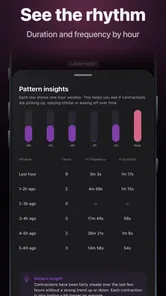
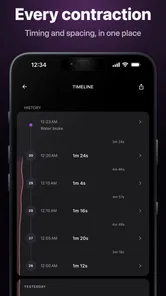
Bump Pulse: Contraction Timer is designed to help expectant parents track labor contractions in a simple, organized way. You can record when a contraction starts and ends, review its duration and frequency, and observe patterns over time. This information may be useful when discussing labor progress with a healthcare professional, especially when contractions become more regular or intense.
How do I track contractions with Bump Pulse?
To track a contraction, open the app and tap the start control when the contraction begins, then tap it again when the contraction ends. The app records the duration and calculates the interval between contractions. After several entries, you can review your recent history to see whether contractions are becoming closer together, lasting longer, or following a more consistent pattern.
Does Bump Pulse: Contraction Timer provide medical advice?
No. Bump Pulse: Contraction Timer is a tracking tool, not a diagnostic or emergency medical service. Its timing information should not replace advice from your doctor, midwife, or maternity unit. If you experience heavy bleeding, severe or unusual pain, reduced fetal movement, leaking fluid, or any symptom that concerns you, contact a qualified healthcare professional immediately rather than relying only on the app.
Pros
- Simple interface makes timing contractions quick and easy.
- Tracks contraction duration
- frequency
- and overall timing patterns.
- Useful history view helps identify changes during early labor.
- Can reduce the need for manual stopwatch calculations.
- Designed specifically for pregnancy and labor tracking.
Cons
- Limited usefulness before contractions become regular or intense.
- Accuracy depends on remembering to start and stop each timer.
- May not offer enough guidance for unusual labor symptoms.
- Some features may require in-app purchases or premium access.
- Should not replace advice from a doctor
- midwife
- or hospital.











