BuildCalc
- 76.00
- 4.7
- Installs
- 10.00K
- Price
- $24.99

Screenshots
Analysis by Reviewed
When a measurement changes halfway through a job, the hard part is often not the arithmetic but keeping every related calculation straight. That is the kind of moment when a dedicated construction calculator can be more useful than a general-purpose calculator. I find BuildCalc most appealing when I need construction-oriented calculations close at hand, though it still takes care to enter the right assumptions and check the result against the plan.
Where setup and first use can snag
BuildCalc is a paid business app from 42nd Parallel, priced at $24.99, with a 4.8 average from 200 ratings and 5K+ installs. It is rated for Everyone, and its current version is 2.1.109; it runs on OS 8.0 or later. Those details make it worth checking compatibility and cost before relying on it for a job, especially if you are installing it on an older device or only need a calculator once in a while.
The app’s construction focus is useful, but it also means the first task is choosing the right kind of calculation rather than treating every problem as a blank arithmetic exercise. I would take a moment to read the relevant help before entering figures. That small pause is particularly worthwhile for a less familiar task: a result can look tidy while still reflecting the wrong inputs or assumptions.
I would also decide before starting whether the figures I have are measurements from the site, dimensions copied from a plan, or values supplied by someone else. Keeping those sources distinct makes it easier to catch a discrepancy later. For instance, if a plan and the actual opening do not agree, entering one measurement into a calculation will not settle which one should govern the work.
Setup checks that prevent avoidable errors
Before relying on the app during a job, I would check that it opens properly on the device I plan to carry and that I can find the calculation type I expect to use. If I have not used a particular tool before, trying it with a simple example is a sensible way to learn what its inputs mean before the pressure of a live task. I would keep that practice separate from job figures so there is no chance of mistaking a test result for a project result.
Unit choice deserves a deliberate check. Plans may use one system while a supplier’s measurements or a teammate’s notes use another. I would settle on the unit system for each calculation before entering dimensions, then verify that the output makes sense in that same context. Switching between metric and imperial is convenient, but it is not a substitute for confirming what the original measurement represents.
For repeated work, a short written checklist can be more useful than relying on memory: calculation type, source of dimensions, units, and any job-specific assumptions. That is not extra bureaucracy; it is a quick way to make the next check meaningful. It also helps when somebody else needs to review the figures, because they can see where the inputs came from rather than only seeing a final answer.
More From Our News Desk

 Gmail
Gmail in a Busy Inbox: Who Benefits Most?
From first account to crowded workday, Gmail earns its place through dependable search and flexible sorting—but its best fit depends on how much inbox maintenance you can tolerate.

 Prime Video
Switching to Prime Video: What Changes in Your Viewing Routine
Prime Video can make a compelling second home for streaming, but switching means learning a different catalog, rental layer, and route from browsing to playback.

 Universal TV Remote Control
 Works Best as a Reliable Backup
A phone remote earns its place through quick setup and reliable habits. Here is how to get more from Universal TV Remote Control—and where its limits show.

 Weather - By Xiaomi
Weather by Xiaomi Review: Clear at a Glance, Less Clear Up Close
Xiaomi’s weather app makes everyday forecasts quick to scan, but its calm surface can leave useful details and recovery paths harder to find than they should be.

 X
X Under Pressure: Can It Recover When Posting Goes Wrong?
A resilience-focused review of X, examining setup, mistaken posts, interruptions, weak connections, and the gaps that matter when recovery needs to be dependable.

 Clash of Clans
 Is Won Between the Battles
Its raids are quick; its community is a long-term project of coordination, teaching, rivalry, and shared responsibility—with all the friction that entails.
Latest News



Recovering a calculation without losing the thread
For a practical workflow, I’d write down the source measurements and units before entering a multi-step job, then compare the displayed result with a quick independent check. If I notice an unexpected answer, I would retrace the inputs one at a time instead of immediately repeating the whole calculation. That makes it easier to spot a typo, a unit mismatch, or an incorrect choice of calculation type.
Saved calculations can help when a familiar task comes around again, but I would treat an old result as a starting point, not a template to trust blindly. Recheck the dimensions and job conditions each time. Switching between metric and imperial is handy when plans, suppliers, or teammates use different systems; it is also a place where care matters, since changing units does not correct a measurement that was entered incorrectly in the first place.
If I have to stop midway through a calculation, I would jot down the measurements and the choices I made before moving on to another task. That small handoff note is useful even when returning to the same job later: it reduces the chance of continuing with an old assumption after the site conditions have changed. I would also label a saved result clearly enough to distinguish one opening, room, or component from another.
If the result still seems off, I would check the arithmetic with a separate method and confirm the measurements on site. For a safety-critical or tightly specified job, the app should support—not replace—the project plans, applicable standards, and a qualified professional’s judgement. A calculator can help organize a decision; it cannot verify that the source measurements are sound.
When the app is not the cause
An unexpected answer does not always point to a problem with the calculator. A measurement taken from an uneven or unfinished surface, a plan revision that has not made it to everyone, or a dimension recorded in the wrong units can all lead to a result that seems wrong. I would first compare the input with its source and confirm that everyone is working from the same version of the relevant plan.
There is also a difference between a calculation being internally consistent and a design being appropriate for a particular project. A result can follow from the figures entered while the figures themselves omit a condition that matters on site. When the work depends on code requirements, structural decisions, or precise tolerances, I would bring the result to the responsible professional rather than treating a second calculator as final authority.
Using construction calculations in the field
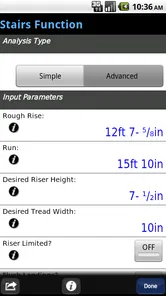
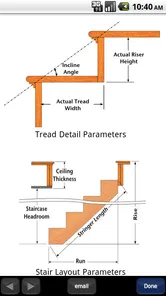
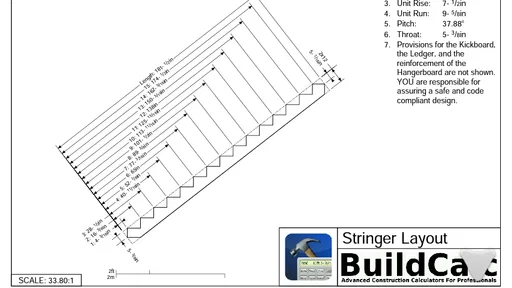
A realistic example is checking stair dimensions during a renovation. I would confirm the available space and the measurements from the plans, select the stair calculation, and use the help guidance if I were unsure what an input meant. Before cutting material, I would compare the output with the plan and remeasure the site. That sequence uses the app to speed up the working math without asking it to resolve a mismatch between a drawing and the actual building.
On a busy day, I can see the value in using it for a quick check before ordering or cutting, then recording the source dimensions separately with the job notes. If the site measurement changes after a wall is opened or a finish is removed, I would start a fresh check using the new figure instead of assuming an earlier saved calculation still applies. The practical advantage is not that the app removes the need to think; it helps keep a specialized calculation within reach while I focus on whether the inputs still describe the work in front of me.
Who benefits, and where another tool fits better
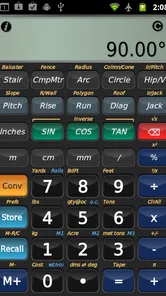
BuildCalc is aimed at people who regularly deal with construction calculations: tradespeople, estimators, and hands-on renovators who want more than a basic calculator. Its focused tools can save menu-hopping between separate calculators or searching for formulas, while the help section gives a way to orient yourself when a calculation is unfamiliar. Someone doing occasional household arithmetic, however, may be better served by the calculator already on their device; the upfront price is harder to justify if construction work is rare.
Compared with a spreadsheet, a construction calculator is more convenient for quick inputs at a job site, while a spreadsheet is often better when I need to document a larger estimate, track many line items, or share a structured record. Neither replaces careful measurement. I would also avoid assuming that a saved calculation is a complete job record: keep project notes and the source dimensions somewhere suitable if you need a clear trail later.
Compared with carrying a separate specialist calculator for each task, having construction calculations in one app may be easier when I move between different kinds of work. The trade-off is that a focused app still has a learning curve: I need to recognize the right tool and understand its inputs, rather than expecting a single basic keypad to solve every problem. If my work mostly involves documenting quantities, preparing estimates for others, or coordinating revisions, I would pair it with a spreadsheet or project record instead of asking the calculator to manage that broader workflow.
The strongest case for paying for it is regular use, where saving time on repeated construction math can matter more than the cost of a general calculator. For a homeowner who only needs to check one measurement during a weekend project, the built-in calculator and a careful written formula may be enough. I would make the purchase decision based on the calculations I actually repeat, not on the assumption that a specialized tool automatically improves every task.
Why BuildCalc Stood Out
The first thing I noticed about BuildCalc is how user-friendly it is. You don't need a degree in rocket science to figure out how to use it, which is a huge plus in my book. The app's interface is intuitive, and it’s designed to help you get your calculations done quickly and accurately.
That ease of entry is most useful when I already understand the job and need a quick way to work through the numbers. It should not be confused with knowing which method applies: on an unfamiliar calculation, I would use the guidance and check the assumptions before treating a result as ready for the site. The app can make the arithmetic more accessible, but the user still has to bring sound measurements and judgement.
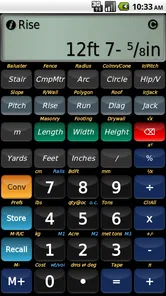
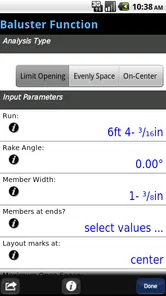
One of the standout features for me is the app's ability to handle complex calculations with ease. Whether you're calculating rafters, stairs, or anything in between, BuildCalc has got you covered. It even includes a detailed help section that guides you through each type of calculation, just in case you need a little extra assistance.
Features That Make It a Must-Have
Let’s talk features. This app isn’t just a one-trick pony. It's packed with tools that are incredibly useful for anyone in the construction industry. For instance, the stair calculator alone is worth the price of admission. It allows for detailed input and provides precise results that save you time and material.
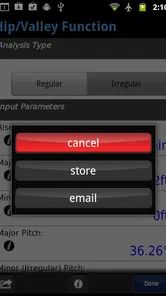
Another feature I found incredibly helpful is the ability to switch between metric and imperial units seamlessly. As someone who works on international projects, this feature is a blessing. You can also save your most used calculations, which is a massive time-saver when you're on a job site.
Those conveniences work best when I use them with a consistent routine: keep the source measurement nearby, check units before entry, and name or note a saved calculation so it is not confused with a similar job. A saved result is useful for speed, not proof that the next set of dimensions matches the last one. That distinction matters especially when a project has several similar components with small but important differences.
And, if that wasn't enough, the app is constantly updated with new features and improvements, which shows that the developers are committed to providing top-notch service. They listen to user feedback and make changes accordingly, which is something I immensely appreciate.
The Verdict
So, is BuildCalc worth the download? In my honest opinion, absolutely. Whether you're a seasoned professional or a weekend warrior, this app will make your life a lot easier. It's accurate, reliable, and incredibly easy to use. Plus, having all these tools in one place means you can leave your cumbersome calculators and notepads at home.
I would qualify that recommendation for occasional users: the $24.99 price is a real consideration if construction calculations are an uncommon need, and someone who only wants ordinary arithmetic has little reason to switch from a basic calculator. For regular field use, though, a dedicated construction tool can be a worthwhile convenience, provided I treat its output as one part of a careful workflow rather than a replacement for checking plans and measurements.
The convenience of having such a powerful tool right in your pocket is unmatched. Give it a try, and I promise you won’t be disappointed. BuildCalc is not just an app; it's a game-changer in the world of construction calculations.
BuildCalc Frequently Asked Questions
How much does BuildCalc cost, and what should I consider before buying it?
BuildCalc is a paid construction calculator app priced at $24.99. Before downloading, consider whether its construction-focused calculations and tools fit the work you do and whether you expect to use them regularly. Its business-oriented purpose may be especially relevant to people who handle building measurements, while occasional users may want to weigh the cost against their needs.
What devices and software versions can run BuildCalc?
BuildCalc is available for Android and iOS, and its minimum operating-system requirement is version 8.0. Check that your device meets this requirement before downloading. BuildCalc is developed by 42nd Parallel, and its current version is 2.1.109. The app is rated for Everyone, making its content suitable for a general audience.
What is BuildCalc and what platforms is it available on?
BuildCalc is a comprehensive construction calculator app designed for professionals in the construction industry. It is available on both Android and iOS platforms. The app provides tools for quick calculations including area, volume, and various building measurements essential for construction projects. Its description presents it as both an easy-to-use and advanced construction calculator, making it relevant for users who want a dedicated tool for building work.
How user-friendly is BuildCalc for someone new to construction apps?
BuildCalc is designed with a user-friendly interface that caters to both seasoned professionals and newcomers to construction apps. It includes intuitive navigation and clear instructions, making it easy for users of all experience levels to perform complex calculations without extensive training or prior experience with similar tools. Its focus on construction-specific tasks means beginners can explore practical measuring and calculation tools in one place.
What are the key features that make BuildCalc stand out from other construction calculator apps?
BuildCalc stands out due to its extensive range of features such as stair layout calculations, advanced roof math, and a comprehensive materials list tracker. These features are specifically tailored to meet the needs of construction professionals, providing precise measurements and calculations that are crucial for efficient project management. Together, they make it useful for more than basic arithmetic, particularly when planning building tasks.
Pros
- Highly accurate calculations for construction.
- User-friendly interface for quick navigation.
- Supports both metric and imperial units.
- Includes advanced features like date math.
- Regular updates improve functionality.
Cons
- Steep learning curve for beginners.
- Limited free version features.
- No cloud backup for projects.
- Occasional bugs in new updates.
- Requires in-app purchases for full access.