

Budget Car Rental
- 3.89K
- 4.6
- Installs
- 1.00M
- Price
- Free

Screenshots

Analysis by Reviewed
For a rental, I care about more than finding a car: I want to compare options without a long wait, make a booking without guesswork, and know what to check before I set off. Budget Car Rental is a free travel app from Avis Budget Car Rental LLC, and its purpose is straightforward: help me arrange a Budget rental from my phone. It suits people who already plan to rent from Budget, though it is less useful if you want to compare every rental company in one place.
What the app is useful for before a trip
I would use it when I have a destination and dates in mind and want to look at a rental directly with Budget. That is a different job from browsing an aggregator, where the main benefit is comparing providers side by side. A direct company app can make sense if you have already chosen Budget or want to keep the search and booking within one provider; if your priority is the widest cross-company comparison, I would start elsewhere and then compare the final terms carefully.
A practical tip is to decide what you need the car to do before searching. A compact vehicle may be easier to park on a city break, while luggage, passengers, or a longer drive can change what feels like good value. I would compare the total cost and the conditions shown for the specific rental, rather than choosing by the first price or vehicle label alone. Rental options and terms can vary by location and dates, so the details on the booking matter more than a general expectation.
Booking Made Easy
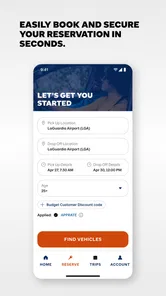
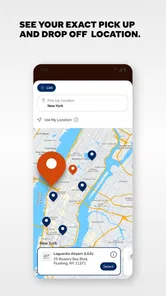
One of the first things you'll notice about Budget Car Rental is their user-friendly booking process. Seriously, it’s as simple as pie! Just hop onto their app or website, punch in your desired location, pick-up and drop-off dates, and voila! You're presented with a plethora of car options. Whether you’re looking for a compact car for city driving or an SUV for a family road trip, Budget has got you covered. The interface is clean, and even my tech-challenged uncle could navigate it with ease.
Speed, planning, and busy travel days
For speed, I would treat the app as a way to organize the rental search, not as a promise that every step will be instant. A search is most useful when the pick-up location and dates are settled; changing those details repeatedly can make comparing choices harder. On a busy travel day, I would complete the booking research before heading to the airport or rental counter, then keep the confirmation details accessible. That simple bit of preparation is more dependable than trying to make decisions while juggling luggage or a delayed itinerary.
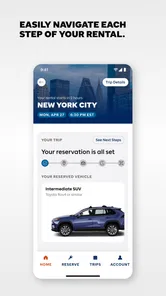
For a realistic example, imagine a weekend visit where the train gets you to town but a day trip beyond it needs a car. I would search with the actual pick-up and return times, check that the location works with my arrival plan, and allow time to collect the vehicle. If plans shift, I would review the reservation’s terms rather than assume that changing dates or returning elsewhere is automatic. This is where a direct booking workflow can be convenient, but the rental conditions still deserve a careful read.
Making the booking fit the journey
I would also think through the handoff between the app and the rest of the trip. If I am arriving by train or plane, I would check the distance and route from the arrival point to the chosen pick-up location before confirming. A seemingly convenient collection time can become stressful if it leaves no room for a late arrival, baggage, or finding the desk. This small bit of itinerary planning is more useful than repeatedly refreshing a search without knowing when I can realistically collect the car.
More From Our News Desk

 Weather - By Xiaomi
Weather by Xiaomi Review: Clear at a Glance, Less Clear Up Close
Xiaomi’s weather app makes everyday forecasts quick to scan, but its calm surface can leave useful details and recovery paths harder to find than they should be.

 X
XX Under Pressure: Can It Recover When Posting Goes Wrong?
A resilience-focused review of X, examining setup, mistaken posts, interruptions, weak connections, and the gaps that matter when recovery needs to be dependable.

 Clash of Clans
Clash of Clans Is Won Between the Battles
Its raids are quick; its community is a long-term project of coordination, teaching, rivalry, and shared responsibility—with all the friction that entails.

 Android Auto
Android Auto Makes the Case for Quieter Car Software
The car interface is no longer judged by how much it can do, but by how quietly it helps. Android Auto shows what drivers now expect—and what still gets in the way.

 MobiOffice: Word, Sheets, PDF
MobiOffice: Transforming Mobile Productivity with Seamless Integration
MobiOffice: Word, Sheets, PDF is redefining mobile productivity with a surprising blend of functionality and innovation.

 EA SPORTS FC Soccer Mobile 26
EA SPORTS FC™ Mobile Soccer: Redefining Mobile Sports Gaming
Dive into EA SPORTS FC™ Mobile Soccer, where immersive gameplay and strategic depth transform mobile sports gaming.
Latest News



For a family visit, I would settle the passenger and luggage needs first, then compare the available choices against them. A car that fits everyone on paper may feel cramped once bags are added, while a larger option may be unnecessary for a short city errand. I would also agree with the other travellers on who will drive and what the pickup plan is, rather than leaving those decisions until the counter. The app can help with the rental search; it cannot make an unclear group plan less confusing.
Variety is the Spice of Travel
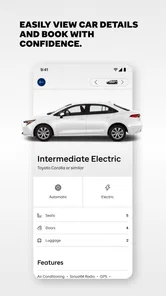
Speaking of options, Budget doesn’t skimp on variety. This is a major plus for someone like me who likes to switch it up. From economy cars to luxury models, there’s something for everyone. I ended up going for a mid-sized sedan, perfect for both city streets and highway cruising. And let me tell you, the car was in tip-top shape. It felt like I was driving a brand-new vehicle!
Vehicle choice is also a trade-off, not just a preference. If I am travelling with several people, I would think about bags and comfort as well as the number of seats; for a short solo errand, a larger vehicle may add cost without adding much value. I would avoid assuming that a vehicle category guarantees a particular make or model. Choosing for the trip’s actual needs helps prevent disappointment if the exact car differs from the one pictured or expected.
Pocket-Friendly Prices
Now, let's talk about the money side of things. Budget lives up to its name by offering some of the most competitive prices out there. They often have discounts and deals, so make sure you keep an eye out for those. I snagged a weekend deal that made the whole experience even sweeter. Plus, they offer various insurance packages, so you can drive with peace of mind without breaking the bank.
My advice is to compare like with like: dates, vehicle class, pick-up point, and the protections or other terms attached to the offer. A low headline price is not enough to judge a rental if the conditions do not match your needs. If you already have cover through another source, check what it actually includes before deciding whether an additional package is worthwhile. That extra reading takes a little time, but it is a better way to judge value than choosing purely on the first figure shown.
Comparing a direct booking with other ways to rent
The main trade-off is focus. A company-specific app keeps the search centered on Budget, whereas rental aggregators are better when I am undecided and want to scan several providers before narrowing the choice. I would use the aggregator to establish what is available for my route and dates, then check the direct offer and conditions before choosing. That two-step approach takes longer than committing to the first result, but it helps me avoid comparing a low headline price with a different vehicle class, location, or set of terms.
If I only need to get around a city for a few short trips, I would also compare the rental with public transport, taxis, or car-sharing where those are practical. A rental is more compelling when I need to travel beyond convenient transit, carry several bags, or make multiple stops on my own schedule. It is less attractive if parking is difficult and the car would sit unused most of the day. The app is for arranging a Budget car; deciding whether a rental makes sense at all still starts with the shape of the journey.
Reliability and what to do when plans change
The app is one part of a rental, while the vehicle handover and support are another. I would keep the booking confirmation handy and check the car’s condition and fuel details at collection, raising any concern with staff before leaving. At return, allow enough time to follow the location’s instructions rather than cutting it close to a flight or appointment. Those checks are useful regardless of how smooth the booking felt, and they make it easier to resolve a mismatch while you are still at the counter.
For reliability, I value a clear plan more than assuming a phone app can remove every travel snag. If a booking detail looks wrong or a journey changes, contact the rental team using the appropriate channel and keep the relevant reservation information available. The app is most helpful when the trip is uncomplicated and the chosen location and timing are settled; travellers who need flexible, multi-company comparisons may find an aggregator better for the initial search.
Recovering calmly from a change of plan
When travel plans change, I would first separate what the app can help me review from what needs direct confirmation with the rental team. A revised arrival time, a different return plan, and a change to the reservation are not necessarily the same request. I would check the booking terms, keep the confirmation details ready, and ask the relevant staff about the specific change instead of assuming it will be accepted automatically. That is especially important when the car is part of a tight connection or a time-sensitive appointment.
To make the handover easier to recover from, I would save the reservation details somewhere accessible before leaving home, not rely on remembering the booking reference while travelling. I would also leave a little breathing room at pickup and return. Those are practical safeguards rather than app functions, but they matter because a mobile booking tool cannot control queues, traffic, or a delayed arrival. The smoother the plan is, the more useful the app’s focused role becomes.
Who it suits, and the practical limits
This is a sensible choice for someone who has decided to rent from Budget and wants a mobile route into that process. It can also suit a traveller arranging a weekend car or planning ahead for a journey where public transport does not cover the final stretch. I would skip it as my only planning tool if I were still deciding between rental brands, or if I wanted a broad view of local transport, taxis, and car-share options alongside rentals. Those needs call for a wider comparison first.
Budget Car Rental has a 4.7 average from around 13,000 ratings, and it has passed over a million installs. It is rated for Everyone; version 13.3 is listed for devices running Android 7.0 or later. Those figures suggest an established app, but they do not guarantee that every search or booking will feel equally smooth on every phone. I would keep the app updated and use a stable connection when making a reservation, especially if I am travelling and need to review details on the go.
Device demands and everyday stability
I would not choose a rental app based on the assumption that it needs a powerful phone; the useful questions are whether it opens reliably on your device and whether you can complete a search with a dependable connection. The listed Android minimum is an older system threshold, but compatibility alone does not guarantee the same responsiveness on every handset. If a screen takes time to load or a search stalls, I would check the connection and retry when settled rather than repeatedly tapping and risking confusion about what has gone through.
For a trip, I would do the important booking work before the day gets hectic and keep the confirmation information available for reference. That gives me a fallback if I have poor reception while moving between terminals or stations. I would not treat the app as a replacement for the reservation details or a conversation with staff when something important needs clarification. The practical value is in reducing the amount of planning I must do at the last minute, not in guaranteeing uninterrupted service everywhere.
Customer Service: A Friend on the Road
One of the highlights of my experience was the outstanding customer service. From the moment I picked up the phone to inquire about a car to the drop-off process, the team was incredibly helpful and friendly. It’s reassuring to know that if anything goes awry, there’s a team ready to assist at any time.
That personal help matters most when a question is specific to a reservation, vehicle collection, or return. I would not treat a reassuring support experience as a substitute for reading the booking terms, but it is useful to know there is a human route to help when a situation needs more than tapping through a screen. The app and staff serve different purposes: one helps organize the rental, while the other can address circumstances around the actual trip.
My performance verdict
As a travel app, Budget Car Rental is focused rather than all-purpose. I would not judge it by whether it replaces every travel service; I would judge it by whether it helps me arrange a Budget rental with a manageable amount of planning. The free download makes it easy to consider, while the actual rental cost and terms still depend on the booking I choose. Its strongest use case is a straightforward trip with dates and a provider already in mind.
In conclusion, Budget Car Rental provides a stellar service that I would recommend to anyone in need of a rental car. Whether you're a frequent traveler or just need a vehicle for a weekend getaway, Budget is a solid choice. With its easy booking process, wide range of vehicles, affordable pricing, and excellent customer support, it’s a no-brainer for your next car rental adventure. So next time you're planning a trip, why not give Budget a shot? You might just find yourself pleasantly surprised.
Budget Car Rental Frequently Asked Questions
Is the Budget Car Rental app free to download, and what devices can run it?
Budget Car Rental is a free Travel & Local app from Avis Budget Car Rental LLC. On Android, it requires version 7.0 or later, so checking your device’s software before downloading can help avoid compatibility issues. The app is also available for iOS devices. Its Everyone content rating makes it suitable for a broad audience.
Who is the Budget Car Rental app designed for?
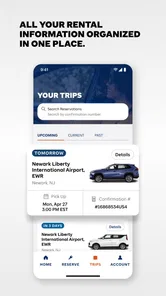
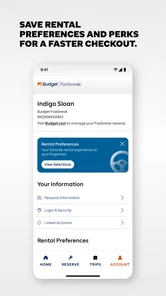
The app is aimed at people who want to handle car-rental tasks from a mobile device, whether they are planning a trip or managing an existing booking. Its store summary, “Budget-Friendly Rental Cars,” reflects its focus on finding and arranging rentals through Budget. It may be particularly useful for travelers who prefer to keep reservation details and rental-related tools in one place.
What are the key features of the Budget Car Rental app?
The Budget Car Rental app offers a range of features to enhance your car rental experience. It allows users to easily search for cars, compare prices, and make reservations. The app also offers real-time updates on reservation status, exclusive discounts, and the ability to manage bookings on the go. Additionally, it provides location details, customer support, and a loyalty program for frequent users.
How does the Budget Car Rental app ensure user security and privacy?
User security and privacy are top priorities for the Budget Car Rental app. The app employs advanced encryption techniques to safeguard personal and payment information. It adheres to strict privacy policies, ensuring that user data is neither shared nor sold to third parties. Users are encouraged to review the app’s privacy policy and terms of service to fully understand how their information is protected.
Is the Budget Car Rental app available for both Android and iOS devices?
Yes, the Budget Car Rental app is available for both Android and iOS platforms. Users can easily download the app from the Google Play Store for Android devices and the Apple App Store for iOS devices. The app is regularly updated to ensure compatibility with the latest operating systems and to improve performance and user experience.
Pros
- User-friendly interface for quick bookings
- Wide range of vehicle options available
- Competitive rental prices
- Flexible cancellation policy
- 24/7 customer support
Cons
- Limited locations in rural areas
- High fees for last-minute rentals
- Extra charges for additional drivers
- Online booking occasionally glitches
- Limited mileage on some rental plans












