Avis Car Rental
- 6.37K
- 4.6
- Installs
- 1.00M
- Price
- Free

Screenshots


Analysis by Reviewed
For me, a rental app earns its place on my phone when it helps me make a decision before I reach the counter and keeps the important details close while I travel. Avis Car Rental is Avis Budget Car Rental LLC’s free app for booking airport and local car rentals. Its appeal is straightforward: arrange a reservation, keep track of it, and have the rental information handy on a phone. I’d consider it most useful when Avis is already a serious option for the trip, rather than as a general-purpose way to compare every rental company.
When a reservation depends on a connection
In everyday use, the app matters most at a few specific moments: while searching for a rental, when checking or changing a reservation, and when getting oriented around pickup or return. Those tasks rely on current trip information, so I’d handle the important ones before I’m rushing through a terminal or standing beside a busy curb. A dependable connection makes it easier to confirm that the details I’m looking at match the trip I’m actually taking.
That affects how I would plan, not just how quickly a screen loads. Before leaving home, I’d check the pickup branch, rental times, and reservation number, then keep those essentials easy to find. If plans change, I’d try to review the booking while I still have a stable connection and enough time to respond. The app is useful for handling Avis arrangements, but I wouldn’t make a flight connection or a tight pickup schedule depend on being able to troubleshoot a phone at the last moment.
Planning and booking around a connection
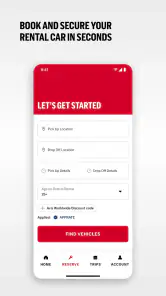
Booking depends on entering the right location and rental times, so the most useful first step is to settle those details before you start comparing cars. Airport pickup and a neighborhood branch can suit very different itineraries; choosing the wrong location can make an otherwise convenient reservation awkward. I’d check the pickup point against my arrival plans and confirm the return time before committing, especially if a flight or other appointment leaves little room for delay.
Booking Made Simple
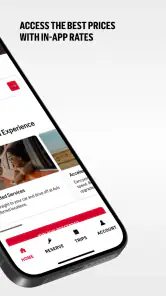
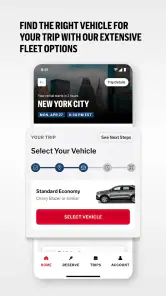
When you first open the Avis Car Rental app, you’re greeted with a sleek interface that practically begs you to start planning your next adventure. It’s super user-friendly, so you won’t need a manual to figure things out. Just pop in your location, pick-up and drop-off times, and watch as the app does its magic, presenting you with a list of available vehicles. Selecting a car is as easy as swiping left or right, and before you know it, you’re all set to hit the road.
That straightforward flow is most helpful once I know what kind of trip I’m booking. I’d settle the timing and branch first, then look at the available vehicle choices; otherwise, an appealing option can distract from a pickup point or schedule that doesn’t work. If I’m still deciding whether to rent from Avis at all, I’d compare providers before starting this process, since the app’s focus is on Avis rather than the wider market.
Extras and repeat bookings
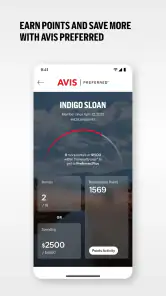
One feature I found particularly handy was the ability to add extras like GPS, child seats, or additional insurance directly from the app. No more last-minute scrambles at the counter! Plus, if you're an Avis Preferred member, the app automatically applies your membership benefits, saving you both time and money.
More From Our News Desk

Clash of Clans Is Won Between the Battles

Android Auto Makes the Case for Quieter Car Software

MobiOffice: Transforming Mobile Productivity with Seamless Integration

EA SPORTS FC™ Mobile Soccer: Redefining Mobile Sports Gaming

How Microsoft OneDrive Became a Mobile Productivity Giant

How Google Translate Breaks Language Barriers Effortlessly
The app also allows you to save your favorite locations, making frequent bookings even more seamless. Need to modify or cancel a reservation? You can do that with a few taps, too, and without any hassle.
Those options are most valuable when I use them deliberately rather than rushing through checkout. I’d review each extra against the trip: a child seat may be essential, while another add-on may not be worth selecting without checking what the journey actually calls for. Likewise, saved locations are a practical shortcut for repeat trips, but they’re worth double-checking when a city has more than one convenient branch. Before relying on a membership benefit, I’d inspect the reservation summary so I know what is being applied to this particular booking.
A useful habit for repeat renters is to treat a saved location as a shortcut, not as proof that the right branch is selected. The same city can have a branch that suits a hotel stay and another that makes more sense for an airport arrival. I’d verify the address every time, particularly if the trip begins somewhere unfamiliar. That quick check can prevent a simple convenience feature from turning into an avoidable detour.
Keeping rental details close on the road
Once booked, the app provides you with all your rental details in one place, including pick-up location, car model, and reservation number. This way, you won’t fumble through emails or papers to find your info. The in-app navigation feature is a nice touch, guiding you straight to the pick-up spot without any detours. And when it’s time to return the car, the app reminds you of the drop-off time, helping you avoid those pesky late fees.
What’s more, if you're traveling abroad, the app supports multiple languages and currencies, which is a huge plus for international travelers.
For a practical airport scenario, I’d book before setting out, confirm the pickup point while I can still correct it, and check the return time before driving away. Once I’m on the move, I’d rather have the reservation number ready than search through a crowded inbox while managing luggage. If the route or booking information takes time to load, having already checked the branch details gives me a clear next step: ask staff about the reservation instead of guessing which counter or location is right.
The app is particularly suited to a traveler who has already chosen Avis and wants the booking details gathered in one place. It can also make sense for someone arranging a rental for a family trip, where checking a child seat or pickup point before arriving is easier than trying to sort those details out in a hurry. It is less compelling for a traveler who is still deciding between several rental firms, or for someone who prefers to arrange everything through a travel agent or a single broader travel service.
When plans shift on the day
Connectivity matters most when the trip stops following the plan. If a flight is delayed or traffic changes my arrival, I’d use a reliable connection to check the reservation details and deal with a change as soon as possible, rather than assume that a saved screen or an old email reflects the latest booking. A phone’s connection can also be inconsistent inside terminals, parking structures, or on the road, so I’d keep the reservation number accessible and note the branch address before setting off. That gives me a useful backup for finding the right counter if loading directions takes longer than expected.
For a realistic airport run, I’d book before leaving home, verify the pickup location while I still have time to correct a mistake, then check the return time before starting the drive. If the app is slow at the curb, the reservation details already noted on my phone help me ask staff a focused question instead of trying to reconstruct the booking. I would not make an unfamiliar connection or a last-minute schedule change depend on the app alone; a little preparation is more dependable than troubleshooting while juggling luggage.
If a booking detail looks wrong, I would pause before changing anything and compare the location and times with the trip plan I intended to make. When the app is slow or a screen fails to load, I’d check whether the phone has a usable connection and retry when it is stable. If that still does not help, the reservation number and branch information give me something concrete to use when asking for assistance. This approach is more useful than repeatedly tapping through screens while tired or under time pressure.
For travelers moving between countries, mobile data deserves a little thought as well. I’d use a stable connection for searches or changes, then avoid repeatedly reopening navigation or rechecking the same booking when I already know the important details. That is a practical way to keep travel tasks manageable without assuming anything about the app’s offline behavior. If I expect limited service, I’d make the key checks before leaving a reliable connection rather than count on being able to retrieve everything later.
Choosing it over other rental tools
Compared with a broad travel search app, Avis’s main advantage is that it is built around handling an Avis reservation rather than browsing the whole rental market. That focus makes it a sensible choice when I already want an Avis vehicle or need to manage a booking with the company. If my priority is comparing different providers, locations, and deal structures side by side, I’d start with a comparison service and use Avis’s app once I’ve decided that Avis fits. The trade-off is convenience within one rental company instead of a neutral view of every alternative.
This is also why I wouldn’t recommend it to someone who rarely rents and has not decided which provider to use: the app is most useful after Avis is on the shortlist. A frequent renter may get more from saved locations and membership handling, while an occasional driver can still use it to keep a one-off reservation organized. Either way, I’d compare the complete booking and pickup details—not just the vehicle choice—before treating a result as the best fit for the trip.
So, is this the right choice for a first-time renter? I’d say yes if Avis is already the preferred company and the main need is to book or keep track of that reservation. If the main question is which company offers the best fit across several providers, a comparison tool is the better starting point. The distinction is simple but important: this app helps me manage a rental with Avis; it is not a substitute for shopping the whole rental market.
For a traveler with a dependable connection and a confirmed plan, that focused role is an advantage. For someone traveling through areas with unreliable service, I’d still consider it useful for preparing the booking, but I’d make sure the key details are noted before departure. And if a trip is so time-sensitive that even a short delay could cause a missed connection, I would build in extra time rather than rely on any app to make the schedule forgiving.
A practical note on data and recovery
Because searching, changing a booking, and getting directions involve current trip information, I’d use the app when I have a dependable connection and avoid leaving those tasks until the last minute. This is particularly sensible before entering an airport’s busy pickup area, where attention is split and signal can be unpredictable. I’d also keep an eye on mobile data while traveling abroad: checking a reservation is one thing, but repeatedly reopening maps or searching again can use more connection time than a quick review of the essential details beforehand.
If something does not load, I’d first check the connection and retry when it is stable, then use the reservation number and pickup information already at hand to get help at the location. The app’s value is not that it removes every travel hiccup; it gives me a more organized starting point and a way to handle ordinary booking tasks without digging through messages. For a trip where connectivity is uncertain, preparing key details before departure is the safer approach.
My own routine would be to check the reservation once after booking, again before leaving for pickup, and once more before setting out on the return leg. That is enough to catch a location or timing mismatch without turning the phone into a constant source of distraction. I’d also avoid trying to make a change while driving; if plans shift, I’d stop somewhere safe first and deal with the booking when I can give it proper attention.
Who will get the most from it
Overall, the Avis Car Rental app is like having a personal assistant in your pocket, dedicated to making your car rental experience as smooth as possible. It’s fast, efficient, and packed with features that cater to both frequent travelers and occasional users alike. Whether you're planning a cross-country road trip or just need a ride for the weekend, this app has got your back. So next time you're on the lookout for a rental, try giving this app a whirl. You might just find it’s the travel companion you never knew you needed.
I’d be more measured about calling it a must-have for every traveler. Its strongest case is a person who has chosen Avis, wants a convenient way to manage that booking, and is comfortable using a phone for travel tasks. Frequent renters can make better use of saved locations and membership handling, while an occasional renter can benefit from having a reservation number and pickup information close at hand. Someone who wants to compare brands first, or who prefers to keep travel arrangements entirely outside a rental company’s own app, may be better served by a broader search option.
It is also worth separating convenience from certainty. The app can make ordinary rental tasks easier to organize, but a traveler should still check the branch, times, and extras carefully and leave room for unexpected delays. In my view, that is the right way to use it: as a focused companion for an Avis booking, not as a guarantee that every travel snag will disappear.
My connectivity verdict
Its Travel & Local focus makes sense for a tool tied to getting from a terminal or branch to the road. The app is rated 4.6 on average, with around 30,000 ratings and about 6,400 written reviews, and has more than a million installs. It is free, rated for everyone, and is currently at version 21.1, with support starting from Android 7.0. It has been available since March 12, 2012, so this is a long-running rental companion rather than a new experiment. My recommendation is simple: use it when Avis is your chosen rental company, prepare for weak connectivity before you travel, and choose a comparison tool instead when shopping across providers matters more than managing one booking.
Avis Car Rental Frequently Asked Questions
What should I know about the Avis Car Rental app before downloading it?
Avis Car Rental is a Travel & Local app for finding and managing car rentals. Its store summary describes airport and local car rentals, making it relevant for people arranging a vehicle for a trip or nearby travel. The app is free to download, has an Everyone content rating, and is published by Avis Budget Car Rental LLC.
Can I use the Avis Car Rental app to find airport and local rental options?
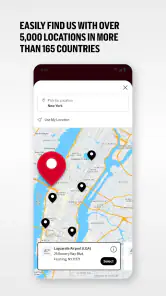
Yes. The app is presented for airport and local car rentals, so it can help you explore rental options for different travel needs. You can use it to search rental locations and view available vehicles before making a reservation. The app is designed to bring those rental tasks together on a mobile device, whether you are planning ahead or managing a trip.
Is the Avis Car Rental app free to download, and what devices can run it?
The Avis Car Rental app is free to download and is available for Android and iOS devices. Its minimum operating system requirement is version 7.0, so it’s worth checking your device settings before installing. The app is published by Avis Budget Car Rental LLC and is intended for travel-related rental tasks, from browsing locations to managing reservations.
What platforms is the Avis Car Rental app available on?
The Avis Car Rental app is available for both Android and iOS devices. You can download it from the Google Play Store for Android or the Apple App Store for iOS. This ensures that users across different platforms can access the app's features conveniently and manage their car rentals on the go.
How do I create an account on the Avis Car Rental app?
Creating an account on the Avis Car Rental app is straightforward. First, download and install the app from your device's app store. Upon opening the app, you will be prompted to sign up. Enter your personal information, such as your name, email address, and a secure password. Follow the on-screen instructions to complete your registration. Once registered, you can easily log in and start using the app.
Pros
- User-friendly interface for easy booking
- Wide range of vehicle options available
- Competitive pricing with discounts
- 24/7 customer support service
- Seamless app navigation for users
Cons
- Limited availability in some regions
- Occasional app crashes reported
- Slow response during peak hours
- Extra fees for young drivers
- Inconsistent vehicle cleanliness

- Category
- Travel & Local
- Version
- 21.1