Bose
- 14.95K
- 4.3
- Installs
- 10.00M
- Price
- Free

Screenshots

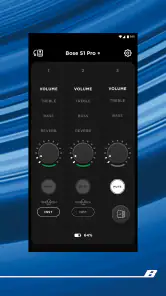

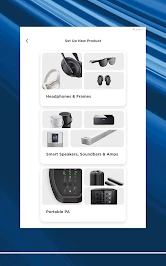
Analysis by Reviewed
I judge a device companion by what it helps me do after the novelty of setup wears off. With Bose, the answer is practical rather than flashy: it gives compatible Bose headphones and speakers a place for setup and device controls, while leaving music discovery and playback to the services I already use. That makes it most valuable when Bose equipment is part of my daily routine, not when I’m looking for a new music library.
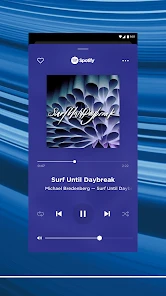
A companion, not a music player
Have you ever found yourself yearning for a way to enhance your auditory experience on your smartphone? Well, let me share my recent dive into the world of the Bose app, a nifty tool that promises to elevate your audio game to the next level.
Where it fits in a Bose setup
I’d think of this as a companion for compatible Bose gear, rather than a general music player. It comes from Bose Corporation and sits in the music-and-audio category, with a free download and an Everyone age rating. That distinction matters: if you mainly want an app to browse a streaming library or control speakers from several brands, your music service or a broader smart-home app may be more useful. This one makes the most sense when Bose equipment is already part of your listening routine.
A typical day gives it a clearer purpose than the short description does. I might connect headphones before leaving home, make a sound adjustment for a noisy commute, then use a Bose speaker later without having to treat each product as a completely separate experience. The practical value is less about replacing the apps where I find music and more about keeping device controls close at hand.
Who gets the most from it
I’d recommend it first to someone who already owns a compatible Bose product and regularly changes how they listen. Commuters who move between quiet rooms and busy streets, people who switch between headphones and a home speaker, and households with more than one Bose device have a clearer reason to keep a dedicated control app installed. Its usefulness grows with the number of times a week I reach for a device setting, not simply with the size of my music collection.
By contrast, if I only use a Bose product as an occasional Bluetooth speaker and never adjust anything after pairing, the app may not become part of my daily routine. The phone’s Bluetooth controls can be enough for basic connection tasks. I’d also skip it as a music-discovery tool: it does not replace the streaming app where I search for albums, build playlists, or manage a listening queue.
Getting Started with Bose
First things first, downloading and setting up the Bose app was a breeze. Available for both Android and iOS, you can easily find it in your respective app store. Once I had it installed, I was eager to see what it had in store.
More From Our News Desk

Clash of Clans Is Won Between the Battles

Android Auto Makes the Case for Quieter Car Software

MobiOffice: Transforming Mobile Productivity with Seamless Integration

EA SPORTS FC™ Mobile Soccer: Redefining Mobile Sports Gaming

How Microsoft OneDrive Became a Mobile Productivity Giant

How Google Translate Breaks Language Barriers Effortlessly
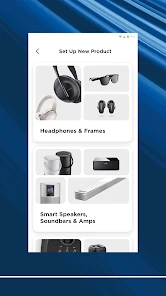
The app interface is sleek and intuitive, which I appreciated right off the bat. It walks you through a simple pairing process, and before you know it, your Bose headphones or speakers are connected and ready to rock. What I found particularly useful was the step-by-step guide for every Bose device, ensuring even the least tech-savvy users won’t get lost.
Making setup less of a chore
For a smoother first run, I’d have the product charged, keep it close to the phone, and follow the instructions shown for that specific device rather than trying to rush through pairing. If I’m setting up a speaker in another room, I’d bring the phone to it instead of tapping through prompts from across the house. That simple choice keeps the process focused on the product I’m actually trying to connect.
One question people often have is whether the app is useful if they have more than one Bose product. It can be, especially when I want to move between headphones and a speaker, but I would still treat each device as its own setup and check which controls are available for it. A shared app does not mean every product has identical options; the device-specific guidance is the more useful reference.
Features That Stand Out
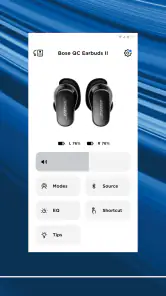
Once you're connected, the app opens up a world of possibilities. One feature that really caught my attention was the ability to customize audio settings. Whether you're a bass lover or prefer a more balanced sound, the equalizer settings let you tweak audio output to your liking. I spent a good amount of time playing around with these settings to find my perfect sound profile.
A small but useful habit is to adjust one setting at a time and listen to a familiar track before changing anything else. That makes it easier to tell whether the sound is genuinely better for your ears or simply different. If you share headphones with someone who prefers another balance, remember that your favorite tuning may not suit both listeners; a quick reset or adjustment can save a lot of fiddling later.
Sound settings in everyday use
I find sound customization most worthwhile when it solves a specific listening problem. A familiar podcast can make a better test than a track with lots of competing instruments if I’m trying to judge speech clarity; a well-known song is more revealing when I’m comparing bass and balance. Rather than chasing a dramatic change, I’d make small adjustments and check them at a normal listening level. That helps avoid mistaking “louder” for “better.”
There is a trade-off to personal tuning: an adjustment that works for one pair of headphones or one kind of recording may not translate to another listening situation. If I move from music to a spoken program, I may prefer a different balance. I’d keep my settings modest enough that they remain comfortable across what I actually listen to, instead of repeatedly rebuilding a profile for every track.
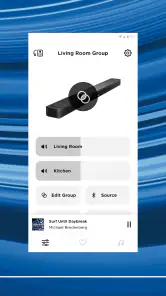
Another cool feature is the music sharing option. Imagine being at a party and wanting to play DJ with your friends. The app allows you to connect multiple Bose products and stream music simultaneously. It's a game-changer for social gatherings, making sure everyone’s tapping their feet to the same beat.
That kind of multi-device listening is most helpful when the products are already set up and within reach; I wouldn’t count on it as a universal way to combine unrelated speakers. For a gathering, I’d test the arrangement before guests arrive and choose one phone as the source. It is a more predictable approach than asking several people to connect their own devices and troubleshoot while music is playing.
A realistic day with the controls
Picture a weekday where I leave home with headphones, switch to a quieter listening setting once I’m indoors, and later put on music through a Bose speaker while cooking. The app’s value in that routine is not that it plays the music for me; it is that I can reach the relevant Bose controls when the listening context changes. If I’m in a hurry, I can leave a setting alone rather than making a tweak just because the option is there.
For a shared home, I’d also decide in advance who is managing the speaker during a gathering. One person choosing the source and checking the connected products is usually simpler than having several guests attempt to take control. The app can support a Bose-centered setup, but it doesn’t remove the need for a little coordination when people and devices are sharing the same space.
User Experience and Performance
In terms of performance, the Bose app delivers a seamless experience. The connection between the app and devices is stable, and I didn’t encounter any lags or drops, which is crucial when you're in the middle of a jam session. The app also updates your devices' firmware automatically, which means you always have the latest features and enhancements without lifting a finger.
For an existing owner, the useful question is whether the app earns space on the phone after setup. I’d keep it if I regularly change sound controls, manage more than one Bose product, or want device guidance nearby. If I leave one product on the same settings and rarely touch its controls, I may open the app only occasionally, but it can still be handy when pairing or checking the device experience again.
How it compares with other control options
The usual alternatives each cover a different job. A phone’s Bluetooth menu is convenient for straightforward pairing and connection checks, but it is not a substitute for product-specific controls. A streaming service is better for finding and playing music, while a broad smart-home app may suit someone trying to manage equipment from several brands. Bose’s app is the more focused choice when the task is adjusting or setting up compatible Bose audio gear.
That focus is also its limit. Someone with a mixed-brand audio setup may find themselves moving between manufacturer apps, and a person who wants one universal dashboard should not assume this app will take over that role. I’d choose it for the Bose controls I need, then keep my music service and any broader home controls for their separate jobs.
The Bose app has been available since September 2018, and its current audience suggests it has become a familiar companion for many listeners: it has a 4.3 average from around 158,000 ratings and over 10 million installs. Those figures show broad reach, but they don’t guarantee that every control will be relevant to every Bose model or every listener. I’d judge it by how well it supports the particular product I own, not by popularity alone.
Compared with the usual alternatives, such as a phone’s basic Bluetooth menu, a manufacturer-neutral audio app, or the streaming service itself, this app’s advantage is Bose-specific control and setup guidance. The trade-off is that it is not a universal control center: people with a mixed collection of audio brands may still need several apps. If you’re shopping for gear rather than managing Bose products you already own, I’d compare the hardware first and treat the app as part of that decision, not as a reason by itself to choose a device.
Compatibility and remaining friction
One practical limitation is that an app can only help when the product you want to manage is compatible and available to connect. I’d check the pairing prompts carefully, keep the phone near the device during setup, and avoid assuming that every Bose product exposes the same controls. Those small expectations help prevent a common frustration: looking for a setting that belongs to a different model or product family.
If a device does not appear as expected, I’d first make sure I’m following the instructions for that product and that it is close enough to the phone for the setup process. I would not assume that every Bose product has the same setup path simply because it shares the brand. The app is most helpful when I let its device-specific prompts guide me rather than searching for a control based on what another model offers.
The noise cancellation controls are especially useful when your surroundings change during the day. I might choose a more focused setting while commuting, then reduce it when I need to hear what is happening around me. On a quiet walk or at home, I may not need to adjust anything at all. The point is to treat the control as situational, rather than assuming one setting is ideal everywhere; awareness of nearby people and traffic should still come first.
What I would watch over time
Because the app and the products it manages are closely tied, I’d pay attention to whether the controls I actually use remain easy to find as my setup changes. Adding another Bose product can make the companion more valuable, but it can also give me more devices to distinguish during setup and everyday use. I’d keep the products I use most clearly identified in my own routine and avoid making a complicated arrangement unless it solves a real listening need.
I’d also judge future changes by their practical effect, not by a longer feature list. For an existing owner, the important questions are whether setup stays straightforward, whether the controls for their particular product remain useful, and whether the app still fits alongside their music service. Those are the things that determine whether it remains a helpful companion rather than an icon I rarely open.
Final Thoughts
All in all, the Bose app is a must-have for anyone using Bose audio products. It not only simplifies device management but also enriches your listening experience with its array of features. From customizable sound settings to seamless connectivity, it's clear that the app is designed with the user in mind.
If you're looking to maximize your audio setup, I’d definitely recommend giving the Bose app a go. It's more than just an app; it’s your gateway to an enhanced auditory adventure.
Bose Frequently Asked Questions
Can I use the Bose app without owning a Bose product?
The Bose app is designed to control Bose smart products, so its main purpose is as a companion for managing those devices. You can download it without owning one, but you are most likely to find it useful if you already have or plan to use a compatible Bose product. It is not presented as a general music player or standalone streaming service.
What kind of app is Bose, and who is it intended for?
Bose is a Music & Audio app developed by Bose Corporation. Its short description is simply “Bose,” while its store summary describes it as an easy-to-use app for controlling Bose smart products. It is intended for people who want to manage Bose devices through an app, rather than for listeners seeking a general-purpose music library or streaming player.
Is the Bose app free to download, and what should I know before installing it?
The Bose app is free to download and is designed to control Bose smart products. It is listed for everyone, so its age rating does not restrict it to adults. Before installing, consider whether you own or plan to use a compatible Bose product, since the app’s purpose is managing Bose devices rather than serving as a general music player. Its store summary describes it as easy to use.
Who makes the Bose app, and how popular is it?
The app is developed by Bose Corporation and sits in the Music & Audio category. It has an average rating of 4.3 from around 158,000 ratings, with roughly 15,000 written reviews and over 10 million installs. Those figures suggest it has attracted a large audience, although ratings and reviews reflect individual experiences and do not guarantee how well it will suit your particular device or needs.
What features does the Bose app offer for enhancing audio experiences?
The Bose app provides a range of features to enhance your audio experience, including customizable sound settings, access to premium audio content, and seamless connectivity with various Bose devices. It also offers a user-friendly interface for managing your audio preferences, updating device firmware, and accessing support materials. Users can also enjoy personalized playlists and sound profiles tailored to different environments.
Pros
- High-quality sound experience
- User-friendly interface
- Customizable settings
- Robust noise cancellation
- Reliable Bluetooth connectivity
Cons
- Expensive compared to competitors
- Limited battery life
- Heavy and bulky design
- Complex setup process
- Incompatibility with some devices
- Category
- Music & Audio
- Version
- Varies with device













