Bose QC Earbuds
- 683.00
- 4.7
- Installs
- 100.00K
- Price
- Free

Screenshots
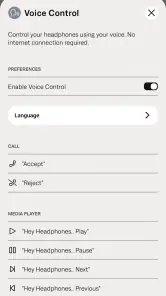
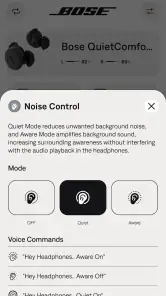


Analysis by Reviewed
If you're anything like me, always on the lookout for the perfect pair of earbuds, then the Bose QC Earbuds might just be your next obsession. I took these buds for a spin, and here's what I found out.
What the app is for
The Bose QC Earbuds app is a free music and audio companion from Bose Corporation, built to manage Bose QuietComfort Earbuds. I’d think of it as the control point for owners, rather than a general music player or a replacement for the audio apps already on your phone. If you don’t use compatible Bose earbuds, there’s little reason to install it; if you do, it gives you a dedicated place to get familiar with them.
It’s a particularly sensible choice for a first-time owner who would rather make the earbuds usable before heading out than learn settings in the middle of a commute. The app is rated for Everyone, and it has a 4.7 average from around 17,000 ratings, with over 100,000 installs. Those figures suggest a well-liked companion, though they don’t tell you whether its approach will suit your habits: the real test is whether you want an app focused on managing one Bose product family.
What to expect before you install
I’d set expectations around the app’s specific job. It is not where I’d go to discover new music, build a podcast queue, or manage every accessory connected to my phone. Its appeal is that it gives owners a place to deal with the QuietComfort Earbuds as a product, while the apps you already use continue to provide the actual listening content. That division keeps the purpose clear once you know what belongs where.
The app is free, and the current release is version 1.1.2. The main decision is less about cost than compatibility: it makes sense when you have the matching Bose earbuds, and far less sense when you are simply looking for a more capable music player. On Android, it requires version 10 or later, so I’d check that before planning setup. If you use an iPhone, the same basic question still applies: do you own the earbuds this companion is meant to manage?
First Impressions: Sleek and Sophisticated
Right out of the box, the Bose QC Earbuds make a statement. They look sleek, feel solid, and scream premium quality. I mean, just holding them, you get this sense of "yeah, I spent my money well." The charging case is compact enough to slip into your pocket, and the earbuds themselves are designed to comfortably fit in your ears without that annoying feeling of them wanting to pop out.
Getting started without guesswork
For a new user, I’d keep the first session simple. Install the app on a supported phone, place the earbuds nearby, and follow the on-screen guidance to get them ready. Because the app exists specifically for managing these earbuds, it’s a more direct starting point than hunting through a general audio app or the phone’s Bluetooth menu alone. I would do this at home, with a few quiet minutes available, rather than trying to pair everything while crossing a busy street or boarding a train.
More From Our News Desk

Clash of Clans Is Won Between the Battles

Android Auto Makes the Case for Quieter Car Software

MobiOffice: Transforming Mobile Productivity with Seamless Integration

EA SPORTS FC™ Mobile Soccer: Redefining Mobile Sports Gaming

How Microsoft OneDrive Became a Mobile Productivity Giant

How Google Translate Breaks Language Barriers Effortlessly
Once setup is complete, make the first test a familiar song or podcast at a comfortable volume. That gives you a useful baseline: you can check that sound is coming through both sides, the fit feels secure, and the controls behave as you expect before you depend on them outside. This small check is more useful than immediately changing every available option, because it helps separate a fit or connection issue from a preference about sound.
Make the first listen a useful test
I’d choose a track or spoken recording I know well, rather than something new, because familiarity makes it easier to notice what is different. Begin at a modest volume and listen for a short stretch in a quiet room. If one side seems quieter, reseat both earbuds before adjusting anything else. A small difference in fit can change how balanced the sound feels, and starting with a familiar recording makes that easier to spot.
For someone setting up their first pair of Bose earbuds, this is also a good moment to learn the basic routine: where the companion app sits on the phone, which app you use to play audio, and how the earbuds feel when properly seated. I wouldn’t try to master every control on day one. A dependable first listen is a better success than a long setup session that leaves you unsure which change helped.
Sound Quality: An Audiophile's Dream
Now, let's get to the meat of it: the sound quality. Oh boy, these earbuds don’t disappoint! The audio is crisp, with highs that sparkle and bass that thumps just right. Whether you're into classical or hip-hop, these buds deliver sound that is both rich and detailed. It's like having a concert in your ears, minus the crowd.
And let's not forget the noise cancellation feature. It's like stepping into your own little world where it's just you and your music. The outside noise just fades away. Perfect for those noisy commutes or when you just need a break from reality.
Making the app useful day to day
In ordinary use, the app matters most when you need to manage the earbuds, not when you simply want to press play. I’d open it before a commute to check the setup, then leave my music or podcast app to handle listening. If you move between a quiet room, a bus, and a shared workspace, decide in advance what kind of listening you want in each place; that avoids fiddling with your phone just as you need to pay attention to your surroundings.
A useful small habit is to make one change at a time and listen for a minute before changing anything else. If the sound feels wrong, first check that both earbuds are seated comfortably; a poor seal can make bass seem weaker and outside noise more noticeable. If the fit is fine, then use the app’s management role to review your setup rather than assuming the music service or the earbuds are at fault. This is a calmer way to troubleshoot than repeatedly disconnecting and reconnecting without knowing what changed.
A realistic routine away from home
Picture a workday that starts with a quiet breakfast, continues with a train ride, and ends at a desk where other people are talking. I’d do the setup and fit check before leaving, then use the audio app I normally trust for a podcast on the way in. When the surroundings change, I’d pause for a moment and decide whether I want to keep listening or be more aware of what’s around me. The useful point is not to keep staring at the companion app; it is to have the earbuds ready before the day gets busy.
That routine also makes troubleshooting less frustrating. If audio stops behaving as expected, I’d first distinguish between a playback issue in the music app and a problem with the earbuds’ connection or fit. Try another familiar recording before making several changes. If the second recording works, the trouble may be tied to the first app or item; if not, the earbuds and their setup deserve attention. A deliberate check like this can save time compared with changing multiple settings at once.
Comfort and Fit: All-Day Wearability
Comfort is key when it comes to earbuds, and Bose nails it. These buds come with multiple ear tip options, so finding the perfect fit is a breeze. I wore them for hours, and there was no discomfort at all. They stay put during workouts too, which, if you're a gym-goer like me, is a huge plus.
When a different option makes more sense
This is not the app I’d choose if I wanted one dashboard to manage earbuds from several brands, browse a music library, or replace my phone’s everyday playback controls. A general Bluetooth settings screen is enough for someone who only needs to connect a device and never expects to manage it again. The Bose app makes more sense when you own the matching earbuds and want a product-specific route to setup and ongoing management; that focus is useful, but it also means its value depends on owning the right hardware.
For a realistic day, I’d set things up at home, test a familiar podcast, and check the fit before leaving. On the train, I’d use the earbuds for listening and keep the phone’s player in charge of playback. At work, I’d take a moment to adjust my listening arrangement before a noisy task rather than making changes mid-call or while concentrating. That routine gives the app a clear job without turning every listening session into a settings session.
Who benefits from this focused approach
I see the strongest case for someone who has just bought the matching earbuds and wants one guided place to get comfortable with them. It is also useful if you already own them but tend to forget where to manage a device-specific setting. In either case, the app’s narrow focus is an advantage: it keeps the companion tied to the earbuds instead of presenting a pile of unrelated audio tools.
On the other hand, if your main aim is to control a mix of headphones from different manufacturers, the usual cross-brand approach is better. Phone Bluetooth settings handle basic connection tasks across devices, while a general music service is where playback belongs. Neither replaces Bose’s own companion for managing its earbuds, but they may be all you need if you rarely adjust anything after connecting. I’d skip installing another app unless that dedicated management role is useful to you.
Battery Life: Keep the Music Going
Battery life is another area where these earbuds shine. You get about 6 hours of listening time on a single charge, and with the charging case, you can extend that to 18 hours. So, whether you're on a long-haul flight or just powering through back-to-back meetings, these buds have got you covered.
Charging is quick too. Just pop them in the case for 15 minutes, and you’ll get up to 2 hours of playtime. That's a lifesaver for those "oops, I forgot to charge my earbuds" moments.
Practical limits to keep in mind
The main trade-off is specialization. This is a companion app for Bose QuietComfort Earbuds, not a universal fix for every Bluetooth audio problem, and installing it won’t make unrelated earbuds manageable through the same controls. If you’re comparing it with broad audio utilities, I’d favor the Bose app for its direct relationship to the matching hardware, but choose a general tool only if cross-brand management is more important than product-specific support.
For an initial question like “Do I need this app just to listen?”, I’d separate basic playback from managing the earbuds: your usual listening app remains where you choose music or podcasts, while Bose QC Earbuds is for the earbuds themselves. If you’re wondering whether to explore everything immediately, I wouldn’t. Get a comfortable fit, confirm that your usual audio plays as expected, and return to the companion when you actually need to manage something. That keeps the first experience reassuring rather than overwhelming.
Small choices that prevent avoidable hassle
One practical tip is to avoid doing first-time setup while you are rushing. Pairing and learning a new device are easier when you can give the screen and the earbuds your attention, and it is safer to do that before you leave rather than during a walk or commute. Afterward, keep the first outing simple: use a familiar listening app, notice whether the fit stays comfortable, and make a note of anything you want to revisit at home.
Another trade-off is that a dedicated companion creates one more app to keep on your phone. For owners who use the earbuds often, that can be worthwhile because it gives management a clear home. For someone who connects the earbuds once and never changes anything, the app may feel like an extra stop in an otherwise simple listening routine. I’d base the decision on whether you expect to return to its management tools, not on the assumption that every audio accessory needs a companion app open all day.
Final Thoughts: Worth Every Penny
In conclusion, if you're in the market for a pair of earbuds that offer excellent sound quality, comfort, and battery life, the Bose QC Earbuds should be at the top of your list. Sure, they might be a bit on the pricey side, but for what they offer, it's money well spent. Trust me; your ears will thank you.
So, why wait? Dive into the world of premium sound with the Bose QC Earbuds and experience audio bliss like never before.
Who I’d recommend it to
I’d recommend the app to someone who already owns the matching earbuds, especially a first-time user who appreciates having a dedicated place to get started instead of relying only on phone settings. I’d skip it if you’re shopping for an app to organize a collection of audio devices or if you don’t own compatible Bose hardware. It is free, runs on Android 10 or later, and version 1.1.2 is the current release. Bose’s 683 written reviews add another perspective alongside the rating, but I’d still judge the app by whether its focused role fits your own routine.
A sensible next step
After your first successful listen, keep the app available for the next time you want to manage the earbuds, but don’t feel you need to open it every time you play audio. That distinction is the clearest way to get value from it: use your normal music app for content, and turn to Bose’s companion when the earbuds themselves need attention. For owners, that is a straightforward arrangement; for everyone else, it is a good reason to leave this one alone.
Bose QC Earbuds Frequently Asked Questions
Do I need Bose QC Earbuds to use the app?
The app is made to manage Bose QuietComfort Earbuds, so owning compatible earbuds is central to getting value from it. It is not a general music-streaming app; its role is to help you manage the earbuds through your phone. If you are considering downloading it before buying or using the earbuds, think of it as a companion app rather than a standalone listening service.
Who makes the Bose QC Earbuds app, and is it suitable for all ages?
Bose Corporation develops the Bose QC Earbuds app, which is intended to support the company’s QuietComfort Earbuds. Its age rating is Everyone, so it is presented as suitable for a broad audience. The app’s usefulness still depends on having the earbuds it manages, but there is no age-specific restriction implied by its rating.
Is the Bose QC Earbuds app free, and what is it used for?
The Bose QC Earbuds app is free to download and is designed to manage Bose QuietComfort Earbuds. It sits in the Music & Audio category, so its purpose is focused on controlling and managing the earbuds rather than serving as a general music-streaming service. The app is developed by Bose Corporation and is rated for Everyone.
What mobile operating systems can run the Bose QC Earbuds app?
The Bose QC Earbuds app is available for Android devices running version 10 or later. Before downloading, check your device’s operating system version so you can confirm it meets that requirement. The app is intended to work with Bose QuietComfort Earbuds, making compatibility with both the phone and the earbuds important for using its management features.
What are the key features of the Bose QC Earbuds app?
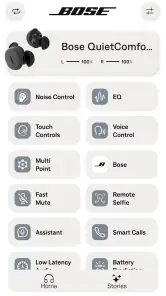
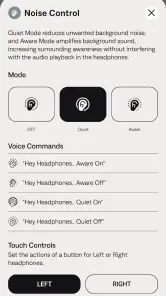
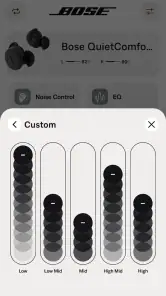
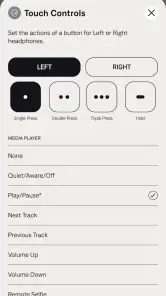
The Bose QC Earbuds app allows users to personalize their listening experience with adjustable noise cancellation settings, customizable touch controls, and access to the latest software updates. Additionally, the app facilitates easy device pairing and provides detailed battery information. Users can also take advantage of the built-in music player and manage multiple Bose devices from the app.
Pros
- Excellent noise cancellation
- Comfortable fit for long use
- High-quality sound
- Good battery life
- Intuitive touch controls
Cons
- Expensive price tag
- Bulky charging case
- Limited customization options
- No multipoint connectivity
- Average call quality
- Category
- Music & Audio
- Version
- 1.1.2













