Boost Cleaner
- 1.00
- 3.6
- Installs
- 10.00K
- Price
- Free

Screenshots
Analysis by Reviewed
When a phone starts feeling crowded, the hardest part is often not finding files to remove but deciding what is genuinely safe to delete. Boost Cleaner approaches that problem as a storage and app-management tool: it scans the device, presents cleanup suggestions, and gives you controls for reviewing those suggestions before taking action. I like that basic idea because a cleaner should help me make decisions, not quietly make them for me.
After using it as a productivity app, my impression is straightforward. It is aimed at people who want a guided way to inspect storage rather than manually browse every folder or open each app’s settings page. The experience is most useful when your phone has accumulated forgotten downloads, unused applications, or other clutter that is difficult to sort through casually. It is less compelling for someone who already keeps a strict storage routine or expects a cleaner to solve every performance problem automatically.
How Boost Cleaner fits into everyday storage management
The app comes from Wycked Few and is available free of charge. That matters when comparing it with cleaner tools that place important actions behind a subscription or one-time purchase. Here, the initial decision is not whether the app is worth paying for; it is whether its review-and-cleanup workflow is useful enough to keep on your phone.
It is listed for everyone and works on Android devices running version 8.0 or later. The current release is version 3.0.0, and the app has passed the early discovery stage with over ten thousand installs. Its average rating is 3.9 from thirteen ratings, which suggests some interest but is still a small sample rather than a definitive verdict from a large user base.
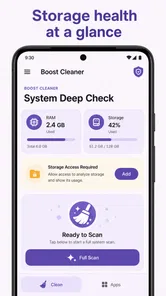
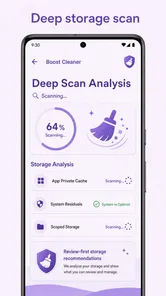
The app’s central promise is deliberately narrower than the broad claims often made by phone-optimization utilities. Its focus is scanning storage, showing cleanup suggestions, and managing apps with visible controls. In practice, that makes it better understood as a decision aid for digital housekeeping than as a magic performance switch.
That distinction is important. Freeing storage can help when a device is close to its capacity, but removing unnecessary files does not automatically make every phone faster, extend battery life, or fix a poorly behaved application. I would use this app when my immediate problem is clutter and uncertainty, not as a general diagnosis for every Android issue.
A review-first workflow is the right starting point
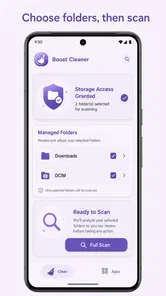
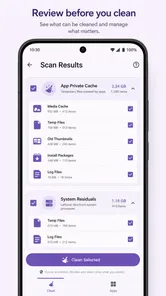
The most useful habit is to treat the scan as an inventory, not an instruction to delete everything it finds. A suggestion is only valuable when I understand what it represents. Before confirming cleanup, I would check whether a file is an old download, a duplicate, a cached item, or something I may still need. The app’s clear-control approach supports that cautious routine better than an aggressive one-tap cleaner would.
More From Our News Desk

Weather by Xiaomi Review: Clear at a Glance, Less Clear Up Close

X Under Pressure: Can It Recover When Posting Goes Wrong?

Clash of Clans Is Won Between the Battles

Android Auto Makes the Case for Quieter Car Software

MobiOffice: Transforming Mobile Productivity with Seamless Integration

EA SPORTS FC™ Mobile Soccer: Redefining Mobile Sports Gaming
This also makes the tool suitable for shared or family devices where storage decisions deserve a second look. A quick scan can reveal why space is disappearing, while the review step gives the owner an opportunity to preserve school documents, travel files, exported photos, or other items that may look disposable at first glance.
One practical workflow is to run a scan before a trip, then review the results with a specific goal: create enough room for new photos and offline content. That is more reliable than deleting random files under pressure at an airport or during an event. I would still open important folders separately when a suggested item has personal or work value.
Managing apps is more useful than chasing a clean-looking number
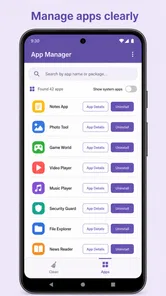
Applications are often the easiest source of forgotten storage. People install a tool for one task, use it once, and then overlook it for months. A cleaner that includes app management can turn that forgotten collection into a review list. The useful question is not simply which app is large, but which one I no longer need and can reinstall later if necessary.
That creates a subtle trade-off. Removing an unused app may recover space, but it can also remove locally stored content or reset an app’s offline state. Before uninstalling, I would open the application itself and check whether it contains drafts, downloaded media, saved projects, or information that has not synchronized elsewhere. Boost Cleaner can help identify candidates, but the final decision still belongs with me.
I find this approach more sensible than judging an app only by its size. A small application that I never use is still clutter, while a larger one may be essential for work, accessibility, navigation, or entertainment. The value comes from combining the scan with personal context.
Where it compares well with ordinary alternatives
The usual alternative is Android’s built-in storage screen and individual app settings. Those controls are often the safest place to verify what is taking space, and they remain important even when using a third-party utility. Boost Cleaner’s advantage is convenience: it brings the inspection process into a more focused cleanup session instead of making me move through several menus.
The built-in tools may be better when I need precise system-level information or want to manage one specific application. They are also the natural fallback when I am unsure about a suggested item. Boost Cleaner makes more sense when I want a broader starting point and a single place to review possible cleanup actions.
Another alternative is a file manager. A file manager gives more direct control over folders and filenames, which is useful for experienced users who already know where their large files live. Boost Cleaner is friendlier for someone who wants guidance, but that guidance can feel less satisfying if I prefer to inspect every folder manually.
Cloud storage can solve a different problem by moving photos and documents away from local storage. It is not a replacement for this app’s cleanup review, because cloud services involve their own storage limits, synchronization choices, and account considerations. I would use cloud backup for preservation and Boost Cleaner for local housekeeping, rather than treating deletion as a substitute for backup.
Three habits that make the app more useful
First, I would separate discovery from deletion. Run the scan when I have time, note the categories that are consuming space, and only then decide what to remove. This avoids the common mistake of making irreversible choices just because the phone reports an urgent storage problem.
Second, I would review app candidates according to frequency and recoverability. An app used once every few months may still be worth keeping if it stores important offline information. Conversely, an app that can be downloaded again and has no valuable local content is a stronger removal candidate. This simple distinction makes the app-management side more practical than sorting by size alone.
Third, I would use the tool as part of a repeating maintenance routine rather than running it constantly. A scan is most valuable after a period of travel, media-heavy use, or installing many temporary apps. Frequent cleaning can become busywork, especially if the phone already has plenty of free space.
A fourth useful habit is to keep a short mental list of folders and applications that should never be touched casually. Work files, authentication tools, navigation downloads, and creative projects deserve a manual check. The more personal the device, the more important it is to treat suggestions as prompts for review rather than automatic permission.
What the free price really means
Because the app is free, the value question is uncomplicated at the entry point: I can try its workflow without committing money. That makes it easy to compare with the phone’s built-in controls and decide whether the extra organization is worthwhile. For a user who only needs occasional storage checks, free access lowers the risk of experimenting.
Free access does not automatically make every cleaner a good choice. The real value depends on whether the app saves enough time or reduces enough confusion to justify its place on the device. If I can achieve the same result comfortably through Android’s storage settings, the benefit may be modest. If I regularly lose track of installed apps and downloaded files, the guided review can be more useful.
I would also avoid assuming that a free cleaner replaces backups or careful file management. The price removes a financial barrier, but it does not remove the need to understand deletion decisions. In my view, that is a healthy way to evaluate it: free to try, useful when it simplifies a recurring task, and not something I would trust blindly with irreplaceable content.
Limitations and points of friction
The biggest limitation is inherent to the category. A storage scan can identify potential clutter, but it cannot know the personal importance of every item. A file that looks old may be needed later, and an unused app may contain data that matters. That means the review stage is not optional for careful users; it is the part that determines whether the tool is genuinely helpful.
There is also a risk of expecting broader results than the app’s focus supports. If my phone is slow because of a system update, a defective application, weak hardware, or a network problem, cleaning storage may not address the cause. I would not install this expecting a guaranteed battery improvement or a universal speed boost.
Users who want deep folder-level control may find the experience less direct than a dedicated file manager. On the other hand, users who want entirely automatic cleanup may find the review process slower than they hoped. That tension is central to the app: its clearer controls encourage caution, but caution naturally requires a little more attention.
The rating of 3.9 is a reasonable sign to approach it with measured expectations, while the small number of ratings means I would not treat that figure as a complete picture of long-term reliability. My own judgment is based more on the usefulness of its workflow than on the number alone.
Who is most likely to benefit
I would recommend trying Boost Cleaner if you often discover that storage is nearly full but do not know where the space went. It is also a good fit for people who install many short-term apps, download media for trips, or prefer a guided checklist over navigating Android settings one screen at a time.
It can be particularly helpful for a less technical phone owner who wants visible choices instead of obscure system menus. The app gives that person a starting point for identifying unnecessary apps and reviewing cleanup suggestions without requiring detailed knowledge of Android storage structure.
It is less suitable for power users who already maintain their files through a carefully organized file manager. I would also skip it if I expect one tap to diagnose performance, protect every personal file automatically, or replace a backup strategy. Someone with plenty of free space and little digital clutter may gain very little from adding another utility.
For a realistic everyday example, imagine a phone used for commuting, work messages, photos, and occasional travel. After several months, it contains old route downloads, unused event apps, duplicate-looking media, and a collection of files saved from messaging conversations. I would run the scan, inspect the suggestions, remove only items I recognize, then check the app list for tools that can be reinstalled when needed. That workflow could make the storage problem clearer without turning cleanup into a risky purge.
My verdict on installing it
Boost Cleaner is worth trying when the problem is disorganized storage and forgotten applications, especially because it is free and built around reviewing suggestions before acting. I appreciate that its usefulness comes from structure rather than exaggerated promises. It gives me a practical starting point, while leaving the important judgment in my hands.
I would install it for periodic cleanup on a crowded phone, then compare its suggestions with Android’s own storage controls before deleting anything important. If the scan consistently helps me find disposable files or forgotten apps, it earns its place. If it merely repeats information I already manage easily, the built-in tools are the better choice.
My final recommendation is therefore conditional but positive: choose Boost Cleaner for guided storage review, not for miracle performance fixes. Its free access makes that experiment easy, its Everyone rating broadens its audience, and its app-management focus gives it a practical role. Just keep backups separate, inspect suggestions carefully, and remember that the safest cleaner is the one that helps you understand what you are removing.
Boost Cleaner Frequently Asked Questions
Can I use Boost Cleaner on my Android or iPhone?
Boost Cleaner is an app in the productivity category, and its minimum operating system requirement is version 8.0. Check your device’s operating system before downloading to make sure it meets that requirement. The available tools may differ between Android and iOS, so review the app’s store page for your platform before deciding whether it suits your device.
What is Boost Cleaner and what does it do?
Boost Cleaner is a mobile maintenance app designed to help users manage storage, remove unnecessary files, and monitor certain aspects of device performance. Depending on your Android or iOS version, its tools may include junk-file cleanup, duplicate-photo detection, battery information, memory optimization, and app management. The available features can vary by platform, device model, and subscription plan.
Is Boost Cleaner safe to use on my phone?
Boost Cleaner can be safe when downloaded from the official Google Play Store or Apple App Store and used with care. Before running a cleanup, review the files and categories selected for deletion rather than accepting every recommendation automatically. Users should also check the app’s permissions and privacy policy, especially if the application requests access to photos, contacts, storage, or other personal information.
Will Boost Cleaner really make my phone faster?
Boost Cleaner may improve the available storage space by removing temporary files, old downloads, duplicates, or other unwanted content. However, it cannot overcome hardware limitations or permanently transform an older phone into a newer one. Closing background apps or clearing memory may provide a temporary change, but modern Android and iOS systems already manage memory automatically, so performance improvements can differ from one device to another.
Does Boost Cleaner cost money or require a subscription?
Boost Cleaner may be available as a free download while placing some advanced tools behind in-app purchases or a recurring subscription. The exact pricing, trial period, and included features can change according to the platform and region. Before confirming a trial or subscription, carefully read the payment screen, renewal terms, and cancellation instructions through Google Play or the App Store.
Pros
- Quickly identifies junk files
- cache
- and unnecessary leftovers.
- Simple interface makes cleaning accessible for less experienced users.
- Includes tools for managing large files and freeing storage space.
- Battery and memory tools help spot apps consuming excessive resources.
- Can improve device organization by highlighting unused applications.
Cons
- Some features may be restricted to the premium subscription.
- Cleaning recommendations can require manual review before deletion.
- Results may vary depending on Android version and device manufacturer.
- Frequent notifications or promotional messages may feel intrusive.
- Aggressive cleaning cannot replace careful management of important files.











