

Bond Home
- 1.12K
- 4.7
- Installs
- 100.00K
- Price
- Free

Screenshots
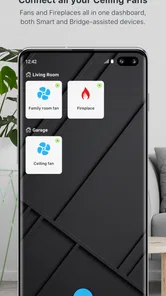
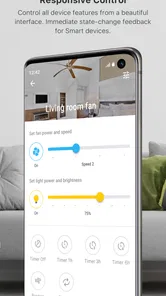
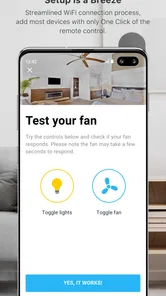
Analysis by Reviewed
I spent time testing Bond Home as a household-control app, and my first impression is that it aims to make everyday home routines feel less scattered. Instead of treating each connected task as a separate chore, it gives you one place to think about your home. That sounds simple, but the usefulness depends heavily on what you already own and how consistently you want to manage it.
Bond Home is a free House & Home app from Olibra LLC. It is available for everyone and supports devices running Android 7.0 or later. The current version is 2.64.3-master1, while the app itself was released on December 4, 2019. Its store summary says “Everything smart,” but I found the more practical description to be a central control point for people who want their home technology to feel easier to handle.
The important distinction is that free access does not automatically mean universal compatibility. You can install the app without paying for it, but its real value comes from whether it fits the equipment and routines in your home. That makes Bond Home more interesting for an existing smart-home user than for someone expecting an app to create a connected home by itself.
How Bond Home fits into everyday home control
I find Bond Home most useful when it gives everyday home controls a clear starting point rather than asking me to rebuild how the whole household works. In this section, I’ll look at the routines where that central approach can genuinely help and where a phone app may be less convenient. That distinction leads naturally to the practical question of what it is like to use day to day.
A single place for routines that otherwise feel disconnected
In a typical home, control can become fragmented quickly. One device may have its own application, another may rely on a remote, and a third may be handled manually. Bond Home is appealing because it encourages a different habit: open one app first, then manage the connected parts of the home from there.
I found that approach most useful during transitions in the day. Leaving the house, settling in for the evening, or preparing a room for sleep are moments when convenience matters more than exploring settings. A central app can reduce the small decisions involved in those routines, especially when the alternative is remembering which remote or application controls which item.
That does not make the experience completely effortless. A central dashboard is only as clear as the devices and controls connected to it. If your setup is small, Bond Home may feel like an extra layer rather than a major improvement. If your home already contains several compatible smart controls, the same layer can become a practical shortcut.
More From Our News Desk

 Instagram
Instagram’s Power Comes From Its Place in Your Phone
A close look at how Instagram turns Meta’s reach, recommendation systems and everyday camera habits into durable platform power—and what that costs users.

 Gmail
GmailGmail in a Busy Inbox: Who Benefits Most?
From first account to crowded workday, Gmail earns its place through dependable search and flexible sorting—but its best fit depends on how much inbox maintenance you can tolerate.

 Prime Video
Switching to Prime Video: What Changes in Your Viewing Routine
Prime Video can make a compelling second home for streaming, but switching means learning a different catalog, rental layer, and route from browsing to playback.

 Universal TV Remote Control
Universal TV Remote Control Works Best as a Reliable Backup
A phone remote earns its place through quick setup and reliable habits. Here is how to get more from Universal TV Remote Control—and where its limits show.

 Weather - By Xiaomi
Weather by Xiaomi Review: Clear at a Glance, Less Clear Up Close
Xiaomi’s weather app makes everyday forecasts quick to scan, but its calm surface can leave useful details and recovery paths harder to find than they should be.

 X
XX Under Pressure: Can It Recover When Posting Goes Wrong?
A resilience-focused review of X, examining setup, mistaken posts, interruptions, weak connections, and the gaps that matter when recovery needs to be dependable.
Latest News



A realistic evening scenario
Imagine arriving home with groceries, a phone in one hand, and no interest in searching for separate controls. You want the living area ready, a connected appliance adjusted, and the house settled without walking from room to room. Bond Home makes sense in that situation because the app can serve as the starting point for those actions rather than forcing you to remember a different control method for every device.
The benefit is not dramatic automation for its own sake. It is the reduction of small interruptions. I would describe the app as most valuable when it removes repeated friction from actions you already perform every day. The more often you repeat a home routine, the more noticeable that centralization becomes.
There is also a useful psychological advantage. When controls are gathered together, it is easier to build a consistent habit around checking the home before leaving or changing its state when returning. That is a modest benefit, but it is exactly the kind of benefit that can make a household app worth keeping installed.
What the free price really means
Bond Home is listed as free, so the initial decision is straightforward: you can try it without committing money. That is a meaningful advantage over a paid utility, particularly when you are still deciding whether a centralized home-control workflow suits you.
However, free access should be judged as an opportunity to test fit, not as proof that the app replaces every other home platform. The app’s value depends on your existing equipment, your preferred routines, and how much control you want from a phone. Someone with no compatible smart-home setup may gain little from installing it, while someone with a suitable collection of devices can get much more from the same free download.
I also appreciate that the price does not force a complicated value calculation before trying the basic experience. You can judge the interface and the usefulness of its central approach for yourself. That is especially helpful in this category, where compatibility and personal habits matter more than a feature list alone.
Where the app delivers genuine value
The strongest value comes from consolidation. Bond Home can make a mixed home setup feel less like a collection of unrelated products. Even if the app does not eliminate every separate control, having one familiar place to begin can make the overall system easier to remember.
Another strength is the way it shifts attention from individual devices to household situations. Instead of thinking only about “the device in the room,” you can think in terms of arriving, leaving, relaxing, or preparing for sleep. That change in perspective is useful because most people do not want to manage technology for its own sake; they want the home to respond with less effort.
For families or shared households, the value question becomes more nuanced. A centralized app may reduce confusion for the person who normally manages the home, but it does not automatically guarantee that everyone will use it comfortably. If other household members prefer physical controls or separate device apps, Bond Home may become one option among several rather than the only control point.
Three practical habits that improve the experience
First, I would start with the routines you repeat most often instead of trying to organize the entire home immediately. Choose the actions that currently require the most searching, switching, or walking around. This gives you a clearer test of whether Bond Home is saving time rather than simply adding another interface.
Second, keep the app’s role deliberately simple at the beginning. A common mistake with home-control software is trying to reproduce every possible arrangement before understanding the daily workflow. I found it more sensible to establish a dependable pattern for one area or one part of the day, then expand only if the central approach genuinely helps.
Third, keep an alternative control method familiar. A phone-based system is convenient, but a household should not feel helpless whenever someone prefers a physical control, needs to act quickly, or does not have the app open. Bond Home works best as a convenient layer, not as a reason to forget how the home can be managed without it.
Where friction can appear
The biggest limitation is that a central app can make the setup look simpler than it feels behind the scenes. Every connected home has some amount of configuration, naming, device discovery, and troubleshooting. Bond Home may give you a cleaner place to interact with the home, but it cannot remove the underlying complexity of the equipment you connect to it.
I would also be cautious about assuming that a single app automatically creates a seamless experience across every brand or product type. Compatibility is the first question to settle before you build your routines around Bond Home. If your main devices do not fit the app’s supported ecosystem, the free installation will not solve that mismatch.
There is a second kind of friction: centralization can make one app feel more important than it should. If you rely on it for many household actions, any confusing screen or unexpected interruption becomes more noticeable. For that reason, I prefer to add controls gradually and keep device names clear and recognizable rather than creating a crowded collection that is difficult to scan.
Another trade-off is learning. A person who already understands connected-home concepts may find the central approach natural. Someone who only wants a quick remote for one device may see extra organization as unnecessary. The app is not automatically better because it offers a broader home perspective; it is better when that perspective matches the way you actually live.
How it compares with the usual alternatives
The most obvious alternative is using each device’s own application. That approach can be perfectly adequate when you own one or two products and rarely change settings. It may also be preferable when a manufacturer’s app provides specialized controls that a broader home app does not present as clearly.
Bond Home becomes more attractive when switching between separate applications starts to feel like work. Its advantage is not necessarily that every individual control is deeper. The advantage is that it encourages a consistent starting point and a more unified view of the home.
Physical remotes and manual controls remain strong alternatives too. They are immediate, familiar, and do not require you to navigate a phone. I would not recommend replacing those habits blindly. Instead, Bond Home is most convincing when it handles actions that benefit from central access, while physical controls remain available for quick or shared use.
Broader smart-home platforms may be a better choice for people who want a large ecosystem, extensive automation, or a highly customized setup. Bond Home is easier to justify when your priority is a focused household-control experience rather than building an elaborate technical project. The right choice depends on whether you want simplicity around daily actions or maximum flexibility across a wide range of products.
Who should use it, and who should skip it
I would recommend Bond Home to someone who already has connected home equipment and is tired of remembering several control methods. It is also a sensible option for a person who wants to experiment with centralized control without paying upfront. The free price makes testing less risky, and the Everyone rating makes it suitable for a broad household audience.
It is particularly well suited to people who repeat the same home routines every day. If you regularly prepare the house before leaving, adjust it when returning, or coordinate several actions in one room, the app has a clear chance to earn its place on your phone.
I would skip it if you only need one simple control and the existing remote or manufacturer app already feels effortless. I would also avoid making it the center of your setup until you have checked that your equipment works with it in the way you expect. A free app can still cost time if you spend an evening reorganizing a system that was already simple enough.
People who dislike phone-based controls may not enjoy the change either. Bond Home is designed around the idea that a smartphone can become the home’s convenient control surface. If you prefer tactile controls, want minimal screen use, or share the home with people who will not use the app, its benefits become less compelling.
What the app’s reception suggests
Bond Home has a 4.7 average from around 2.1 thousand ratings, with roughly 1.1 thousand written reviews and over 100 thousand installs. Those figures suggest that the app has attracted a meaningful audience and that many users find the overall idea worthwhile. I would still treat that reception as context rather than a guarantee, because a home-control app can feel excellent or frustrating depending on the equipment connected to it.
The release history also matters in a practical way. Since the app has been available since 2019 and continues under version 2.64.3-master1, it is not a brand-new experiment that appeared without any time in the field. That does not remove the need to test your own setup, but it gives the app a more established feel than a newly launched utility.
My verdict on its value
After using Bond Home, I see it as a useful free option for simplifying a compatible connected home, not as a universal answer for every household. Its best quality is the attempt to turn separate device interactions into a more coherent daily routine. That can be genuinely valuable when the home has enough connected equipment to make switching between controls annoying.
The trade-off is that centralization brings responsibility. You need to organize the setup thoughtfully, confirm compatibility, and avoid assuming that one app will make every device equally convenient. I would begin with one repeated routine, keep an alternative control method available, and judge the app by whether it removes real friction after several days of normal use.
My recommendation is to try Bond Home if you want a free, centralized way to manage a compatible smart home. I would not choose it merely because the category sounds useful or because a single app seems automatically simpler. For the right household, it can become a comfortable daily shortcut; for a home with few connected devices or a strong preference for physical controls, the usual alternatives may remain the better choice.
In short, Bond Home delivers the most value when it helps you think less about individual devices and more about how your home should feel at different moments of the day. That is a focused promise, and in my experience it is enough to make the app worth testing, provided you approach it as a practical organizer rather than a magic replacement for every existing control.
Bond Home Frequently Asked Questions
Is Bond Home free to download, and which phones can run it?
Bond Home is free to download and is intended for users who want to manage compatible smart-home equipment from a phone. It requires Android 7.0 or later, so check your device’s operating system before installing. The app is listed for everyone, and the developer is Olibra LLC. Downloading the app is only one part of getting started; compatible Bond hardware may also be needed to control devices.
What is Bond Home and what does the app do?
Bond Home is a smart-home control app designed to connect compatible household devices and make them easier to operate from a phone. Depending on the supported hardware, it can control ceiling fans, lights, remotes, and other connected equipment. The app is most useful when paired with Bond-compatible devices, rather than as a standalone tool for controlling every appliance in your home.
Which devices are compatible with Bond Home?
Compatibility depends on the Bond Home hub or controller you own and the type of equipment you want to connect. The platform is commonly used with ceiling fans, fan lights, and certain infrared or radio-frequency remote-controlled devices. Before downloading, check the official compatibility information and confirm that your fan, light, or remote uses a supported signal, since not every model can be added automatically.
Does Bond Home require additional hardware or a subscription?
The app itself is generally used together with Bond hardware, such as a compatible Bond Bridge or another supported controller. Installing the application does not necessarily allow direct control of appliances without that hardware. Basic control features may be available without a recurring subscription, but availability can vary by product, integrations, or future service changes, so review the current terms before purchasing equipment.
Can Bond Home work with Alexa, Google Assistant, or other smart-home platforms?
Bond Home is intended to work with selected smart-home ecosystems, allowing compatible devices to be controlled through voice assistants or centralized routines. Setup usually requires linking your Bond account with the relevant platform and assigning devices to rooms. The exact commands and available features can differ by device, assistant, and region, so some advanced functions may still need to be configured inside the Bond app.
Pros
- Remote control for compatible locks
- lights
- cameras
- and garage doors
- Guest access can be shared without handing out physical keys
- Activity history helps monitor entries and connected device use
- Supports scheduled access for family members
- guests
- or service providers
- Clean interface makes everyday smart-home controls easy to find
Cons
- Requires compatible Bond devices or supported third-party hardware
- Some features depend on a stable internet connection
- Initial device pairing may take time and troubleshooting
- Advanced automation options can feel limited for power users
- Remote access may be affected by outages or cloud-service issues







