Bitwarden Password Manager
- 5.87K
- 4.8
- Installs
- 5.00M
- Price
- Free
Screenshots
Analysis by Reviewed
I used to treat passwords as a small nuisance: reuse one for a while, reset another when I forgot it, and hope I could get through sign-in without interrupting whatever I was doing. That routine made every new account harder to manage. Bitwarden Password Manager is useful because it gives those logins one place to live, turning security from a scattered chore into a repeatable part of my day.
Start with a calmer sign-in routine
My first practical change was to stop expecting myself to remember every password. I save a login when I create or update an account, then use the app to retrieve it when I need it. That sounds basic, but the habit matters: a password manager only helps if I capture credentials at the moment I make them, rather than promising myself I’ll sort them out later.
For example, when I sign up for a delivery service on my phone, I can save its login instead of inventing a familiar password I already use elsewhere. The next time I order, autofill can reduce the friction of signing in. If I’m on a shared or unfamiliar device, I can still use the stored details without relying on memory or leaving a password in a note that was never meant to hold sensitive information.
Keep the vault useful, not cluttered
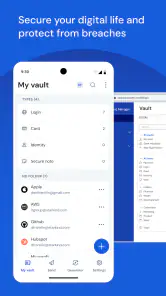
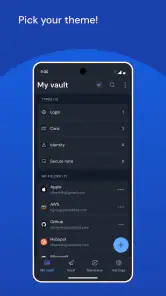
Bitwarden is a productivity app as much as a security tool: its value depends on whether the information I need is easy to find. Folders help separate work, personal accounts, and less frequent logins. Notes can hold context that would otherwise be forgotten, such as which account a login belongs to. I’d keep that organization simple at first; too many folders create another filing system to maintain.
A useful habit is to check a saved entry when I change a password, rather than assuming the vault updated itself. I also try to give entries names that make sense outside the moment I created them. “Main email” is more helpful later than a vague label that forces me to open several records and guess. Attachments can keep related material with an entry, though I would use that option selectively and avoid treating the vault as a general-purpose file cabinet.
Why Bitwarden Stands Out
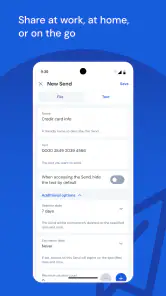
First off, let's talk about the user interface. If you're like me and slightly intimidated by techy-looking apps, you'll appreciate Bitwarden's clean and straightforward design. The setup process is a breeze – a few clicks, and you're ready to go. What really caught my attention is how easily you can organize your passwords. You can create folders, add notes, and even attach files. It's like having your own personal assistant who never forgets anything!
Security at Its Best
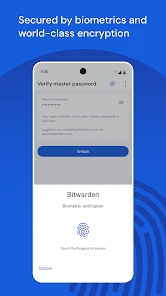
Security is the name of the game here, and Bitwarden takes it very seriously. It uses end-to-end encryption, which means your data is locked up tighter than Fort Knox. Plus, there's two-factor authentication (2FA) for that extra layer of security. I sleep better at night knowing that my sensitive information is protected by such robust measures. Also, if you're the kind who likes to double-check things, you'll be glad to know that Bitwarden is open-source. This means the code is out there for anyone to scrutinize, ensuring transparency and trustworthiness.
You May Like

Clash of Clans Is Won Between the Battles

Android Auto Makes the Case for Quieter Car Software

MobiOffice: Transforming Mobile Productivity with Seamless Integration

EA SPORTS FC™ Mobile Soccer: Redefining Mobile Sports Gaming

How Microsoft OneDrive Became a Mobile Productivity Giant

How Google Translate Breaks Language Barriers Effortlessly
Let it handle the repetitive work
For a sustainable routine, I’d make the password generator part of account creation rather than waiting until a password feels weak. Generate a distinct password, save it with the right entry, and move on. This avoids the familiar trap of adding an account to the vault but continuing to reuse an old password elsewhere. It is a small workflow change with a practical payoff: fewer credentials to memorize and less temptation to use the same one repeatedly.
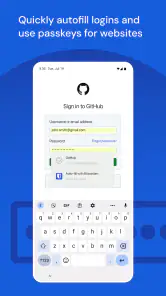
Autofill is convenient, but I still pause before accepting a sign-in suggestion, especially if I have multiple accounts for the same service. Choosing the right saved entry prevents signing into a personal account when I meant to use a work one. If autofill does not fit a particular screen or site, copying the saved password is a reasonable fallback. The app is most helpful when I treat autofill as a shortcut, not as a reason to stop checking what I’m submitting.
Cross-Platform Convenience
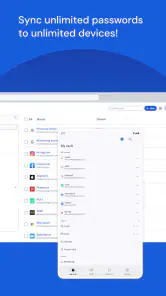
What’s really cool is that Bitwarden supports just about every platform you can think of – iOS, Android, Windows, and even Linux. So, whether you're switching from your phone to your laptop or tablet, your passwords are always within reach. I love how seamlessly it integrates with browsers too. Autofill forms, anyone? It's a lifesaver, especially when you're in a rush and can't be bothered to type out your entire email and password.
Know where the routine can break
A vault is not a substitute for remembering how to access the vault itself. I would choose a master password I can reliably recall, keep it private, and take time to understand the account recovery options before storing everything there. Losing access to the manager can turn a convenient system into a stressful one, so I would not rush through setup or assume that every recovery problem can be solved by the app.
There can also be a transition period. Older accounts may still use repeated or outdated passwords, and moving them into a manager does not automatically improve them. I’d prioritize the accounts that would cause the most trouble if compromised—email, financial services, and accounts used to reset other logins—then work through the rest gradually. That keeps the task manageable and makes the vault useful from the start.
How it fits beside the usual alternatives
Compared with saving passwords in a browser, a dedicated manager gives me a more deliberate place to organize logins and notes rather than leaving everything tied to one browser’s workflow. A browser’s built-in tool may be enough if I use one device and want the fewest setup steps. Bitwarden makes more sense when I switch between devices or want my password routine to feel separate from a particular browser.
It also differs from simply keeping passwords in a notes app: notes are flexible, but they make it easy to leave sensitive details in a less purpose-built system and harder to manage a growing set of logins consistently. On the other hand, anyone who dislikes maintaining a vault or wants sign-in to happen with almost no setup may prefer to stay with a familiar built-in option. I see Bitwarden as a good middle ground for people willing to spend a little time establishing a reliable habit.
A practical way to move accounts over
I wouldn’t try to migrate every login in one sitting. I’d begin with my email account, since access to it often affects password resets elsewhere, then add the accounts I use each week. After that, I could capture less frequent logins as they come up. This staged approach makes it easier to notice a missing username or an outdated entry while the account is still fresh in my mind, instead of turning setup into a long and error-prone cataloging job.
When an account has more than one login, I’d make the distinction part of the entry name: a personal address and a work address should be obvious at a glance. That small naming choice pays off on a busy morning, when choosing the wrong account can mean backing out and repeating the sign-in. It also helps if a family member or colleague has a separate account on the same service; the vault should identify whose credentials are saved, not just which website they belong to.
Make everyday autofill predictable
Autofill is most useful when I know what to expect from it. On a new phone or after changing how I sign in, I’d test it with a low-stakes account before depending on it during a time-sensitive task. If several entries appear for one service, I’d clean up their names rather than repeatedly guessing. This is a modest bit of maintenance, but it reduces the chance that convenience becomes confusion when I’m signing in quickly.
There is also a sensible boundary between saving a password and trusting every prompt. I check the service and account before filling credentials, especially when a page or app has sent me there unexpectedly. A manager can make using a unique password easier, but it cannot decide whether I opened the right sign-in screen. Keeping that quick check in my routine is a better balance than treating autofill as automatic permission to proceed.
Bitwarden is a free productivity app from Bitwarden Inc., and its 4.8 average across around 117,000 ratings reflects how widely it is used; it has over 5 million installs. It is rated for Everyone, and version 2025.11.0 lists Android 10 as the minimum operating-system requirement. Those details make it an approachable option for many Android users, though I’d still check that my device meets the requirement before planning a switch.
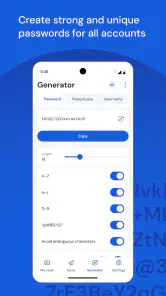
There's also a handy password generator feature. If you’re like me and struggle with coming up with strong passwords, this tool is a godsend. It generates complex passwords that are virtually impossible to crack, keeping your accounts safer from potential threats.
What the generator changes in practice
The generator is particularly useful when a website asks me to create a password at the end of a registration flow. I can avoid the familiar cycle of making up a memorable phrase, then adapting it slightly for the next account. My practical tip is to save the generated password immediately with the correct login. If I leave the registration page first and tell myself I’ll record it later, I’ve recreated the exact memory problem the vault is meant to solve.
Some services have picky password rules, so a generated option may need adjusting to fit the form. I treat that as a one-time compatibility step: follow the site’s requirements, save the final password, and use that saved version going forward. The goal isn’t to make every account identical in format; it’s to make each credential distinct while keeping the record accurate enough that I can sign in without guesswork.
Who should make the switch?
I’d recommend trying Bitwarden if you juggle logins across devices, tend to reuse passwords, or want a clearer separation between work and personal accounts. It suits someone who is willing to build a small routine: save a login when creating it, update the record when changing it, and keep the vault organized enough to find things later. If you only use a handful of accounts on one device and already find your browser’s password tool effortless, moving everything may not feel worthwhile.
The app is free, which makes it easier to test whether a dedicated vault fits the way you work without committing money first. Bitwarden has been available since August 27, 2016, and its current Android release is 2025.11.0. I would start with a few everyday accounts, learn how autofill behaves on my devices, and only then move the rest. That gives me a chance to catch any awkwardness before I rely on it for every sign-in.
When a different approach is the better fit
If I rarely create accounts, stick to one device, and already use a browser’s built-in password saving without friction, I may not gain enough from changing my routine. The browser option can be more direct because it is already where I sign in. Likewise, someone who dislikes the responsibility of a master password and maintaining a separate vault may find that the extra organization is not worth the adjustment. I’d rather be honest about that than recommend a dedicated manager as a universal upgrade.
For people who do switch between devices or keep work and personal logins separate, a dedicated vault has a clearer advantage: the routine is not centered on one browser. I’d still test the experience on the devices I actually use, since autofill is the part that makes the manager feel effortless and small differences in a sign-in flow can affect how often I rely on it. If the test feels awkward, I can adapt my process before moving every important account.
Wrapping It Up
At the end of the day, Bitwarden is more than just a password manager; it's a peace-of-mind provider. It simplifies the way you manage and secure your digital life, without breaking the bank. The free version is fantastic, but if you want to unlock even more features, the premium version is worth every penny. So, if you're tired of password headaches and security worries, give Bitwarden a try. Trust me, once you do, you'll wonder how you ever managed without it!
My recommendation comes with one condition: treat the vault as a habit, not a one-time cleanup. Save new credentials as they are created, keep the master password memorable and private, and make time to replace reused passwords on important accounts. Do that, and Bitwarden can remove a surprising amount of everyday sign-in friction. If you would rather not manage a separate vault at all, a built-in browser manager may be the simpler choice; for me, the added organization is worth the small routine.
Bitwarden Password Manager Frequently Asked Questions
Can I use Bitwarden on Android and iOS?
Yes. Bitwarden is available as a mobile app for Android and iOS, so you can use it on a phone or tablet to manage logins and passwords. Its purpose is to help keep you safe while online, and having a password manager on your mobile device can make saved credentials easier to access when signing in. The app is free to download and is rated for Everyone.
What should I know about Bitwarden’s age rating and general audience?
Bitwarden is a productivity app intended for general users, and its content rating is Everyone. Its focus is managing logins and passwords, making it relevant to people who want a dedicated place for their credentials rather than a game or entertainment app. Before downloading, consider whether you are ready to make a password manager part of your regular sign-in routine.
Can I use Bitwarden’s password generator to create stronger passwords?
Yes. Bitwarden includes a password generator, which can help you create passwords instead of reusing familiar ones across accounts. You can save generated passwords in your vault and use the app’s autofill feature when signing in. This makes the generator useful both when setting up a new account and when updating a password you already use.
Is Bitwarden suitable for someone new to password managers?
Bitwarden is designed to make managing logins more convenient by keeping passwords in a vault and helping fill them in when you sign in. If you are new to password managers, you will need to get comfortable relying on a single master password to access your stored information. The app is free to download and is intended for general users.
What is Bitwarden Password Manager and how does it work?
Bitwarden Password Manager is a secure and open-source password management application that allows users to store, share, and manage their passwords across devices. It encrypts your data locally before it's stored on Bitwarden's servers, ensuring that only you have access to your sensitive information. The app offers an auto-fill feature, password generator, and the ability to access your vault from various platforms, making password management seamless and secure.
Pros
- Open-source and transparent development.
- Cross-platform availability ensures access anywhere.
- Strong security features with end-to-end encryption.
- Free version offers robust functionalities.
- Easy-to-use interface for all user levels.
Cons
- No offline access to passwords.
- Limited customer support response time.
- Premium features require subscription.
- Some features might need technical knowledge.
- Occasional sync delays between devices.

- Category
- Productivity
- Version
- 2025.11.0











