

BitTorrent®- Torrent Downloads
- 43.22K
- 4.5
- Installs
- 50.00M
- Price
- Free

Screenshots
Analysis by Reviewed
When a torrent seems stuck, I start by checking its activity rather than repeatedly tapping the download button. Peer availability can affect progress, and a file with few active sources may move slowly or not at all. That is a practical difference from a direct download, where one server usually supplies the file: BitTorrent relies on sharing between peers, so speed and continuity can vary with the torrent and the network.
Check the basics before changing settings
I would first confirm that the phone has a steady connection and enough free storage for the files I actually want. A large download can be interrupted by a weak Wi-Fi signal or a device running short on space; neither problem is fixed by changing torrent settings. If the app appears idle, checking its displayed peer and seeder information can help distinguish a source problem from a paused task.
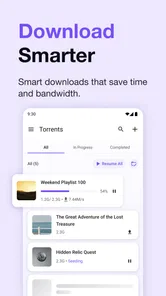
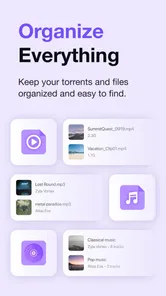
Selective downloading is useful when a torrent contains several files but I only need one. I can avoid spending storage and bandwidth on material I will not use, then review the chosen files before starting. That small decision makes the app more practical on a phone than treating every torrent as an all-or-nothing package.
A workflow that suits mobile use
For an everyday example, I might add a legitimate, freely shared file while I am on a reliable connection, select only the parts I need, and let the transfer run while I do something else. If I have to leave the network or free up bandwidth, pausing and resuming is more sensible than deleting the task and starting over. I would also check the file’s progress before relying on it for a trip or another moment when I will be offline.
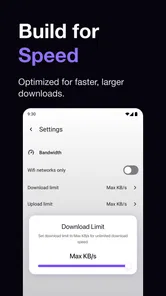
Download and upload limits give me a way to keep transfers from crowding out other internet use. I would lower them if a video call or browsing feels sluggish, then adjust them again when the connection is less busy. The trade-off is straightforward: limiting a transfer can make it take longer, but it can make a shared connection more comfortable for everyone.
Know what the app can and cannot fix
If progress remains slow despite a stable connection, the source material may simply have little peer activity. Switching between Wi-Fi and mobile data can help identify a local connection issue, but it cannot create more peers or make an unavailable file appear. I also treat the app’s speed and peer details as clues, not as a guarantee that a particular transfer will finish quickly.
BitTorrent is best for people who already have a legitimate torrent file or magnet source and are comfortable managing downloads themselves. If you want a curated streaming catalogue, a conventional video app is a better fit; if you only need an occasional file from one provider, a standard browser download is usually simpler. Peer-to-peer transfers also call for care: I stick to material I have the right to download and open, and I do not assume that a familiar filename proves a file is safe.
More From Our News Desk

 Gmail
GmailGmail in a Busy Inbox: Who Benefits Most?
From first account to crowded workday, Gmail earns its place through dependable search and flexible sorting—but its best fit depends on how much inbox maintenance you can tolerate.

 Prime Video
Switching to Prime Video: What Changes in Your Viewing Routine
Prime Video can make a compelling second home for streaming, but switching means learning a different catalog, rental layer, and route from browsing to playback.

 Universal TV Remote Control
Universal TV Remote Control Works Best as a Reliable Backup
A phone remote earns its place through quick setup and reliable habits. Here is how to get more from Universal TV Remote Control—and where its limits show.

 Weather - By Xiaomi
Weather by Xiaomi Review: Clear at a Glance, Less Clear Up Close
Xiaomi’s weather app makes everyday forecasts quick to scan, but its calm surface can leave useful details and recovery paths harder to find than they should be.

 X
XX Under Pressure: Can It Recover When Posting Goes Wrong?
A resilience-focused review of X, examining setup, mistaken posts, interruptions, weak connections, and the gaps that matter when recovery needs to be dependable.

 Clash of Clans
Clash of Clans Is Won Between the Battles
Its raids are quick; its community is a long-term project of coordination, teaching, rivalry, and shared responsibility—with all the friction that entails.
Latest News



Hey there, fellow download enthusiasts! Today, let’s talk about an app that’s been a game-changer in the world of file sharing and downloads: BitTorrent®- Torrent Downloads. If you haven't heard about it yet, you might be missing out on a whole new level of convenience when it comes to managing your downloads.
Discovering the Power of BitTorrent®
First things first, BitTorrent®- Torrent Downloads is all about speed and efficiency. It’s like having your own personal assistant who’s always ready to fetch any file you need from the vast ocean of the internet. Whether it's a movie, music, or even large software files, this app handles it all without breaking a sweat.
Ease of Use
One of the things I absolutely love about BitTorrent is its user-friendly interface. Even if you’re not tech-savvy, navigating through the app is a breeze. The developers have done a fantastic job in making sure that everything is just a tap away. From searching for torrents to downloading them, every step is straightforward and intuitive.
Speed and Performance
Now let’s talk about what really matters – speed. With BitTorrent, you’re not just downloading a file; you’re downloading it super-fast! The app optimizes bandwidth usage and allows you to download multiple files simultaneously without any hiccups. It’s like being in the fast lane of the internet highway.
Moreover, it doesn’t hog your device’s resources. You can continue using your phone for other tasks while your downloads are running in the background. Multitasking for the win!
Security and Reliability
If security is your concern, rest easy because BitTorrent takes it seriously. The app provides robust security features to ensure your downloads are safe and secure from any prying eyes. Plus, the reliability is top-notch. You can pause and resume downloads at your convenience, which is super handy if you’re on the go.
Customization and Features
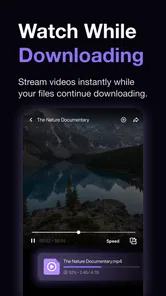
BitTorrent also shines in terms of customization. You can set download and upload limits, choose specific files within a torrent to download, and even play media files directly from the app. It’s like having a Swiss Army knife for torrents right in your pocket.
For those who love stats, the app provides detailed information about download speeds, peers, and seeders, giving you a comprehensive view of your downloading experience.
In conclusion, BitTorrent®- Torrent Downloads is a must-have app for anyone who regularly downloads large files. It combines a user-friendly interface with powerful features, ensuring you have a seamless and efficient downloading experience. So why wait? Dive into the world of torrents and let BitTorrent revolutionize the way you download.
Where BitTorrent fits among download apps
In the broader video players and editors category, this app is a specialist rather than a replacement for a media library or editor. Its appeal is the transfer workflow: managing peer-based downloads, choosing files, and checking activity in one place. I would choose a streaming service when I want instant, licensed viewing without waiting, and a cloud-storage app when I need to retrieve my own files from a personal account. BitTorrent is more useful when the file itself is distributed through a torrent and I want control over the transfer.
That distinction also sets expectations for playback. Being able to play a media file from the app is convenient for a quick check, but I would use a dedicated media player when I need a richer library, broader playback controls, or a viewing experience built around organizing a collection. The download tool and the viewing tool solve different problems, even when the same phone can do both.
Who should install it—and who should pass
Rainberry, Inc. develops this free app, which is rated for Everyone and has a 4.5 average from around 949,000 ratings. It has passed 50 million installs, a sign that mobile torrenting is a familiar use case, though popularity does not remove the need to choose sources carefully. The current version is 8.2.58, and it runs on Android 7.0 or later. Optional in-app purchases range from $2.99 to $4.99 per item.
I would recommend it to someone who understands the basics of torrents, sometimes downloads large or multi-file material, and wants to decide what gets transferred rather than accepting a single packaged download. It is less suited to someone who expects a search box to behave like a fully vetted content catalogue, or who wants every file to download at a predictable speed. The app can manage the transfer; it cannot guarantee the quality, legitimacy, availability, or safety of whatever source a user chooses.
Small habits that prevent wasted time
Before leaving a download unattended, I check that the intended files are selected and that storage is available. I also avoid starting several large transfers just because simultaneous downloads are possible: on a constrained connection, splitting bandwidth can make each one feel slower. When a task stalls, I note whether peer activity is present, then check the connection and available space before removing and re-adding anything. That order preserves a useful clue and avoids needless restarts.
For media, I treat in-app playback as a convenience rather than a promise that every format or file will behave perfectly. If playback is awkward, the sensible next step is to use a player suited to that file, not assume the transfer has failed. Likewise, if a download completes but the file will not open, that points toward the file or the playback app as much as the torrent client. Separating those checks makes troubleshooting less frustrating.
My practical verdict
BitTorrent®- Torrent Downloads is a capable choice when peer-to-peer downloading is genuinely what I need, and its controls make more sense once I use them to manage bandwidth, select only relevant files, and diagnose slow progress. It is not the simplest route to ordinary streaming or one-off downloads, and its performance depends on conditions beyond the app. I would install it for deliberate, legitimate torrent transfers, keep expectations realistic, and choose a conventional streaming, browser, or cloud app when that better matches the job.
BitTorrent®- Torrent Downloads Frequently Asked Questions
How much storage space should I have available before downloading with BitTorrent®?
It is sensible to check your device’s available storage before starting a torrent, especially if you plan to keep several files or stream and download at the same time. Downloaded files take up space on the phone or tablet, and a nearly full device can make everyday use less convenient. Choose files you actually want and remove completed downloads when you no longer need them.
Can I choose which files to download from a torrent?
A torrent may include one file or a collection of files, so look over its contents before you begin and make sure you want what it contains. This helps avoid downloading material you do not need and using extra storage or data. Also check that the source is trustworthy and that you have permission to access the files, since the app’s ability to download a torrent does not establish that its contents are authorized.
Does BitTorrent® use mobile data, and should I use Wi-Fi?
Torrent downloads and streaming require an internet connection and can use a significant amount of data depending on the files and how you use the app. If you have a limited mobile-data plan, consider connecting to Wi-Fi before starting a large download or watching a torrent. Keep an eye on your own data use and connection, particularly when downloading or streaming away from home.
Is BitTorrent® available for free, and what do in-app purchases cover?
BitTorrent® is free to download and use, with in-app purchases priced from $2.99 to $4.99 per item. The app is published by Rainberry, Inc., and its stated purpose is to find, download, and stream torrents on a phone or tablet. Review any purchase details shown in the app before paying, and remember that costs from third-party websites or services are separate from the app’s purchases.
What should I check before downloading a torrent in BitTorrent®?
Before starting a download, check that the torrent comes from a source you trust and that you have permission to access the files. Torrent files are shared between users, so the source and the content matter. BitTorrent® is designed to find, download, and stream torrents on a phone or tablet, but careful selection helps you avoid unwanted or unauthorized files.
Pros
- Fast download speeds for large files
- User-friendly interface
- Supports magnet links
- Low resource usage
- Free to use with no hidden charges
Cons
- Contains ads in the free version
- May lead to copyright issues
- Occasional connection drops
- Lacks built-in media player
- No integrated VPN support













