

µTorrent® Pro - Torrent App
- 3.79K
- 4.8
- Installs
- 500.00K
- Price
- $2.99

Screenshots
Analysis by Reviewed
In a shared household, a torrent app can be useful when one person wants to queue a legitimate download while keeping a phone available for ordinary tasks. I find µTorrent® Pro - Torrent App most appealing when the phone is the device I already have with me and I want downloaded media ready for a commute or a quiet evening. It is a focused tool, though, not a shared family library: anyone using the same device should agree on what is being downloaded and where it will be saved.
When a Phone Makes Sense for Downloads
I would reach for a mobile torrent client when I have a specific, lawful file in mind and want to manage it without sitting at a computer. Think of a long train ride: I can prepare a video before leaving, then watch it locally rather than relying on a connection along the way. The convenience is real, but it depends on planning. The file has to finish, fit on the device, and work with the playback options available to me.
That is a different job from browsing a streaming catalog. Streaming usually wins when I want to discover something and play it immediately; torrenting suits a file I have already chosen and can obtain lawfully. A phone also makes a less natural home base than a computer for a large archive or transfers that need to run for hours. I see this app as a practical on-the-go option, not a replacement for every kind of media setup.
Choosing the Right Shared-Device Routine
On a shared phone, the main question is not only who can open the app but who is accountable for what is in its queue. Before starting a download, I would agree on a simple handoff: identify the file, check that it is wanted, and tell other users whether it is still in progress. This avoids someone else clearing it to make room or assuming a partial file is ready to play.
A useful habit is to keep the queue intentional rather than adding several items just because it is easy to do so. Each queued file can occupy storage and keep the phone busy, and the person who starts it may not be the person who later needs the space. If the device belongs to one person but is occasionally lent to others, I would make that boundary explicit instead of treating the app as a communal inbox.
Keeping Expectations Realistic
Before relying on a download for a trip or a quiet evening, I would check its progress and confirm the file is complete while I still have time to adjust. A file name alone does not guarantee that the content is playable, and a download that pauses will not be ready merely because I expected it to finish. Testing playback at home is a small step that can prevent a frustrating surprise away from a reliable connection.
There is also a practical distinction between downloading and organizing. This app can bring files onto the phone and play supported content, but that does not make it a household catalog with shared profiles or a tidy library for multiple people. If everyone wants a separate watch history, managed access, or a central collection, a streaming service or a media-library solution will be more appropriate. I would not choose a torrent app to solve those problems.
More From Our News Desk

 Gmail
GmailGmail in a Busy Inbox: Who Benefits Most?
From first account to crowded workday, Gmail earns its place through dependable search and flexible sorting—but its best fit depends on how much inbox maintenance you can tolerate.

 Prime Video
Switching to Prime Video: What Changes in Your Viewing Routine
Prime Video can make a compelling second home for streaming, but switching means learning a different catalog, rental layer, and route from browsing to playback.

 Universal TV Remote Control
Universal TV Remote Control Works Best as a Reliable Backup
A phone remote earns its place through quick setup and reliable habits. Here is how to get more from Universal TV Remote Control—and where its limits show.

 Weather - By Xiaomi
Weather by Xiaomi Review: Clear at a Glance, Less Clear Up Close
Xiaomi’s weather app makes everyday forecasts quick to scan, but its calm surface can leave useful details and recovery paths harder to find than they should be.

 X
XX Under Pressure: Can It Recover When Posting Goes Wrong?
A resilience-focused review of X, examining setup, mistaken posts, interruptions, weak connections, and the gaps that matter when recovery needs to be dependable.

 Clash of Clans
Clash of Clans Is Won Between the Battles
Its raids are quick; its community is a long-term project of coordination, teaching, rivalry, and shared responsibility—with all the friction that entails.
Latest News



Getting Started with µTorrent® Pro
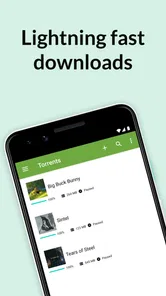
First off, setting up the µTorrent® Pro - Torrent App was a breeze. The installation process was straightforward, and the user interface is sleek and intuitive, making it a joy to navigate. You won't find yourself lost in a sea of confusing options; instead, everything is laid out clearly, so you can jump right into downloading your favorite content.
Boundaries Before the First Download
For a household device, the useful setup step is less about tweaking every option and more about deciding who is responsible for the download queue. A torrent client can keep working after the initial tap, so I would avoid leaving a shared phone with a queue that nobody recognizes. Agree on a simple routine: check the selected files, confirm there is enough storage, and make sure the person who started a download knows when it is finished.
The app costs $2.99, so I would treat the purchase as a choice for someone who expects to use a dedicated torrent client, rather than an automatic buy for every phone in the home. It is an Android app from Rainberry, Inc.; the current version is 8.2.55 and it requires Android 7.0 or later. That makes the platform and compatibility worth checking before planning around it, especially if your household mainly uses iPhones or older Android devices.
That platform detail matters in a mixed-device home. I would not assume that installing it on one Android phone creates a shared setup that carries over to other people’s devices. If another household member uses a different platform, agree who will handle the download and where the finished file will be available. When that arrangement sounds cumbersome, a streaming option that works across the devices you already use may be simpler.
Features that Stand Out
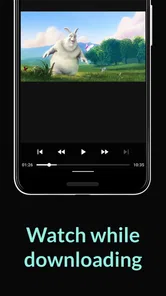
The app is packed with features that are designed to enhance your torrenting experience. One of the features I found particularly useful is the ability to download files directly to your mobile device. This means you can have your favorite movies, music, or whatever else you fancy, right in your pocket, ready to be enjoyed on the go. Plus, with the built-in media player, you can play your downloaded content directly within the app, which is a nice touch.
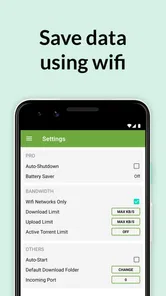
Another highlight is the app's battery-saving preferences. The developers really thought about how to make the app as efficient as possible. You can set it to stop downloading when your battery drops to a certain level, which is something I personally appreciated during my long commutes. There’s nothing worse than being stranded with a dead phone!
A practical workflow is to queue a file while connected to a suitable network, then let the battery threshold act as a backstop rather than assuming the phone can download indefinitely. If you are heading out, check the queue and remaining battery before leaving; a pause caused by the limit may mean a file is not ready when you expect it. For large media, I would also decide in advance whether keeping it on the phone is worth the storage it occupies.
One subtle benefit of that battery setting is that it turns an unpredictable session into a decision you can make ahead of time. I would set a limit that leaves enough charge for the rest of the day, then avoid starting an important transfer right before going out. The trade-off is straightforward: protecting the phone’s remaining battery can also delay the download. If timing matters more than conserving charge, I would plan the session around when the phone can remain available rather than expecting the setting to balance everything automatically.
Storage deserves the same kind of planning. A download that is useful for one trip can become clutter afterward, especially on a phone shared by people with different needs. I would decide who is responsible for removing a file once it is no longer needed, and check the available space before adding another large item. That small bit of housekeeping is more valuable than building a long queue and sorting it out later.
Coordinating Downloads in a Shared Home
When several people share one device, a clear handoff matters more than a complicated download plan. I would have the person starting a torrent note what it is and whether it is still active, then let other users know before they clear files or change the queue. This avoids the ordinary frustration of mistaking an unfinished download for an abandoned one.
Compared with streaming apps, a torrent client asks you to manage the file yourself: you choose what to download, wait for it, and use local storage. That can be worthwhile for lawful content you want available offline, but streaming is easier when you simply want to press play without planning ahead. Compared with a desktop torrent client, using a phone is convenient when you are away from a computer, while a desktop is generally the more natural choice for a long-running home download or a large collection.
For everyday coordination, I would keep the message brief and specific: what was selected, whether it is still downloading, and whether anyone can remove it. That is not a technical feature; it is a shared-device habit that prevents avoidable confusion. It also makes clear that the app itself is not handling household permissions or deciding which person owns a file. If that level of separation is essential, a device used by one person at a time is a better fit.
There is a second trade-off in choosing a phone over a computer: portability makes it easy to check a transfer, but it also means the device may be needed for calls, navigation, or other daily tasks. I would avoid treating several simultaneous downloads as a set-and-forget household service. For a small, purposeful queue the phone is convenient; for a continuous stream of requests from multiple people, a desktop workflow is easier to supervise and less likely to compete with the handset’s ordinary role.
Performance and Reliability
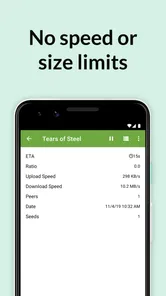
When it comes to performance, µTorrent® Pro doesn’t disappoint. Downloads are fast and reliable, and the app handles large files with ease. During my testing, I didn’t encounter any crashes or bugs, which is always a relief. It’s clear that a lot of attention has been paid to making sure the app runs smoothly.
One thing that sets this app apart is its ability to manage multiple downloads seamlessly. Even when juggling several large files, the app maintained its speed and performance, which is crucial for anyone who relies on torrents for their entertainment needs.
Still, the phone is not always the best place to run several transfers. Downloads compete with everyday use for battery, storage, and attention, and mobile network conditions can make a planned finish less predictable. I would use the queue for a few selected files rather than treating a handset as an unattended download station. If reliable overnight transfers or extensive file organization are priorities, a computer is likely a better fit.
My practical test for whether to use the phone is simple: can I keep the download small enough, check it at a sensible time, and leave enough room for the rest of the device’s job? If yes, the mobile approach has a clear convenience advantage. If I need to keep returning to the queue, worry about storage, or leave the device occupied for a long stretch, the convenience disappears. In that case, a computer is not merely more powerful; it is a better-matched tool for the task.
Age, Trust, and Everyday Use
The app is rated Everyone, and it has a 4.8 average from around 43,000 ratings, with over 100,000 installs. Those figures can help establish that it is an established app, but they do not settle whether a particular download is appropriate for everyone using a shared device. The age label applies to the app, not to every file a user might choose to retrieve, so I would keep household expectations clear and make sure younger users understand that distinction.
For a family or shared household, I would treat age and trust as a conversation rather than assuming the app’s label settles what is suitable. Explain that the client is a tool for transferring files, and that the person choosing a file is responsible for checking that it is appropriate and lawful. If younger users can access the same phone, agree on who may add items and who should ask first. That is a human boundary, not a substitute for supervision.
For example, if I wanted a video ready for a family trip, I would choose a legitimate file in advance, check that the phone has room, and use the built-in player to test playback before leaving. That small check catches the most avoidable disappointment: discovering on the journey that a file is incomplete or not the one I intended. The player is handy for content it can play, while a separate video player may suit someone whose priority is broader playback controls rather than downloading.
If playback is the main reason you are considering the app, I would compare it with a dedicated video player before paying. The built-in option is convenient because the download and viewing steps sit together, but someone who already has a preferred player may gain little from that integration. Conversely, if your purpose is to obtain a lawful file and watch it on the same phone, keeping both tasks in one place can reduce small bits of friction. Which side matters more depends on how you actually use your device.
The Household Verdict
µTorrent® Pro was released on Sep 11, 2013, and its appeal remains quite specific: it combines mobile torrent downloads, playback, and battery-conscious settings in one Android app. Rainberry, Inc. has built a tool that makes sense for people comfortable managing files themselves and who have a clear, lawful use for torrents. It is less suitable for a household that wants a simple streaming experience, shared accounts, or a central media library.
It is also a purchase I would make for a clear personal use, not simply because a household occasionally needs an offline video. At $2.99, the cost is modest, but the value still depends on whether the torrent workflow will be used often enough to justify a dedicated app. A person who mostly streams, rarely manages local files, or expects family-wide profiles should skip it and choose a solution built around those habits instead.
In conclusion, if you’re in the market for a torrent app that offers not only speed and efficiency but also a robust set of features, you can’t go wrong with µTorrent® Pro - Torrent App. It’s a solid choice for both casual and heavy users alike. Whether you're downloading the latest blockbuster or a full discography of your favorite band, this app has got you covered. So go ahead, give it a whirl, and happy downloading!
µTorrent® Pro - Torrent App Frequently Asked Questions
Does µTorrent® Pro need a constant internet connection?
Yes. Torrent downloads rely on an internet connection, so you’ll need to be connected while transferring files. You can use Wi-Fi or mobile data, but a stable connection is helpful when downloading larger files. If you plan to use mobile data, keep an eye on your plan’s allowance, since torrenting can use data quickly.
Can I choose where downloaded files are saved?
It’s worth checking the app’s storage and download settings before starting a large transfer, so you know how downloads will fit on your device. Torrent files can take up considerable space, especially when you keep several downloads at once. Make sure you have enough available storage and review completed files periodically to avoid filling your device.
Is µTorrent® Pro suitable for downloading large files?
µTorrent® Pro can be used for torrent downloads of different sizes, but larger transfers require more time, a dependable connection, and enough free storage. Download speed can vary with your internet connection and the availability of seeders. Consider whether you want to leave downloads running for a while and whether your device has room for the finished files.
Can I use µTorrent® Pro while other apps are open?
You can use your device for other tasks while downloads are in progress, although performance and battery use may depend on your device and connection. The app’s battery-saver feature is one of its advertised benefits. For long transfers, it can still be sensible to monitor your device’s battery and data usage, particularly when you are away from Wi-Fi.
Is µTorrent® Pro a good choice for someone new to torrenting?
It may suit newcomers who want a dedicated Android torrent app with media playback included. Before downloading, it helps to understand that torrenting transfers files through a peer-to-peer process and that download availability and speed vary. Choose sources carefully, check your connection and storage, and consider whether the paid, ad-free experience is right for you.
Pros
- Ad-free experience enhances usability.
- Faster download speeds with Pro version.
- Allows setting download/upload limits.
- Supports Wi-Fi only mode to save data.
- Playback media directly from the app.
Cons
- Requires Android 5.0 or higher.
- Lacks built-in search functionality.
- No integrated media player for all formats.
- Subscription model may deter some users.
- Occasional crashes reported by users.













