µTorrent®- Torrent Downloader
- 151.17K
- 4.7
- Installs
- 100.00M
- Price
- Free

Screenshots
Analysis by Reviewed
When I need to manage a torrent from my phone rather than leave the task for a computer, µTorrent®- Torrent Downloader is useful because it brings downloading and playback together in one place. That convenience is its clearest strength, not a promise that every download will be quick or effortless: results depend on the torrent and the connection. I’d consider it for legitimate files I want to handle on Android, while keeping an eye on data use and the source of each file.
What makes the phone workflow worthwhile
The real advantage here is not simply that a transfer can happen on a phone. It is that I can start a legitimate torrent, let it make progress while I use the device for other things, and then decide whether the file is worth keeping without first moving the task to a computer. That convenience suits occasional, self-directed downloads better than a routine built around a large archive that needs constant sorting.
There is a trade-off in keeping the work mobile: a phone’s storage and connection are more limited resources than a desktop setup usually offers. Before adding a large transfer, I’d check free space and consider whether I’ll need the phone for other data-heavy tasks. If the file is urgent or the connection is unreliable, a trusted direct download or a computer may be the calmer choice.
A phone-friendly way to handle torrents
Rainberry, Inc. makes this free app for Android, where it sits among video players and editors but focuses on torrent downloads. It has been available since September 5, 2012, and version 8.2.55 supports Android 7.0 and later. Its 4.6 average from around 5.4 million ratings, alongside more than 100 million installs, suggests it has become a familiar option for many users. The app is rated for Everyone; optional in-app purchases are listed at $2.99 per item.
That popularity shouldn’t be mistaken for a guarantee that torrenting is the right method for every file. A direct download from a trusted source is usually simpler when one is available: there’s no need to manage a torrent or wait for peers. µTorrent is more appealing when a file is shared through a legitimate torrent and I want to keep the transfer on my phone instead of moving to a desktop client.
Where it fits into an everyday routine
Imagine I find a permitted large video file while away from home. I can add its torrent, let the transfer run while I do other things, then check whether playback is worthwhile without first waiting for the entire download to finish. That can save time, though it’s still sensible to use a stable Wi-Fi connection for a sizable transfer and to avoid assuming that streaming will be smooth if the download is struggling.
A practical habit is to review the file contents before committing to a download, especially when a torrent contains several items. If I only need one file, choosing just that item can avoid spending storage and data on material I won’t use. I’d also check available phone storage before starting: a transfer that runs out of room partway through is more frustrating than one postponed until space is available.
More From Our News Desk

 Gmail
Gmail in a Busy Inbox: Who Benefits Most?
From first account to crowded workday, Gmail earns its place through dependable search and flexible sorting—but its best fit depends on how much inbox maintenance you can tolerate.

 Prime Video
Switching to Prime Video: What Changes in Your Viewing Routine
Prime Video can make a compelling second home for streaming, but switching means learning a different catalog, rental layer, and route from browsing to playback.

 Universal TV Remote Control
 Works Best as a Reliable Backup
A phone remote earns its place through quick setup and reliable habits. Here is how to get more from Universal TV Remote Control—and where its limits show.

 Weather - By Xiaomi
Weather by Xiaomi Review: Clear at a Glance, Less Clear Up Close
Xiaomi’s weather app makes everyday forecasts quick to scan, but its calm surface can leave useful details and recovery paths harder to find than they should be.

 X
X Under Pressure: Can It Recover When Posting Goes Wrong?
A resilience-focused review of X, examining setup, mistaken posts, interruptions, weak connections, and the gaps that matter when recovery needs to be dependable.

 Clash of Clans
 Is Won Between the Battles
Its raids are quick; its community is a long-term project of coordination, teaching, rivalry, and shared responsibility—with all the friction that entails.
Latest News



When a torrent is the wrong tool
I wouldn’t choose this app just because a file is large. When a publisher offers a straightforward, trusted download, that route avoids peer availability and the extra step of managing a torrent. Likewise, if my goal is to watch something from a hosted catalog, a streaming service is a better fit: it handles delivery without asking me to find a torrent or manage a local file.
The distinction matters for expectations. A torrent can make sense when a permitted file is distributed that way, but its progress depends on the activity of the torrent and the quality of the connection. If I need dependable access at a precise time, I’d prefer a source with a clear direct-download option or plan ahead rather than assume the transfer will finish on demand.
Getting Started with µTorrent
First things first, let's talk about how easy it is to dive into the world of torrents with µTorrent. The app is super lightweight, and I’m talking about a mere few MBs here. Download it, and within moments, you’re ready to explore the vast sea of torrents. The sleek interface is one of the first things you'll notice. It's intuitive, making navigation a walk in the park, even if you're a rookie in the torrent world.
Features That Make Life Easy
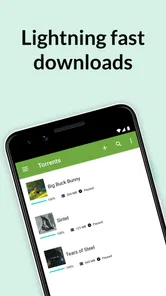
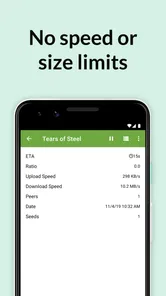
Now, what’s inside the app? For starters, it offers a fast download speed. I mean, who has time to wait forever for a file, right? With µTorrent, files download like a breeze. The app optimizes bandwidth usage, ensuring you get the best speeds without hogging all your data. Plus, you can set download priorities and even schedule them, which is a neat feature if you ask me.
The ability to prioritize and schedule work is most useful when I’m juggling a few downloads or prefer to leave a transfer until a more convenient time. I would treat the speed claim as a best-case possibility rather than a certainty: torrent performance depends on the availability of peers and the quality of the connection. If progress stalls, checking the network and the torrent’s activity is more realistic than expecting the app to force a faster transfer.
For a less disruptive routine, I’d schedule a transfer for a time when I’m not relying on the phone for other demanding tasks, then check progress before assuming it can be left alone. Priorities also help when I have more than one item in progress and want the most useful file first. They don’t change the underlying availability of peers, though, so I see them as a way to organize work rather than a fix for a slow torrent.
Compared with a conventional streaming app, this is a hands-on tool: I choose a torrent and manage a file transfer rather than simply press play on a hosted catalog. Compared with a desktop torrent client, the phone app is easier to carry around, but a larger screen and desktop controls may be better for sorting many downloads or managing files in detail. If I only want to watch videos online, a regular media player or streaming service is the less complicated choice.
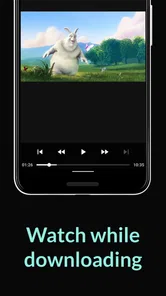
Another gem is the built-in media player. Gone are the days when you had to wait until the download was complete to start watching. With this feature, you can start streaming while the download is still in progress. It’s like having your cake and eating it too!
In practice, I’d treat that as a preview option, not a guarantee that every file will play smoothly from the outset. If playback pauses, letting more of the file download first may be a better use of time than repeatedly restarting it. This is particularly handy when I want to check that a permitted video is the one I intended to get, but it is less compelling if I already use a dedicated player with the controls and library organization I prefer.
Another useful decision is whether to keep a completed file on the phone. If I only wanted to check it or watch it once, I’d make a point of reviewing local storage afterward and removing material I no longer need. That small cleanup step helps prevent a downloader from quietly turning into a storage-management problem, especially when several transfers include files I didn’t intend to keep.
Security and Privacy
In today’s digital age, privacy is a big deal, and µTorrent doesn’t skimp on this. It offers secure connections ensuring your downloads are private. The app also supports peer-to-peer file sharing, which not only speeds up the process but also keeps your data safe from prying eyes. You can even use a VPN with the app for added security, keeping all your torrenting activities under wraps.
I’d be careful not to read that as a substitute for good judgement. A VPN can add a layer of privacy, but it doesn’t make an untrusted torrent safe or make copyrighted sharing lawful. I stick to files I have permission to download, use sources I trust, and consider what network I’m on before starting a transfer. Those checks matter more than assuming any downloader can protect me from every risk.
For anyone wondering whether torrenting is appropriate for a particular file, my rule is simple: use it only when the source and your right to download the material are clear. A privacy tool does not change that responsibility, and a familiar app cannot vouch for every torrent someone may find elsewhere. If I can’t establish that the file is legitimate, I skip it rather than treating a download manager as a safety check.
Who should choose it, and who should pass
This app makes the most sense for someone comfortable with torrents who wants a portable way to manage legitimate downloads and appreciates being able to preview media. It’s less suited to people who want a one-tap download from a familiar website, dislike managing storage, or mainly need a polished video library. In those cases, direct downloads or a dedicated streaming and playback app will feel more straightforward.
I’d also recommend it to someone who occasionally needs a phone-based torrent workflow and is willing to check progress, storage, and file selection rather than treating the process as completely automatic. A person who regularly manages many large transfers, needs extensive file organization, or prefers a keyboard-and-mouse workspace will probably be happier with a desktop client. For playback alone, a dedicated media player is the more focused choice.
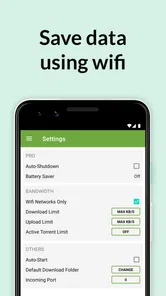
If I were setting up a routine for occasional use, I’d start on Wi-Fi, pick only the files I actually need, and check progress before leaving a transfer unattended. The free entry point makes trying it easy, while the listed purchases mean it’s worth checking what an optional item offers before paying. My recommendation is measured: µTorrent is a capable, established Android option for the right torrent workflow, but it isn’t a universal replacement for direct downloads, desktop clients, or video apps.
One question I’d answer before installing is whether the phone has enough room for the intended files, including anything I may want to keep after playback. Another is whether a stable connection will be available for the time the transfer needs. Those practical checks are more useful than expecting the app to overcome a weak connection or limited storage, and they make the difference between a convenient mobile task and a frustrating one.
Final Thoughts
All in all, if you’re on the lookout for a reliable torrent downloader, µTorrent®- Torrent Downloader should be at the top of your list. It’s fast, user-friendly, and packed with features that make downloading a seamless experience. Whether you’re downloading large files or streaming content, this app has got your back. So, why not give it a whirl and see how it transforms your downloading adventures?
My more specific verdict is that its strongest case is convenience: selecting legitimate torrent files, managing a transfer on Android, and previewing compatible media in one place. Its weaker case is anything that demands guaranteed speed, effortless safety, or the detailed control of a desktop setup. If that distinction matches how you download, it is worth considering; if not, a direct source or dedicated player will likely suit you better.
µTorrent®- Torrent Downloader Frequently Asked Questions
What does µTorrent®- Torrent Downloader do?
µTorrent®- Torrent Downloader is an Android app for downloading and playing torrents. It uses peer-to-peer file sharing, in which data is exchanged through other participants rather than obtained only from a single source. This approach can be useful for transferring files, but download performance depends on the particular torrent and your connection. Before installing, consider whether torrent-based downloading suits the way you want to get and use files.
Is µTorrent®- Torrent Downloader an official app?
Yes. µTorrent®- Torrent Downloader is presented as the official torrent app for Android, developed by Rainberry, Inc. It is designed to bring torrent downloading and playback together in one app. If you are choosing where to install it, use a trusted app store and check the developer name so you can distinguish the official app from similarly named offerings.
Does the app let me download and play torrents in one place?
Yes, µTorrent®- Torrent Downloader is described as an app for downloading and playing your torrents. That combination may be convenient if you want to manage a transfer and access media on the same device. Playback can still depend on the file format, the state of the download, and your device, so do not assume every torrent will play in the same way.
What should I consider about peer-to-peer sharing before installing?
Torrenting is based on peer-to-peer sharing, so transfers can involve both downloading and uploading data. This is different from simply opening a file stored on your device, and it may affect your connection use. Think about whether you are comfortable with that kind of file sharing, choose content carefully, and check that you have permission to download and share it.
Can I use µTorrent®- Torrent Downloader without creating an account?
The app is intended for downloading and playing torrents, but whether you need an account can depend on the app’s current setup and the content source you use. You will generally need a torrent or magnet link for the material you want to access. Before installing, consider how you plan to obtain those links and review any sign-in prompts or permissions shown on your device.
Pros
- Fast download speeds
- Easy-to-use interface
- Supports large files
- Low resource consumption
- Remote control feature
Cons
- Contains ads
- Limited free features
- Potential security risks
- Occasional crashes
- Requires internet connection