Bird — Ride Electric
- 16.00K
- 4.8
- Installs
- 10.00M
- Price
- Free

Screenshots

Analysis by Reviewed
Before I would count on a shared scooter for an important trip, I would treat the first outing as a small test: find a nearby vehicle, check its displayed battery and route, unlock it, and complete the ride calmly. That simple sequence tells you much more than looking at a map alone. Bird — Ride Electric is easiest to understand as a flexible link in a journey, not a promise that a scooter will always be waiting exactly where you need one.
Why a short test ride is worth it
If you are new to shared electric vehicles, it is tempting to plan a whole afternoon around the first scooter you see. I would resist that urge. Pick a familiar destination and a route with an easy alternative, such as walking or taking public transport. Then you can learn how the app and vehicle fit into your routine without feeling pressured to solve every part of a trip at once.
This approach is especially useful if you are unsure about riding in traffic or navigating a city on a scooter. The first ride can answer practical questions that a map cannot: whether the handlebars feel comfortable, whether you can follow the route without distraction, and whether there is a sensible place to leave the vehicle at the end. If any part feels awkward, you can choose another way to travel next time rather than forcing the scooter into a role it does not suit.
Plan around the whole journey, not just the scooter
A shared ride can look quick when you focus only on the distance between two points. In real life, you also need to find a vehicle, inspect its estimated range, get oriented, and park at your destination. I would allow time for those steps, particularly on a first attempt. That small buffer makes the experience less stressful and helps you avoid making decisions while rushing.
For example, if I were travelling to an appointment from a transit stop, I would check the map before leaving the station, but I would not assume the closest scooter is the best one. A vehicle slightly farther away might fit the route better, while the nearest one could have less displayed range than I want. If no suitable vehicle appears, switching to walking or continuing by transit is a sensible plan, not a failed attempt.
That kind of flexibility is the main difference between using Bird and relying on a personal vehicle. A personal scooter is under your control but needs to be stored and maintained. With Bird, you avoid keeping one at home, but you accept that a suitable shared ride may not be available at the moment you need it. I find the exchange worthwhile for occasional connections, less so when every minute of a schedule matters.
So, let's talk about Bird — Ride Electric. You know those days when you just can't deal with traffic and parking hassles? That's where this app swoops in like a superhero on wheels. I've taken it for a spin, and here's what I've got to share with you.
More From Our News Desk

Clash of Clans Is Won Between the Battles

Android Auto Makes the Case for Quieter Car Software

MobiOffice: Transforming Mobile Productivity with Seamless Integration

EA SPORTS FC™ Mobile Soccer: Redefining Mobile Sports Gaming

How Microsoft OneDrive Became a Mobile Productivity Giant

How Google Translate Breaks Language Barriers Effortlessly
What to expect from a shared ride
Bird is a travel and local transport app from Bird Rides, Inc., built around finding and riding shared electric vehicles. Its basic appeal is practical: a scooter can bridge the awkward stretch between a transit stop and your destination, or make a short local trip feel less like a chore. It is free to install, rated for Everyone, and its current version is 4.374.0.1. The service itself depends on what is available where you are, so I would treat the app as a useful option rather than a guaranteed replacement for buses, walking, or a car.
That distinction matters when you are planning. I would open the map before relying on a scooter for a time-sensitive trip, check whether a nearby vehicle appears, and leave enough room for a backup plan. Unlike a personal scooter, a shared one is not waiting in your hallway; unlike a taxi, it does not take you door to door. In the right setting, though, it can be a flexible middle ground. Bird has a 4.8 average from around 278,000 ratings and over 10 million installs, which suggests that many people find the idea useful, but your experience still hinges on local availability and the route you need to travel.
Getting Started with Bird
First things first, downloading the Bird app is a breeze. It's available on both Android and iOS, which is super convenient. Once installed, you just need to sign up, and boom, you're ready to fly! The app's interface is clean and straightforward, making it easy for anyone to navigate, even if you're not exactly tech-savvy.
First setup and finding your ride
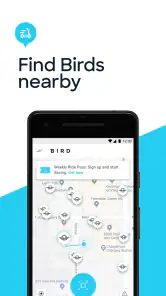
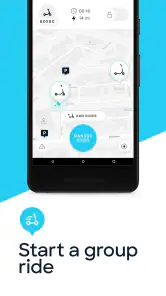
One of the coolest features is the map that shows you all the available electric scooters nearby. It's like a treasure hunt, but instead of gold, you find a nifty scooter ready to whisk you away. Just tap on the scooter icon, and you’ll see its battery level and approximate range. This is super handy because you don't want to end up stuck halfway to your destination with a dead scooter, right?
For a first ride, I would keep the destination modest and pick a route that is easy to follow rather than trying to cross town. Check the displayed battery estimate against your actual plan, then allow a little margin instead of treating the range as a promise. A straight-line map distance does not always reflect the turns, hills, or detours of a real journey. This small bit of planning is more useful than rushing to the closest scooter just because it is nearest.
The riding experience and first successful trip
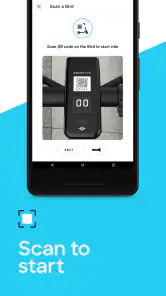
Okay, so here’s the fun part. Riding a Bird scooter is a blast! These scooters are electric, so they're eco-friendly and quiet. Just scan the QR code on the scooter to unlock it, and off you go! The acceleration is smooth, and the brakes are responsive, giving you that sense of freedom without compromising safety. I found myself grinning ear to ear as I zipped through the streets.
A reassuring first outing could be a short ride from a transit stop to a nearby appointment, with enough time to pause and check the route before unlocking. Make sure the scooter you are looking at matches the one you scan; that simple check helps avoid starting the wrong vehicle. If the scan or unlock does not work immediately, I would stop and recheck the QR code and the app screen rather than repeatedly tapping through in a hurry. The first meaningful success is not a long ride: it is getting from A to B, ending the trip correctly, and knowing what to expect next time.
Safety, local rules, and the parts that take attention
Now, I know what you're thinking: "Is it safe?" Well, the app provides guidelines to ensure you ride responsibly. Always wear a helmet, follow traffic rules, and park the scooter properly when you're done. Some cities have specific regulations, so make sure to check those out in the app. It’s like they say, "Better safe than sorry," right?
The practical trade-off is that the app can guide you, but it cannot make an unsuitable street comfortable or turn a crowded sidewalk into a good riding route. I would choose streets and paths where riding is permitted and where I can stay in control, then slow down around pedestrians and junctions. If the weather, surface, traffic, or local restrictions make the route feel wrong, walking or public transport is the better choice. A scooter is most helpful when the route itself suits one.
Ending your ride without a last-minute scramble
When you're done, just park the scooter in a designated area, tap "End Ride" on the app, and you're good to go. The app automatically calculates the cost based on the time and distance traveled, and it’s usually pretty reasonable. Plus, no more worrying about parking tickets or gas prices!
I would check the parking situation at the destination before unlocking, especially if I am heading to a busy building or a place where scooters might obstruct people. Leaving a little time to end the ride calmly is worthwhile: locate an acceptable spot, park without blocking a walkway or entrance, and confirm in the app that the ride has ended. If you are comparing the cost with a bus or walking, consider the whole trip rather than only the short time on the scooter; shared rides are convenient, but they are not automatically the cheapest choice for every journey.
Who Bird suits—and when I would choose something else
I see Bird as a strong fit for people who already have a destination in mind and need a convenient short-distance connection, especially when walking would take too long and public transport does not cover the final stretch neatly. It can also make a low-pressure city outing more enjoyable when you have flexibility to choose a route and return the scooter appropriately. It is less compelling for anyone who needs predictable door-to-door transport, carries bulky bags, dislikes balancing on a scooter, or cannot find a suitable legal route. In those cases, a bus, taxi, or simply walking may be more comfortable and dependable.
For a realistic weekday example, imagine arriving by train with a meeting a little farther away than you want to walk. I would check the map while still planning the rest of the journey, choose a scooter with enough displayed range for the route, and keep a transit or walking alternative in mind. That workflow avoids treating the first icon on the map as a guaranteed ride. It also makes Bird easier to use as a connection rather than building an entire schedule around a vehicle that may not be there when you arrive.
What I would check before making it a habit
Bird has been available since October 9, 2017, and its broad adoption makes it a familiar option in shared electric transport. Still, popularity does not answer the most personal question: whether it works for your regular route. I would try it first on a journey where arriving a little later would not cause trouble, then judge the experience by the full sequence—finding a scooter, unlocking it, riding comfortably, and ending the trip in a suitable place. That is a better test than focusing only on the enjoyable minutes of riding.
If you are new to shared scooters, the main question is whether you need to own one. Bird removes the need to keep a personal scooter at home, but you trade that control for availability and the need to locate and return a shared vehicle. If you only need occasional short trips, that exchange can make sense. If you expect to ride the same route every day or need guaranteed transport at a precise time, I would compare it with a fixed transit option or another dependable way to travel before making it part of a routine.
A practical habit for repeat rides
Once you know the basics, the most useful improvement is to make the check routine rather than improvising each time. Before setting off, I would confirm that a vehicle is shown near the point where I will actually be able to reach it, compare the displayed range with the route, and think about where I can leave it at the far end. Those checks take less effort than having to rethink the trip halfway through, and they make it easier to decide early that another option is better.
I would also pay attention to the parts of the journey that change from day to day. A route that feels comfortable in quiet conditions may be less appealing when streets are busy, visibility is poor, or the pavement is uneven. The app can help with locating a scooter, but choosing when not to ride is part of using a shared vehicle well. For someone who wants a relaxed outing, that judgment matters as much as the convenience of getting moving quickly.
What the popularity and cost mean in practice
The app is free to install, but the ride itself is a separate consideration. Because the charge is calculated from time and distance, I would not assume that a short-looking journey will always compare favorably with a bus or a walk. Think about whether the scooter saves enough time or effort to justify choosing it, and factor in the time spent locating and parking it. That is a more reliable way to decide than treating the ride as automatically inexpensive.
There are around 16,000 written reviews, alongside the much larger pool of ratings. I take that broad audience as a sign that shared scooters are a familiar choice for many people, not a guarantee that every neighborhood has convenient vehicles or that every trip will feel smooth. The app’s Everyone age rating describes its store classification; a rider still needs to make sensible choices about the streets, traffic, and local rules involved in a real journey.
Making the decision after your first ride
After trying Bird once, I would ask three practical questions: did I find a scooter without too much detour, was the route comfortable to ride, and could I end the trip somewhere appropriate? If the answer is yes to all three, it may be a useful option for that particular journey. If the ride itself was fine but locating or parking the vehicle was awkward, I would test a different route or use it only when I have more flexibility.
That is why I would not judge the service only by whether the scooter moved smoothly. The useful experience is the entire chain, from planning through the final confirmation that the ride has ended. A good result can mean discovering a reliable short connection for occasional errands; it does not have to mean replacing your usual way of getting around. Keeping that modest expectation makes the app easier to appreciate on its strongest days.
In conclusion, if you haven't tried Bird, I highly recommend it. Whether you're commuting to work or just exploring the city, it's a fun and convenient way to get around. Just imagine the fresh air and the thrill of the ride. So, what are you waiting for? Give it a spin and let the adventure begin!
Bird — Ride Electric Frequently Asked Questions
Who develops Bird — Ride Electric, and what is the app designed for?
Bird — Ride Electric is developed by Bird Rides, Inc. and is a Travel & Local app centered on shared electric vehicles. It is intended for people who want to find and use a shared scooter through an app rather than arrange a privately owned one. The experience revolves around locating a vehicle, unlocking it for a ride, and using the app to manage the trip.
Is Bird — Ride Electric free to download, and what devices can run it?
Bird — Ride Electric is free to download, and its content rating is Everyone. It is a Travel & Local app from Bird Rides, Inc., intended for people who want to use shared electric vehicles. The app requires iOS 9 or later, so check your device’s operating system before installing to make sure it meets that requirement.
What is Bird — Ride Electric and how does it work?
Bird — Ride Electric is a popular app designed to provide users with access to electric scooters for short-distance travel. It operates by allowing users to locate nearby scooters using the app's map feature. Once found, users can unlock the scooter via the app and start their ride. The app tracks the duration and distance of the ride, charging the user accordingly upon completion. Its focus on shared electric vehicles makes it useful for getting around without arranging a privately owned scooter.
How do I find and unlock an electric scooter using Bird?
To find and unlock a scooter using Bird — Ride Electric, open the app and use the map to locate available scooters nearby. Once you select a scooter, approach it and scan the QR code located on the handlebar using the app. This action unlocks the scooter, enabling you to start your ride. Ensure you have a valid payment method linked to your account before unlocking. The map-led process gives you a way to identify a nearby scooter before you begin.
What are the payment options available in Bird — Ride Electric?
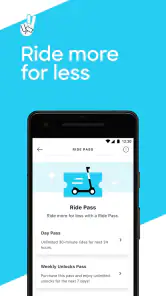
Bird — Ride Electric offers several payment options to cater to different user preferences. Users can link their credit or debit cards directly to the app for seamless transactions. Additionally, Bird often provides the option to add funds to a Bird wallet within the app, which can be used for rides. Always check the app for any promotions or discounts available. Since rides are charged after completion, review the payment details in the app before setting off.
Pros
- Eco-friendly transportation option
- Easy to locate and unlock scooters
- Affordable pricing for short trips
- User-friendly app interface
- Great for reducing urban congestion
Cons
- Limited availability in some areas
- Battery life can be short on busy days
- Requires a smartphone to use
- Not suitable for long-distance travel
- Parking can be challenging in crowded areas

- Category
- Travel & Local
- Version
- 4.374.0.1