BILL Spend & Expense (Divvy)
- 555.00
- 4.5
- Installs
- 100.00K
- Price
- Free

Screenshots

Analysis by Reviewed
Managing business spending usually becomes difficult long before the amount of money involved feels significant. A few employees pay for supplies, someone forwards a receipt late, a manager approves an expense in a chat, and the finance team eventually has to rebuild the story from scattered messages. I found BILL Spend & Expense most useful when treated as the center of a repeatable spending routine rather than as a place to look at transactions after everything has already gone wrong.
This is a free business app from Bill.com Inc., built around corporate cards and expense management. Its role is practical: give a team a more consistent way to handle company purchases and keep the supporting information connected to them. The app is available to users aged Everyone, and its current version is 4.0.17 for devices running iOS 12 or later. That broad device requirement makes it approachable for teams that are not using the newest phones.
After using it as part of a small-business workflow, my view is fairly clear. It can replace a messy mixture of card statements, email attachments, spreadsheets, and memory, but it is not a magic fix for weak internal habits. The strongest results come when a company decides who records spending, when receipts are added, and how managers review exceptions. Without those decisions, even a well-designed expense tool can become another inbox.
Building a spending workflow before opening the app
The most important preparation happens outside the screen. Before asking employees to use BILL Spend & Expense, I would define which purchases belong on company cards, who is allowed to make them, and what information a reviewer needs before approving them. A simple rule such as “add the receipt and a short business reason as soon as practical” is more useful than a long policy nobody remembers.
This matters because the app can organize spending, but it cannot reliably infer the business purpose of every purchase. A restaurant charge might be a client meeting, a team lunch, or a personal mistake. A software charge might be a recurring tool that should remain active or an unwanted renewal. The human context still has to come from the person who made the purchase or the manager responsible for it.
I would also decide how often the finance owner checks the app. A daily review may suit a busy team with frequent purchases, while a smaller company might use a weekly rhythm. The key is consistency. If reviews happen only when month-end reporting is already urgent, the app becomes a place for cleanup instead of a way to prevent confusion.
There is a useful distinction between recording a transaction and completing an expense record. A card charge may show that money was spent, but a complete record should explain what was bought, why it was necessary, and which part of the business should carry it. BILL Spend & Expense is most valuable when the team treats those details as part of the purchase, not as optional paperwork added much later.
More From Our News Desk

Weather by Xiaomi Review: Clear at a Glance, Less Clear Up Close

X Under Pressure: Can It Recover When Posting Goes Wrong?

Clash of Clans Is Won Between the Battles

Android Auto Makes the Case for Quieter Car Software

MobiOffice: Transforming Mobile Productivity with Seamless Integration

EA SPORTS FC™ Mobile Soccer: Redefining Mobile Sports Gaming
What the app changes compared with the usual alternatives
The usual alternative is a shared spreadsheet combined with email. That approach can work for a very small operation, especially when only one person spends money and one person checks it. It becomes fragile when several employees submit expenses, because the spreadsheet does not naturally keep the original receipt, the transaction context, and the review conversation together.
Email has the opposite problem. It preserves messages, but the information is spread across subjects, attachments, replies, and forwarded copies. A manager may approve a purchase in one thread while the receipt sits in another. Searching can locate individual messages, but it does not create a dependable spending routine.
A general banking app is helpful for seeing account activity, yet it is usually designed for account holders rather than for a team with different spending responsibilities. It may show the amount and merchant while leaving the business explanation to another system. BILL Spend & Expense is better suited to the point where company spending needs to be captured and reviewed as work, not merely observed as a bank event.
That comparison also shows where the app should not be overextended. If a company needs a complete accounting platform, detailed purchasing controls, or a broad financial operations suite, an expense app alone may not cover the whole process. I would use it as a focused layer for corporate spending and expense management, then make sure it fits the company’s wider finance process rather than assuming it replaces every other tool.
Capturing purchases without creating another chore
The practical test for any expense app is what happens immediately after a purchase. If adding the necessary context takes too much effort, employees postpone it. Once the details are delayed, receipts disappear, memories fade, and the finance reviewer has to ask questions that should have been answered at the start.
My preferred routine is to treat the purchase as unfinished until its supporting information is handled. After paying for something on behalf of the business, I would open the app while the reason is still obvious, attach the relevant receipt or record, and add a concise explanation that another person can understand without asking me later. That small habit reduces the number of ambiguous transactions waiting at the end of the week.
The organization benefit is not just visual neatness. It creates a trail that helps a manager distinguish ordinary spending from something that needs attention. A recurring charge, an unusually large purchase, or a transaction from an unfamiliar merchant can be reviewed in context instead of judged from the amount alone.
One non-obvious advantage of this approach is that it shifts the burden toward the person with the best knowledge. The employee who made the purchase knows the purpose immediately. The finance reviewer usually does not. Asking the reviewer to reconstruct that purpose later is inefficient, while asking the spender to provide a short explanation at the right moment is usually easier.
A realistic day with the app
Imagine a small design team preparing a client presentation. One employee buys presentation materials, another pays for a taxi to a meeting, and the team lead uses the company card for a working meal. In a spreadsheet-based process, the three people might send receipts to different addresses, write descriptions in different styles, and remember the details only when someone requests them.
With a shared expense routine in place, each person handles the purchase close to the moment it happens. The materials purchase can be identified by project purpose, the taxi can be connected to the meeting, and the meal can include the attendees or business reason. The manager then reviews three understandable records rather than three unexplained card entries.
The important insight is that the app does not create the quality of those descriptions by itself. The team’s rule does. BILL Spend & Expense provides a common place for the process, but the company still needs to agree on what “complete” means. A short, specific note is generally more useful than a vague label such as “business expense.”
For employees who travel or buy supplies away from a desk, mobile access is particularly relevant. The value is less about checking the app constantly and more about removing the excuse that expense work must wait until someone is back at a computer. That said, I would avoid turning every purchase into a long data-entry session. The process should capture the few details needed for a confident review, not demand an essay.
Organizing information for the person who reviews it
Different people need different levels of detail. A spender needs a quick way to record context. A manager needs enough information to decide whether the purchase makes sense. A finance owner needs a dependable record that can be followed up without repeatedly contacting the employee. A good internal routine respects all three viewpoints.
I recommend agreeing on a small vocabulary before the team begins. Decide how projects, clients, departments, or business purposes should be named, and avoid allowing every employee to invent a different version. Consistent wording makes later review easier and prevents similar expenses from being treated as unrelated simply because their descriptions differ.
This is one of the app’s less obvious trade-offs: centralization improves visibility only when the information entering the system is consistent. If every person uses a different naming style, the app may still contain all the transactions, but the organization will not be as useful as it could be. A five-minute team agreement can therefore improve the result more than another round of reminders.
Turning expense work into a repeatable routine
I would introduce BILL Spend & Expense in stages rather than asking a team to change every finance habit at once. Start with one clear spending group, such as travel or company-card purchases, and define the expected action after each transaction. Once people understand the rhythm, expand it to other forms of business spending.
A sustainable routine needs three moments: capture, review, and follow-up. Capture belongs as close to the purchase as possible. Review belongs on a predictable schedule. Follow-up should be reserved for incomplete or unusual records rather than used as the normal way to collect basic information.
For a manager, the review should be more than approving everything quickly. I would look for patterns: repeated merchants, charges that do not match the stated purpose, missing context, and purchases that appear to be personal or outside the agreed rules. The goal is not to make ordinary spending painful. It is to make exceptions visible while they are still easy to correct.
For the finance owner, the routine can also reveal where the policy is unclear. If several people describe the same type of purchase differently, the problem may not be employee carelessness. The policy may need a clearer example. If receipts are often delayed after a particular kind of trip, the process may need a simpler handoff or a better reminder at the point of purchase.
Small habits that make the system work better
My first practical tip is to write descriptions for a stranger. Instead of “supplies,” write what the supplies supported. Instead of “meeting,” identify the business purpose. This makes the record useful weeks later, when the original conversation is no longer fresh.
My second tip is to separate ordinary delay from a genuine exception. An employee who forgets one receipt needs a prompt and a simple correction path. A purchase that repeatedly lacks a credible business reason deserves a policy conversation. Treating both cases as identical creates unnecessary friction for reliable employees and fails to address the real risk.
My third tip is to use the app as a feedback loop. If managers repeatedly ask the same question, update the team’s guidance so the answer is supplied earlier. This turns expense review into process improvement instead of an endless series of individual corrections.
A fourth useful habit is to avoid relying on one person’s memory of the system. If the finance owner is away, another authorized reviewer should understand the routine and know what a complete record looks like. Centralized information is most helpful when the workflow remains understandable to more than one person.
These habits are not flashy features, but they determine whether the app saves time. The best expense system is not the one with the most activity. It is the one that makes the correct action easy enough to repeat and the incorrect action noticeable enough to fix.
Where the workflow can fail
The biggest weakness I noticed is the same weakness found in many expense tools: adoption is behavioral. If employees see the app as administrative work that can always be postponed, the company will still face incomplete records. A manager can request better information, but cannot create accurate business context after the fact.
There is also a risk of over-reviewing. If every small purchase triggers a long approval conversation, employees may work around the process or stop seeing it as reasonable. Teams should decide which transactions need close attention and which can move through a lighter review. BILL Spend & Expense can support a structured process, but the company must set a proportionate standard.
Another friction point is the boundary between expense management and accounting. The app can help organize corporate spending, but finance teams should be clear about where the next stage of reconciliation, reporting, or bookkeeping happens. If that handoff is vague, users may assume that recording a purchase in the app completes every financial obligation.
Device compatibility is worth checking before rollout. The app supports iOS 12 and later, which covers many devices, but a company with older hardware should confirm that every intended user can participate. A workflow that works for managers but excludes field employees because of their phones will quickly create side channels and duplicate work.
I would also be cautious with teams that have very unusual purchasing arrangements. If spending is mostly handled through invoices, procurement contracts, or a specialized accounting process, a corporate-card and expense-management focus may not be the best center of operations. In that situation, the app could add another step instead of simplifying the existing one.
Questions I would answer before rollout
One common question is whether a small team really needs a dedicated tool. My answer is conditional. If one person handles nearly every purchase and the volume is low, a disciplined spreadsheet may be enough. Once several people spend money or receipts regularly arrive late, the cost of scattered information usually becomes more significant than the effort of adopting a shared system.
Another question is whether employees need finance expertise to use it. They should not need accounting knowledge to record a normal purchase. They do need clear company guidance about business purpose, acceptable spending, and what to do when a receipt is unavailable or a transaction looks wrong. The app can simplify the record; it cannot replace those instructions.
People also want to know whether the app suits occasional users. It can, provided the company keeps the routine simple. Occasional travelers should not have to learn an elaborate finance process for a few purchases, but they still need a clear expectation about when to capture information and whom to contact if something fails.
For managers wondering how often to check, I would begin with a schedule that matches spending volume and then adjust it. Frequent activity benefits from shorter review cycles because questions are easier to answer while events are fresh. Low activity may not justify constant checking. What matters is avoiding a backlog that turns every review into an investigation.
Finally, users may ask whether it is better than their current spreadsheet. If the spreadsheet is genuinely maintained, consistently labeled, and easy for everyone to access, the difference may be modest for a very small operation. BILL Spend & Expense becomes more compelling when the organization needs a shared corporate-card and expense workflow that does not depend on one person manually merging receipts and explanations.
Who should adopt it and who should skip it
I would recommend BILL Spend & Expense to small and growing teams where employees make purchases on behalf of the business and managers need a clearer view of those expenses. It is especially suitable when the current process involves forwarded receipts, inconsistent spreadsheet entries, or repeated end-of-month questions. The app’s free price also lowers the barrier for a team that wants to establish a more organized process before committing to a larger financial system.
It is a good fit for companies willing to set simple rules and reinforce them. The strongest users will not treat it as a passive archive. They will capture information promptly, use consistent descriptions, and review unusual spending without making every normal purchase feel suspicious.
I would skip it, or at least compare it carefully with a broader platform, if the main requirement is full accounting, complex procurement, or a highly specialized approval structure. It may also be unnecessary for a solo operator with very few transactions and an already reliable bookkeeping method. Adding an app is not automatically an improvement if it creates a second place to enter the same information.
The public response suggests that many users find the product useful: it holds a 4.5 average from around 4.3 thousand ratings, with more than 500 reviews and over 100 thousand installs. I see those figures as evidence of established interest rather than a guarantee that every team will have the same experience. Expense workflows are unusually dependent on company policy, employee habits, and the way the app fits with existing finance work.
After testing it as part of a broader productivity system, I would describe BILL Spend & Expense as a practical coordination tool. Its real strength is bringing the purchase, the explanation, and the review closer together. Its real limitation is that it cannot make an unclear policy clear or make a careless routine consistent.
My recommendation is to adopt it when your company is ready to define the habit around the app. Start with a narrow spending workflow, agree on what a complete record looks like, review on a predictable schedule, and use repeated questions to improve the policy. Used that way, this business app can replace a surprising amount of financial chasing. Used without that structure, it is likely to become another place where unfinished expense work waits.
For teams that need a focused way to manage corporate spending and expenses on supported iOS devices, I think it is worth trying. The product is free, carries an Everyone age rating, and comes from Bill.com Inc.; more importantly, it addresses a real operational problem without requiring the team to begin with a complicated finance transformation. BILL Spend & Expense is at its best when it quietly supports a dependable routine rather than demanding attention as a separate project.
BILL Spend & Expense (Divvy) Frequently Asked Questions
Can I use BILL Spend & Expense without an employer or business account?
BILL Spend & Expense is designed for organizational spending rather than personal budgeting. Access is generally connected to a company account, with an employer or administrator setting up users and deciding what each person can do. If you are looking for an app to track personal purchases, this may not be the right fit; check with your organization to see whether it uses BILL Spend & Expense.
What devices can run BILL Spend & Expense?
The app is available for mobile devices, and its minimum operating-system requirement is version 12. Before downloading, check your device’s OS version and make sure you have enough room for the installation and future updates. Compatibility is only one part of the experience: your organization also needs to provide access, since many of the app’s spending and expense tools depend on its account setup.
What is BILL Spend & Expense (Divvy), and who is it designed for?
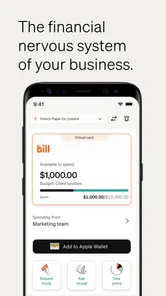
BILL Spend & Expense, formerly known as Divvy, is a business spending and expense-management platform designed for companies, finance teams, managers, and employees. It combines corporate cards, budgets, expense tracking, receipt collection, approvals, and reporting in one place. It is mainly intended for organizations rather than personal budgeting, so users generally need access through an employer or an eligible business account.
Can employees use the app to submit receipts and manage business expenses?
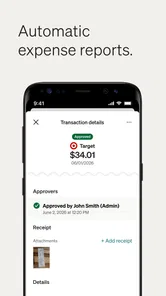
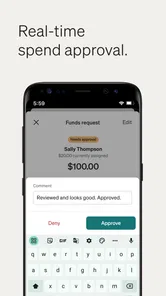
Yes. Employees can typically use the mobile app to capture receipts, review transactions, add notes or expense details, and submit spending for approval. Depending on the company’s configuration, the app may also show assigned budgets, card activity, reimbursement information, and policy requirements. Available actions can vary because administrators control permissions, approval workflows, and required fields for each organization.
Does BILL Spend & Expense include a corporate card or budget management features?
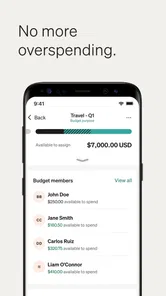
The platform is built around business spending controls and may include corporate card functionality, employee spending limits, budgets, and approval rules. Managers can use these tools to allocate funds and monitor activity, while finance teams can review transactions and compare spending with company policies. However, card availability, eligibility, limits, fees, and specific financial products depend on the employer’s agreement and approval by BILL.
Pros
- Real-time card controls help limit unauthorized or unnecessary spending.
- Receipt capture makes it easier to keep transaction records organized.
- Custom approval workflows can support different company spending policies.
- Useful reporting tools help finance teams monitor budgets and expenses.
- Mobile access lets employees manage cards and submit expenses while traveling.
Cons
- Most features are designed for businesses rather than personal budgeting.
- Setup may require administrative work and integration with existing systems.
- Some employees may find expense policies and approval steps restrictive.
- Advanced tools may depend on the company’s subscription and permissions.
- Support and account access can be tied closely to an employer’s administrator.












