BILL AP & AR Business Payments
- 1.54K
- 4.3
- Installs
- 500.00K
- Price
- Free

Screenshots
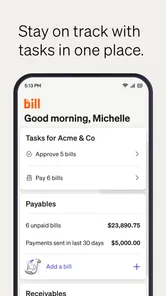
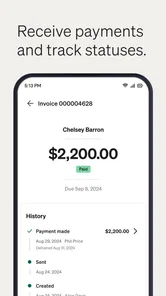
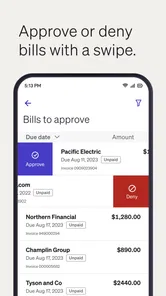
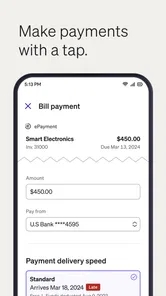
Analysis by Reviewed
I installed BILL AP & AR to see whether it could make the less enjoyable parts of running a business—paying bills, tracking incoming money, and keeping payment work organized—feel more manageable. My overall impression is that it is most useful as a focused business payments companion, not as a complete accounting system or a replacement for every finance tool a company may already use.
The app comes from Bill.com Inc. and sits in the business category. Its purpose is straightforward: help businesses handle accounts payable and accounts receivable online. That sounds narrow, but the distinction matters. A small company often has invoices arriving by email, payment requests waiting for approval, customers who need to be paid, and a business owner trying to understand what has actually moved through the payment process. A mobile app built around those workflows can be valuable when the alternative is opening a desktop system for every small decision.
BILL AP & AR is free to download and rated for Everyone, which makes it easy to try without treating the installation as a major commitment. It has passed the half-million-install mark and holds an average rating of 4.3 from roughly 7,500 ratings, with about 1,500 written reviews. Those figures suggest a well-established product rather than an experimental finance app, although they should not be mistaken for proof that it will fit every company’s process.
How the current mobile experience fits real business work
In day-to-day use, the strongest idea behind this app is reducing the distance between noticing a payment task and dealing with it. A business owner may be away from the office when an invoice needs attention. An operations manager may want to check whether a payment is moving forward without asking someone to open a computer. A finance team member may need a quick view of work already submitted. The mobile format is well suited to those moments because it places payment-related work closer to the person making the decision.
I would describe the app as a control point for accounts payable and accounts receivable activity. That is different from a general banking app, where the focus is usually on balances and transactions, and different from traditional accounting software, where the focus may be broader bookkeeping, reporting, tax preparation, and reconciliation. BILL AP & AR is more specifically concerned with the movement and handling of business payments.
That focus is helpful when your main problem is operational follow-through. It is less helpful if you expect the app to teach you accounting, replace a full ledger, or provide every financial report your company might eventually need. Before installing it, I would ask a simple question: do I need a mobile way to participate in bill payment and collection workflows, or do I need an entire business finance platform? The answer determines whether this feels focused or limited.
A realistic use case for a small team
Imagine a small design studio where the owner approves supplier invoices, an administrator prepares payment work, and customers pay against issued invoices. The owner is traveling when a supplier sends a reminder. Instead of waiting until returning to the office, the owner can use the mobile app to stay connected to the relevant payment process. Later, the administrator can continue handling the routine work while the owner deals with exceptions and approvals.
More From Our News Desk

Weather by Xiaomi Review: Clear at a Glance, Less Clear Up Close

X Under Pressure: Can It Recover When Posting Goes Wrong?

Clash of Clans Is Won Between the Battles

Android Auto Makes the Case for Quieter Car Software

MobiOffice: Transforming Mobile Productivity with Seamless Integration

EA SPORTS FC™ Mobile Soccer: Redefining Mobile Sports Gaming
The useful detail here is not simply that payments can be handled online. It is that responsibility can be separated. The person who checks whether a bill is legitimate does not always need to be the person who carries out every administrative step. For a growing business, that separation can make a process easier to supervise. It also creates a reason to use the app even when the company already has accounting software: the accounting system can remain the broader record, while the payment workflow gets a more direct mobile touchpoint.
There is a trade-off. The more people involved in payment approval, the more important it becomes to understand who is expected to act next. A mobile interface can make a pending task easier to reach, but it cannot solve unclear internal rules. I would establish a simple routine before relying on the app: decide who reviews invoices, who approves them, who follows up on exceptions, and when the accounting records are checked. Without that structure, convenience can turn into another place where unfinished work accumulates.
Where the app feels more practical than usual alternatives
The usual alternative for a small business is often a mixture of email, spreadsheets, online banking, and desktop accounting software. That combination may work at first, but it creates several handoffs. An invoice can sit in an inbox, approval can happen in a chat message, payment can be made through a bank portal, and the record can be updated later in accounting software. Each handoff increases the chance that someone loses track of status.
BILL AP & AR makes more sense when you want payment work to have a dedicated home rather than being scattered across those tools. Compared with a bank app, it is aimed at business payment workflows rather than personal money management. Compared with a spreadsheet, it offers a more structured place to work than rows and manually maintained status labels. Compared with a full desktop accounting package, it is more approachable for quick mobile involvement, but it should not automatically be treated as a complete substitute.
My preference would be to use it alongside a broader accounting process when the company needs both. I would not choose it as the only financial tool for a business that depends heavily on detailed reporting, complex bookkeeping, or specialized industry accounting. Its advantage is concentration: it helps bring payment tasks together. Its limitation is the same concentration, because a narrow tool cannot cover every financial responsibility.
What the version history tells existing users
The current version is 3.7.171, and the app has been available since December 16, 2015. That long presence matters because payment software is not something I want to treat like a disposable utility. Businesses need continuity, and an app that has remained in use over many years is more reassuring than one that has just appeared. The version number also shows that the product has continued to evolve rather than remaining frozen in its original form.
Still, a version number by itself does not tell me that every change will be visible or transformative. In a business payments app, some of the most important improvements may be behind the scenes: better reliability, smoother handling of existing workflows, clearer navigation, or compatibility work. Those changes can benefit established users without creating a dramatic new feature to advertise.
For someone already using an earlier release, I would expect the main value of staying current to be a more dependable relationship with the service and access to the app’s present workflow. I would not update solely because the number looks newer, but I would avoid treating an old installation as equivalent to the current experience. Payment apps are connected to processes where small interface or compatibility changes can affect how confidently people complete work.
For a new user, the evolution is relevant in a different way. The app is not just a mobile experiment attached to a business idea; it represents a product that has been maintained across a substantial period. That does not remove the need to test it against your company’s approval habits, but it makes a trial more reasonable than it would be with an unproven tool.
Small workflow habits that make a difference
One useful habit is to treat the mobile app as a decision and monitoring tool rather than automatically forcing every task onto a phone. Reading an invoice or checking a status can be comfortable on a mobile screen. Reviewing a complicated document, comparing multiple records, or investigating an unusual payment may be better on a larger display. Using the app selectively prevents the convenience of mobility from becoming a source of avoidable mistakes.
A second habit is to separate routine payments from exceptions. Routine work benefits from a predictable process, while unusual amounts, unfamiliar suppliers, duplicate-looking invoices, or changed payment details deserve slower review. The app can help you reach payment work quickly, but speed should not be the goal in every situation. In my view, the best use of mobile access is faster attention, not automatic approval.
A third insight is that accounts receivable deserves the same discipline as accounts payable. Businesses often focus on paying suppliers because those tasks feel urgent, while incoming payments are checked less consistently. Keeping an eye on receivables can help a company notice which customer payments need follow-up and which expected money has not arrived. That makes the AR side more than an extra label; it can support better cash-flow awareness when used as part of a regular routine.
I would also create a short internal note for each person using the app explaining what requires immediate action and what can wait for the next office review. This sounds basic, but it reduces the risk that a notification or pending item is interpreted differently by different team members. The app can centralize work, while the business still needs clear human decisions around it.
Where friction may remain
The first limitation is scope. A business payments app is not automatically a complete accounting environment. If your work depends on detailed financial statements, inventory management, payroll, tax workflows, project costing, or industry-specific records, you may still need separate software. BILL AP & AR may participate in that wider setup, but I would not assume that its payment focus covers everything your accountant or finance manager needs.
The second limitation is that mobile convenience does not remove the seriousness of payment decisions. A small screen can encourage quick taps, and a person working between meetings may not give an invoice the same attention as someone seated at a desk. I would be especially careful with unfamiliar payees and changed instructions. The app can make access easier, but your verification process remains essential.
The third issue is fit for larger organizations. A small team may appreciate a direct workflow and a limited number of decision-makers. A larger company may need more elaborate controls, broader integrations, detailed audit practices, or role structures that should be evaluated carefully before switching from established systems. The right question is not whether the app can be installed across a company, but whether it matches the company’s existing responsibilities and review standards.
There is also a human limitation: not everyone wants to manage business finances on a phone. Some users prefer a desktop screen for documents, lists, and side-by-side comparisons. If your team sees mobile access as distracting rather than helpful, the app may add another channel without improving completion. In that case, the better choice may be to keep the desktop workflow central and use mobile access only for urgent checks.
Security-minded use without overcomplicating the routine
Because this is a payments app, I would approach it differently from a casual productivity download. I would use it only on devices that are kept updated and protected, avoid leaving an unlocked phone unattended, and make sure every team member understands that payment instructions deserve independent scrutiny. These are practical habits, not reasons to avoid the app.
I would also avoid using a single person as the only source of knowledge about the workflow. If that person is unavailable, the business should still know how pending bills and receivables are reviewed. A clear handover process is particularly useful for mobile work because the app makes it easy to check in from different places, but the company still needs continuity when staff change or take time away.
Another worthwhile practice is to compare the payment workflow with the company’s accounting records on a regular schedule. The app may help people act on payment tasks, while the accounting system remains the place where the broader financial picture is maintained. Treating those as complementary views can reduce confusion. I would not wait until an end-of-month scramble to discover that a payment was handled in one system but not reflected properly in another.
Who should try it and who should look elsewhere
I think BILL AP & AR is a sensible candidate for freelancers with recurring business bills, small companies with shared payment responsibilities, and managers who need to stay involved while away from a desk. It is also worth considering when email and spreadsheets have become too unreliable for tracking who needs to review or follow up on payment work.
I would be more cautious if you are looking for a full accounting replacement, a personal budgeting app, or a tool designed mainly for detailed financial analysis. It may also be a poor fit for a company whose processes are already highly specialized and work well inside a larger enterprise finance system. In those situations, adding a focused mobile payment app could create duplication rather than clarity.
The free price makes experimentation easier, but I would still test it with a real, low-risk workflow rather than judging it from a quick launch. Choose a normal bill, involve the people who would actually approve or process it, and see whether the app makes responsibilities clearer. Then try an incoming-payment follow-up and compare how naturally the team moves between payable and receivable work. That trial will tell you more than a feature checklist.
What I would watch before making it central
For current users, I would watch how comfortably the latest version handles everyday continuity: opening the app when a decision is urgent, finding the relevant payment item, understanding what needs attention, and returning later without losing the thread. Reliability and clarity matter more here than visual novelty. A payments tool earns trust through repeated, uneventful use.
I would also pay attention to how well the mobile experience fits the desktop and accounting habits already used by the business. The best outcome is not simply having another place to view bills. It is having a connected process in which mobile review, payment action, and financial record-keeping support one another without excessive duplicate entry.
My final view is positive but deliberately practical. BILL AP & AR is a focused business app from Bill.com Inc. that can make accounts payable and accounts receivable work easier to reach, especially for small teams that need flexibility. Its established history, current 3.7.171 release, free entry point, and Everyone age rating make it approachable for a broad audience. I would recommend it when the main problem is keeping business payment work organized and accessible, not when the goal is to replace an entire finance department’s software stack.
Used with clear approval rules, careful review of unusual transactions, and a separate broader accounting process where necessary, it can become a useful part of a company’s routine. Used as a shortcut around financial controls or as an all-purpose accounting solution, it is less convincing. That balance is the key to deciding whether this particular mobile tool belongs in your business workflow.
BILL AP & AR Business Payments Frequently Asked Questions
Who is BILL AP & AR Business Payments designed for?
BILL AP & AR Business Payments is a business app from Bill.com Inc. for companies that handle payments and invoices. It is aimed at business owners and finance or accounting teams, rather than people looking for a personal budgeting or bill-paying tool. The app is free to download and has an Everyone content rating, though businesses should consider whether its workflows suit their own needs.
What is BILL AP & AR Business Payments used for?
BILL AP & AR Business Payments is a business finance platform designed to help companies manage accounts payable and accounts receivable in one place. It can be used to send and receive invoices, schedule vendor payments, collect customer payments, organize transaction records, and improve visibility into cash flow. It is primarily aimed at businesses rather than personal finance users.
Is BILL AP & AR Business Payments suitable for small businesses?
Yes, the platform can be useful for small and growing businesses that want to reduce manual payment work and keep financial operations organized. It may help owners and accounting teams automate recurring tasks, manage approvals, and track outstanding invoices. However, users should review the available plans, transaction fees, supported payment methods, and accounting features to confirm that the service matches their company’s size and workflow.
Can I connect BILL with accounting software and business tools?
BILL is designed to work with common business accounting workflows and may support integrations with accounting platforms and other productivity tools, depending on the product and subscription plan. These connections can help synchronize bills, invoices, payment statuses, and vendor or customer information. Before downloading or subscribing, check the current integration list because supported services, setup requirements, and synchronization options can change.
Is BILL AP & AR Business Payments secure?
The service is built for handling sensitive business payment and financial information and includes security measures intended to protect accounts and transactions. Even so, no online platform eliminates every risk. Businesses should use strong, unique passwords, enable available multi-factor authentication, limit user permissions, and carefully verify payment details before approving transactions. It is also important to review BILL’s current privacy policy and security documentation.
Pros
- Streamlines invoice tracking and payment management in one place.
- Helps businesses maintain clearer records of accounts receivable.
- Can reduce manual follow-ups with organized payment information.
- Useful for monitoring outstanding balances and payment status.
- Supports more consistent workflows for recurring business payments.
Cons
- May require setup and data migration before delivering full value.
- Advanced features may depend on the selected subscription or plan.
- Not ideal for businesses needing extensive accounting customization.
- Payment workflows can be confusing until users learn the interface.
- Availability of features may vary by region
- currency
- or payment provider.












