

Bill of lading
- 7.00
- 2.6
- Installs
- 10.00K
- Price
- Free

Screenshots
Analysis by Reviewed
When paperwork has to move with a shipment, a bill of lading is more than a formality. It identifies the cargo, records the transport arrangement, and gives the people handling the load a shared document to check. I tested Bill of Lading Manager App with that practical job in mind, and my impression is straightforward: it is a focused business tool for creating bills of lading without building each document from scratch.
The app is aimed at people who need a quick way to prepare this type of shipping document rather than users looking for a complete logistics platform. That narrow purpose is its main appeal. It does not try to become an inventory suite, a fleet tracker, or a broad accounting package. If your immediate problem is producing a bill of lading while working from an Android device, the simple approach makes sense. If you expect a connected system that coordinates every stage of a shipment, you should set your expectations much lower.
How the app fits into a real shipping workflow
When I think about fitting this app into an actual shipping day, I start with the handoff: the document should match the order, the cargo, and the people receiving it before the vehicle leaves. I’d use a brief, repeatable check at that point, so a last-minute change is caught before paperwork travels with the load. That practical checkpoint also helps separate app trouble from problems elsewhere in the process.
A focused business utility from Snappii
Bill of Lading Manager App is a business app developed by Snappii. Its store summary presents it as a way to create bills of lading quickly and easily, and that description matches the role I found most convincing for it: a document-preparation shortcut for transport-related work.
In a small operation, the person arranging a delivery may also be the person receiving the order, speaking with the carrier, and preparing the paperwork. That is where a dedicated utility can be useful. Instead of opening a general word processor and trying to remember which fields belong on a shipping document, I would use this app as a structured starting point, then review the result carefully before handing it to a driver, customer, or warehouse contact.
A realistic example would be a local supplier sending several pallets to a customer. The office worker confirms the shipper and consignee details, records the cargo information, prepares the document, and checks it against the order before the vehicle leaves. The benefit is not dramatic automation; it is reducing the amount of time spent recreating the same kind of paperwork. That distinction matters because the app’s value comes from convenience and consistency, not from replacing the judgment required to verify a shipment.
What I would check before relying on a document
I would treat every completed bill of lading as a document that needs a human review. Names, addresses, quantities, descriptions, and transport details can have real consequences when they are wrong. A quick creation process is helpful only if the final page accurately reflects the load.
More From Our News Desk

 Gmail
GmailGmail in a Busy Inbox: Who Benefits Most?
From first account to crowded workday, Gmail earns its place through dependable search and flexible sorting—but its best fit depends on how much inbox maintenance you can tolerate.

 Prime Video
Switching to Prime Video: What Changes in Your Viewing Routine
Prime Video can make a compelling second home for streaming, but switching means learning a different catalog, rental layer, and route from browsing to playback.

 Universal TV Remote Control
Universal TV Remote Control Works Best as a Reliable Backup
A phone remote earns its place through quick setup and reliable habits. Here is how to get more from Universal TV Remote Control—and where its limits show.

 Weather - By Xiaomi
Weather by Xiaomi Review: Clear at a Glance, Less Clear Up Close
Xiaomi’s weather app makes everyday forecasts quick to scan, but its calm surface can leave useful details and recovery paths harder to find than they should be.

 X
XX Under Pressure: Can It Recover When Posting Goes Wrong?
A resilience-focused review of X, examining setup, mistaken posts, interruptions, weak connections, and the gaps that matter when recovery needs to be dependable.

 Clash of Clans
Clash of Clans Is Won Between the Battles
Its raids are quick; its community is a long-term project of coordination, teaching, rivalry, and shared responsibility—with all the friction that entails.
Latest News



My practical habit would be to prepare the document before the driver arrives, compare it with the sales order or dispatch note, and then read it once more after any last-minute change. This is especially important when a shipment is split, when the cargo description is abbreviated, or when multiple parties are involved. A specialized form can organize the work, but it cannot know whether the number of cartons in front of you matches what you entered.
One useful way to think about the app is as a controlled template rather than an authority on shipping compliance. That mindset prevents a common mistake: assuming that a neatly completed document is automatically correct for every carrier, route, or type of goods. For ordinary office workflows, it can be a sensible tool. For regulated or unusually complex freight, I would still compare the result with the requirements of the carrier and the people receiving the paperwork.
Free access and where the value question changes
The app is free to install, which makes trying it relatively easy for a small business or an occasional shipper. That free entry point is important because the need for bills of lading is often irregular. A company that prepares documents only now and then may not want to commit to a large logistics subscription simply to solve a narrow paperwork problem.
There are also in-app purchases ranging from ninety-nine cents to one hundred ninety-nine dollars and ninety-nine cents per item. That is a very wide range, so I would not assume that every useful capability is included in the free experience. Before building a daily process around the app, I would inspect the purchase screen and identify exactly what an item unlocks, whether it is necessary for the workflow, and whether the charge is appropriate for the number of documents the business prepares.
This is the most important cost distinction: free installation does not necessarily mean a completely free long-term workflow. For someone who needs only occasional document creation, the free access may be enough to justify a trial. For a company that expects repeated use, the purchase structure deserves attention before staff members depend on it. I would make that decision based on the actual work it saves, not simply on the attractive download price.
What the modest scale suggests
The app has passed ten thousand installs and carries an average rating of two point six from around thirty-three ratings, with seven written reviews. Those figures do not tell me that the app is unusable, but they do make me cautious about recommending it blindly for a mission-critical operation.
A rating at that level suggests that the experience may not satisfy every user, and a relatively small review pool means I would avoid treating the score as a complete technical verdict. My own approach would be to test the entire path that matters to me: entering a realistic shipment, reviewing the finished document, and confirming that the output fits the way my company exchanges paperwork. If that trial exposes friction, the low cost of starting should not persuade me to ignore it.
The app was released on September 10, 2015, and the current version is 1.0.39. It requires at least iOS 8.1, according to its listed platform requirement. That makes checking device compatibility an early step, especially if you are working with older hardware or managing an office where not every phone or tablet is updated in the same way.
Where it is stronger than an ordinary document editor
The clearest advantage over a blank document is focus. A general editor gives you flexibility, but that flexibility can become a burden when you repeatedly need the same business document. You have to locate an old file, duplicate it, remove yesterday’s details, and make sure no outdated information survives. A dedicated bill-of-lading tool is more appropriate when the goal is to start from the right kind of document every time.
It can also be more approachable for a colleague who is not comfortable designing forms. A structured workflow reduces the temptation to improvise the layout or omit a field simply because the person preparing the paperwork is in a hurry. That is a practical strength, particularly in small teams where shipping duties rotate between office staff.
Compared with a full transportation-management system, however, the trade-off is obvious. A larger platform may connect orders, inventory, carriers, tracking, customer records, and reporting in one place. Bill of Lading Manager App is better suited to the document itself. If your main requirement is a connected chain of operational records, a dedicated logistics platform will probably offer more value even if it costs more and takes longer to set up.
Three workflow tips that make a real difference
First, I would create a short internal checklist that sits beside the app. The checklist should remind the person preparing the document to compare the shipment against the source order, confirm the parties’ names and addresses, and verify the cargo description and quantity. This is a simple step, but it turns the app from a form-filling shortcut into part of a repeatable office process.
Second, I would avoid using vague cargo descriptions just because they are faster to type. A description that makes sense to the person packing the goods may be unclear to a carrier or receiver later. The better approach is to use wording that your team can recognize consistently, while still checking any carrier-specific expectations that apply to the shipment.
Third, I would separate preparation from final approval. The person entering the details can save time by working from the order, but another person should review the document when the shipment is valuable, unusual, or divided across several packages. This two-person check is more useful than assuming the app itself will catch a mismatch.
A fourth tip is to test the app with a normal shipment and an awkward one before adopting it. The normal example shows whether it is fast enough for daily work. The awkward example reveals how well it handles changes, incomplete information, or a shipment that does not fit your usual pattern. That test is more informative than reading a short description because it measures the app against your actual paperwork habits.
Limitations I would take seriously
The rating is the first warning sign, but it is not the only one. A bill of lading is often part of a wider chain of records, and a narrowly focused app may leave you switching between tools for orders, customer information, storage records, and delivery follow-up. That may be perfectly acceptable for a small business, but it becomes tiring when document volume grows.
The broad in-app purchase range is another point of friction. A free download is useful for evaluation, yet the possibility of a high-priced item means the app should be assessed as a paid workflow if the features you need sit behind a purchase. I would not approve a purchase for a team until I knew whether it covers the number of users, documents, or tasks that matter to us.
I would also be careful about choosing it for an operation that needs deep collaboration or centralized oversight. If several employees must work from a shared record, or if managers need a live view of every shipment, a single-purpose mobile document tool may create extra copying and checking. In that situation, the usual alternative is not another form app but a broader shipping or business system.
Finally, the app’s age and current version make a compatibility check sensible. I would install it on the actual device used in the warehouse or office, not just on a manager’s newer phone. A workflow that works in a quick demonstration but is awkward on the team’s everyday hardware is not a good bargain, even when the initial download costs nothing.
Who is most likely to get value from it?
I see the best fit in a small carrier, supplier, wholesaler, independent dispatcher, or office that prepares bills of lading often enough to dislike starting from a blank page but not often enough to justify a full logistics suite. These users can benefit from a focused tool that keeps document preparation close to the shipment.
It may also suit a person who works away from a desk and needs to prepare paperwork during a loading or delivery process. The value there is convenience: the document task can happen near the work instead of waiting until someone returns to a desktop computer. I would still build in a review step, because mobility makes speed easier but does not make data entry more accurate.
I would recommend skipping it if you need an all-in-one system for inventory, route planning, tracking, billing, and customer communication. It is also a poor first choice if your organization has strict document approval rules that require centralized templates, audit trails, or multiple roles. In those cases, paying for a more comprehensive service may be more economical than forcing a small app into a process it was not designed to manage.
My buy-or-skip verdict
I would try Bill of Lading Manager App when the problem is specifically the repeated creation of bills of lading and the business wants a low-risk way to explore a dedicated solution. The free installation gives occasional users a reasonable starting point, while the focused purpose may save time compared with repeatedly modifying general documents.
I would not treat it as an automatic recommendation for professional freight operations. The average rating of two point six, the limited number of written reviews, the broad purchase range, and the narrow document focus all argue for a hands-on trial before adoption. Use a realistic shipment, inspect the finished paperwork, and decide whether the free experience actually covers your needs before considering any purchase.
My final view is cautiously positive for the right audience. The app delivers the most value when a simple bill-of-lading workflow is the goal, not when you need a complete logistics command center. For occasional or small-scale shipping paperwork, it is worth testing. For high-volume, heavily regulated, or highly integrated operations, I would skip it in favor of a broader business system that can connect the document to the rest of the shipment.
Bill of lading Frequently Asked Questions
Who is Bill of Lading Manager App designed for?
Bill of Lading Manager App is a business app for people who handle freight paperwork, including carriers, drivers, freight brokers, warehouses, and shippers. Its purpose is to help users create bills of lading quickly and easily. Before downloading, consider whether your work involves preparing or managing these shipping documents and whether a mobile app fits the way your team handles them.
What does Bill of Lading Manager App cost to download and use?
The app is free to download, with in-app purchases offered at different price points. The free download may be enough to explore the app, while some functions or usage may involve a purchase. Check the purchase options shown in the app before committing, particularly if you plan to use it across a business or want to understand potential costs before making it part of your regular workflow.
What is a bill of lading app used for?
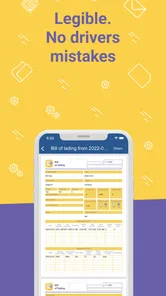
A bill of lading app is designed to help carriers, drivers, freight brokers, warehouses, and shippers create, complete, store, and share shipping documents digitally. Instead of relying on printed forms, users can enter shipment details, record pickup and delivery information, capture signatures, and send documents to the appropriate parties. It can make freight documentation faster, more organized, and easier to access while reducing the risk of lost paperwork.
Can I create and complete bills of lading from my phone?
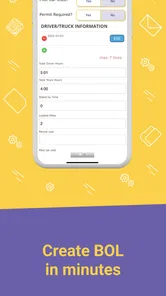
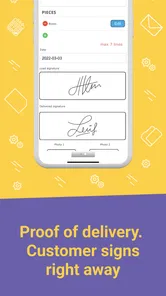
Yes, the app is generally intended to let users prepare and manage bills of lading directly from a smartphone or tablet. You can typically add shipper and consignee details, cargo descriptions, quantities, weights, reference numbers, and delivery notes. Depending on the specific version and account setup, you may also be able to attach photos, collect electronic signatures, and finalize the document at the pickup or delivery location.
Does the app work without an internet connection?
Offline availability depends on the application and its current features, so users should check the app listing before relying on it in areas with poor coverage. Some bill of lading apps allow documents to be created or edited offline and synchronize them once an internet connection returns. Others require an active connection for login, document submission, signature processing, or cloud storage, which may be important for drivers working on remote routes.
Pros
- Streamlines shipment documentation and reduces manual paperwork.
- Makes key cargo and carrier details easier to organize and review.
- Useful for tracking responsibilities between shippers
- carriers
- and consignees.
- Can help identify missing information before a shipment is processed.
- Improves access to shipping records when working away from the office.
Cons
- Some features may require accurate data entry to avoid costly documentation errors.
- Not all bill of lading formats or carriers may be supported.
- Sensitive shipment information may require careful privacy management.
- Users unfamiliar with shipping terms may face a learning curve.
- Access can be limited when internet connectivity is poor.











