

BestInterest for Coparents
- 16.00
- 4.4
- Installs
- 10.00K
- Price
- Free

Screenshots



Analysis by Reviewed
Co-parenting becomes difficult when a simple message about pickup time turns into an argument, a missed detail, or a long trail of screenshots. I approached BestInterest as a practical parenting app for those moments: not as a replacement for a conversation, a mediator, or legal advice, but as a way to make communication calmer and easier to follow. Its focus on AI-assisted co-parenting gives it a different feel from an ordinary family calendar or messaging app.
The app is made by BestInterest and is free to install, with optional in-app purchases ranging from $9.99 to $299.99 per item. It is intended for everyone, runs on Android 7.0 and later, and its current version is 3.0.3. The public response is encouraging, with a 4.4 average from over one hundred ratings and more than ten thousand installs. Those figures suggest a growing niche audience rather than a universally established household tool, which is useful context when deciding how much of your family’s routine to move into it.
How I would use BestInterest in a normal co-parenting week
I would use BestInterest as a steady checkpoint across the week, not as a place to move every family detail at once. At the start of the week, I’d confirm the immediate handoffs, then return to it only when a plan changes or a clear answer is needed. That rhythm helps me notice whether a recurring snag needs a shared agreement rather than yet another reminder.
Start with one reliable place for the essentials
My first recommendation is to avoid trying to organize every part of family life on the first day. Begin with the information that most often causes friction: who has the child, when a handoff happens, where the exchange takes place, and what needs to travel with the child. A focused setup makes the app easier to use and gives both parents a shared reference point before more complicated conversations appear.
The strongest baseline workflow is deliberately boring. I would check the schedule before sending a question, write messages around one subject at a time, and return to the app when a decision needs to be remembered. That habit matters more than clever wording. If one parent sends a message about school, transport, medication, and a weekend change all at once, even a well-designed tool cannot prevent confusion. Keeping each exchange narrow makes the record easier to understand later.
For example, imagine that a child has a school activity on Thursday, one parent is responsible for the afternoon, and the other parent normally handles the evening handoff. Instead of beginning with an accusation about who forgot what, I would use the app to establish the relevant time and responsibility, then send a short message asking for confirmation. If the plan changes, I would update the conversation with the new arrangement rather than relying on memory or a separate text thread.
This is where the idea of calmer communication becomes practical. The goal is not to make every message sound formal. It is to remove unnecessary emotional material from logistical exchanges. A message such as “Can you confirm pickup at the usual time after the activity?” gives the other parent something specific to answer. It also creates a clearer history than a stream of vague messages sent across several apps.
More From Our News Desk

 Gmail
GmailGmail in a Busy Inbox: Who Benefits Most?
From first account to crowded workday, Gmail earns its place through dependable search and flexible sorting—but its best fit depends on how much inbox maintenance you can tolerate.

 Prime Video
Switching to Prime Video: What Changes in Your Viewing Routine
Prime Video can make a compelling second home for streaming, but switching means learning a different catalog, rental layer, and route from browsing to playback.

 Universal TV Remote Control
Universal TV Remote Control Works Best as a Reliable Backup
A phone remote earns its place through quick setup and reliable habits. Here is how to get more from Universal TV Remote Control—and where its limits show.

 Weather - By Xiaomi
Weather by Xiaomi Review: Clear at a Glance, Less Clear Up Close
Xiaomi’s weather app makes everyday forecasts quick to scan, but its calm surface can leave useful details and recovery paths harder to find than they should be.

 X
XX Under Pressure: Can It Recover When Posting Goes Wrong?
A resilience-focused review of X, examining setup, mistaken posts, interruptions, weak connections, and the gaps that matter when recovery needs to be dependable.

 Clash of Clans
Clash of Clans Is Won Between the Battles
Its raids are quick; its community is a long-term project of coordination, teaching, rivalry, and shared responsibility—with all the friction that entails.
Latest News



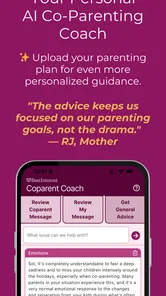
Use the AI as a drafting aid, not as the decision-maker
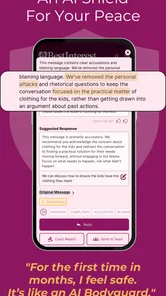
The AI angle is appealing because co-parenting messages can be emotionally loaded. I see the most useful role for it as a pause between feeling and sending. If I am annoyed, I can first identify the practical point I need to communicate, then use the app’s assistance to make the wording calmer and more direct. That can help prevent a message written in the heat of the moment from making the next exchange harder.
There is an important boundary here. AI cannot know the full history of a family, the child’s needs, or the meaning behind an apparently small disagreement unless a parent explains it. I would never copy an AI-generated suggestion without reading it carefully. A polite sentence can still be inaccurate, too vague, or unintentionally provocative. The parent remains responsible for checking names, times, responsibilities, and tone before sending anything.
A useful personal routine is to separate facts from conclusions. “The appointment ends at four” is a fact. “You never respect the schedule” is a conclusion. When preparing a message, I would keep the first kind of statement and remove the second unless it is genuinely necessary for a separate conversation. This approach lets the app support a repeatable communication habit instead of becoming a machine for producing longer messages.
Keep the child’s needs at the center of the record
BestInterest is most appropriate when both adults are willing to use a shared process. It can help organize communication, but it cannot create cooperation where neither parent is prepared to listen. I would use it for practical matters such as routines, school coordination, travel details, and changes to agreed plans. I would avoid turning every parenting disagreement into a permanent written debate.
That distinction is especially important when a child is involved. A record should explain what the child needs and what arrangement was made, not expose the child to adult conflict. I would also avoid using the app as a place to vent. Writing an angry draft privately may feel satisfying for a moment, but the better habit is to reduce the issue to a question that can actually be answered.
Check the settings before building a routine around the app
Experienced users should spend a little time reviewing the available settings and account controls before depending on the app for daily coordination. I would look for options related to notifications, message behavior, account access, and how much information appears in alerts. The right choices depend on whether the phone is shared, whether work notifications are distracting, and how quickly each parent needs to notice a schedule change.
Notifications deserve particular attention. Too many alerts can make a parent ignore the important ones, while too few can cause a missed handoff. I would aim for a middle ground: retain alerts for time-sensitive communication, but avoid treating every minor exchange as an emergency. If the app offers notification controls, adjusting them early is more useful than changing them after a missed appointment.
I would also review the wording before enabling any AI-assisted action that feels automatic. A drafting tool is helpful when it suggests a calmer version for approval. It is less comfortable when a user assumes that the app understands the family context without supervision. My rule would be simple: nothing should be sent on my behalf unless I have read it and agree with every practical detail.
Another setting-related habit is to decide what belongs in BestInterest and what belongs elsewhere. Routine co-parenting logistics fit naturally. Sensitive professional advice, urgent medical decisions, and matters requiring a qualified legal interpretation should not be delegated to an app. If a child is in immediate danger or a medical situation is urgent, I would contact the appropriate emergency or professional service rather than waiting for an in-app exchange.
Make repeatable shortcuts out of ordinary habits
The app becomes more useful when it supports a consistent pattern. I would create a small personal checklist before sending a schedule-related message: date, time, location, responsibility, and what response is needed. This is not a special feature claim; it is a way to use the app more effectively. A parent who follows the same checklist is less likely to omit the detail that causes a second round of messages.
Short messages are another practical shortcut. Instead of writing one long explanation about a weekend change, I would use a compact structure: what changed, why it matters to the child, the proposed alternative, and the requested confirmation. This gives the other parent a clear path to agreement or correction. It also makes the conversation easier to review if the same issue comes up later.
When a recurring arrangement works well, I would treat it as a template in my own thinking. For example, school-day handoffs can follow the same order each week: confirm the activity, confirm transport, confirm the exchange, then close the topic. The app does not need to do everything automatically for this routine to save time. The real gain comes from reducing the number of decisions made from scratch.
One less obvious benefit of this approach is that it exposes repeated friction. If the same question appears every week, the problem may not be the wording of a message but the lack of a shared agreement. In that situation, I would stop sending another reminder and arrange a calmer conversation about the underlying routine. BestInterest can help reveal the pattern, but the parents still need to solve it.
Where the app can help during tense exchanges
In a difficult exchange, I would use the app as a cooling-off tool. First, I would write down the outcome needed. Second, I would remove blame, sarcasm, and old grievances. Third, I would check whether the message contains one answerable request. Only then would I send it. This workflow makes the AI assistance more valuable because the user has already done the essential thinking.
Suppose one parent arrives late for a handoff. A message focused on the event and next step is more useful than a judgment about character. I might write that the handoff has not happened, state where the child is waiting, and ask for an estimated arrival time. If the issue becomes recurring, the pattern can be addressed separately with a more structured discussion. Separating the immediate need from the larger complaint prevents a child’s current situation from being buried under past frustration.
The app may also be useful for parents who struggle to find a neutral tone in writing. Some people communicate well face to face but sound harsher in text; others become overwhelmed by long messages. AI-assisted phrasing can provide a starting point. I would still edit for natural language, because overly polished wording can feel artificial or even suspicious between parents who know each other well.
Important limits around records and court-related expectations
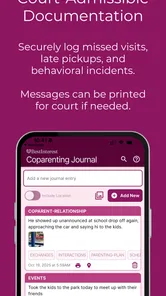
The court-admissible positioning requires careful judgment. I would treat organized, factual communication as potentially helpful documentation, but I would not assume that using BestInterest automatically makes every message legally sufficient or accepted in every situation. Whether a record matters depends on the circumstances and the rules that apply to the family. The app should not be presented as a substitute for legal advice.
That limitation is not a minor technicality. A parent may believe that a neatly stored message proves an entire story, while the message actually shows only one part of an event. Context, accuracy, completeness, and authenticity still matter. I would avoid editing facts to make myself look better, avoid using the app to provoke admissions, and keep professional guidance separate from personal assumptions.
Privacy is another reason to use restraint. Co-parenting involves personal schedules and information about children. Before entering sensitive details, I would read the app’s current privacy and account terms and make sure both parents understand how they intend to use the service. I would also protect the phone and account with the normal security measures available on the device. A parenting app can organize communication, but good digital hygiene remains the user’s responsibility.
How it compares with ordinary alternatives
A shared calendar is excellent for dates, but it usually does not help much with the wording of a disagreement. A standard messaging app is familiar and fast, yet important arrangements can disappear among unrelated conversations. A spreadsheet can track schedules, but it demands more manual maintenance and does not naturally support calmer communication. BestInterest sits between these options by combining co-parenting organization with AI-oriented message support.
That combination is most valuable for parents whose main problem is communication friction rather than a complicated calendar. If the only need is to mark alternating weekends, a basic calendar may be simpler. If the family already has a cooperative relationship and communicates comfortably, adding another app may create unnecessary duplication. BestInterest earns its place when both parents want a dedicated space for parenting exchanges and appreciate help turning emotional drafts into practical messages.
It is also not the right tool for every family situation. Parents dealing with serious safety concerns, coercive control, or an active emergency need specialized support and professional advice. An app can provide structure, but structure is not protection by itself. In high-conflict cases, I would consider guidance from a qualified professional before deciding how digital communication should be handled.
Costs, expectations, and who should try it
The free entry point makes it reasonable to test the workflow without committing immediately. At the same time, optional purchases from $9.99 to $299.99 per item mean I would inspect the purchase screen carefully and make sure I understand what any paid option provides before confirming it. The wide range suggests that users should not assume every useful capability is included in the free experience.
I would recommend trying the app with one narrow goal for the first week: perhaps school logistics or handoff coordination. Notice whether both parents actually check it, whether notifications arrive at useful times, and whether the AI suggestions reduce editing or add another step. If the other parent refuses to participate, the app’s shared value drops sharply, because one-sided organization cannot replace mutual use.
The everyone age rating makes the app broadly accessible as a software product, but that does not mean every conversation belongs in front of a child. I would keep adult communication private and use age-appropriate judgment about what children see. The app is for parents coordinating care, not for making children responsible for managing the adults’ disagreement.
My verdict after building a repeatable system
BestInterest works best when I treat it as a disciplined communication workspace rather than a magic conflict solver. Its useful contribution is the combination of a dedicated co-parenting setting and AI assistance that can encourage calmer drafts. The strongest results come from small habits: one topic per message, clear requests, careful notification choices, and a final human review before anything is sent.
I would choose it over ordinary messaging when the family needs a more focused record and both parents are willing to follow the same process. I would choose a simpler calendar when scheduling is the only challenge, and professional support when the problem involves safety, legal interpretation, or severe conflict. That is the central trade-off: BestInterest can make cooperation easier to practice, but it cannot supply cooperation on its own.
For a parent who wants to reduce avoidable misunderstandings and is comfortable checking AI-assisted wording instead of trusting it blindly, the app is worth exploring. Its free starting point lowers the barrier, while the optional purchase range makes careful review of upgrades important. My final view is positive but measured: the app is most effective when it becomes part of a calm, repeatable routine—not when it is expected to solve the relationship behind the routine.
BestInterest for Coparents Frequently Asked Questions
What devices and operating systems can run BestInterest for Coparents?
BestInterest for Coparents is a parenting app for Android, and its minimum OS requirement is version 7.0. Before downloading, check your device’s operating-system version and confirm that the app is available for your particular device in its official app store. Keeping your device’s software current can also help with compatibility and security when using an app to manage family communication.
What is BestInterest for Coparents and who is it designed for?
BestInterest for Coparents is a co-parenting support app designed to help separated or divorced parents organize communication, schedules, and shared responsibilities. It is intended for families who need a clearer way to manage parenting arrangements, reduce misunderstandings, and keep important information in one place. Before downloading, parents should review whether its available tools match their specific custody, communication, and family-management needs.
What features does BestInterest for Coparents offer?
BestInterest for Coparents is described as an AI-powered co-parenting app focused on calmer, conflict-free parenting and communication intended to be court-admissible. It also focuses on practical co-parenting organization, including tools that may help parents coordinate schedules, document important parenting information, manage shared responsibilities, and communicate more consistently. Depending on the current version and subscription plan, certain features may be limited or require payment. It is a good idea to check the app’s latest store description and privacy information before relying on it for essential family arrangements.
Can BestInterest for Coparents replace a parenting agreement or legal advice?
No. BestInterest for Coparents should be treated as an organizational and communication aid, not as a replacement for a court-approved parenting plan, legal advice, mediation, or professional counseling. The app may help parents keep records and coordinate everyday matters, but it cannot interpret custody orders or resolve legal disputes. If a situation involves safety concerns, legal conflict, or changing custody terms, consult a qualified professional.
Is my family’s information private and secure in BestInterest for Coparents?
Because co-parenting apps can contain sensitive information about children, schedules, messages, and family arrangements, privacy should be considered before creating an account. Review the app’s privacy policy, data-collection disclosures, account-security options, and any information about sharing with third parties. Use strong, unique login credentials and avoid entering unnecessary sensitive details unless you understand how the information is stored and protected.
Pros
- Keeps co-parenting messages and schedules organized in one place.
- Shared calendar helps both parents track custody dates and activities.
- Provides a clear record of agreements
- updates
- and important conversations.
- Can reduce misunderstandings by keeping communication focused and documented.
- Useful for coordinating school events
- appointments
- and routine responsibilities.
Cons
- Both parents may need to use the app consistently for it to be effective.
- Some advanced tools or features may require a paid subscription.
- Notifications can become overwhelming when many updates are posted.
- The app may not replace formal legal agreements or professional mediation.
- Privacy depends on account security and how carefully sensitive details are shared.











