Beckett Mobile
- 547.00
- 3.4
- Installs
- 100.00K
- Price
- Free

Screenshots
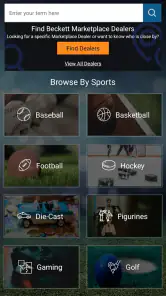
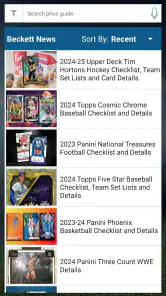

Analysis by Reviewed
Collecting sports cards can be wonderfully tactile, but it also creates a practical problem: the more cards I acquire, the harder it becomes to remember what I own, what I still want, and which details matter when I am comparing a new find. Beckett Mobile is built for that collector’s mindset. Developed by Beckett, this free sports app focuses on people who want a mobile companion for their card collection rather than a general sports-news experience.
I approached it as someone who wanted to check card information without carrying a binder everywhere. My overall impression is mixed but useful: the app has a clear purpose and can become a handy reference point, yet its average rating of 3.4 from around 1.6 thousand ratings suggests that the experience is not equally smooth for everyone. I can see why dedicated collectors keep it installed, while casual users may find the learning curve and limitations harder to justify.
What makes the app worth considering is not simply that it belongs to the sports category. Its value comes from fitting into the small decisions collectors make every day: checking a card while browsing, organizing a collection after a purchase, or preparing for a trade. The important question is whether that workflow feels comfortable for your eyes, hands, attention span, and collection habits.
How clearly Beckett Mobile supports different collectors
Readability and navigation during everyday collection work
My first concern with any card-collection app is whether I can find the useful information quickly. Beckett Mobile is aimed at a specialized audience, so its organization makes more sense once I think like a collector instead of a casual sports fan. I am not opening it merely to see a score or headline. I am trying to identify a card, keep track of an item, or make a more informed decision about a purchase.
That focus is helpful because it gives the app a defined job. I do not have to wade through unrelated entertainment features to reach the collecting side. At the same time, specialist apps can feel dense. Card terminology, sets, players, editions, and condition-related details may be obvious to experienced collectors but less welcoming to someone who has recently inherited a box of cards.
I would recommend taking a few minutes to learn the app’s layout before relying on it at a busy show. A quiet first session is more productive than trying to understand every screen while standing at a dealer’s table. I found that the best approach is to begin with a small group of cards I already recognize, then use those familiar examples to understand how the app expects information to be searched or recorded.
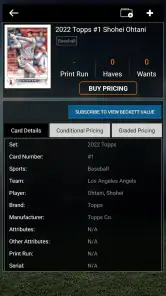
For readability, the biggest practical issue is information density. A card reference can contain several details that look similar at a glance, especially when I am comparing players or editions. Collectors with strong vision and experience may move through that information comfortably, but people who need larger text, stronger contrast, or more breathing room may have to slow down. The app is more useful when I treat it as a deliberate reference tool rather than something I skim at speed.
More From Our News Desk

Clash of Clans Is Won Between the Battles

Android Auto Makes the Case for Quieter Car Software

MobiOffice: Transforming Mobile Productivity with Seamless Integration

EA SPORTS FC™ Mobile Soccer: Redefining Mobile Sports Gaming

How Microsoft OneDrive Became a Mobile Productivity Giant

How Google Translate Breaks Language Barriers Effortlessly
That distinction matters for older collectors and for anyone who gets visual fatigue from small, crowded screens. I would use the phone’s own display settings, including text enlargement where supported, before deciding whether the app is comfortable. However, enlarging system text can sometimes make a compact interface harder to scan, so there is a trade-off between seeing individual words clearly and keeping the surrounding context visible.
Navigation habits that make the app less tiring
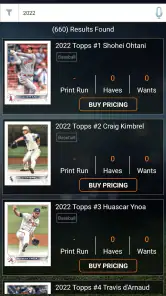
One useful habit is to separate identification from decision-making. When I am looking at an unfamiliar card, I first concentrate on finding the closest matching record. Only after that do I think about whether the card belongs in my collection, deserves further research, or is worth discussing with another collector. This two-step approach reduces the mental load created by trying to read, compare, and judge everything at once.
I also prefer using the app in short sessions. A collector who wants to catalog hundreds of cards in one sitting may become frustrated, particularly if every item requires careful checking. Working through a manageable batch gives me a chance to catch mistakes before they spread through the collection. It also makes the process more accessible for users who have limited concentration, hand stamina, or vision endurance.
Another practical tip is to keep a simple offline note or physical sorting system beside the phone while organizing. I can group cards by sport, player, or collection goal first, then use Beckett Mobile for focused checking. That is less glamorous than doing everything inside one app, but it prevents the phone interface from becoming the only place where I have to remember what I am doing.
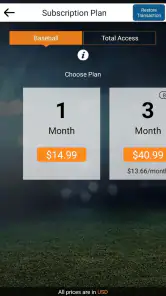
The app’s free entry point is important here. I can explore its usefulness without paying upfront, which makes it easier to test the navigation with my own collection and my own accessibility needs. Still, optional purchases range from $1.99 to $999.99 per item, so I would pay close attention before confirming anything. The wide range means the free starting point should not be confused with an entirely cost-free collecting workflow.
Motor and sensory considerations when handling cards and a phone
Sports-card collecting is already a two-handed activity. I may be holding a card in one hand, protecting it from damage, and using the other hand to operate the phone. That creates a real accessibility challenge for people with reduced grip strength, tremors, limited dexterity, or only one consistently available hand.
My preferred workaround is to prepare the phone before picking up the card. I set the screen brightness and orientation first, place the phone on a stable surface, and keep the card in a sleeve or holder while I inspect it. This reduces the number of delicate movements required at the same time. It also protects the card from being dropped while I am trying to navigate.
For users sensitive to glare, a card show can be especially difficult. Plastic sleeves, overhead lighting, and a bright phone screen can all create reflections. I get better results by changing my viewing angle instead of simply increasing brightness. A darker screen may be easier on the eyes in some settings, while a brighter screen helps outdoors; neither choice works universally.
People who are sensitive to visual clutter may want to avoid rapid switching between several records. I find it easier to finish one identification, make a brief note of the result, and then move to the next card. This is slower, but it makes discrepancies easier to notice and reduces the chance that I confuse one player or edition with another.
Voice interaction and external accessibility tools can sometimes help with phone use, but I would not build my entire workflow around them without testing the specific screens first. A tool may read labels well while struggling with dense card details or controls that depend on visual context. The sensible approach is to try the app with the accessibility features already familiar to you and judge whether they support the tasks you actually perform.
Situational access: at home, in a shop, and at a card show
At home, Beckett Mobile is easiest to appreciate. I have stable lighting, a table, sleeves, sorting trays, and enough time to compare details. This setting also suits collectors who need frequent breaks or prefer to enlarge the phone display. I can work through a small pile, stop when my eyes or hands become tired, and return later without the pressure of a seller or a queue.
A realistic home scenario is sorting a recently purchased group of cards on a weekend. I divide them into broad piles first, then check the uncertain cards one at a time. The app is most useful for the cards that do not immediately fit my memory. Instead of searching every familiar item, I reserve attention for the ones where a small difference could change the identification.
In a shop, the app becomes more valuable but also more demanding. I may have only a minute to decide whether to ask a question or continue browsing. Noise, poor lighting, crowded tables, and social pressure all reduce the time I can spend reading. I would prepare by learning the navigation at home and keeping the phone accessible, rather than unlocking it only after I have already picked up a card.
At a card show, situational access becomes the main issue. People move around me, signals and battery life may be concerns, and I may not have a comfortable surface for the phone. Someone with hearing differences may not be affected by the app itself, but the surrounding environment can make communication with sellers harder when the app prompts a follow-up discussion. Someone with visual or motor limitations may need a companion to hold the card, phone, or notes.
That does not make the app unsuitable for disabled collectors. It means the best experience may involve adapting the setting rather than expecting the app to solve every barrier. A companion can read a detail aloud, help stabilize the phone, or keep track of the cards already checked. A portable stand can also reduce hand strain, although that is an accessory-based solution rather than an app feature.
What the app does well for different ability levels
The clearest strength is its narrow purpose. Because Beckett Mobile is made for sports card collection lovers, I do not have to turn a general note-taking app into a cataloging system from scratch. That can be especially helpful for collectors who find open-ended tools overwhelming. A dedicated environment gives the task boundaries: I know I am here to work with cards, not build a complicated database.
The app can also support different levels of expertise. A new collector can use it as a starting point for learning the vocabulary and structure of the hobby, while an experienced collector can use it as a quick reference during sorting or buying. The same screen may feel too detailed to one person and reassuringly specific to another.
Its broad availability is another practical advantage. The app has passed one hundred thousand installs, and it runs on Android devices using version 5.0 or later. That does not guarantee identical performance on every phone, but it does make the minimum requirement relatively approachable for people who keep an older device as their collecting phone.
The Everyone content rating also makes the app suitable for households where younger collectors are involved. I would still supervise purchases and collection decisions, particularly because in-app items can be expensive. A young person may understand the card information perfectly well but not fully understand the financial consequences of an optional purchase.
For collectors with cognitive or attention-related needs, the strongest strategy is to create a repeatable routine. I would use the same order every time: sort, identify, record, and put the card away. The app can fit into that sequence, but it does not replace the structure. Keeping the number of cards per session small makes errors less likely and gives the activity a clear stopping point.
Remaining barriers and where another option may be better
The most important limitation is that a specialized card app is not automatically an accessible card app. A collector may understand the subject perfectly and still struggle with small controls, dense screens, awkward touch targets, or too much information in one view. If your phone’s accessibility settings do not make the interface comfortable, the app may become more tiring than helpful.
I would also be cautious about treating it as the only record of a valuable collection. A separate backup method, such as a spreadsheet or written inventory, can protect against confusion and give me a more flexible way to sort by personal categories. That extra work is inconvenient, but it is worthwhile when the collection has sentimental or financial importance.
A general spreadsheet may be better for someone who needs very large text, custom color coding, simple columns, or full control over the order of information. A camera-based note system may suit a collector who mainly wants visual reminders rather than detailed reference work. On the other hand, those alternatives require more setup and may lack the specialized context that makes Beckett Mobile useful in the first place.
There is also a cost-awareness barrier. The app is free to download, which lowers the risk of trying it, but the available in-app purchases cover a very broad price range. I would not hand the phone to a child or a new collector without checking purchase protections first. I would also avoid paying simply because a feature appears relevant; I would test the free experience and decide whether the purchase solves a specific problem in my workflow.
Another trade-off is speed versus accuracy. In a fast buying situation, I may want an instant answer, but card identification often deserves patience. If I rush, I can select a near match and carry that mistake into my collection records. The app is better suited to careful checking than to making impulsive decisions under pressure.
Finally, collectors who want a full social marketplace, an elaborate budgeting system, or a broad sports-news hub may find the app too focused. Its identity is tied to card collecting. That focus is its advantage for the right person and its limitation for someone expecting an all-purpose sports companion.
My inclusive verdict for sports card collectors
After using Beckett Mobile as a focused collection reference, I see it as a practical tool for people who already know why they want a sports-card app. It is free to start, comes from Beckett, and has enough staying power to attract a substantial collector audience. The current version is 6.9, and the app has been available since September 1, 2016, so it is not a brand-new experiment.
My recommendation depends heavily on context. If you collect at home, can read information comfortably on your phone, and want a dedicated place to support card identification and organization, I think it is worth trying. It is particularly useful when paired with a simple sorting routine and a second backup record for important cards.
I would be more cautious if you have significant visual fatigue, limited hand control, or need an interface that can be completely reshaped around your personal accessibility preferences. In that situation, test it with your device settings before investing time in a large catalog. If the screens remain tiring, a customizable spreadsheet may be the kinder choice, even if it lacks the specialized feel.
For families and younger collectors, the Everyone rating is reassuring, but purchase controls still deserve attention. For serious collectors, the app can save time, but it should support judgment rather than replace it. I would still inspect the physical card, compare details carefully, and keep my own backup notes.
My bottom line: Beckett Mobile is most successful as a focused companion for deliberate sports-card collecting, not as a universal solution for every collector or every accessibility need. Its specialized purpose gives it real value, while its information density, device-dependent comfort, and optional purchase range mean that the right setup matters. I would recommend a careful trial, a stable workspace, and a slower identification workflow. Used that way, it can make collection work more manageable without pretending that one mobile app can remove every barrier.
Beckett Mobile Frequently Asked Questions
What devices and operating systems can run Beckett Mobile?
Beckett Mobile is available for mobile devices, and Android users need a device running Android 5.0 or later. Before installing, check that your device is compatible and has enough storage for the app and updates. A reliable internet connection is useful for accessing online card resources and account features while using the app.
Who develops Beckett Mobile, and what is its age rating?
Beckett Mobile is developed by Beckett and is categorized as a sports app for people interested in sports-card collecting. Its content rating is Everyone, so it is presented as suitable for a broad audience. Parents and younger collectors can still review the app’s features and any account or payment prompts together before using it.
What is Beckett Mobile used for?
Beckett Mobile is designed for collectors who want convenient access to Beckett’s sports and trading-card resources from a mobile device. Depending on the available features and region, the app may help users check card information, follow market values, browse collecting content, and manage parts of their hobby while away from a desktop browser. It is especially useful for collectors who regularly research cards before buying, selling, or organizing a collection.
Is Beckett Mobile free to download and use?
The app is free to download, but some services, databases, publications, valuation tools, or premium content can require a subscription, account, or separate payment. In-app purchases range from $1.99 to $999.99 per item, so review the specific pricing details shown before confirming a purchase. Availability and costs can vary by country, platform, and the Beckett service connected to your account.
Do I need a Beckett account to use Beckett Mobile?
Some basic areas of Beckett Mobile may be accessible without signing in, but an account is generally needed for personalized functions, subscriptions, saved information, or access to restricted collecting resources. Creating an account can also make it easier to synchronize details across supported devices. Users should check the current sign-in requirements during setup, since Beckett may change which features are public and which require registration.
Pros
- Quick access to Beckett price guides and collectible values
- Useful for checking cards
- comics
- and other collectibles on the go
- Search tools help narrow results by set
- player
- or item
- Supports collectors researching market trends before buying or selling
- Convenient companion for users familiar with Beckett’s grading services
Cons
- Many detailed price guides may require a paid subscription
- Some listings may not reflect the latest marketplace sale prices
- Search results can feel limited for obscure or older collectibles
- Account registration may be needed to access certain features
- App usefulness depends heavily on the collectibles covered by Beckett
- Category
- Sports
- Version
- 6.9





